
1. Introduction
Thank you for choosing the KGKGK SW-825 Digital PM2.5 Detector. This device is designed to provide accurate measurements of PM2.5 levels, temperature, and humidity in your environment. Please read this manual thoroughly before using the device to ensure proper operation and to maximize its lifespan. Keep this manual for future reference.
2. Safety Information
- Do not expose the device to extreme temperatures, direct sunlight, or high humidity.
- Avoid dropping or subjecting the device to strong impacts.
- Do not attempt to disassemble or modify the device. This will void the warranty.
- Keep the device away from water and other liquids.
- Use only the specified charging cable and adapter.
- Keep out of reach of children.
3. Product Overview
The KGKGK SW-825 is a compact and portable air quality monitor equipped with high-precision sensors for PM2.5, temperature, and humidity. Its large display ensures clear readability of all data.
3.1 Device Components
Refer to the diagram below for an overview of the device's components and display elements.

Figure 1: Front and top view of the SW-825 detector with labeled components. Key components include the PM2.5 value display, temperature and humidity readings, power switch key, charging port, laser particle sensor, SET key, UP key, and DOWN key.
- Display Screen: Shows PM2.5 concentration, temperature, humidity, and battery status.
- Power Switch Key: Used to turn the device on or off.
- Charging Port: For connecting the charging cable.
- Laser Particle Sensor: Detects PM2.5 particles.
- SET Key: Used to enter and confirm settings.
- UP Key: Used to navigate or increase values in settings.
- DOWN Key: Used to navigate or decrease values in settings.
- Temperature and Humidity Sensor: Measures ambient temperature and humidity.
3.2 Display Elements
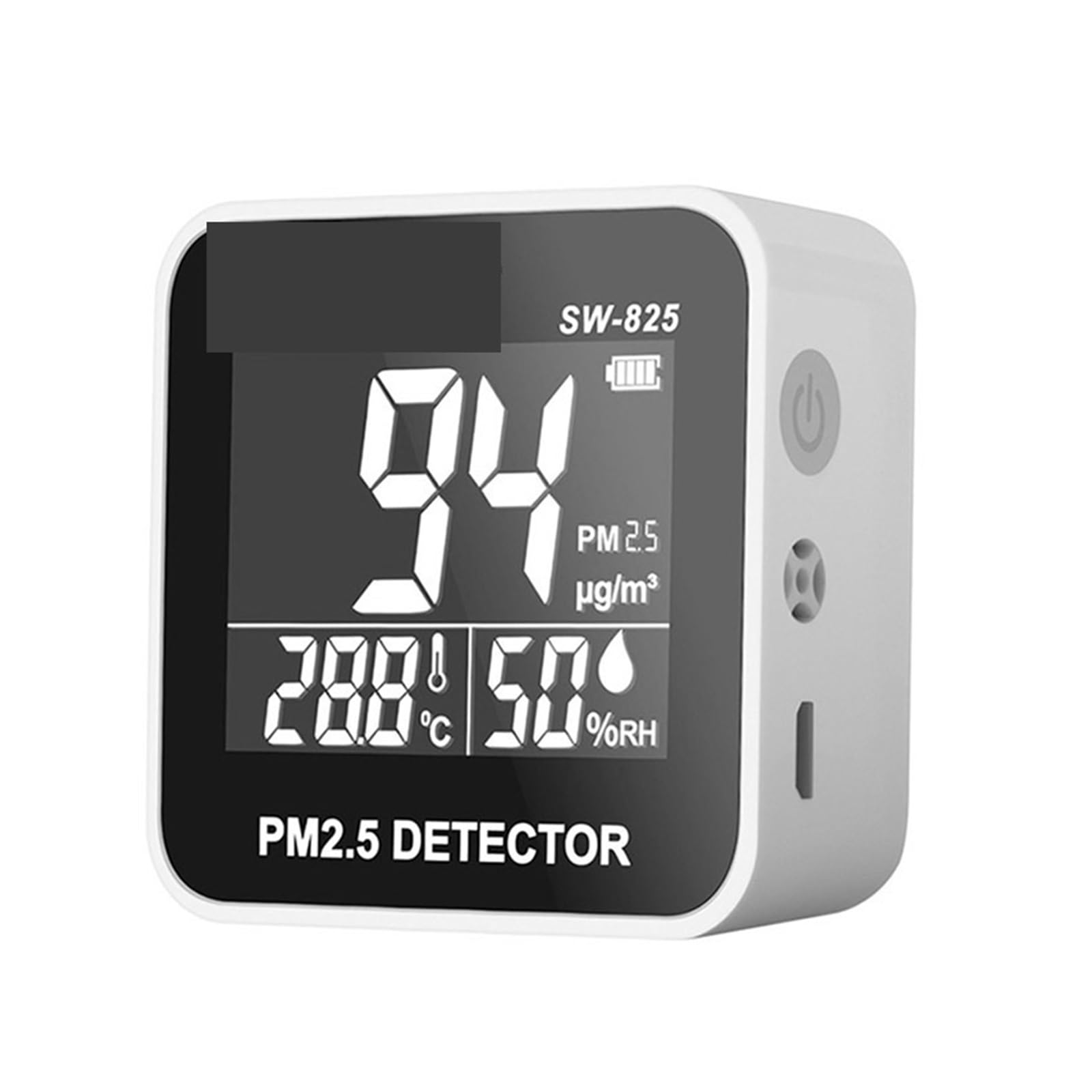
Figure 2: The SW-825 display showing a PM2.5 reading of 54 µg/m³, temperature of 28.8°C, and humidity of 50% RH.
- PM2.5 Value: Displays the concentration of particulate matter 2.5 in micrograms per cubic meter (µg/m³).
- Temperature: Shows the ambient temperature in Celsius (°C).
- Humidity: Indicates the relative humidity (%RH).
- Battery Indicator: Shows the current battery level.
4. Setup
4.1 Initial Charging
Before first use, fully charge the device. Connect the provided charging cable to the charging port on the device and the other end to a suitable USB power adapter (not included) or a computer USB port. The battery indicator on the display will show charging status.
4.2 Powering On/Off
- To Power On: Press and hold the Power Switch Key (refer to Figure 1) for a few seconds until the display lights up.
- To Power Off: Press and hold the Power Switch Key again for a few seconds until the display turns off.
5. Operating Instructions
5.1 Taking Measurements
Once powered on, the device will automatically begin to measure PM2.5, temperature, and humidity. The readings will be displayed on the screen in real-time. Allow a few moments for the readings to stabilize after powering on or moving the device to a new location.
5.2 Understanding Readings
The PM2.5 value is displayed in µg/m³. Lower values indicate better air quality. The temperature is in °C and humidity in %RH.
5.3 Alarm Function
The device features an alarm function that alerts you when the PM2.5 concentration exceeds a preset value. When the alarm is triggered, the PM2.5 data on the screen will flash red.

Figure 3: Comparison of normal status (PM2.5 = 8 µg/m³) and alarm status (PM2.5 = 138 µg/m³) where the PM2.5 reading flashes red.
Setting the Alarm Value:
- Press the SET key to enter the alarm setting mode. The current alarm value will flash on the screen.
- Use the UP and DOWN keys to adjust the alarm threshold to your desired PM2.5 concentration.
- Press the SET key again to confirm and save the new alarm value.
The default alarm value for the instrument is 115 µg/m³.
6. Maintenance
6.1 Cleaning
- Wipe the device surface with a soft, dry cloth.
- Do not use abrasive cleaners, solvents, or corrosive chemicals.
- Ensure no dust or debris obstructs the sensor openings.
6.2 Storage
When not in use for extended periods, store the device in a cool, dry place, away from direct sunlight and extreme temperatures. Ensure the device is fully charged before storing to maintain battery health.
7. Troubleshooting
| Problem | Possible Cause | Solution |
|---|---|---|
| Device does not power on. | Low battery or no charge. | Charge the device using the provided cable. |
| Inaccurate readings. | Sensor obstruction, device not stabilized, or extreme environmental conditions. | Ensure sensor openings are clear. Allow device to stabilize for a few minutes. Move to a stable environment. |
| Display is dim or blank. | Low battery or device is off. | Charge the device. Press the Power Switch Key to turn on. |
| Alarm not triggering. | Alarm threshold set too high. | Adjust the alarm threshold to a lower value (refer to Section 5.3). |
8. Specifications
| Model | SW-825 |
| PM2.5 Measurement Range | 0-500 µg/m³ |
| Sensors | High-precise semiconductor TVOC sensor, electrochemical CO sensor, infrared PM2.5 sensor, temperature and humidity sensor |
| Display | 4.8-inch large screen |
| Item Weight | 1.1 pounds (approx. 0.5 kg) |
| Package Dimensions | 0.39 x 0.39 x 0.39 inches (approx. 1 x 1 x 1 cm) - Note: These dimensions appear to be placeholder values and may not reflect the actual product size. |
| Manufacturer | KGKGK |
Note: Specifications are subject to change without notice.
9. Warranty and Support
For warranty information and technical support, please refer to the documentation provided at the time of purchase or contact your retailer. Keep your purchase receipt as proof of purchase.
For further assistance, please visit the official KGKGK website or contact customer service.