
1. Introduction
Thank you for choosing the YOJOCK HD08 Carbon Monoxide Detector. This compact, plug-in device provides essential protection by continuously monitoring carbon monoxide (CO) levels, along with displaying temperature and humidity for reference. Designed for versatility, it is suitable for use in homes, offices, RVs, hotels, and during travel. Please read this manual thoroughly before use to ensure proper installation, operation, and maintenance.
2. Product Overview
Key Features
- 3-in-1 Monitoring: Detects Carbon Monoxide (CO) and provides reference displays for temperature and humidity.
- High-Performance Sensor: Equipped with an advanced electrochemical sensor for fast and reliable CO detection (0–999 PPM) with a response time of less than 5 seconds.
- 85dB Audio & Visual Alert: Triggers a loud 85 dB audio alarm and displays CO concentration on screen when dangerous levels are detected.
- Compact & Portable: Small size (8.6 x 6.9 x 5.2 cm, 70g) and detachable plug make it ideal for travel.
- Energy-Saving: Low power consumption (≤2W).
- User-Friendly Display: 2.1-inch HD color screen with adjustable brightness.
- Self-Test Function: Ensures the device is functioning correctly.
Components
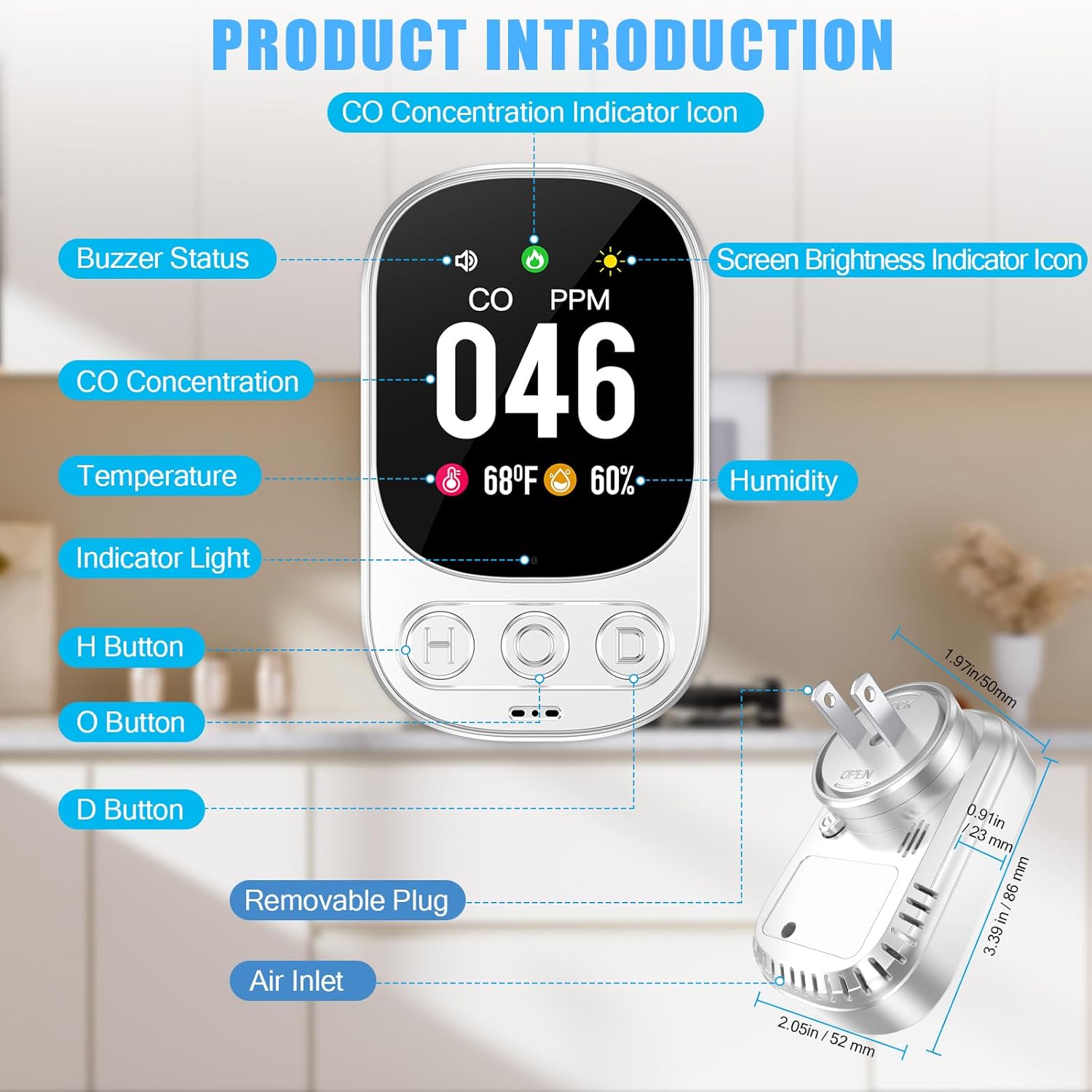
The device features a clear digital display showing CO levels, temperature, and humidity. It includes three control buttons (H, O, D) for various functions, an indicator light, and a removable plug for portability. Air inlets are located on the device for gas detection.
3. Setup
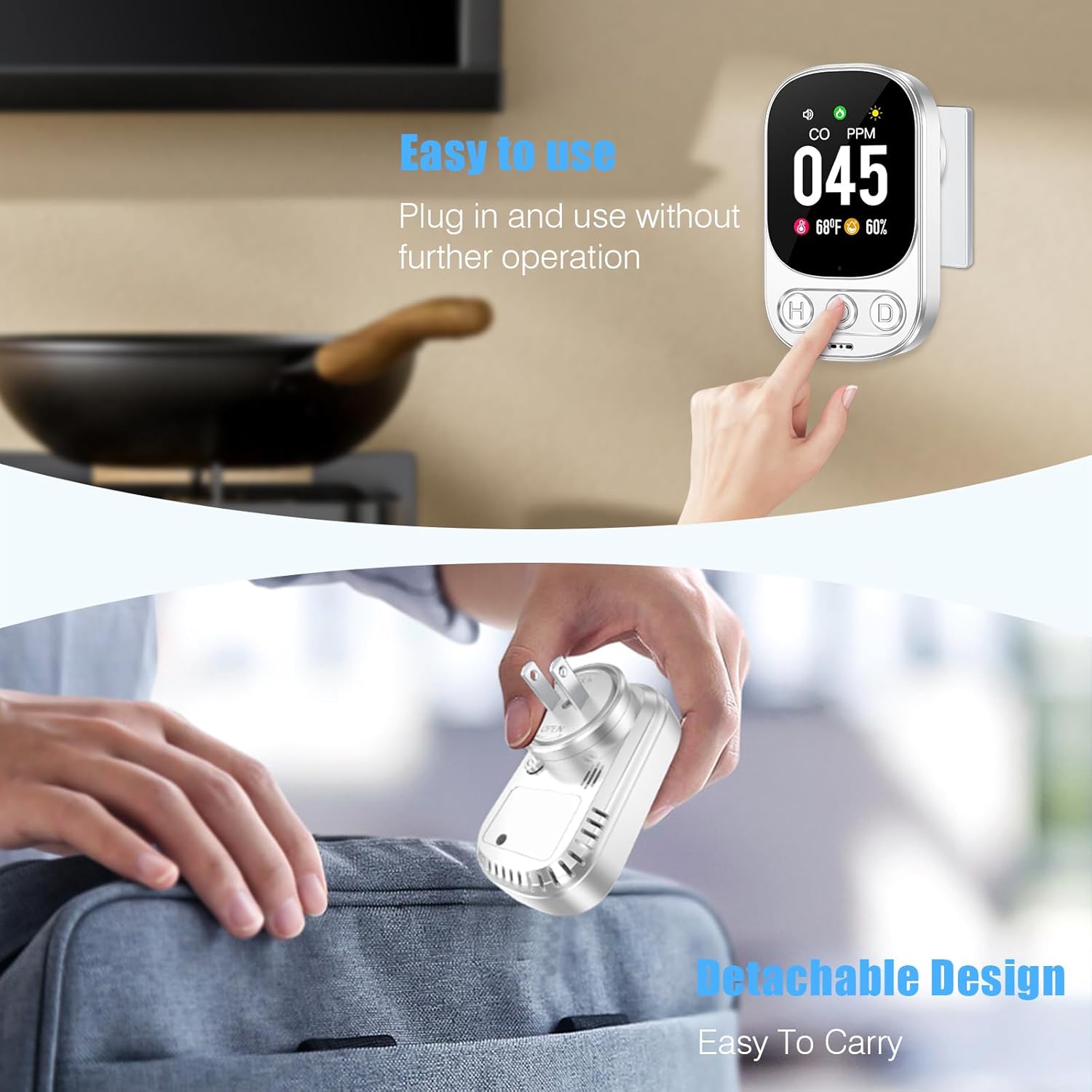
The YOJOCK HD08 Carbon Monoxide Detector is designed for easy plug-and-play setup.
- Unpack: Carefully remove the detector from its packaging.
- Attach Plug: Ensure the detachable plug is securely locked into the device.
- Plug In: Insert the detector into a standard wall outlet. The device will begin a warm-up period (approximately 28 seconds) and then enter monitoring mode.
- Placement: For optimal detection, place the detector in a room where CO sources might be present, such as near a furnace, water heater, or in living areas and bedrooms. Avoid placing it directly above heat sources or in areas with high humidity.
Initial Test
It is recommended to perform an initial test after plugging in the device to ensure it is working correctly.

- Plug the CO detector into an outlet and wait for approximately 28 seconds to allow it to warm up.
- Place a lit incense stick near the CO sensor (located at the bottom). The CO concentration will be detected and displayed shortly.
Note: The detector will show 000 PPM when no CO is detected. When testing near exhaust ducts or stoves, if your car engine or stove is burning cleanly, the detector may continue to display 000 PPM.
4. Operating Instructions
Display and Controls

- CO Concentration: Displays in PPM (Parts Per Million).
- Temperature: Displays in °C or °F.
- Humidity: Displays as a percentage (RH%).
Button Functions

- 'O' Button (Self-Test / Temperature Unit Switch):
- Short Press: Initiates a self-test. The green light will blink 3 times and 3 beeps will sound if the device is functioning normally.
- Long Press: Toggles the temperature unit between Celsius (°C) and Fahrenheit (°F).
- 'H' Button (Screen Brightness): Short press to adjust the screen brightness (Low, High, or Off).
- 'D' Button (Mute/Unmute Alarm): Short press to mute or unmute the alarm sound.
Alarm Levels and Indicators

- Safe (0-50 PPM): Green blinking icon, no audible alarm.
- Warning (51-200 PPM): Yellow blinking icon, "Di Di Di" alarm sounds every 2 minutes.
- Danger (201-999 PPM): Red blinking icon, continuous audible alarm. Press the 'D' button to activate or mute the alarm.
Note: When CO levels reach ≥200 PPM, the alarm will sound continuously and cannot be manually silenced until the CO level drops below 200 PPM.
Video Demonstration: Product Operation
5. Maintenance
- Regular Cleaning: Gently wipe the exterior of the detector with a soft, damp cloth. Do not use harsh chemicals or abrasive cleaners.
- Keep Vents Clear: Ensure the air inlets and vents are free from dust, debris, or obstructions to allow for accurate gas detection.
- Monthly Self-Test: Perform a self-test at least once a month by short-pressing the 'O' button to confirm proper operation.
- Avoid Extreme Conditions: Do not expose the detector to extreme temperatures, high humidity, or direct water.
6. Troubleshooting
- Alarm Sounds: If the alarm sounds, immediately move to fresh air, ventilate the area, and contact emergency services. Do not re-enter the premises until it has been deemed safe by professionals.
- Red Indicator Light: A red blinking indicator light may signal that the CO gas concentration exceeds the standard level, or there is a mute error or sensor failure. Refer to the alarm levels section for specific actions.
- No Display/Device Not Responding: Ensure the device is securely plugged into a working outlet. If the issue persists, unplug and re-plug the device.
- Inaccurate Temperature/Humidity: Small deviations (±5% / ±5°C) are normal. Readings become more accurate approximately 60 minutes after plugging in.
7. Specifications
| Feature | Description |
|---|---|
| Product Model | HD08 |
| Brand | YOJOCK |
| Power Source | Plug in (AC 110-220V / 50-60Hz) |
| Sensor Type | Electrochemical |
| Carbon Monoxide Measurement Range | 0-999 PPM (Accuracy: ±5%) |
| Temperature Measurement Range | -10°C to 50°C / 14°F to 122°F (Accuracy: ±3%) |
| Humidity Measurement Range | 5% - 95% RH (Accuracy: ±5%) |
| Alarm Sound Level | 85 dB |
| Product Dimensions | 8.6D x 6.9W x 5.2H Centimetres |
| Item Weight | 70 Grams |
| Lifespan | Approx. 5 years (Can last up to 7 years with optimal use) |
| Enclosure Material | ABS |
8. Warranty and Support
The YOJOCK HD08 Carbon Monoxide Detector comes with a 2-year warranty from the date of purchase. This warranty covers defects in materials and workmanship under normal use.
For any questions, concerns, or technical support, please contact our customer support team. We are committed to providing assistance within 24 hours to ensure your peace of mind.
- Manufacturer: Shenzhen Huidu Technology Co., Ltd.
- Brand Contact: YOJOCK