
MDWXDOFP LDM-35
LDM-35 Laser Rangefinder User Manual
High-Precision Infrared Rangefinder Laser Electronic Ruler Handheld Measuring Instrument
1. Introduction
Thank you for choosing the MDWXDOFP LDM-35 Laser Rangefinder. This high-precision infrared laser measuring instrument is designed for accurate and efficient distance, area, and volume measurements. Its compact and handheld design makes it ideal for various applications in construction, interior design, and DIY projects. Please read this manual thoroughly before using the device to ensure safe and optimal performance.
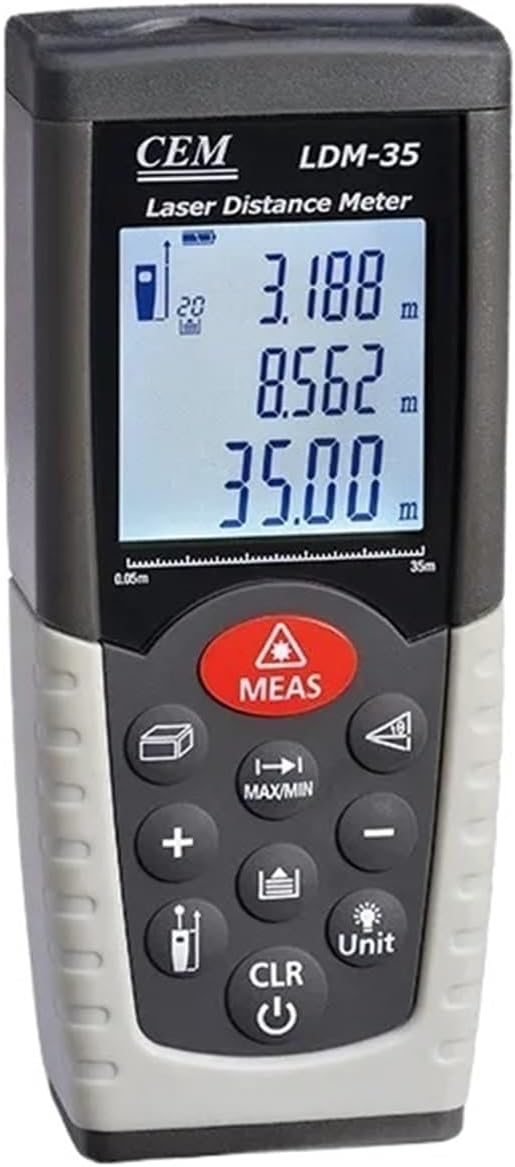
Figure 1: Front view of the LDM-35 Laser Rangefinder, showing the display and control buttons.
2. Safety Information
To ensure safe operation and prevent damage to the device or injury to yourself or others, please observe the following safety precautions:
- Laser Radiation: This device emits Class 2 laser radiation. Do not stare directly into the laser beam or direct it at other people. Avoid prolonged exposure.
- Eye Protection: Never look directly into the laser aperture. Use caution when operating in environments where the laser beam could reflect off shiny surfaces.
- Children: Keep the device out of reach of children.
- Operating Environment: Do not operate the device in explosive atmospheres, such as in the presence of flammable liquids, gases, or dust.
- Maintenance: Do not attempt to disassemble or modify the device. Refer all servicing to qualified personnel.
- Batteries: Use only the specified battery type. Dispose of batteries properly according to local regulations.
3. Product Features
The LDM-35 Laser Rangefinder offers a range of features designed for precision and ease of use:
- High Precision: Accurate measurements with a precision of ±1.5mm.
- Multiple Measurement Modes: Supports single distance, continuous measurement, area, volume, and Pythagorean theorem calculations.
- Fast Measurement: Achieves measurements in as little as 0.5 seconds.
- Durable Design: Optimized for strong light measurement and adaptable to harsh environments.
- Large LCD Display: Clear and easy-to-read display for measurement results.
- Compact and Portable: Handheld design for convenient use anywhere.

Figure 2: Diagram illustrating key features such as strong light optimization, high precision, fast measurement, and 1mm perception.
4. Components and Controls
Familiarize yourself with the main components and controls of your LDM-35 Laser Rangefinder:

Figure 3: Side view of the LDM-35 Laser Rangefinder, showing its ergonomic design.
4.1. Device Layout
- Laser Emission Aperture: Where the laser beam exits.
- Laser Receiving Lens: Where the reflected laser beam is detected.
- LCD Display: Shows measurement results, mode indicators, and battery status.
- Keypad: Contains various function buttons.
- Battery Compartment: Located at the bottom/rear for battery insertion.
4.2. Keypad Functions
| Button | Function |
|---|---|
| MEAS | Initiates a single measurement; confirms selection. |
| MAX/MIN | Switches between continuous measurement (Max/Min tracking). |
| + / - | Adds or subtracts measurements. |
| Unit | Changes measurement units (e.g., meters, feet, inches). |
| CLR / Power | Clears the last measurement; long press to power on/off. |
| Function Buttons | Buttons for Area, Volume, and Pythagorean measurement modes. |
5. Setup
5.1. Battery Installation
- Locate the battery compartment cover on the rear of the device.
- Slide or unclip the cover to open it.
- Insert the required batteries (e.g., AAA batteries) according to the polarity indicators (+/-) inside the compartment.
- Close the battery compartment cover securely.
5.2. Powering On/Off
- To Power On: Press and hold the CLR / Power button until the display illuminates.
- To Power Off: Press and hold the CLR / Power button until the display turns off. The device will also automatically power off after a period of inactivity to conserve battery life.
5.3. Unit Selection
To change the measurement unit (e.g., meters, feet, inches):
- Press the Unit button repeatedly to cycle through the available units. The selected unit will be displayed on the screen.
6. Operating Instructions
6.1. Single Distance Measurement
- Point the laser aperture at the target surface.
- Press the MEAS button once. The laser will activate.
- Press the MEAS button again to take the measurement. The result will be displayed on the screen.
6.2. Continuous Measurement (Max/Min Tracking)
- Press the MAX/MIN button. The device will start continuous measurement.
- Move the device slowly to scan the desired area. The display will show the current, maximum, and minimum distances.
- Press MEAS or MAX/MIN again to stop continuous measurement.
6.3. Area Measurement
- Press the Area function button (usually indicated by a square icon).
- Measure the first side (e.g., length) by pointing the laser and pressing MEAS.
- Measure the second side (e.g., width) by pointing the laser and pressing MEAS.
- The calculated area will be displayed.
6.4. Volume Measurement
- Press the Volume function button (usually indicated by a cube icon).
- Measure the length, width, and height sequentially by pressing MEAS after each dimension.
- The calculated volume will be displayed.
6.5. Pythagorean Measurement
This mode allows indirect measurement of heights or distances using the Pythagorean theorem.
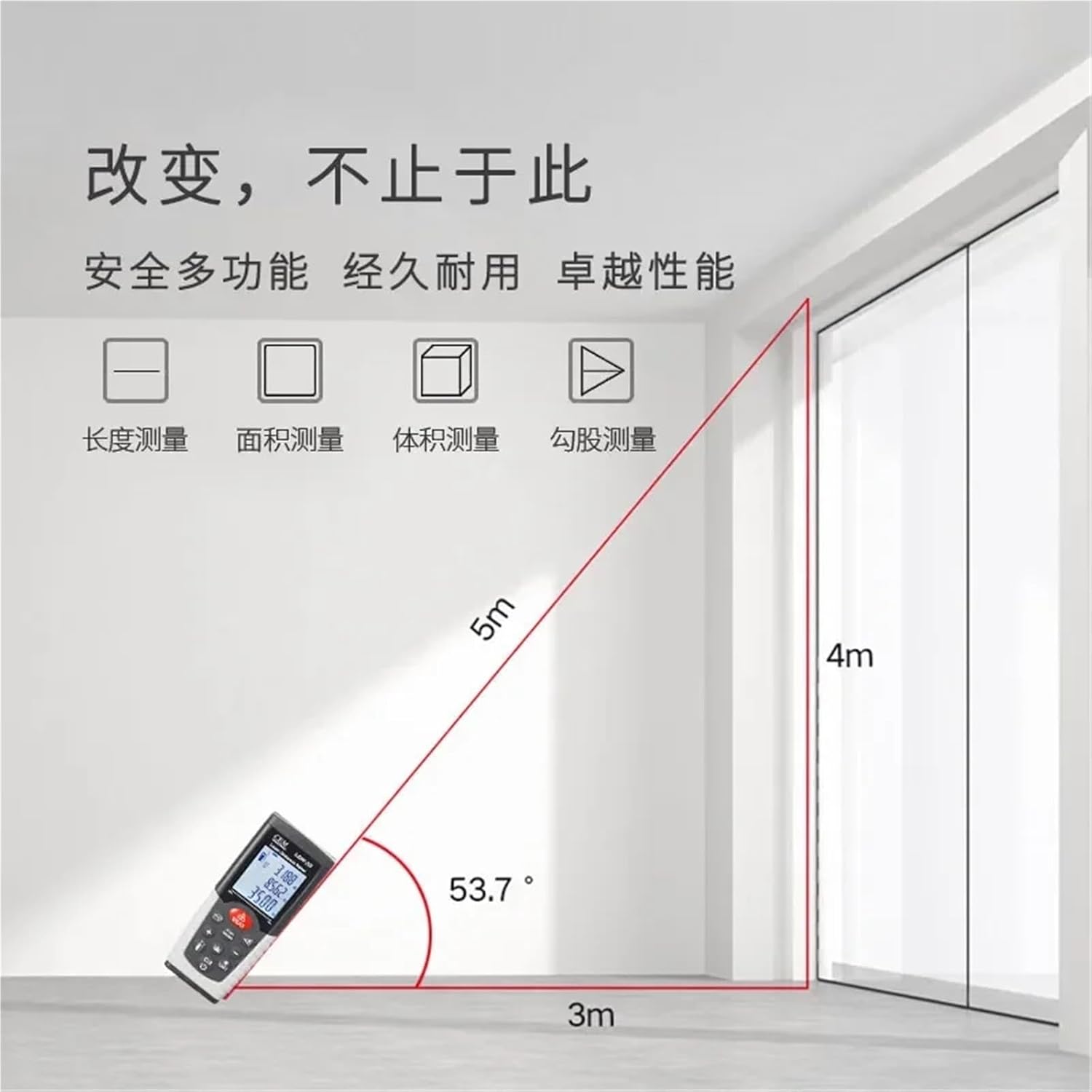
Figure 4: Illustration of Pythagorean measurement for calculating height or distance indirectly.
- Press the Pythagorean function button (usually indicated by a triangle icon).
- Follow the on-screen prompts to measure the required sides (e.g., hypotenuse and one leg for height calculation).
- The device will automatically calculate and display the unknown side.
7. Maintenance
Proper maintenance ensures the longevity and accuracy of your LDM-35 Laser Rangefinder:
- Cleaning: Use a soft, damp cloth to clean the device casing. Do not use abrasive cleaners or solvents.
- Lens Care: Gently clean the laser emission and receiving lenses with a soft, lint-free cloth, similar to cleaning camera lenses. Avoid touching the lenses with your fingers.
- Storage: When not in use for extended periods, remove the batteries to prevent leakage. Store the device in a cool, dry place, away from direct sunlight and extreme temperatures.
- Avoid Impact: Protect the device from drops and strong impacts, which can affect its calibration and internal components.
8. Troubleshooting
If you encounter issues with your LDM-35 Laser Rangefinder, refer to the following common problems and solutions:
| Problem | Possible Cause | Solution |
|---|---|---|
| Device does not power on. | Low or dead batteries; incorrect battery polarity. | Replace batteries with new ones; ensure correct polarity. |
| Inaccurate measurements. | Dirty laser lens; unstable measuring surface; strong light interference. | Clean the lens; ensure stable positioning; measure in less reflective or shaded areas. |
| "Error" message on display. | Measurement out of range; laser beam obstructed; internal error. | Ensure target is within range; clear obstructions; restart the device. If persistent, contact support. |
| Display is dim or flickering. | Low battery power. | Replace batteries. |
9. Specifications
| Parameter | Value |
|---|---|
| Model | LDM-35 |
| Measurement Range | Up to 35 meters (approx. 115 feet) |
| Measurement Accuracy | ±1.5mm |
| Measurement Units | m / ft / in |
| Laser Class | Class 2 |
| Automatic Laser Off | 30 seconds (approx.) |
| Automatic Instrument Off | 180 seconds (approx.) |
| Power Supply | AAA Batteries (not specified, assuming common type) |
| Operating Temperature | 0°C to 40°C (32°F to 104°F) |
| Storage Temperature | -20°C to 60°C (-4°F to 140°F) |
| Dimensions | 1.18 x 0.79 x 0.39 inches (from product specifications) |
| Weight | 1.76 ounces (from product specifications) |
10. Customer Support
For technical assistance, warranty information, or service inquiries, please contact MDWXDOFP customer support through your original point of purchase or visit the official MDWXDOFP website.
Please have your product model number (LDM-35) and purchase details ready when contacting support.
Related Documents - LDM-35
 |
LASER MEASURE 100M 5M: Laser Distance Measure & Tape Measure Features and Functions Detailed overview of the LASER MEASURE 100M 5M, a versatile tool combining a 100-meter laser distance measure with a 5-meter tape measure. Explore its functions like cross-marking, area, volume, Pythagorean measurements, and modes including single, continuous, and reference point measurements. |
 |
SNAKOL Laser Distance Meter Operation Manual User manual for SNAKOL Laser Distance Meter models LDM-B50m, LDM-B70m, LDM-B100m, LDM-B120m. Covers safety, operation, functions, technical specs, and troubleshooting. |
 |
NICHIDO N600A Portable Laser Distance Meter Instruction Manual Instruction manual for the NICHIDO N600A portable laser distance meter. Covers features, specifications, usage, safety precautions, and troubleshooting. Provides guidance on operation and maintenance for accurate distance measurements. |
 |
UNI-T LM Series Laser Distance Meters: LM50A, LM70A, LM100A, LM120A User Guide Explore the UNI-T LM Series Laser Distance Meters (LM50A, LM70A, LM100A, LM120A). This guide details precise measurement capabilities for area, volume, and distance, ideal for construction, engineering, and design professionals. Features include ergonomic design, millimeter accuracy, and data storage. |
 |
Dreamburgh 4-in-1 Laser Measuring Tape User Manual Technical specifications and features for the Dreamburgh 4-in-1 Laser Measuring Tape, featuring an 80m laser rangefinder, 5m tape measure, and digital angle sensing. |
 |
Beta Precision Electronic Rulers Instruction Manual - Accurate Measurement Solutions Comprehensive instruction manual for Beta Precision Digital Electronic Rulers, detailing features, specifications, usage, and maintenance for accurate non-contact measurements in industries like Flexo, Offset, and Electronics. |
Ask a question about this manual
Ask about setup, troubleshooting, compatibility, parts, safety, or missing instructions. Manuals+ will review the question and use this page’s manual context to help answer it.