
1. Introduction
This manual provides detailed instructions for the installation, operation, and maintenance of your CNSTWEI 12.3-inch Android 14 Car Radio Stereo Screen. Please read this manual thoroughly before installation and use to ensure proper function and to maximize your product experience.
This unit is designed for specific Mercedes-Benz models: A-Class W176, CLA-C117, and GLA-X156, manufactured between 2013 and 2018, and compatible with NTG 4.0, 4.5, and 5.0 systems. Ensure your vehicle's dashboard matches the product images for compatibility.
2. Product Overview and Key Features
The CNSTWEI 12.3-inch Android 14 Car Radio Stereo Screen replaces your factory OEM screen, integrating advanced Android functionalities while retaining original car system features. It offers a high-definition display and a comprehensive suite of connectivity options.
Key Features:
- Display: 12.3-inch HD Screen, Glass+Glass Capacitive Touch Screen, 1920x720 HD Resolution, IPS Screen, Full Laminated.
- Operating System: Android 14.
- Memory: 8GB RAM, 128GB ROM SSD (for 12.3" NTG5.0 8+128GB variant).
- Connectivity: Built-in Dual Band WiFi (2.4GHz and 5GHz), 4G Connection, Bluetooth 5.0, USB Tethering.
- Integration: Built-in Wireless & Wired Car Auto Play, Built-in Wireless & Wired Android Auto.
- Audio: Built-in DSP (Digital Sound Processor), AUX Audio Output.
- Navigation: Accurate GPS Navigation, supports online and offline maps.
- User Interface: 3 UI Themes, Split Screen, Picture-in-Picture (PIP).
- Original System Retention: Retains original car radio, amplifier function, factory joystick control, original camera, and other OEM functions.

Image: Comparison of the car dashboard before and after installation of the 12.3-inch Android screen, showing the larger, integrated display.
3. Package Contents
Verify that all components are present in the package before beginning installation:
- 1 x Car Radio Stereo (12.3-inch Android Screen)
- 1 x Power Cable
- 1 x USB Cable
- 1 x GPS Antenna
- 1 x 4G Antenna
- 1 x AUX Cable
- 1 x Installation Screw Set
- Installation Tools (typically included)
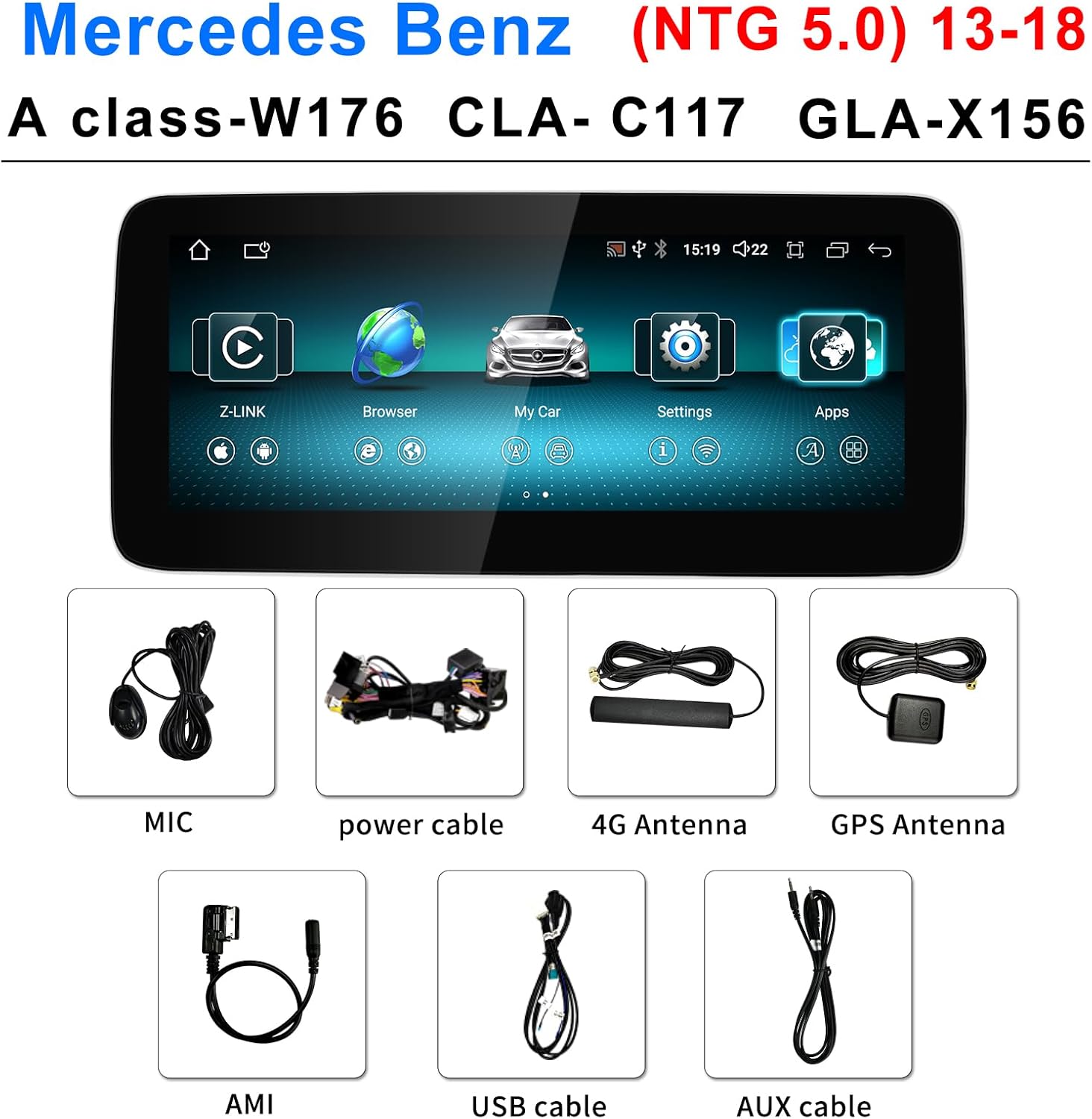
Image: All included components, such as the MIC, power cable, 4G antenna, GPS antenna, AMI cable, USB cable, and AUX cable.
4. Installation Guide
Installation requires careful handling and knowledge of car electronics. It is recommended to seek professional assistance if you are not comfortable with the process. Incorrect wiring or installation can damage the unit or your vehicle.
Important Notes Before Installation:
- Disconnect the car battery before starting any electrical work.
- Ensure the unit is compatible with your specific Mercedes-Benz model and NTG system version (NTG 4.0/4.5/5.0).
- The installation involves removing parts of the car dashboard to access wiring.
- Test all functions of the unit before fully reassembling the dashboard.
General Installation Steps (Consult a professional or detailed vehicle-specific guide):
- Carefully remove the original car screen and dashboard trim panels.
- Disconnect the original wiring harness from the factory screen.
- Connect the provided power cable, USB cable, GPS antenna, 4G antenna, and AUX cable to the new Android unit.
- Connect the new wiring harness to the vehicle's existing connections, ensuring all connections are secure.
- Mount the new 12.3-inch Android screen into the dashboard opening.
- Reconnect the car battery.
- Power on the unit and test all functionalities (touchscreen, audio, navigation, Bluetooth, CarPlay/Android Auto, original system retention).
- If all functions operate correctly, carefully reassemble the dashboard trim panels.
If you encounter any installation issues, please contact customer support for assistance.
5. Basic Operation
The unit operates on Android 14 and features a responsive touchscreen interface. The main interface provides access to various functions and applications.
Navigating the Interface:
- Touchscreen: Use gestures like tap, swipe, and pinch-to-zoom, similar to a smartphone or tablet.
- Home Button: Returns to the main home screen.
- Back Button: Navigates to the previous screen or menu.
- Recent Apps: Displays recently used applications for quick switching.
- Original System Access: A dedicated icon or gesture allows switching back to the original Mercedes-Benz NTG system.
Audio Output Options:
The unit supports multiple ways to output audio, ensuring compatibility with your vehicle's sound system:
- Bluetooth: Connect your smartphone via Bluetooth for audio streaming and hands-free calls.
- AUX Connection: Use the provided AUX cable to connect the unit's audio output to your car's AUX input.
- USB: Play audio and video files directly from a USB drive.
- Original System Retention: The unit integrates with and utilizes the original car's amplifier system.
Video: A demonstration of the main interface, showing navigation through music, navigation, Bluetooth, "My Car" information, CarPlay, video playback, instrument display, and settings menus.
6. Advanced Features
6.1 Wireless CarPlay & Android Auto
The unit supports both wireless and wired Apple CarPlay and Android Auto, allowing seamless integration of your smartphone for navigation, music, calls, and messaging.
- Connection: Connect your smartphone via Bluetooth for wireless CarPlay/Android Auto, or use a USB cable for a wired connection.
- Functionality: Access compatible apps directly from the car screen, use voice commands, and enjoy a familiar smartphone interface optimized for driving.

Image: The screen displaying the Wireless CarPlay interface, showing common applications for navigation, communication, and entertainment.
6.2 GPS Navigation
The unit features accurate GPS navigation with support for both online and offline maps. You can link your preferred navigation apps to the home screen for quick access.
- Online Maps: Requires a Wi-Fi or 4G connection (via SIM card or USB tethering) to download map data and receive real-time traffic updates.
- Offline Maps: Download maps for your region to use navigation without an internet connection.
- Audio Integration: Navigation instructions can be heard while listening to music or radio.

Image: The screen showing a detailed GPS navigation map, highlighting the unit's capability for precise route guidance.
6.3 Digital Sound Processor (DSP)
The built-in DSP allows for fine-tuning of audio output, providing a high-fidelity surround stereo experience. Adjust equalizer settings to match your audio preferences.
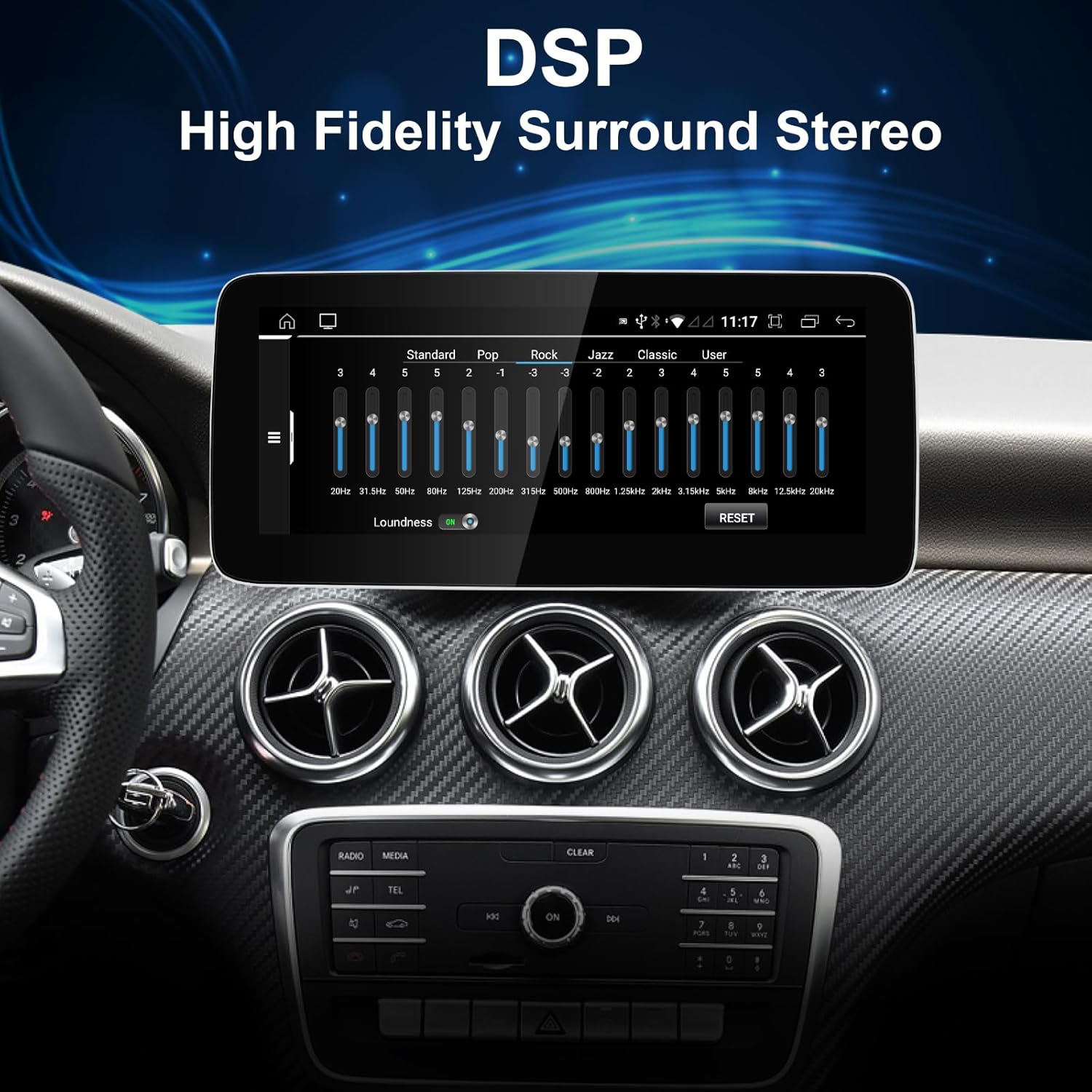
Image: The DSP interface on the screen, showing equalizer controls for customizing audio output.
6.4 Wi-Fi and 4G Connectivity
Stay connected with built-in dual-band Wi-Fi (2.4GHz and 5GHz) and 4G support. This enables online navigation, app downloads, and internet browsing.
- Wi-Fi: Connect to a mobile hotspot or home Wi-Fi network.
- 4G: Requires a compatible SIM card (not included) and a data plan for independent cellular connectivity.
- USB Tethering: Share your phone's internet connection via USB.
7. Settings and Customization
Access the "Settings" menu to configure various aspects of the Android system and the unit's features.
- System Settings: Adjust display, sound, network, connected devices, language, date & time, and perform factory data reset.
- NTG Settings: Specific settings related to the integration with the original Mercedes-Benz NTG system.
- Volume Control: Independent volume adjustments for different audio sources.
- Navigation Settings: Configure default navigation app, voice prompts, and map preferences.
- Backup Camera Display: Settings for original or aftermarket rearview cameras.
8. Maintenance
To ensure the longevity and optimal performance of your car stereo screen, follow these simple maintenance guidelines:
- Screen Cleaning: Use a soft, lint-free cloth specifically designed for electronic screens. Gently wipe the screen to remove dust and fingerprints. Avoid abrasive cleaners or harsh chemicals.
- Software Updates: Periodically check for software updates to ensure you have the latest features and security patches. Follow the on-screen instructions for any available updates.
- Environmental Conditions: Avoid exposing the unit to extreme temperatures, direct sunlight for prolonged periods, or excessive moisture.
9. Troubleshooting
This section addresses common issues you might encounter. For problems not listed here, please contact customer support.
| Problem | Possible Cause | Solution |
|---|---|---|
| Unit does not power on. | Incorrect power cable connection, blown fuse, car battery disconnected. | Check all power connections. Ensure the car battery is connected. Inspect vehicle fuses. |
| No sound or distorted audio. | Incorrect AUX connection, Bluetooth not paired, volume too low, DSP settings. | Verify AUX cable is correctly connected and selected as input. Re-pair Bluetooth. Adjust volume levels. Check DSP equalizer settings. |
| GPS signal is weak or inaccurate. | GPS antenna not properly installed or obstructed. | Ensure GPS antenna is securely connected and placed in a clear line of sight (e.g., on the dashboard). |
| CarPlay/Android Auto not connecting. | Bluetooth not enabled, USB cable issue, phone compatibility. | Ensure Bluetooth is on and paired. Try a different USB cable. Check phone settings for CarPlay/Android Auto. |
| Original car functions not working. | Incorrect wiring harness connection, NTG system settings. | Double-check all wiring harness connections. Review NTG settings within the Android unit. |
10. Specifications
| Feature | Detail |
|---|---|
| Brand | CNSTWEI |
| Model Name | A Class-W176 CLA-C117 GLA-X156 Car Radio Touchscreen |
| Screen Size | 12.3 Inches |
| Resolution | 1920x720 HD |
| Operating System | Android 14 |
| RAM | 8GB (for 12.3" NTG5.0 8+128GB variant) |
| ROM | 128GB SSD (for 12.3" NTG5.0 8+128GB variant) |
| Connectivity | Bluetooth 5.0, USB, Wi-Fi (2.4G/5G), 4G (SIM card required) |
| Special Features | Wireless/Wired CarPlay, Wireless/Wired Android Auto, Built-in DSP, GPS Navigation, Split Screen, PIP |
| Compatible Vehicle Type | Mercedes-Benz A Class-W176, CLA-C117, GLA-X156 (2013-2018) with NTG 4.0/4.5/5.0 |
| Item Weight | 1.8 Kilograms |
11. Warranty and Support
The product comes with a 1-year warranty from the manufacturer, CNSTWEI. For warranty claims, technical support, or installation assistance, please contact your retailer or the manufacturer directly.
It is recommended to keep your purchase receipt as proof of purchase for warranty purposes.