Introduction
Welcome to your new EnHomee 55" L Shaped Farmhouse Office Desk. This manual provides essential information for assembly, operation, maintenance, and troubleshooting to ensure you get the most out of your desk. Please read all instructions carefully before beginning assembly or use.

The EnHomee 55" L Shaped Farmhouse Office Desk, showcasing its spacious design, integrated monitor stand, and ample storage. This desk is designed to enhance productivity and organization in any home office or bedroom setting.
Important Safety Information
To ensure safe use and prevent injury or damage, please adhere to the following safety guidelines:
- Always ensure the desk is properly anchored to the wall or floor to prevent tip-overs, especially if children are present.
- Do not place excessively heavy items on the monitor stand or shelves to avoid overloading and potential structural failure.
- Always follow the assembly instructions carefully to ensure the desk is properly constructed and stable.
- Keep all electrical components (power outlets, LED lights) away from liquids.
- Ensure all cables are neatly managed to prevent tripping hazards.
Product Features
Your EnHomee L-shaped desk is equipped with several features designed for convenience and efficiency:
- 55-Inch L-Shaped Large Desk: Provides a spacious workspace for multiple monitors, computers, and office essentials.
- 2 Drawers & Double Storage Shelves: Offers ample space for organizing files, books, and office supplies, keeping your workspace tidy.
- Built-In Charging Station: Features 3 AC outlets, 1 USB port, and 1 Type-C port for convenient charging of your devices.
- LED Lighting: Customizable LED lighting with 7 colors, 7 blinking frequencies, and 14 modes to personalize your workspace ambiance.
- Sturdy & Durable Surface: Constructed from durable wood planks, offering a scratch-resistant and waterproof surface for long-lasting use.
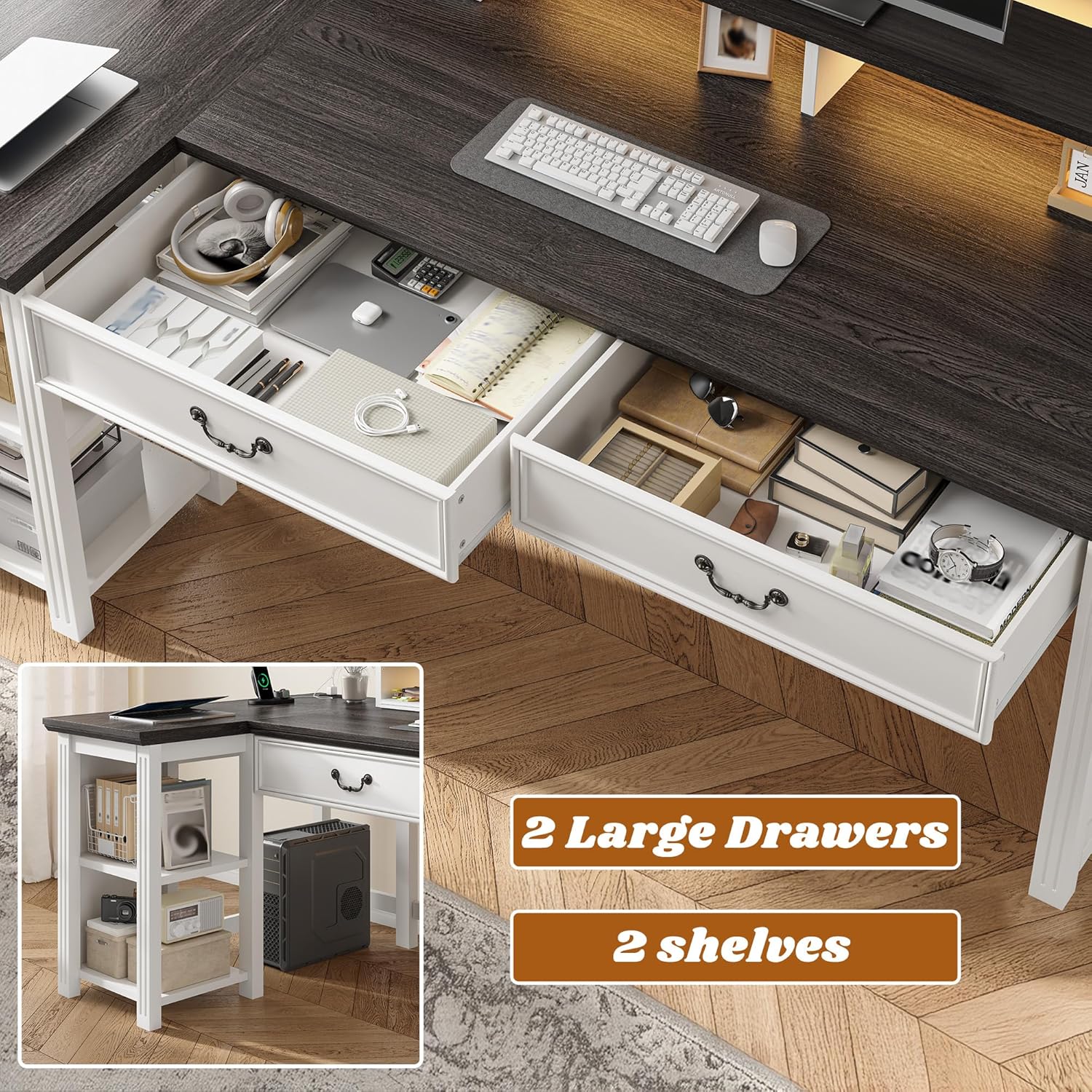
Detail view of the desk's integrated storage, featuring two spacious drawers and two open shelves for efficient organization of office supplies and personal items.

The convenient built-in charging station, providing easy access to power with 3 AC outlets, 1 USB port, and 1 Type-C port for all your electronic devices.

The desk features integrated LED light strips under the monitor stand, offering a range of colors and modes to create a personalized and dynamic lighting environment.
Specifications
| Attribute | Detail |
|---|---|
| Brand | EnHomee |
| Product Dimensions | 37"D x 55"W x 38"H |
| Color | Black+white |
| Style | Farmhouse |
| Base Material | Wood |
| Finish Type | Painted |
| Special Features | Built-In USB Outlet, Ergonomic, L-Shape, Monitor Stand |
| Room Type | Bedroom, Living Room, Office, Study Room |
| Item Weight | 121 Pounds |
| Number of Drawers | 2 |
| Number Of Shelves | 2 |
| Required Assembly | Yes |
| Recommended Number of People for Assembly | 2 |
| Tools Recommended For Assembly | Screw Driver (All assembly tools included) |

Detailed dimensions of the EnHomee L-shaped desk, including overall length, width, height, and specific measurements for the L-section and monitor stand.
Setup and Assembly
The EnHomee L-shaped desk is designed for straightforward assembly. All necessary tools are included with your purchase. It is recommended that two people assemble the desk for ease and safety.
Assembly Steps:
- Unpack all components and verify against the parts list provided in the detailed illustrated instructions.
- Follow the step-by-step instructions carefully, paying attention to the orientation of each part.
- Secure all screws and fasteners firmly, but do not overtighten until the entire section is aligned.
- Once assembled, ensure the desk is stable and all connections are secure.
- Position the desk in your desired location, ensuring proper clearance and stability.
This video provides an overview of the L-shaped computer desk, highlighting its features and demonstrating aspects of its assembly and functionality. It showcases the desk's dimensions, sturdiness, integrated charging station, storage capacity, and LED lighting options.
Operating Instructions
Using the Charging Station:
- Plug the desk's main power cord into a standard wall outlet.
- Utilize the 3 AC outlets for standard electronics, and the 1 USB and 1 Type-C ports for charging compatible devices.
- Avoid overloading the outlets.
Controlling LED Lights:
- Refer to the specific LED light controller instructions included in your package for detailed operation.
- Typically, a remote or integrated button will allow you to cycle through 7 colors, adjust blinking frequencies, and select from 14 different modes.
Ergonomic Use:
- The integrated monitor stand helps elevate your screen to an ergonomic height, promoting better posture.
- Adjust your chair height to ensure your feet are flat on the floor and your arms are at a comfortable angle to the keyboard.

This image illustrates the benefit of the integrated monitor stand in promoting a comfortable and healthy perspective, helping users maintain proper posture for a healthier life compared to desks without such features.
Maintenance
To keep your EnHomee desk in optimal condition:
- Cleaning: Wipe the desk surface with a damp cloth. Avoid harsh chemicals or abrasive cleaners that could damage the finish.
- Spills: Promptly wipe up any spills to prevent water damage or staining, as the surface is waterproof but prolonged exposure can cause issues.
- Fasteners: Periodically check and tighten all screws and fasteners to ensure the desk remains stable and secure.
- Electrical Components: Ensure the power strip and LED lights are free from dust and debris. Do not attempt to repair electrical components yourself.
Troubleshooting
If you encounter any issues with your desk, please refer to the following common solutions:
- Desk Wobbles: Ensure all screws are tightened. Check that the desk is on a level surface. If not, use furniture pads to stabilize.
- Drawers Not Sliding Smoothly: Check the drawer slides for any obstructions or misalignments. Ensure the drawer rails are properly installed and lubricated if necessary.
- LED Lights Not Working: Verify the power connection to the LED strip and the wall outlet. Check the remote control battery if applicable. Ensure no wires are pinched or damaged.
- Power Outlets Not Functioning: Confirm the desk's main power cord is securely plugged into a working wall outlet. Check if the circuit breaker on the power strip (if present) has tripped.
- Missing or Damaged Parts: If you received damaged or missing parts during assembly, please contact EnHomee customer support immediately with your purchase details.
Warranty and Support
EnHomee is committed to providing high-quality products. For information regarding product warranty, please refer to the warranty card included in your original packaging or visit the official EnHomee website.
For any questions, concerns, or assistance with your EnHomee L Shaped Farmhouse Office Desk, please contact our customer support team:
- Online Support: Visit the EnHomee Store on Amazon or their official website for FAQs and contact options.
- Protection Plans: Extended protection plans may be available for purchase to cover your product beyond the standard warranty period. Check Amazon's product page for details on 2-Year or 3-Year Protection Plans.


