
1. Introduction
Thank you for choosing the CollaredEagle Twin Bed Frame. This metal platform bed frame is designed for comfort and convenience, featuring an integrated charging station and dynamic LED lighting. It provides robust support for your mattress without the need for a box spring. This manual provides essential information for safe assembly, operation, and maintenance of your new bed frame.
2. Safety Information
- Weight Limit: Do not load more than 350 lbs (158 kg) on the bed frame. Exceeding this limit may cause damage or injury.
- Sharp Edges: Be cautious of sharp edges on metal components during assembly and use. Wear protective gloves if necessary.
- Assembly: Ensure all parts are correctly assembled and all bolts are securely tightened before use. Periodically check and retighten all connections.
- Children: Keep children away from the assembly area. Small parts can be a choking hazard.
- Placement: Place the bed frame on a flat, stable surface to prevent wobbling or instability.
- Electrical Safety: Ensure the charging station is connected to a properly grounded power outlet. Do not overload the outlets. Keep liquids away from electrical components.
3. Package Contents
Please verify that all components are present before beginning assembly. If any parts are missing or damaged, please contact customer support.
- Headboard/Footboard Sections
- Side Rails
- Metal Slats
- Support Legs
- Charging Station Unit (with 2 USB ports & 2 AC outlets)
- LED Light Strip Kit (with controller)
- Assembly Hardware (bolts, washers, nuts)
- Assembly Tools (Allen wrench, etc.)
- Instruction Manual
4. Setup and Assembly
Assembly typically takes approximately 30 minutes. Follow the numbered parts and detailed instructions provided in the package. It is recommended to assemble with two people.
- Unpack and Identify Parts: Carefully unpack all components and lay them out. Refer to the parts list to ensure everything is present and undamaged.
- Assemble Frame Sections: Connect the headboard and footboard sections to the side rails using the provided bolts and tools. Do not fully tighten bolts until the entire frame is assembled.
- Attach Support Legs: Securely attach all support legs to the designated points on the frame.
- Install Metal Slats: Place the metal slats across the frame. The unique locking mechanism ensures secure fastening. Ensure all slats are properly seated to minimize friction and prevent noise.
- Install Charging Station: Integrate the charging station unit into the designated slot on the bed frame. Connect its power cable.
- Install LED Light Strip: Adhere the LED light strip to the desired locations on the bed frame, typically along the underside or edges. Connect the light strip to the controller and power source.
- Final Tightening: Once all components are in place, go back and securely tighten all bolts and connections.
- Add Mattress: Carefully place your mattress on the assembled bed frame. No box spring is needed.
5. Operating Instructions
5.1 Charging Station
The integrated charging station provides convenient power access for your electronic devices.
- USB Ports: Use the 2 USB ports to charge smartphones, tablets, and other USB-powered devices.
- AC Outlets: The 2 AC outlets are suitable for charging laptops, lamps, or other small appliances.
- Usage: Simply plug your device into the appropriate port. Ensure the bed frame is connected to a wall outlet for the charging station to function.

5.2 LED Lights
The bed frame features dynamic multi-color RGB LED light strips, controllable via a phone app or remote controller.
- Power On/Off: Use the remote or app to turn the LED lights on or off.
- Color Selection: Choose from over 60,000 colors to match your preference.
- Brightness Adjustment: Adjust the intensity of the light.
- Modes: Select various lighting modes, such as static color, fading, jumping, or flashing.
- Music Sync: The LED lights can synchronize with music, creating a dynamic visual effect. Follow the app instructions to enable this feature.
- Timer: Set a timer for the lights to automatically turn off.


6. Maintenance
- Cleaning: Wipe the metal frame with a soft, damp cloth. Avoid harsh chemicals or abrasive cleaners that could damage the finish.
- Connections: Periodically check all bolts and connections to ensure they remain tight. Retighten as necessary to maintain stability and prevent noise.
- Electrical Components: Keep the charging station and LED light components dry and free from dust. Do not attempt to repair electrical parts yourself.
- Under-Bed Storage: Utilize the 10.8 inches of under-bed storage space to keep your area tidy. Ensure items stored do not obstruct airflow or damage the LED strips.
7. Troubleshooting
- Issue: Bed frame makes noise (creaking).
- Solution: Ensure all metal slats are securely fastened in their locking mechanisms. Check and tighten all assembly bolts. The design is intended to minimize noise, so loose connections are the most common cause.
- Issue: LED lights are not working.
- Solution: Verify that the LED light strip is properly connected to the controller and the power adapter is plugged into a working outlet. Check the remote control battery or ensure the phone app is correctly paired and functioning.
- Issue: Charging station is not providing power.
- Solution: Confirm that the bed frame's main power cord is securely plugged into a functional wall outlet. Test the outlet with another device. Ensure your devices are properly connected to the USB ports or AC outlets.
- Issue: Bed frame feels unstable or wobbly.
- Solution: Recheck all assembly bolts and ensure they are fully tightened. Verify that the bed frame is placed on a level surface. Ensure all support legs are making firm contact with the floor.
8. Specifications
- Brand: CollaredEagle
- Model: Twin Bed Frame
- Color: Black
- Material: Metal
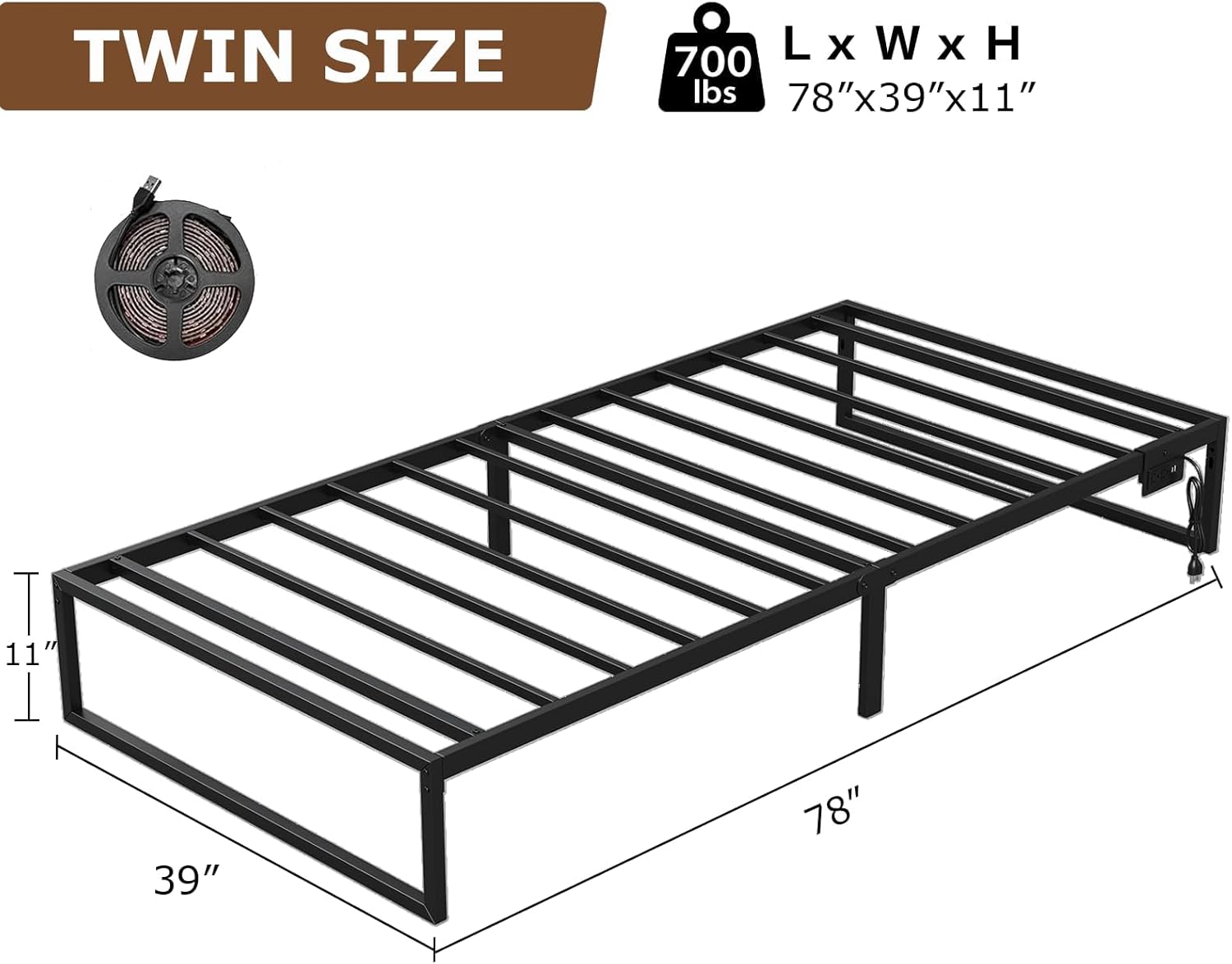
- Product Dimensions: Approximately 104 cm (L) x 20 cm (W) x 13.5 cm (H) (packaged) / 78" (L) x 39" (W) x 11" (H) (assembled)
- Item Weight: Approximately 16.2 kg (35.7 lbs)
- Maximum Weight Capacity: 350 Pounds (158 kg)
- Special Features: Integrated Charging Station (2 USB ports, 2 AC outlets), RGB LED Lights with Music Sync and App Control
- Under-Bed Clearance: 10.8 inches
9. Warranty and Support
For warranty information or technical support, please refer to the documentation included with your purchase or contact CollaredEagle customer service through the retailer where the product was purchased. Please have your purchase receipt and product model information available when contacting support.