
1. Introduction
The SKYCENX SK202D is a versatile 3-in-1 handheld device integrating a dual-channel oscilloscope, a 6000-count multimeter, and a DDS signal generator. Designed for electrical testing and measurement, it offers an 80MHz bandwidth, 200MSa/s sampling rate, and a clear TFT color screen for various applications.

Figure 1: SKYCENX SK202D highlighting its three primary functions.
2. Package Contents
Verify that all items listed below are included in your package. If any items are missing or damaged, please contact customer support.
- SKYCENX SK202D Main Unit
- Oscilloscope Probe
- Multimeter Test Leads
- USB Type-C Cable
- User Manual
- Storage Pouch
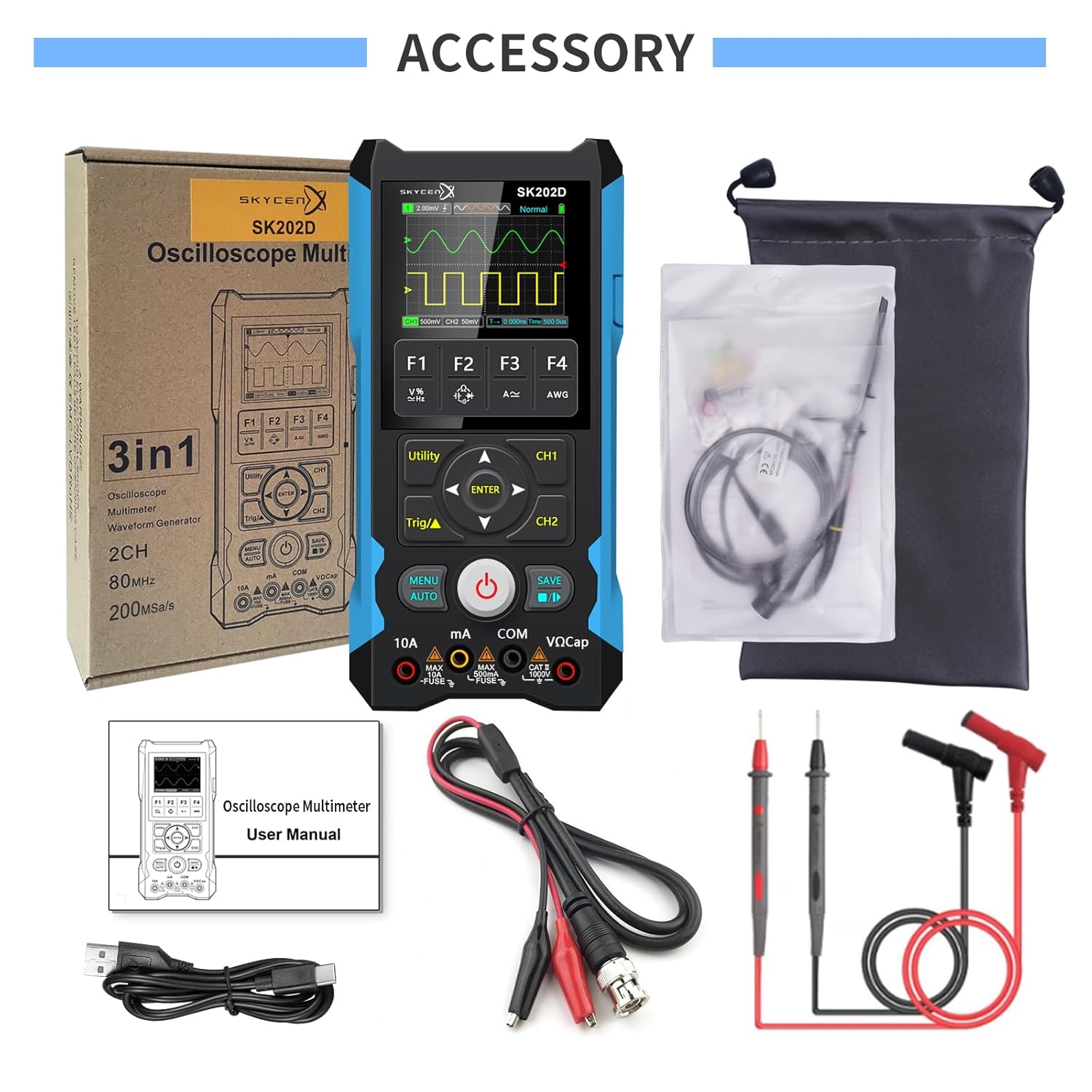
Figure 2: Included accessories with the SKYCENX SK202D.
3. Product Features
- Dual-Channel Oscilloscope: 80MHz bandwidth, 200MSa/s real-time sampling rate. Features automatic measurement, FFT mathematical operations, cursor measurement, persistence mode, and YZ mode. Vertical sensitivity from 10mV/div to 10V/div.
- 6000 Counts Multimeter: Measures AC/DC Voltage (up to 750V AC, 1000V DC), DC/AC Current (up to 10A), Resistance (up to 60 MΩ), Capacitance (up to 99.99 mF), Continuity, and Diode.
- DDS Signal Generator: Supports sine wave (1Hz-5MHz), square wave (10Hz-1MHz), and triangle wave (10Hz-1MHz) outputs with 1Hz step.
- Data Management: Capable of storing 2000 sets of data and 200 waveforms. Supports Type-C connection for data transfer to computers or tablets.
- Power & Battery: 15W fast charging for approximately 10 hours of usage time. Built-in auto power-off function.
- Display: 320×240 resolution TFT color screen for clear visibility in various lighting conditions.
4. Setup
4.1 Initial Charging
Before first use, fully charge the device using the provided USB Type-C cable and a compatible 15W charger. The charging indicator on the screen will show charging status.

Figure 3: Device charging via USB Type-C.
4.2 Power On/Off
Press and hold the red power button located on the front panel to turn the device on or off.
4.3 Connecting Probes
For oscilloscope functions, connect the oscilloscope probe to the CH1 or CH2 BNC input. For multimeter functions, connect the test leads to the appropriate input jacks (VΩCap, mA, 10A, COM).

Figure 4: Overview of button functions and input ports.
5. Operating Instructions
5.1 General Navigation
Use the directional buttons (Up, Down, Left, Right) and the ENTER button to navigate menus and adjust settings. The MENU/AUTO button accesses the main menu or enables auto-ranging/auto-setup functions. The SAVE button stores data or waveforms.
5.2 Oscilloscope Mode
Press the CH1 or CH2 button to activate the respective oscilloscope channel. Use the F1-F4 function buttons for quick access to common oscilloscope settings such as vertical sensitivity, time base, trigger settings, and measurement parameters. The device supports FFT analysis, cursor measurements, and waveform storage.

Figure 5: Oscilloscope mode displaying a waveform.

Figure 6: Detailed view of oscilloscope waveform analysis features.
5.3 Multimeter Mode
Rotate the rotary switch to select the desired multimeter function (e.g., Voltage, Current, Resistance, Capacitance, Diode, Continuity). Connect the test leads to the circuit under test. The display will show the measurement value. Use the MODE button to switch between AC/DC or other sub-functions.

Figure 7: Multimeter mode displaying various measurements.
5.4 Signal Generator Mode
Access the signal generator function via the AWG (Arbitrary Waveform Generator) button or menu. Select the desired waveform type (sine, square, triangle) and adjust frequency and amplitude using the directional buttons and ENTER. Connect the signal generator output to the circuit requiring a test signal.

Figure 8: Signal generator mode with various waveform outputs.
5.5 Data Storage and PC Connection
The device can store measurement data and waveforms. To transfer data, connect the SK202D to a computer or tablet using the USB Type-C cable. PC software may be required for full data analysis and is available upon request from the Skycenx store.

Figure 9: USB connection for data transfer to smart devices.
5.6 Product Function Introduction Video
Video 1: An overview of the SKYCENX SK202D's various functions and operational modes.
5.7 Handheld Oscilloscope Multimeter Demonstration Video
Video 2: A demonstration of the handheld oscilloscope and multimeter functions in use.
6. Maintenance
6.1 Cleaning
Wipe the device with a soft, dry cloth. Do not use abrasive cleaners or solvents. Ensure the device is powered off and disconnected from any power source before cleaning.
6.2 Battery Care
To prolong battery life, avoid fully discharging the device frequently. Charge the device regularly, especially if it will not be used for an extended period. Store in a cool, dry place.
6.3 Storage
When not in use, store the device and its accessories in the provided storage pouch to protect it from dust and physical damage.
7. Troubleshooting
- Device does not power on: Ensure the battery is charged. Connect to a power source and try again.
- Inaccurate measurements: Check probe connections and ensure the correct measurement mode is selected. Calibrate if necessary (refer to advanced settings in the full manual).
- Slow response to button presses: This can sometimes occur. Try restarting the device. Ensure the firmware is up to date if updates are available.
- No waveform display: Verify probe connection, trigger settings, and input signal. Adjust vertical and horizontal scales.
- Data transfer issues: Ensure the USB cable is securely connected and the correct PC software/drivers are installed.
For further assistance, please refer to the comprehensive user manual or contact SKYCENX customer support.
8. Specifications
8.1 General Specifications
- Batteries: 2 Lithium Ion batteries (included)
- Parcel Dimensions: 23.5 x 18.01 x 4.5 cm
- Weight: 879.97 g
- Power Source: Battery Powered
- Style: Digital
- Color: Black
- Upper Temperature Rating: 40 Degrees Celsius
- UPC: 782331265784
8.2 Oscilloscope Specifications
| Parameter | Value |
|---|---|
| Channels | 2 |
| Bandwidth | 80MHz |
| Sampling Rate | 200MSa/s |
| Record Length | 6K |
| Horizontal Range | 5ns/div ~ 500s/div |
| Vertical Range | 1x: 10mV/div ~ 10V/div |
| Bandwidth Limit | 20MHz |
| Input Resistance | 1MΩ/15pF |
| Input Coupling | DC, AC, GND |
| Probe Attenuation | 1X, 10X, 100X |
| Protection Voltage | 300Vpp |
| Trigger Type | Edge trigger |
| Trigger Mode | Auto, Normal, Single |
| Trigger Level | ±4div |
| Measurement Data | Vp-p, Vrms, Vavg, Vp, Vmax, Vmin, F, T, T+-, Du+, Du- |
| Storage | 2000 sets of DMM data, 200 sets of Waveform, Thumbnail preview |
Table 1: Oscilloscope Specifications.

Figure 10: Visual representation of oscilloscope specifications.
8.3 Multimeter Specifications
| Function | Range | Uncertainty |
|---|---|---|
| DC Voltage | 600.0mV ~ 1000V | 0.75%rdg + 10dgt |
| AC Voltage | 600.0mV ~ 750V (TRMS, 40Hz ~ 1KHz) | 1.0%rdg + 10dgt |
| DC Current | 60.00mA/500.0mA/6.000A/10.00A | 1.2%rdg + 10dgt |
| AC Current | 60.00mA/500.0mA/6.000A/10.00A TRMS | 1.5%rdg + 10dgt |
| Resistance | 600.0Ω ~ 60.00MΩ | 1.0%rdg + 5dgt |
| Capacitance | 10.00nF ~ 1.000mF/10.00mF ~ 100.0mF | 2.0/5.0%rdg + 10dgt |
| Frequency | 10.00Hz ~ 10.00MHz | 1.0%rdg + 5dgt |
| Diode Test | Open circuit voltage is about 3V, Max test current is about 2mA | |
| Continuity Test | ≤50Ω buzzer sound, ≥600Ω display OL | |
| Other Functions | AUTO Range, TRMS/Change gear prompt, Sound switch, USB communication, Automatic shut-down |
Table 2: Multimeter Specifications.

Figure 11: Visual representation of multimeter specifications.
8.4 Signal Generator Specifications
| Parameter | Value |
|---|---|
| Sine Wave Frequency | 1Hz ~ 5MHz |
| Square Wave Frequency | 1Hz ~ 1MHz |
| Triangle Wave Frequency | 1Hz ~ 1MHz |
| Backlighting Time | 5Vpp, 3Vpp, 2Vpp, 1Vpp, 500mVpp, 200mVpp, 100mVpp, 0Vpp |
Table 3: Signal Generator Specifications.

Figure 12: Visual representation of signal generator and backlighting specifications.
9. Warranty and Support
The SKYCENX SK202D comes with a standard manufacturer's warranty. For detailed warranty information, technical support, or service inquiries, please contact SKYCENX customer service through the retailer where the product was purchased or visit the official SKYCENX website.