
TBANVOO 73473020
TBANVOO T962-V2.0 Reflow Oven User Manual
Automatic IC Heater Soldering Reflow Oven
Model: 73473020 | Brand: TBANVOO
1. Introduction and Overview
The TBANVOO T962-V2.0 Reflow Oven is an advanced 800W IC heater soldering machine designed for efficient and precise automatic welding of various electronic components. Utilizing microcomputer control, it streamlines the entire soldering process from preheating to cooling, making it suitable for both single-layer and double-layer PCB boards. This manual provides essential information for safe operation, setup, maintenance, and troubleshooting to ensure optimal performance of your reflow oven.
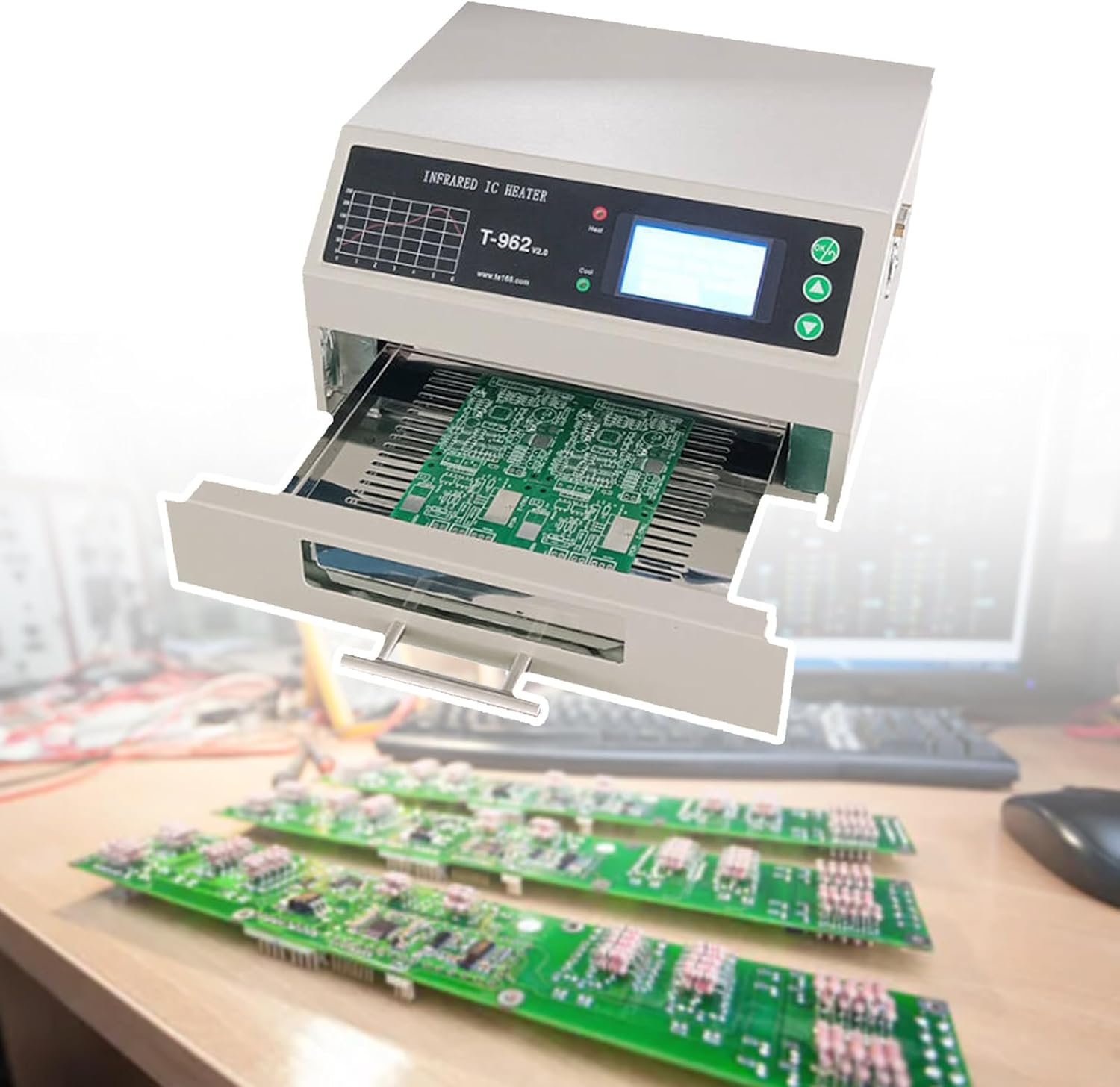
Figure 1.1: The TBANVOO T962-V2.0 Reflow Oven with its pull-out tray, ready for soldering printed circuit boards.
2. Safety Information
Please read and understand all safety instructions before operating the reflow oven. Failure to follow these instructions may result in electric shock, fire, or serious injury.
- Electrical Safety: Ensure the power supply matches the specified voltage (110V for this model). Do not operate with damaged cords or plugs. Disconnect power before cleaning or maintenance.
- Heat and Burns: The oven reaches high temperatures. Do not touch hot surfaces during or immediately after operation. Allow sufficient cooling time. Use heat-resistant gloves if handling components immediately after reflow.
- Ventilation: Operate the oven in a well-ventilated area. Soldering processes can produce fumes. Consider using an external smoke exhaust system (not included with the machine).
- Flammable Materials: Keep flammable liquids, gases, and materials away from the oven.
- Children and Pets: Keep children and pets away from the operating area.
- Proper Use: Use the oven only for its intended purpose of reflow soldering. Do not modify the unit.
3. Product Features
The T962-V2.0 Reflow Oven incorporates several features designed for precision and ease of use:
- Automatic Welding: Microcomputer-controlled process from preheating to cooling.
- Programmable Profiles: Stores up to eight temperature parameter waves in memory.
- PC Connectivity: Allows connection to a computer for modifying temperature curve settings.
- Large Welding Area: Features a spacious 180 x 235 mm (7.1 x 9.2 inch) drawer.
- Efficient Heating: 800W power with fast heating and uniform temperature distribution via a fan.
- Versatile Application: Suitable for single and double-sided PCB boards, and various component packages including CHIP, SOP, PLCC, QFP, BGA.
- Visual Operation: Drawer design with LCD display allows monitoring of the soldering process.
- Compact Design: Lightweight and small footprint for easy bench positioning and storage.
4. Components and Parts
Familiarize yourself with the main components of the reflow oven:

Figure 4.1: Internal view showing the infrared quartz heating tube for high thermal effect, the unique cooling wind design for main board heat dissipation, and the high-quality stainless steel material for heat resistance.

Figure 4.2: Key external features including the anti-scalding stainless steel tray handle, the double-layered quartz glass for clear internal viewing, and the embedded power socket and switch for safe operation.

Figure 4.3: Rear panel illustrating the unique louver opening and closing design for thermal insulation and energy conservation, along with the strong and efficient smoke exhaust fan.

Figure 4.4: The effective and environmentally friendly waste gas collection system, showing how a suitable Φ110mm smoke exhaust pipe (purchased separately) can be connected to prevent exhaust gas from escaping.
5. Setup
Follow these steps for initial setup of your reflow oven:
- Unpacking: Carefully remove the reflow oven from its packaging. Inspect for any shipping damage.
- Placement: Place the oven on a stable, level, heat-resistant surface in a well-ventilated area. Ensure there is adequate clearance around the unit for air circulation and heat dissipation.
- Power Connection: Connect the power cord to the oven's input socket (AC 110V). Ensure the power switch is in the 'OFF' position before plugging into a wall outlet.
- Exhaust System (Optional but Recommended): For optimal fume extraction and a healthy work environment, connect a Φ110mm smoke exhaust pipe to the exhaust outlet at the rear of the unit. Note: The smoke exhaust pipe is not included and must be purchased separately.
- Initial Power On: Flip the power switch to 'ON'. The LCD display should illuminate.
6. Operating Instructions
The T962-V2.0 Reflow Oven simplifies the soldering process with its automated features.
6.1. Understanding Temperature Profiles
The oven can store 8 different temperature profiles, each designed for specific soldering requirements. These profiles manage the preheat, soak, reflow, and cool-down phases automatically. Refer to the display and control buttons to select the desired profile.

Figure 6.1: This chart illustrates various temperature applications for the reflow oven, ranging from mold core preheating (300-400℃) to laboratory reagent heating (30-100℃), demonstrating its wide range of uses beyond just PCB soldering.
6.2. Loading the PCB
Carefully place your PCB board with components onto the pull-out drawer. Ensure components are properly aligned and secured if necessary. The maximum welding area is 180 x 235 mm.
6.3. Starting the Reflow Process
- Select the appropriate temperature profile using the control panel buttons.
- Push the drawer fully into the heating chamber.
- Initiate the soldering cycle (refer to the specific button on your unit, typically labeled 'Start' or 'Run').
- Monitor the process via the LCD display. The oven will automatically proceed through the pre-defined stages.
6.4. Connecting to a Computer
The oven can be connected to a computer to customize and fine-tune temperature curve settings. Refer to the included software (if applicable) and connection instructions for detailed steps on how to modify and upload profiles.
7. Maintenance
Regular maintenance ensures the longevity and optimal performance of your reflow oven.
- Cleaning: Ensure the oven is completely cool and unplugged before cleaning. Use a soft, dry cloth to wipe down the exterior. For the interior, gently clean any flux residue or debris from the heating chamber and tray. Avoid abrasive cleaners or solvents.
- Drawer Maintenance: Keep the pull-out drawer and its rails clean to ensure smooth operation.
- Ventilation Grilles: Periodically check and clean the ventilation grilles to prevent dust buildup, which can impede airflow and cooling.
- Inspection: Regularly inspect the power cord for any signs of damage.
8. Troubleshooting
If you encounter issues with your T962-V2.0 Reflow Oven, refer to the following common problems and solutions:
| Problem | Possible Cause | Solution |
|---|---|---|
| Oven does not power on. | No power supply; power cord loose; power switch off. | Check power outlet; ensure power cord is securely plugged in; turn power switch to 'ON'. |
| Temperature not reaching set point. | Incorrect profile selected; heating element issue; poor ventilation. | Verify selected profile; ensure proper ventilation; contact support if heating element is suspected. |
| Soldering results are inconsistent. | Incorrect temperature profile; improper component placement; insufficient solder paste. | Adjust temperature profile; ensure proper component alignment; verify solder paste application. |
| Excessive smoke/fumes. | Lack of proper ventilation; type of flux used. | Ensure operation in a well-ventilated area; consider installing an external smoke exhaust system. |
9. Specifications
Detailed technical specifications for the TBANVOO T962-V2.0 Reflow Oven:
| Parameter | Value |
|---|---|
| Model | T-962 (V2.0) |
| Power | 800W |
| Cycle Time | 1 - 8 minutes |
| Temperature Profiles | 8 pre-defined profiles |
| Temperature Range | 0-280℃ (32-536℉) |
| Drawer Size (Welding Area) | 180 x 235 mm (7.1 x 9.2 inch) |
| Input Voltage | 110V (for this model) |
| Item Weight | 16.26 pounds (7.38 kg) |
| Package Dimensions | 14.96 x 14.57 x 9.84 inches |
| Manufacturer Part Number | 73473020 |
10. Warranty and Support
For any questions, technical assistance, or warranty inquiries regarding your TBANVOO T962-V2.0 Reflow Oven, please contact TBANVOO customer support. Refer to your purchase documentation for specific warranty terms and contact information.
Note: Protection plans may be available for purchase separately through your retailer.
Ask a question about this manual
Ask about setup, troubleshooting, compatibility, parts, safety, or missing instructions. Manuals+ will review the question and use this page’s manual context to help answer it.