
CANMOV 0be934b1-9d89-4328-a2f5-5c080e766ea9
CANMOV Power Recliner Chair User Manual
Model: 0be934b1-9d89-4328-a2f5-5c080e766ea9
Introduction
Thank you for choosing the CANMOV Power Recliner Chair. This manual provides essential information for the safe assembly, operation, and maintenance of your new recliner. Please read it thoroughly before use and retain it for future reference.

Image: The CANMOV Power Recliner Chair in Smoky Gray, showcasing its design and faux leather finish.
Safety Information
- Do not lean to one side or lean forward when the chair is in the open (reclined) position. This can cause instability and potential injury.
- Ensure the power cord is not a tripping hazard and is placed away from high-traffic areas.
- Keep children and pets away from the moving parts of the recliner during operation.
- Do not allow children to play on or around the recliner.
- Avoid placing heavy objects on the footrest when it is extended.
- Always ensure the chair is on a stable, level surface before use.
Product Specifications
| Brand | CANMOV |
| Model Number | 0be934b1-9d89-4328-a2f5-5c080e766ea9 |
| Color | Smoky Gray |
| Material | Faux Leather, Foam Fill |
| Overall Dimensions (W x D x H) | 40.5" x 39" x 37" |
| Expanded Length | 65" |
| Seat Dimensions (W x D) | 21.7" x 21.7" |
| Seat Height | 18.3" |
| Weight Capacity | 350 lbs |
| Reclining Positions | Adjustable up to 140° |
| Features | Power Recline, USB Charging Port, Vintage Rivet Decoration |
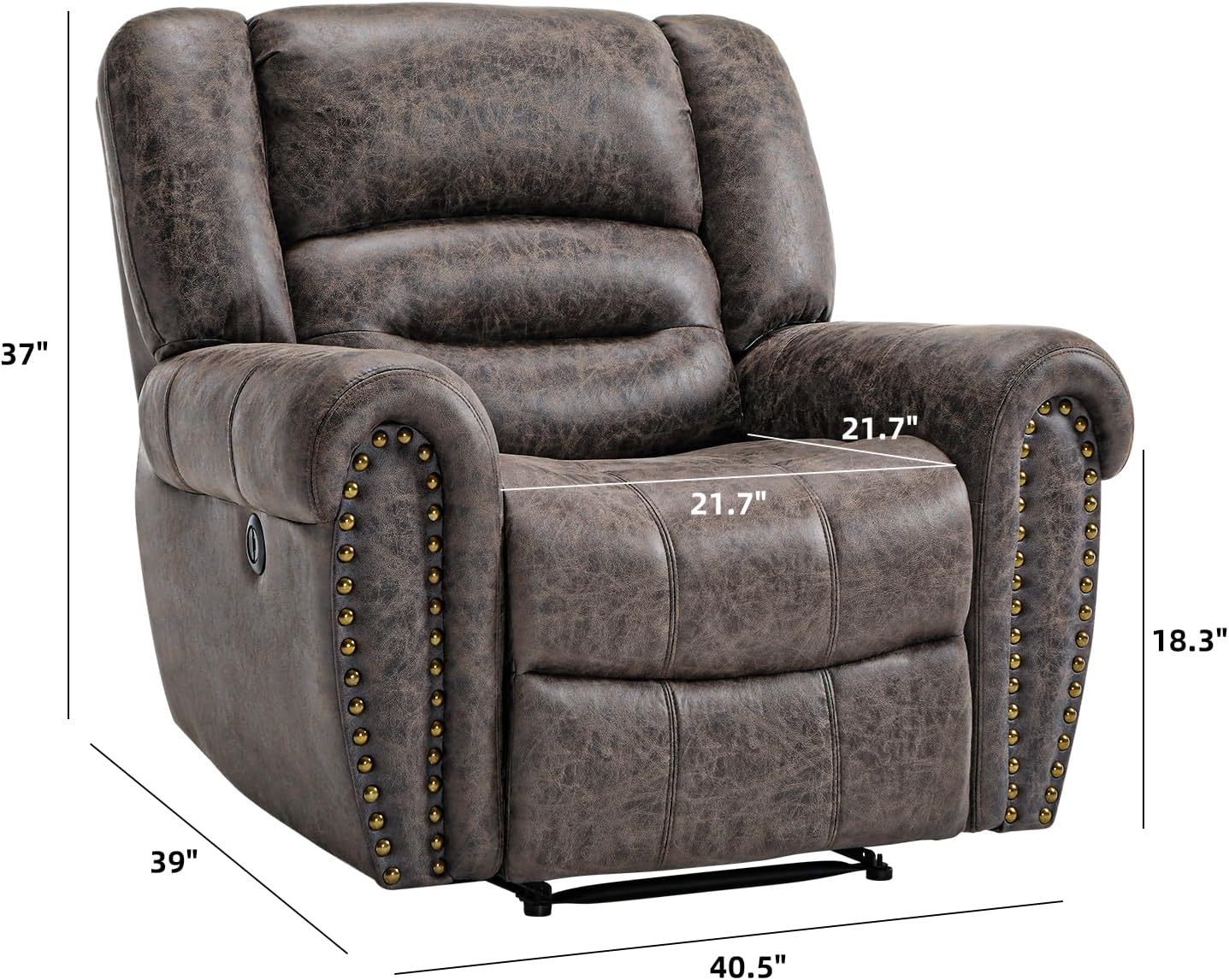
Image: Detailed dimensions of the recliner chair, including width, depth, height, seat dimensions, and expanded length.
Setup Instructions
Your CANMOV Power Recliner Chair is designed for easy assembly. Follow these steps to set up your chair:
- Unpack Components: Carefully remove all parts from the packaging. Ensure all components are present: backrest, seat base, armrests (if separate), and power adapter.
- Attach Backrest: Align the metal brackets on the backrest with the corresponding slots on the seat base. Slide the backrest down firmly until it locks into place. You should hear a click.
- Connect Power: Locate the power cable extending from the chair base. Connect it to the provided power adapter, then plug the adapter into a standard electrical outlet.
- Position Chair: Place the chair in your desired location, ensuring there is enough space behind and in front of the chair for full recline.
- Test Functionality: Sit in the chair and test the recline function using the control buttons.
Note: If you encounter any difficulties during assembly, please refer to the included assembly guide or contact customer support.
Operating Instructions
The CANMOV Power Recliner Chair features intuitive controls for comfortable adjustment.

Image: Close-up of the integrated USB charging port located on the side control panel of the recliner.
Recline Function:
- Locate the control buttons on the side of the armrest.
- To recline, gently press and hold the button that extends the backrest and footrest. The chair will smoothly move to your desired position, up to 140°.
- To return to the upright position, press and hold the other button until the chair is fully upright and the footrest is retracted.
- You can stop the recline at any point between upright and fully reclined (e.g., 120° for watching TV, 140° for napping).
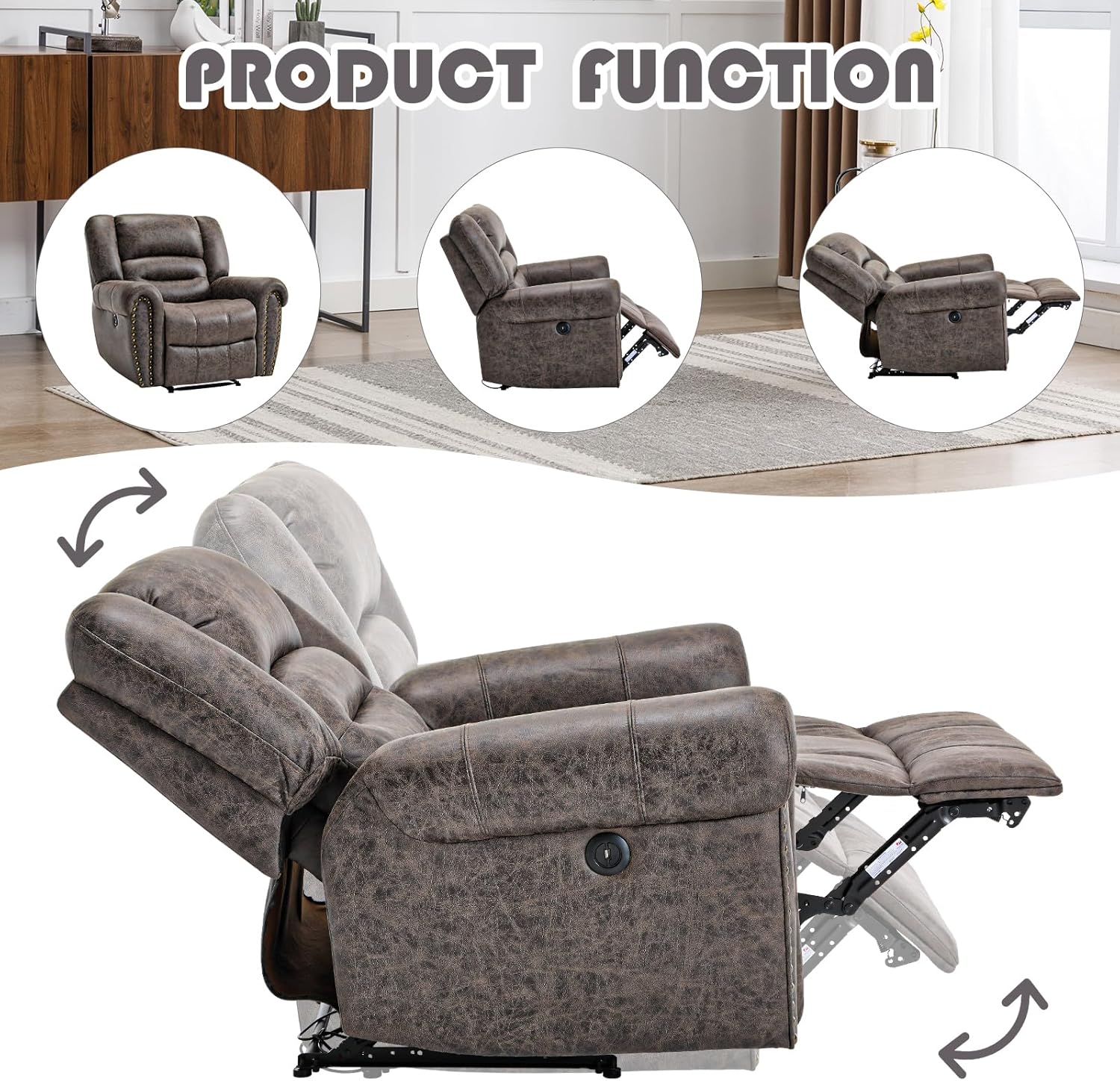
Image: Visual representation of the recliner chair transitioning through various recline positions, from upright to fully extended.
USB Charging Port:
- A USB charging port is integrated into the control panel on the side of the armrest.
- Plug your compatible device's USB cable into this port to charge your phone or tablet while relaxing in the chair.
- Ensure the chair is connected to a power source for the USB port to function.
Video: An official CANMOV video demonstrating the comfort and functionality of the recliner chair in various home settings, highlighting its ease of use and relaxation benefits.
Maintenance and Care
Proper care will extend the life and appearance of your recliner chair.
- Cleaning Faux Leather: The faux leather material is easy to maintain. Gently wipe the surface with a damp towel to remove dust and spills. Avoid using harsh chemicals or abrasive cleaners, as these can damage the material.
- Spill Management: For liquid spills, blot immediately with a clean, dry cloth. Do not rub.
- General Cleaning: Regularly vacuum the chair to remove dust and debris from crevices.
- Mechanism Care: The reclining mechanism is designed for durability. Avoid forcing the mechanism. If it becomes stiff, ensure no obstructions are present. Do not apply lubricants unless specifically instructed by customer support.
- Sunlight Exposure: Avoid prolonged exposure to direct sunlight to prevent fading and material degradation.

Image: Detailed views of the recliner's features, including the overstuffed backrest, vintage rivet decoration, comfortable armrests, comfortable seat, and the sturdy, stable support mechanism.
Troubleshooting
If you experience issues with your recliner, please consult the following common solutions:
- Chair Does Not Recline:
- Ensure the power cord is securely plugged into both the chair and the wall outlet.
- Check if the wall outlet is functioning by plugging in another device.
- Verify that all connections within the chair (if accessible) are firm.
- USB Port Not Charging:
- Confirm the chair is powered on and connected to an active electrical outlet.
- Try a different USB cable or device to rule out cable/device issues.
- Recline Mechanism is Stiff or Noisy:
- Inspect for any obstructions (e.g., foreign objects, fabric) caught in the mechanism.
- Ensure the chair is on a level surface.
- If the issue persists, contact customer support. Do not attempt to lubricate or disassemble the mechanism yourself.
Warranty and Support
CANMOV is committed to providing high-quality products and customer satisfaction. For specific warranty details regarding your recliner chair, please refer to the warranty card included with your purchase or visit the official CANMOV website.
If you require assistance, have questions, or need to report an issue, please contact CANMOV customer service. Our team is available to provide helpful, prompt, and friendly support.
- Online Support: Visit the CANMOV Brand Store on Amazon.
- Email Support: Refer to your product packaging or the official website for email contact information.
Related Documents - 0be934b1-9d89-4328-a2f5-5c080e766ea9
 |
CANMOV Recliner Chair User Manual and Return Policy This document provides attention and return policy, brand story, product specifications, fitting list, assembly instructions, remote operation, usage information, maintenance tips, and important attentions for CANMOV recliner chairs. |
 |
CANMOV Power Lift Recliner User Manual & Return Policy Comprehensive guide for CANMOV power lift recliners, covering installation, assembly, usage, maintenance, cleaning, return policy, and brand story. Includes troubleshooting tips and contact information. |
 |
CANMOV Power Lift Recliner Chair - Assembly, Usage, and Maintenance Guide Comprehensive guide for CANMOV power lift recliners, covering brand story, product features, detailed assembly instructions, usage information, cleaning tips, and important attention points. Learn how to set up and maintain your CANMOV upholstered furniture. |
Ask a question about this manual
Ask about setup, troubleshooting, compatibility, parts, safety, or missing instructions. Manuals+ will review the question and use this page’s manual context to help answer it.