Introduction
This manual provides comprehensive instructions for the safe and efficient operation, maintenance, and troubleshooting of your 10L portable dehumidifier air purifier. Please read this manual thoroughly before using the appliance and retain it for future reference.
This dehumidifier is designed to remove excess moisture from the air, helping to control dampness and condensation in medium-sized rooms (18-20m²). It features a 2-liter water tank, an automatic shut-off function when the tank is full, an LED display, and a reusable air filter.
Product Overview
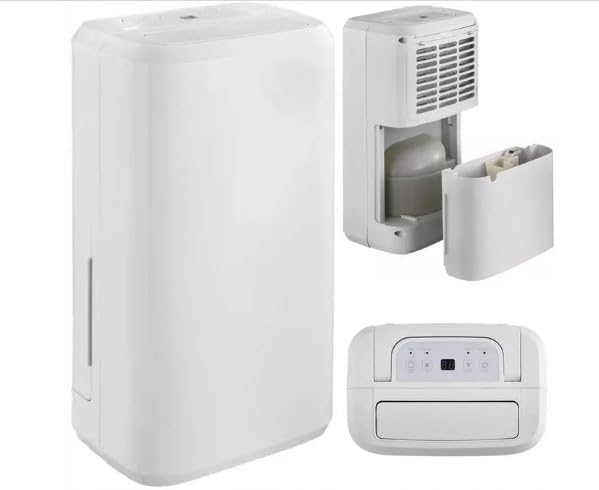
Figure 1: Front view of the 10L portable dehumidifier, showing its compact design and integrated handle.
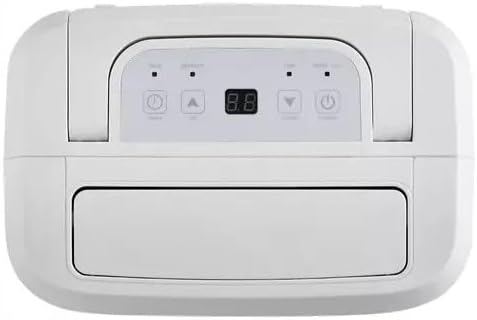
Figure 2: Top view of the dehumidifier, highlighting the intuitive LED display and control panel for easy operation.

Figure 3: Side view of the dehumidifier with the 2-liter water tank removed, illustrating the easy access for emptying.

Figure 4: Rear view of the dehumidifier, showing the removable and washable air filter for maintenance.
Safety Instructions
Always follow basic safety precautions when using electrical appliances to reduce the risk of fire, electric shock, and injury to persons.
- Ensure the power supply voltage matches the rating label on the appliance (220-240V).
- Do not operate the dehumidifier with a damaged cord or plug.
- Do not block air inlets or outlets. Maintain at least 20cm clearance from walls and furniture.
- Do not immerse the appliance, cord, or plug in water or other liquids.
- Unplug the dehumidifier before cleaning or performing any maintenance.
- Keep out of reach of children and pets.
- This appliance uses R-290 refrigerant, which is a natural gas with low environmental impact. Handle with care and ensure proper ventilation.
Setup
- Unpacking: Carefully remove the dehumidifier from its packaging. Retain packaging for future storage or transport.
- Placement: Place the dehumidifier on a firm, level surface in the room where moisture removal is desired. Ensure there is at least 20cm of space around all sides for proper airflow. Avoid placing near heat sources or in direct sunlight.
- Power Connection: Plug the power cord into a grounded electrical outlet (220-240V).
- Water Tank: Ensure the 2-liter water tank is correctly inserted into the unit. The unit will not operate if the tank is full or incorrectly positioned.
- Continuous Drainage (Optional): For continuous operation without emptying the tank, connect the provided drain hose to the continuous drainage outlet on the back of the unit. Ensure the hose is sloped downwards to allow gravity drainage into a suitable receptacle.
Operating Instructions
Control Panel (Refer to Figure 2)
The control panel features an LED display and several buttons for operation.
- Power Button: Press to turn the unit ON or OFF.
- Humidity Setting Buttons (Up/Down Arrows): Use these buttons to adjust the desired humidity level. The LED display will show the current and target humidity.
- Timer Button: Press to set the operating timer. You can set the unit to turn ON or OFF after a specified number of hours (e.g., 2, 4, 8 hours).
- LED Display: Shows current humidity, set humidity, and timer settings.
Basic Operation
- Plug in the dehumidifier.
- Press the Power Button to turn the unit on. The unit will start operating in continuous mode or at the last set humidity level.
- Use the Up/Down Arrows to set your desired humidity level. A common comfortable humidity range is between 40% and 60%. The unit will cycle on and off to maintain this level.
- To use the timer function, press the Timer Button repeatedly to select the desired operating duration.
- When the water tank is full, the unit will automatically shut off, and an indicator light (if available) will illuminate. Empty the water tank and reinsert it to resume operation.
Maintenance
Regular maintenance ensures optimal performance and extends the lifespan of your dehumidifier.
Emptying the Water Tank
- When the water tank is full, the dehumidifier will stop operating and an indicator will signal.
- Carefully pull out the water tank from the unit (refer to Figure 3).
- Empty the collected water into a sink or drain.
- Reinsert the empty water tank firmly back into the dehumidifier. The unit will resume operation automatically.
Cleaning the Air Filter
The reusable air filter should be cleaned every two weeks or more frequently depending on usage and air quality.
- Unplug the dehumidifier from the power outlet.
- Locate the air filter compartment at the back of the unit (refer to Figure 4).
- Remove the air filter.
- Clean the filter using a vacuum cleaner to remove dust and debris. For heavier dirt, wash the filter gently with warm, soapy water.
- Allow the filter to air dry completely before reinserting it into the unit. Do not use a dryer or direct heat.
- Reinsert the dry filter and close the compartment.
Cleaning the Unit Exterior
Wipe the exterior of the dehumidifier with a soft, damp cloth. Do not use abrasive cleaners or solvents.
Troubleshooting
| Problem | Possible Cause | Solution |
|---|---|---|
| Dehumidifier does not turn on. | No power; Water tank full or incorrectly inserted; Power button not pressed. | Check power connection; Empty and reinsert water tank correctly; Press the power button. |
| No water collected or low extraction. | Room humidity is already low; Air filter is clogged; Temperature is too low; Unit size is too small for the room. | Increase desired humidity setting; Clean the air filter; Ensure room temperature is above 5°C; Consider a larger capacity unit for bigger rooms. |
| Unit runs continuously. | Desired humidity set too low; Continuous drainage enabled. | Increase desired humidity setting; Check if continuous drainage hose is connected and functioning. |
| Unusual noise. | Unit not on a level surface; Obstruction in fan. | Place on a flat, stable surface; Check for and remove any obstructions (unplug first). |
Specifications
| Feature | Detail |
|---|---|
| Model Name | D002A |
| Brand | Generic |
| Colour | White |
| Dehumidification Capacity | 10 Liters per Day |
| Tank Volume | 2 Litres |
| Suitable Floor Area | 18-20 m² (20 Cubic Metres) |
| Power Voltage Supply | 220-240V |
| Product Dimensions (D x W x H) | 27.6 x 18.5 x 48 cm |
| Item Weight | 10 kg |
| Auto Shutoff | Yes (when tank is full) |
| Refrigerant | R-290 (environmentally friendly) |
| Filter Type | Washable Filter |
Warranty and Support
For warranty information and customer support, please refer to the purchase documentation or contact the retailer where the product was purchased. Keep your proof of purchase for any warranty claims.
For technical assistance or inquiries, please contact the manufacturer or seller directly. The manufacturer is listed as "b&q" in the product specifications.
