
Introduction
This manual provides essential instructions for the installation, operation, and maintenance of the ZMYUXME CV56BH-Q42 Universal TV Motherboard. This 3-in-1 universal motherboard is designed for various TV models, featuring two HDMI interfaces and supporting a voltage range of 45-70V with a 560mA power supply. Please read this manual thoroughly before proceeding with installation or use.
Important Safety Information
- Professional Installation Recommended: Installation of this TV motherboard requires technical expertise. Incorrect installation can lead to damage to the product, the television, or personal injury. It is highly recommended that installation be performed by a qualified technician.
- Power Disconnection: Always disconnect the television from the main power supply before attempting any installation, maintenance, or repair.
- Electrostatic Discharge (ESD): Electronic components are sensitive to static electricity. Take appropriate ESD precautions (e.g., use an anti-static wrist strap) when handling the motherboard.
- Voltage and Current: Ensure that the power supply connected to the motherboard matches the specified voltage (45-70V) and current (560mA) requirements.
- Ventilation: Ensure adequate ventilation around the installed motherboard to prevent overheating.
- Liquid Exposure: Keep the motherboard away from liquids and moisture.
Product Overview
The CV56BH-Q42 is a versatile TV motherboard designed to replace or upgrade existing television components. It integrates essential functions into a single board, simplifying TV repair and customization.
Key Features:
- 3-in-1 universal design for versatile compatibility with various TV models.
- Equipped with 2 HDMI interfaces for easy connection to multiple devices.
- Supports a wide voltage range of 45-70V, making it suitable for different power requirements.
- Delivers a reliable 560mA power supply for stable performance.
- Ideal for DIY repairs and upgrades to enhance your television experience.
Component Identification:

Figure 1: Front view of the CV56BH-Q42 Universal TV Motherboard, showing various input/output ports (HDMI, VGA, USB, AV) and the main processing unit. A remote control is also visible, indicating compatibility.
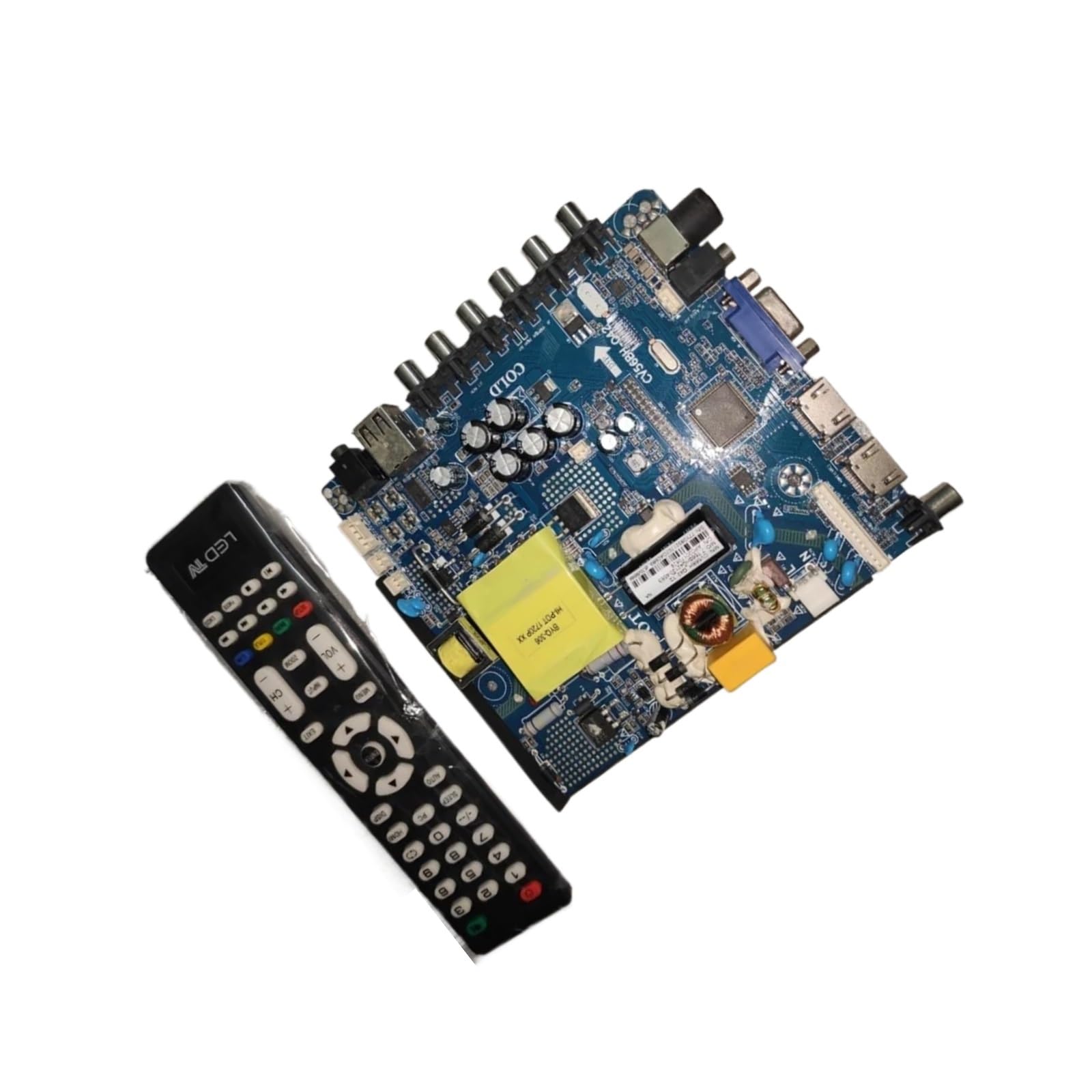
Figure 2: Rear view of the CV56BH-Q42 Universal TV Motherboard, displaying the solder points, circuit traces, and heat sink area. This view is important for understanding internal connections.

Figure 3: Close-up view of the motherboard, clearly showing the model number "CV56BH-Q42" printed on the circuit board, along with other component identifiers like "DIP" and a crystal oscillator.
Setup and Installation
This section outlines the general steps for installing the CV56BH-Q42 motherboard. Due to the universal nature and varying TV models, specific steps may differ. Consult your TV's service manual for detailed disassembly and reassembly instructions.
- Preparation:
- Ensure the TV is unplugged from the power outlet.
- Place the TV face down on a soft, clean surface to prevent screen damage.
- Gather necessary tools (screwdrivers, anti-static wrist strap, multimeter).
- Accessing the Old Motherboard:
- Remove the back cover of the television.
- Carefully disconnect all cables from the existing motherboard (e.g., power, LVDS, backlight, speakers, input ports). Document connections if necessary.
- Unscrew and remove the old motherboard.
- Installing the CV56BH-Q42:
- Align the CV56BH-Q42 motherboard with the mounting holes in the TV chassis.
- Secure the new motherboard with screws, ensuring it is firmly in place.
- Reconnect all necessary cables:
- Power Supply: Connect the power input cable. Ensure the power supply provides 45-70V and 560mA.
- LVDS Cable: Connect the LVDS cable to the display panel. Ensure correct orientation.
- Backlight Cable: Connect the backlight power cable.
- Speaker Cables: Connect the speaker cables.
- Input/Output Ports: Connect any external input/output cables (e.g., IR sensor, control panel buttons).
- Initial Power-Up and Testing:
- Before reattaching the back cover, temporarily connect the TV to power.
- Power on the TV and check for basic functionality (e.g., backlight, on-screen display).
- Test HDMI inputs with a known working device.
- If issues arise, refer to the Troubleshooting section.
- Final Assembly:
- Once functionality is confirmed, disconnect power.
- Carefully reattach the TV's back cover.
- Secure all screws.
Operating Instructions
After successful installation, the TV will operate similarly to its original state, with the CV56BH-Q42 motherboard managing its core functions. Operation is typically performed via a compatible remote control (as shown in Figure 1) or the TV's integrated control buttons.
- Power On/Off: Use the power button on the remote control or the TV's control panel.
- Input Selection: Use the "Input" or "Source" button on the remote to switch between connected devices (e.g., HDMI 1, HDMI 2, AV, VGA, USB).
- Menu Navigation: Use the directional buttons and "OK" or "Enter" button on the remote to navigate the on-screen display (OSD) menu for settings adjustments.
- Volume Control: Adjust audio levels using the volume up/down buttons.
- Channel Selection: If a tuner is connected and configured, use channel up/down buttons to change channels.
Maintenance
The CV56BH-Q42 motherboard is designed for long-term reliability with minimal maintenance. Adhering to the following guidelines can help ensure its longevity:
- Cleaning: Periodically, with the TV unplugged, gently clean the exterior of the TV and any accessible vents to prevent dust buildup. Do not use liquid cleaners directly on the motherboard.
- Ventilation: Ensure that the TV's ventilation openings are not blocked, allowing for proper airflow to dissipate heat from the motherboard.
- Environmental Conditions: Operate the TV in a stable environment, avoiding extreme temperatures, high humidity, or direct sunlight.
- Firmware Updates: If firmware updates become available from the manufacturer, follow the provided instructions carefully. Incorrect firmware updates can damage the device.
Troubleshooting
If you encounter issues after installing the CV56BH-Q42 motherboard, refer to the following common problems and solutions:
| Problem | Possible Cause | Solution |
|---|---|---|
| No power / TV does not turn on. |
|
|
| No picture / Black screen. |
|
|
| No sound. |
|
|
| Remote control not working. |
|
|
If the problem persists after attempting these solutions, it is recommended to consult a qualified technician or contact customer support.
Specifications
| Feature | Detail |
|---|---|
| Model Number | CV56BH-Q42 |
| Brand | ZMYUXME |
| Type | Three in One Universal TV Motherboard |
| HDMI Interfaces | 2 |
| Voltage Range | 45-70V |
| Current Output | 560mA |
| Maximum Resolution (Implied) | 1920x1080 (Full HD) |
| Package Dimensions | 1.18 x 0.79 x 0.39 inches |
| Item Weight | 1.76 ounces |
| ASIN | B0DPSVTSJR |
Warranty Information
Specific warranty terms for the ZMYUXME CV56BH-Q42 Universal TV Motherboard are provided by the seller at the time of purchase. Please retain your proof of purchase for any warranty claims. For detailed information regarding warranty coverage, duration, and procedures, please contact the retailer or seller directly.
Customer Support
For technical assistance, troubleshooting beyond this manual, or inquiries regarding your ZMYUXME CV56BH-Q42 Universal TV Motherboard, please contact the seller or manufacturer's customer support channels. When contacting support, please have your product model number (CV56BH-Q42) and purchase details readily available.