
1. Introduction
This manual provides comprehensive instructions for the installation, operation, and maintenance of your ZMYUXME CV56BH-Q42 Universal TV Motherboard. This 3-in-1 universal TV motherboard is designed for versatile compatibility, featuring 2 HDMI interfaces and supporting a voltage range of 45-70V with a 560mA power supply. Please read this manual thoroughly before use to ensure proper functionality and safety.
2. Safety Information
Warning: Electrical components can be dangerous. Installation should only be performed by qualified personnel. Always disconnect power before handling the motherboard or any connected components.
- Ensure all power sources are disconnected before installation or maintenance.
- Avoid touching exposed circuits while the board is powered.
- Handle the motherboard by its edges to prevent damage from static electricity.
- Do not expose the motherboard to moisture or extreme temperatures.
- Use only compatible power supplies and cables.
3. Package Contents
Verify that all items are present in your package:
- ZMYUXME CV56BH-Q42 Universal TV Motherboard
- Remote Control (if included with your specific purchase)
- (Optional) User Manual (this document)

Image: ZMYUXME CV56BH-Q42 Universal TV Motherboard and included remote control. The motherboard features various ports and components, while the remote control has standard TV functions.
4. Product Overview
The CV56BH-Q42 is a versatile TV motherboard designed to replace or upgrade existing TV mainboards. It integrates essential functions into a single unit, simplifying TV repair and customization.
Key Features:
- 3-in-1 universal design for broad compatibility.
- Two HDMI interfaces for connecting multiple high-definition devices.
- Wide voltage support: 45-70V.
- Stable 560mA power delivery.
- Suitable for DIY repairs and TV upgrades.
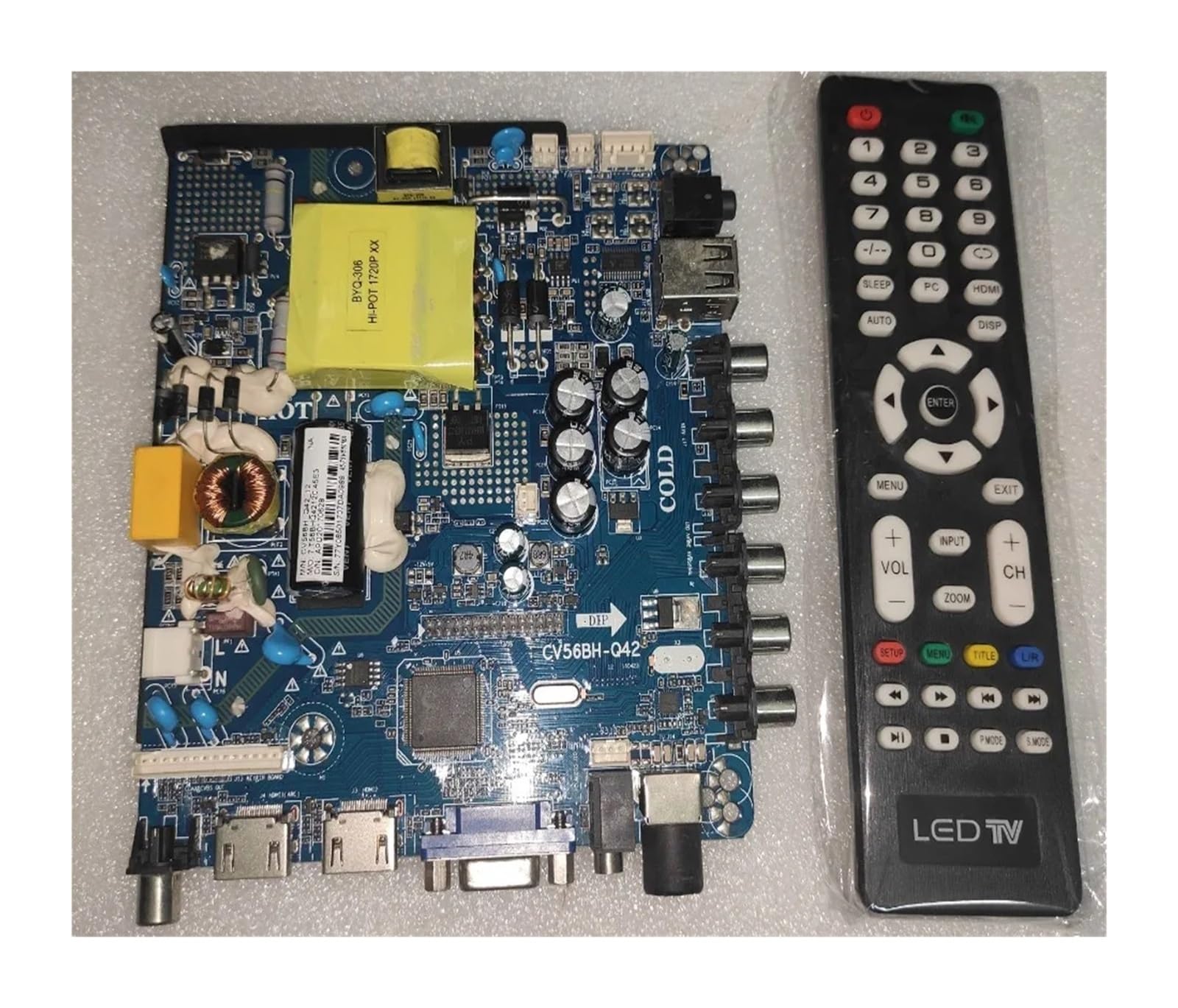
Image: Front view of the ZMYUXME CV56BH-Q42 Universal TV Motherboard, showing various input/output ports and main components.

Image: Back view of the ZMYUXME CV56BH-Q42 Universal TV Motherboard, displaying the circuit board layout and additional components.

Image: Close-up view of the ZMYUXME CV56BH-Q42 Universal TV Motherboard, highlighting the model number "CV56BH-Q42" printed on the board.
5. Setup and Installation
This section outlines the general steps for installing the CV56BH-Q42 motherboard. Specific installation procedures may vary depending on your TV model. Professional installation is recommended.
- Preparation: Disconnect the TV from all power sources. Lay the TV face down on a soft, clean surface to protect the screen.
- Access the Mainboard: Remove the back cover of your TV to access the existing mainboard. Document cable connections with photos before disconnecting.
- Remove Old Mainboard: Carefully disconnect all cables (power, LVDS, backlight, speakers, etc.) from the old mainboard. Unscrew and remove the old mainboard.
- Install New Mainboard: Position the CV56BH-Q42 motherboard in the TV chassis. Secure it with appropriate screws, ensuring it is firmly seated.
- Connect Cables: Reconnect all necessary cables to the corresponding ports on the new motherboard. Pay close attention to the LVDS cable orientation and power connections.
- Power Supply: Ensure your TV's power supply is compatible with the 45-70V input requirement of the CV56BH-Q42.
- Initial Test: Before reattaching the back cover, connect the TV to power and perform a brief test to ensure basic functionality (power on, display, sound).
- Final Assembly: If the test is successful, disconnect power, reattach the TV's back cover, and secure all screws.
6. Operating Instructions
Once installed, the CV56BH-Q42 motherboard functions as the core of your TV. Operation will primarily be through your TV's remote control or integrated buttons.
Basic Operation:
- Power On/Off: Use the power button on your remote control or TV.
- Input Selection: Use the "Input" or "Source" button on your remote to switch between connected devices (e.g., HDMI 1, HDMI 2, AV, VGA).
- Volume Control: Adjust volume using the +/- buttons on the remote.
- Channel Navigation: For antenna/cable TV, use channel up/down buttons.
Connecting Devices:
- HDMI Devices: Connect Blu-ray players, gaming consoles, or streaming devices to the HDMI 1 or HDMI 2 ports.
- Analog Devices: Use the AV (RCA) or VGA ports for older devices if available on your specific board configuration.
7. Maintenance
The CV56BH-Q42 motherboard requires minimal maintenance. Following these guidelines can help ensure its longevity:
- Cleaning: Periodically, with the TV unplugged, gently clean dust from the TV's vents and around the motherboard using compressed air or a soft brush.
- Environment: Ensure the TV is operated in a well-ventilated area, away from direct sunlight, excessive heat, and moisture.
- Firmware Updates: If firmware updates become available for this specific model, follow the manufacturer's instructions carefully. Incorrect updates can damage the board.
8. Troubleshooting
If you encounter issues with your TV after installing the CV56BH-Q42 motherboard, refer to the following common problems and solutions:
| Problem | Possible Cause | Solution |
|---|---|---|
| No Power | Loose power connection, faulty power supply, incorrect voltage. | Check all power cables. Verify power supply output matches motherboard requirements (45-70V). Ensure TV is plugged into a working outlet. |
| No Picture/Display | Incorrect LVDS cable connection, wrong input source, faulty backlight. | Ensure LVDS cable is correctly and securely connected. Select the correct input source using the remote. Check backlight connections. |
| No Sound | Loose speaker connection, muted volume, incorrect audio settings. | Verify speaker cables are properly connected. Check volume levels and ensure TV is not muted. Adjust audio settings in the TV menu. |
| Remote Control Not Working | Dead batteries, IR sensor blocked, incompatible remote. | Replace remote batteries. Ensure no obstructions between remote and TV's IR sensor. Confirm the remote is compatible with the motherboard. |
If problems persist after attempting these solutions, consult a qualified technician or contact ZMYUXME customer support.
9. Specifications
| Feature | Detail |
|---|---|
| Brand | ZMYUXME |
| Model Number | CV56BH-Q42 |
| Input Voltage Range | 45-70V |
| Current Output | 560mA |
| HDMI Interfaces | 2 |
| Compatibility | Universal (3-in-1 design) |
| Item Weight | 50 Grams |
| ASIN | B0DPST1WSL |
10. Warranty and Support
For warranty information and technical support, please refer to the documentation provided with your purchase or contact ZMYUXME customer service through the retailer where the product was purchased. Keep your purchase receipt as proof of purchase.
Note: Unauthorized modifications or improper installation may void the product warranty.