
1. Introduction
This manual provides detailed instructions for the installation, operation, and maintenance of your Slinkdsco 915MHz LoRa Whip Antenna. This antenna is designed to enhance the range and stability of your LoRa-based devices, particularly within Meshtastic networks. Please read this manual thoroughly before use to ensure optimal performance and longevity of your product.
2. Product Features
- Long Range Boost: The 17cm soft whip antenna is engineered to improve connection stability and maximize long-range communications for LoRa-based devices, specifically designed for efficient operation at 915MHz within Meshtastic networks.
- Durable Design: Constructed from high-quality, flexible rubber, this antenna is resistant to bending, rain, and rust, making it suitable for various indoor and outdoor environments and weather conditions.
- Easy Installation: Includes a 10cm SMA to U.FL IPX cable for direct connection to devices with SMA connectors or IPEX interfaces. No specialized tools or software are required for quick setup.
- Wide Compatibility: Designed for use with Meshtastic ESP32 LoRa V3, Heltec V3, LilyGo T-Echo, RAK, and other 915MHz LoRa modules.
- Optimal Frequency Range: Operates within 900MHz - 930MHz, centered at 915MHz, with a low SWR (Standing Wave Ratio) of ≤1.5 for efficient signal transmission.
3. Package Contents
Each package contains the following items:
- 2 x 915MHz LoRa Whip Antenna (17cm length)
- 2 x 10cm U.FL to SMA Female Connector Cable
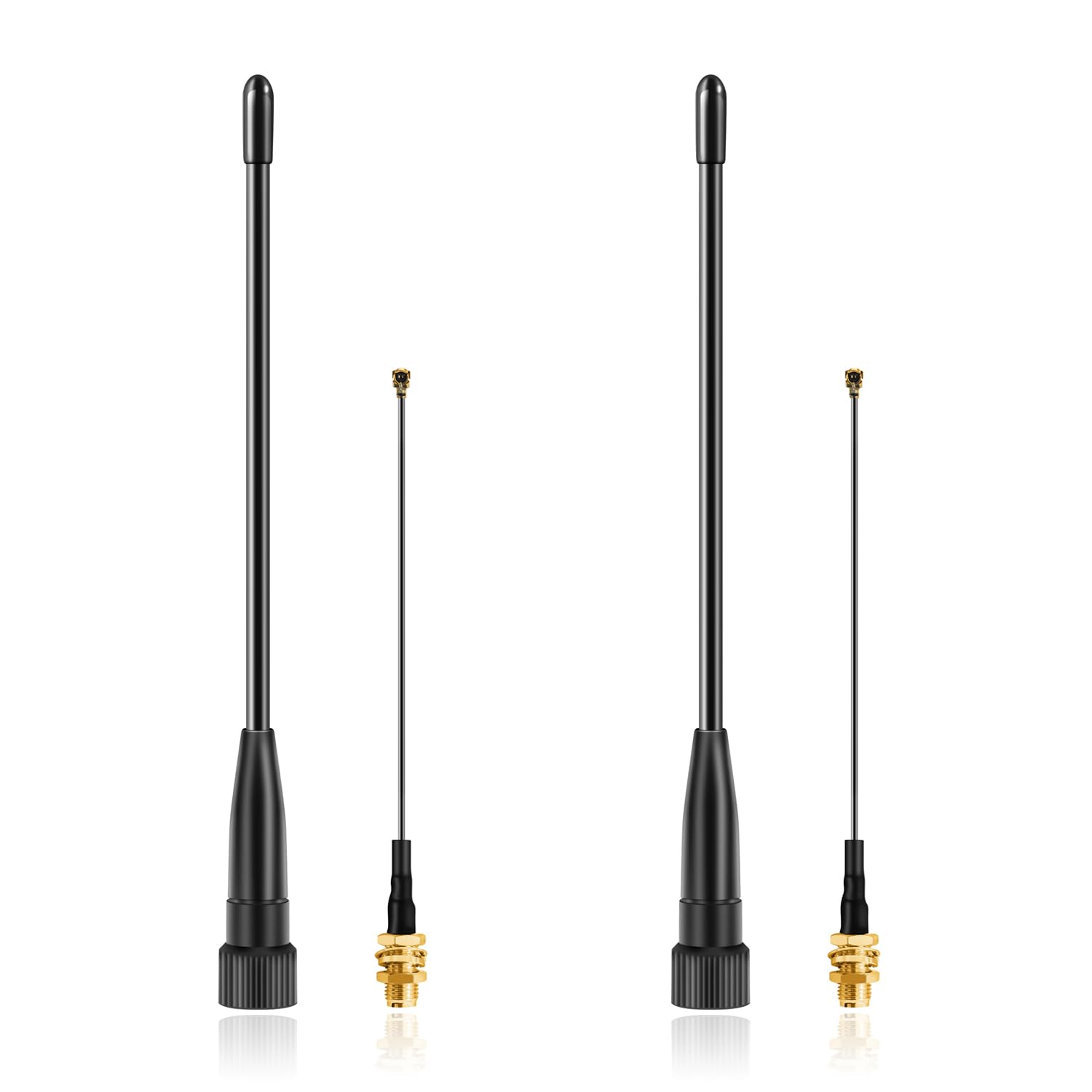
Image: The Slinkdsco 915MHz LoRa Whip Antenna (left) and the included 10cm U.FL to SMA Female Connector Cable (right).

Image: Detailed dimensions showing the 17cm (6.7 inch) length of the whip antenna and the 10cm (3.94 inch) length of the U.FL to SMA cable.
4. Setup and Installation
Follow these steps to properly install your Slinkdsco LoRa Whip Antenna:
- Identify Connector Type: Determine if your LoRa device uses an SMA connector directly or an IPEX (U.FL) connector.
- Direct SMA Connection: If your device has an SMA female connector, simply screw the SMA male end of the whip antenna directly onto the device's antenna port. Ensure it is finger-tight.
- IPEX (U.FL) Connection: If your device uses an IPEX (U.FL) connector, first connect the U.FL end of the provided 10cm cable to the IPEX port on your device. Then, screw the SMA female end of the cable onto the SMA male connector of the whip antenna. Ensure all connections are secure.
- Important Note: Do not change LoRa antennas while your device is powered on. This can cause damage to your radio module. Always power off your device before connecting or disconnecting antennas.
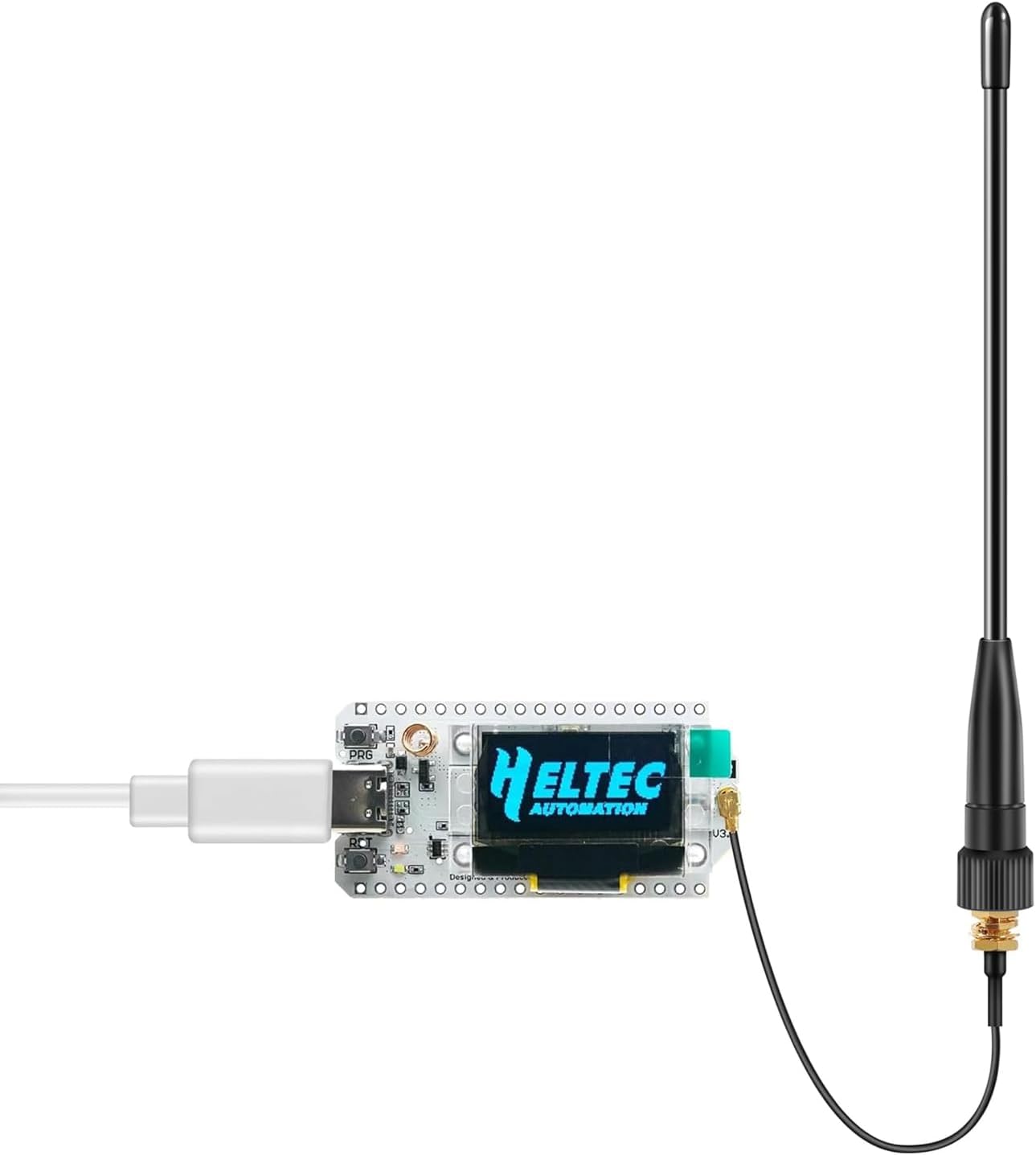
Image: An example showing the Slinkdsco whip antenna connected to a Heltec V3 LoRa device via the U.FL to SMA cable.

Image: Close-up views of the SMA female connector on the antenna, the U.FL connector on the cable, and the SMA male connector on the cable, illustrating connection points.

Image: The Slinkdsco 915MHz LoRa antenna shown with various compatible Meshtastic modules, including ESP32 LoRa V3, Heltec V3, and LilyGo T-Echo.
5. Operation
Once the antenna is securely connected to your 915MHz LoRa device, power on your device. The antenna will immediately begin to improve your device's signal reception and transmission capabilities. For Meshtastic networks, this will translate to:
- Extended Range: Communicate over greater distances.
- Improved Stability: Experience more reliable connections and fewer dropped packets.
- Enhanced Network Participation: Your device will be able to detect and connect to more nodes within the Meshtastic network.
Optimal performance is achieved when the antenna is positioned vertically and has a clear line of sight, especially for long-range applications.

Image: Visual representation of how the antenna provides stability and maximizes long-range communication for diverse applications.
6. Maintenance
The Slinkdsco LoRa Whip Antenna is designed for durability and requires minimal maintenance.
- Cleaning: If the antenna becomes dirty, wipe it gently with a soft, damp cloth. Avoid using harsh chemicals or abrasive materials.
- Inspection: Periodically inspect the antenna and its connectors for any signs of wear, damage, or corrosion. Ensure connections remain tight.
- Environmental Resistance: The flexible rubber construction is resistant to bending, rain, and rust. However, prolonged exposure to extreme conditions may affect its lifespan.

Image: The flexible design of the Slinkdsco whip antenna, highlighting its durability and resistance to bending.
7. Troubleshooting
If you experience issues with your antenna, consider the following:
- Poor Signal/Range:
- Ensure the antenna is securely connected to your device.
- Verify that your device is operating on the correct 915MHz frequency band.
- Check for obstructions between your device and other nodes. Try repositioning the antenna for a clearer line of sight.
- Confirm that the antenna is oriented vertically for optimal omnidirectional performance.
- Physical Damage: Inspect the antenna and cable for any visible damage. If damaged, replacement may be necessary.
8. Specifications
| Feature | Specification |
|---|---|
| Frequency Range | 900MHz - 930MHz (Center 915MHz) |
| Antenna Gain | 10dBi |
| Antenna Connector | SMA-Male |
| Antenna Length | 17cm (6.7 inches) |
| Impedance | 50 Ohm |
| SWR (Standing Wave Ratio) | ≤1.5 |
| Cable Type (Included) | 10cm U.FL to SMA Female Connector Cable |
| Material | High-quality flexible rubber |
| Item Weight | 1.76 ounces (per antenna set) |
| Package Dimensions | 7.83 x 1.42 x 1.3 inches |

Image: SWR (Standing Wave Ratio) performance graph, indicating an SWR of less than 1.3 at 915 MHz for optimal efficiency.
9. Customer Support
For any questions regarding the product or after-sales service, please contact us via email. We aim to resolve and reply to all inquiries within 24 hours.
Manufacturer: Slinkdsco