
Introduction
This instruction manual provides detailed guidance for the proper setup, operation, and maintenance of your JOLGRDWS Universal Remote Control. This remote is designed to be compatible with various air conditioner models from brands such as Midea, Kaysun, Maxicool, and Kaisai, including specific models like RG57A4/BGEF, KID 02S, RG57A6/BGEF, RG57A6(B)/BGEF, and RG57A4-BGEF. Please read this manual thoroughly before use to ensure optimal performance and longevity of your device.
Product Overview
The JOLGRDWS Universal Remote Control is a replacement or secondary remote for compatible air conditioning units. It features a clear LCD display and intuitive button layout for easy control of your air conditioner's functions. No programming is required; simply insert batteries and it's ready for use with compatible models.

Figure 1: Front view of the JOLGRDWS Universal Remote Control. The remote is white with an orange ON/OFF button and a central circular temperature control. The LCD screen displays current settings.
Setup
Battery Installation
- Locate the battery compartment cover on the back of the remote control.
- Slide the cover downwards or press the latch (if present) to open the compartment.
- Insert two (2) 1.5V AA alkaline batteries, ensuring the positive (+) and negative (-) terminals match the diagrams inside the compartment.
- Replace the battery compartment cover by sliding it back into place until it clicks securely.
Note: This remote control does not require any programming. Once batteries are installed, it is ready for use with compatible air conditioner models.
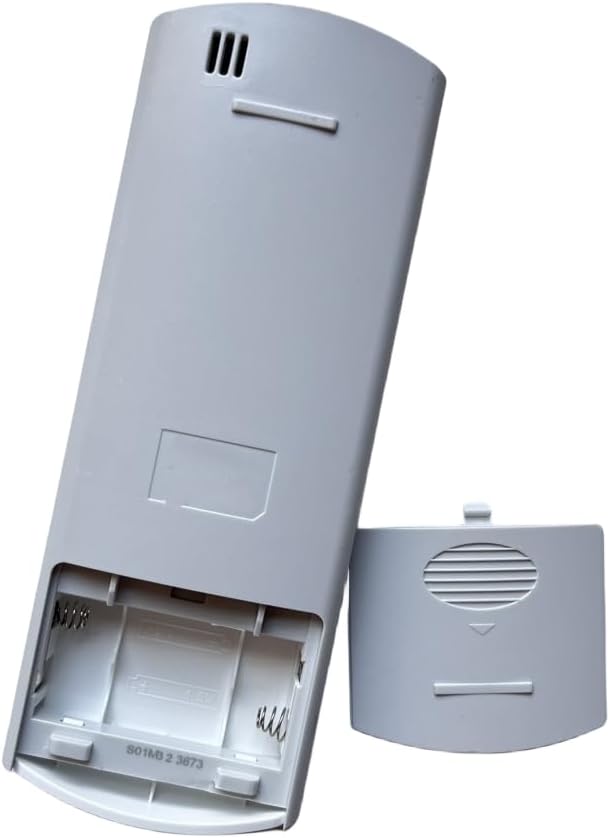
Figure 2: Rear view of the remote control with the battery cover removed, illustrating the battery insertion points.
Operating Instructions
Point the remote control directly at the air conditioner's receiver when operating. Ensure there are no obstructions between the remote and the unit.
Button Functions
- ON/OFF: Press to turn the air conditioner unit on or off.
- MODE: Cycles through available operating modes: Auto, Cool, Dry, Fan, Heat (if supported by your AC unit).
- TEMP ▲ / ▼: Adjusts the desired temperature setting upwards or downwards.
- FAN: Cycles through fan speed settings: Auto, Low, Medium, High.
- SHORT CUT: Activates a pre-set favorite setting (e.g., a specific mode and temperature).
- TIMER ON: Sets a timer for the unit to turn on automatically.
- TIMER OFF: Sets a timer for the unit to turn off automatically.
- SLEEP: Activates sleep mode, which adjusts temperature gradually for comfort during sleep and saves energy.
- SWING: Controls the horizontal louver swing function.
- DIRECT: Adjusts the vertical louver position.
- TURBO: Activates maximum cooling or heating capacity for rapid temperature change.
- LED: Turns the display light on the indoor unit on or off.
Maintenance
- Cleaning: Wipe the remote control with a soft, dry cloth. Do not use liquid cleaners or abrasive materials.
- Battery Replacement: Replace batteries when the display becomes dim or the remote's range decreases. Always replace both batteries simultaneously with new 1.5V AA alkaline batteries. Remove batteries if the remote will not be used for an extended period to prevent leakage.
- Storage: Store the remote in a cool, dry place away from direct sunlight and extreme temperatures.
Troubleshooting
| Problem | Possible Cause | Solution |
|---|---|---|
| Remote not responding. | Dead or incorrectly inserted batteries. | Replace batteries with new 1.5V AA alkaline batteries, ensuring correct polarity. |
| Remote has short range. | Weak batteries; obstruction between remote and AC unit. | Replace batteries. Ensure a clear line of sight to the AC unit's receiver. |
| AC unit does not respond to commands. | Remote not compatible with AC unit; AC unit power off. | Verify AC unit model compatibility. Check if the AC unit is powered on. |
| LCD display is dim or blank. | Low battery power. | Replace batteries. |
Specifications
- Brand: JOLGRDWS
- Model Compatibility: Midea, Kaysun, Maxicool, Kaisai Air Conditioners (e.g., RG57A4/BGEF, KID 02S, RG57A6/BGEF, RG57A6(B)/BGEF, RG57A4-BGEF)
- Communication Type: RF (Radio Frequency), IR (Infrared)
- Battery Type: 2 x 1.5V AA Alkaline Batteries (not included)
- Special Features: No programming required
- Dimensions (L x W x H): Approximately 1 x 1 x 1 cm (as per product data, likely package dimensions)
- Weight: Approximately 50 grams
Warranty and Support
For any issues or inquiries regarding your JOLGRDWS Universal Remote Control, please refer to your purchase documentation or contact the seller directly for support. Specific warranty details may vary by retailer and region.