
Introduction
Thank you for choosing the Kuicur Sonic Electric Toothbrush. This manual provides essential information for the safe and effective use of your new toothbrush. Please read it thoroughly before first use and keep it for future reference.
Package Contents
Your Kuicur Sonic Electric Toothbrush package includes the following items:
- 1x Kuicur Sonic Electric Toothbrush Handle
- 10x Replacement Brush Heads
- 1x Travel Case
- 1x USB Charging Cable
- 1x User Manual
- 1x Toothbrush Holder

Image: All items included in the Kuicur Sonic Electric Toothbrush package, neatly arranged.
Setup
1. Charging the Toothbrush
Before first use, fully charge your toothbrush. The toothbrush features a long-lasting battery, providing up to 90 days of use on a single 8-hour charge.
- Connect the USB charging cable to the charging port at the bottom of the toothbrush handle.
- Plug the USB cable into a compatible USB power adapter (not included) or a computer USB port.
- The battery indicator light will illuminate to show charging status. A full charge typically takes 8 hours.
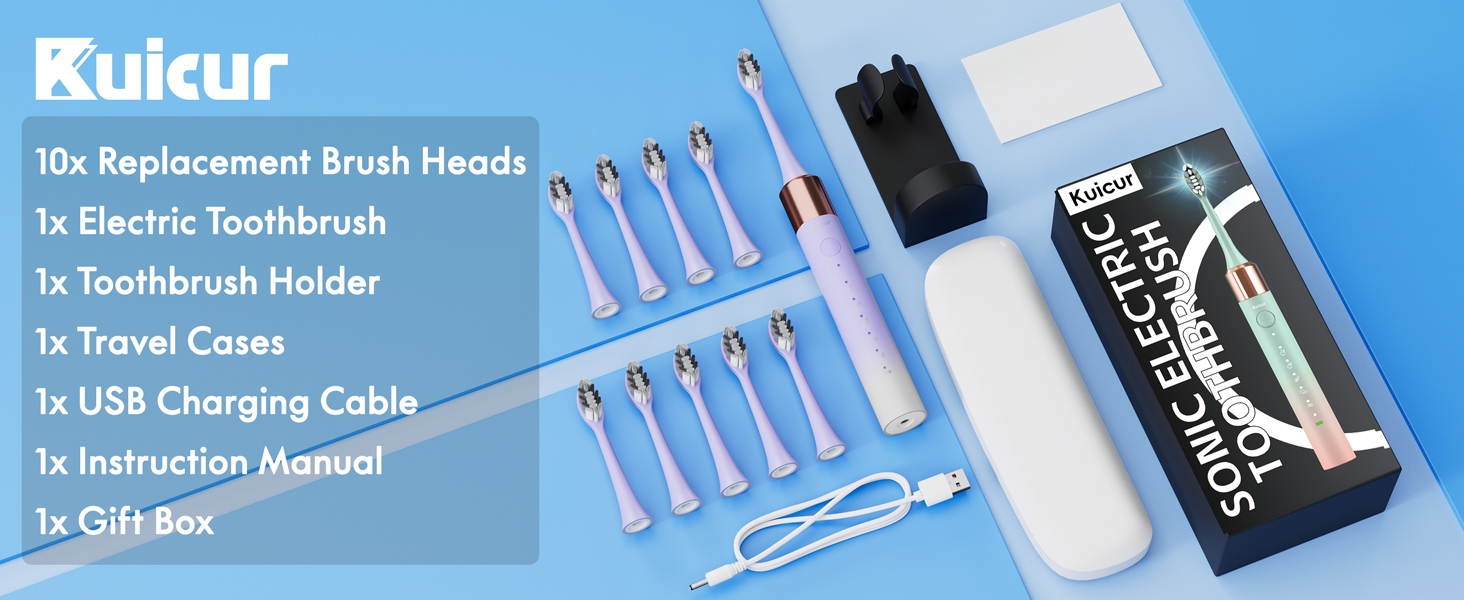
Image: The Kuicur Sonic Electric Toothbrush handle connected to a USB charging cable, illustrating the charging process.
2. Attaching a Brush Head
- Align the brush head with the metal shaft on the toothbrush handle.
- Push the brush head down firmly until it clicks into place. Ensure it is securely attached.

Image: A side view of the toothbrush handle, showing the attachment point for the brush head.
Operating Modes
Your Kuicur Sonic Electric Toothbrush offers 5 customizable cleaning modes to suit various oral care needs:
- Clean Mode: For daily thorough cleaning.
- White Mode: For deep cleaning and surface stain removal.
- Massage Mode: Gentle stimulation for gum care.
- Sensitive Mode: For gentle cleaning of sensitive teeth and gums.
- Tongue Cleaner Mode: For effective tongue cleaning to reduce bad breath.

Image: A visual representation of the toothbrush handle highlighting the 5 distinct cleaning modes and their corresponding icons.
Usage Instructions
1. Brushing Your Teeth
- Wet the brush head and apply a small amount of toothpaste.
- Place the brush head against your teeth at a slight angle towards the gum line.
- Press the power button to turn on the toothbrush. Press the button again to cycle through the different modes.
- Gently move the brush head slowly across your teeth, allowing the sonic vibrations to clean each surface. Do not scrub.
- The smart timer will pause every 30 seconds to indicate when to move to a different quadrant of your mouth, ensuring a complete 2-minute brushing cycle.
- The toothbrush will automatically turn off after 2 minutes.
Video: A demonstration of the Kuicur Sonic Electric Toothbrush in use, highlighting its features and brushing technique.

Image: An illustration demonstrating the powerful 42,000 VPM sonic cleaning action of the toothbrush, showing water and toothpaste reaching between teeth.
Maintenance
1. Cleaning the Toothbrush
- After each use, rinse the brush head thoroughly under running water.
- Wipe the handle with a damp cloth. Do not immerse the handle in water.
2. Replacing Brush Heads
It is recommended to replace your brush head every 3 months, or sooner if the bristles become frayed. Your package includes 10 replacement brush heads, providing approximately 30 months of use.
- Grip the brush head and pull it straight off the handle.
- Align a new brush head with the metal shaft and push it down firmly until it clicks into place.

Image: A display of ten replacement brush heads, emphasizing the long-lasting supply for the toothbrush.
Specifications
| Feature | Detail |
|---|---|
| Brand | Kuicur |
| Model Number | Kuicur-PurpleWhite |
| Power Source | Battery Powered |
| Battery Life | Up to 90 days on a single charge |
| Brushing Modes | 5 (Clean, White, Massage, Sensitive, Tongue Cleaner) |
| Vibrations per Minute | Up to 42,000 |
| Waterproof Rating | IPX8 |
| Item Firmness | Soft |
| Age Range | Kid, Adult |
Safety Information
- Do not leave the toothbrush within reach of young children.
- Replace brush heads every 3 months for optimal oral hygiene.
- Consult a dentist if you experience excessive bleeding from the gums or if bleeding continues after 1 week of use.
- Do not use this product for any purpose other than oral cleaning.
Troubleshooting
If you encounter any issues with your toothbrush, please refer to the following common solutions:
- Toothbrush not turning on: Ensure the toothbrush is fully charged. If the issue persists, contact customer support.
- Weak vibrations: The battery may be low. Recharge the toothbrush. If the brush head is old, replace it with a new one.
- Brush head detaches during use: Ensure the brush head is securely clicked into place on the metal shaft.
Warranty and Support
Your Kuicur Sonic Electric Toothbrush is covered by a manufacturer's warranty. For detailed warranty information, please refer to the packaging or contact Kuicur customer support.
For assistance with product setup, operation, or troubleshooting, please visit the Kuicur Store on Amazon or contact our customer service team directly.