
1. Introduction
The G-Wolves HT-S2 is a high-performance lightweight wireless gaming mouse, engineered for precision and speed. Featuring an advanced PAW3395 sensor, 8KHz polling rate, and a durable, ergonomic design, this mouse is built to enhance your gaming experience. This manual provides essential information for setting up, operating, maintaining, and troubleshooting your HT-S2 mouse.
2. Package Contents
Verify that all items are present in your package:
- G-Wolves HT-S2 Wireless Gaming Mouse
- USB Charging/Data Cable
- Wireless Receiver (2.4Ghz)
3. Product Overview
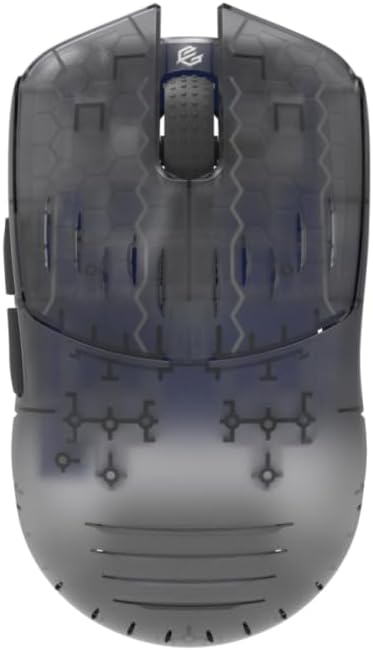
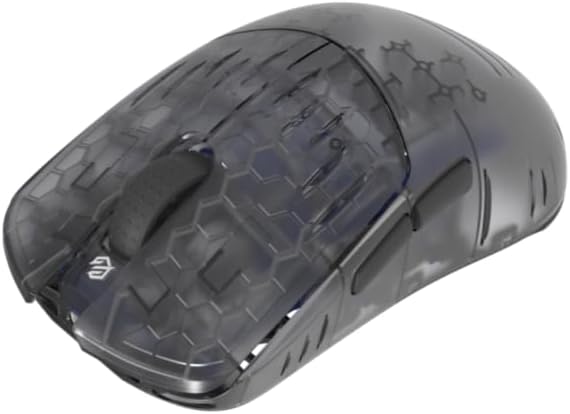
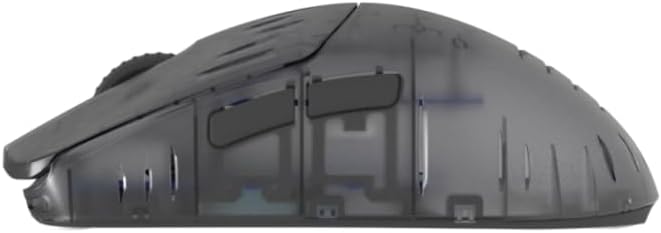
The G-Wolves HT-S2 mouse combines an ultra-light design with advanced technology. It features a PixArt PAW3395 sensor, Nrf52840 high-performance CPU, and 6 programmable buttons. The symmetrical design accommodates various grip styles, and the honeycomb shell contributes to its low weight and improved grip.
4. Setup
4.1 Charging the Mouse
Before initial use, ensure the mouse is fully charged. Connect the provided USB cable to the mouse's charging port and to an available USB port on your computer or a USB power adapter. The mouse includes one P76 battery. A full charge provides approximately 60 hours of average use.
4.2 Connecting Wirelessly (2.4Ghz)
- Insert the 2.4Ghz wireless receiver into an available USB port on your computer.
- Turn on the mouse using the power switch located on the underside.
- The mouse should automatically connect to the receiver. If connection is not established, refer to the troubleshooting section.
4.3 Connecting Wired (USB)
To use the mouse in wired mode or while charging, connect the USB cable directly from the mouse to your computer's USB port. The mouse will function as a wired device and charge simultaneously.
5. Operating Instructions
5.1 Power On/Off
Use the switch on the bottom of the mouse to power it on or off. Powering off the mouse when not in use conserves battery life.
5.2 DPI Adjustment
The mouse features a PixArt PAW3395 sensor with a maximum CPI of 26,000. DPI can be adjusted in increments of 50. The software allows for independent X and Y-axis DPI settings for precise control. Use the dedicated DPI button (if available, otherwise via software) to cycle through preset DPI stages.
5.3 Polling Rate
The HT-S2 supports an ultra-fast 8kHz polling rate, reducing data transmission delays to less than 0.25 milliseconds. With an optional 8kHz receiver, latency can be further reduced to under 0.125 milliseconds. The polling rate can be configured via the customization software.
5.4 Programmable Buttons
The mouse is equipped with 6 programmable buttons. These buttons can be customized using the G-Wolves software to assign macros, key functions, or multimedia controls. Settings are stored in the mouse's onboard memory.
6. Customization Software
To unlock the full potential of your G-Wolves HT-S2 mouse, download and install the official G-Wolves customization software or use the web-based interface. This software allows you to:
- Adjust DPI settings (including X/Y axis).
- Configure polling rate.
- Set Lift-Off Distance (LOD).
- Adjust debounce time for buttons.
- Customize RGB lighting effects.
- Create and assign macros.
- Fine-tune button response times.
- Utilize DIY functions and diagnostic tools.
Settings are saved to the mouse's onboard memory, allowing you to retain your preferences even when switching computers without the software installed.
7. Maintenance
7.1 Cleaning
To maintain optimal performance, regularly clean your mouse. Use a soft, dry cloth to wipe the surface. For stubborn dirt, a slightly damp cloth with mild soap can be used, ensuring no liquid enters the mouse. Avoid abrasive cleaners or solvents.
7.2 Battery Care
To prolong battery life, avoid fully discharging the mouse frequently. Charge the mouse when the battery indicator suggests low power. Store the mouse in a cool, dry place when not in use for extended periods.
8. Troubleshooting
- Mouse not responding: Ensure the mouse is powered on and the wireless receiver is securely plugged into a working USB port. Try connecting the mouse via USB cable to check for wired functionality.
- Intermittent connection: Ensure the receiver is not obstructed and is within the 10-meter range. Avoid placing the receiver near other wireless devices that may cause interference.
- Tracking issues: Clean the sensor lens on the underside of the mouse. Ensure you are using the mouse on a suitable surface (e.g., a mouse pad). Adjust LOD settings in the software if necessary.
- Button double-clicking or not registering: Adjust the debounce time setting in the customization software. The mouse features a pre-debounce algorithm for 0ms response, but software adjustment can fine-tune this.
- Scroll wheel issues: If the scroll wheel exhibits bounce-back or inconsistent scrolling, adjust the scroll wheel debounce algorithm setting in the customization software.
- Software not detecting mouse: Ensure the mouse is connected and powered on. Reinstall the software or try the web-based interface.
9. Specifications
| Feature | Detail |
|---|---|
| Brand | G-Wolves |
| Model Name | HTS2 |
| Weight | 32 Grams |
| Dimensions (L x W) | 4.3"L x 2.4"W (110mm x 61mm) |
| Sensor | PixArt PAW3395 Optical |
| Maximum CPI | 26,000 (adjustable in 50 DPI increments) |
| Polling Rate | Up to 8kHz |
| Connectivity | 2.4Ghz Wireless, USB Wired |
| Buttons | 6 Programmable Buttons |
| Switches | Huano (80 million clicks rated), TTC Gold Decoder |
| Battery Life | Approx. 60 Hours |
| Hand Orientation | Ambidextrous |
| Compatible OS | Windows 7 and above (PC/Mac/Laptop compatible) |
| Material | Plastic (Honeycomb Shell) |
10. Warranty and Support
10.1 Warranty Information
The G-Wolves HT-S2 Lightweight Wireless Gaming Mouse comes with a one-year manufacturer's warranty from the date of purchase. This warranty covers defects in materials and workmanship under normal use. It does not cover damage caused by accident, misuse, unauthorized modification, or external causes.
10.2 Technical Support
For technical assistance, warranty claims, or further inquiries, please contact your retailer or visit the official G-Wolves support website. Please have your product model (HTS2) and proof of purchase ready when seeking support.