
AUCARAUTO OEM 7-Inch Screen (Ships from syschotech)
AuCar Android 13 15.6 Inch Car Radio Head Unit User Manual
Model: OEM 7-Inch Screen (Ships from syschotech)
1. Product Overview
This manual provides detailed instructions for the AuCar Latest Android 13 15.6 Inch Car Radio Head Unit, designed for GMC Sierra and Chevrolet Silverado models from 2019-2024 with OEM 7-inch screens. This multimedia player offers GPS navigation, 8GB RAM + 128GB ROM, Wireless Carplay, and Android Auto, enhancing your in-car entertainment and connectivity.

Figure 1: AuCar 15.6 Inch Car Radio Head Unit.
2. Compatibility and Pre-Installation
This head unit is compatible with GMC Sierra and Chevrolet Silverado 1500, 2500HD, 3500HD models from 2019 to 2024 that originally came with a Factory OEM 7-inch or 8-inch screen car radio head unit. It is not compatible with OEM 4-inch screens.
It is crucial to verify your vehicle's original screen size and console shape before installation. OEM 8-inch and 7-inch head units have different wiring and internal software configurations. Please contact technical support if you have any doubts.

Figure 2: Compatibility guide for OEM screen sizes.
For optimal performance and to avoid issues, it is recommended to send a picture of your car's dashboard, along with the model, manufacturing year, OEM screen size, and center console shape, to the seller after placing your order.
3. Setup and Installation
3.1. Package Contents
The package includes the head unit and necessary cables for installation.
- Head unit
- Power adapter cable
- Speaker adapter
- AUX-CAMERA-MIC harness
- GPS Antenna
- 4G SIM card cable socket
- OEM 7-inch model factory buttons adapter socket
- Factory LVDS adapter
- 10.3.5mm External MIC harness
- USB cable
- Faceplate covers

Figure 3: Included components for installation.
3.2. Installation Process
The head unit is designed for pure plug-and-play installation, requiring no cutting or jointing. It is fully compatible with OEM IN TOUCH systems. There is no need to connect steering wheel control wires or debug AUX.
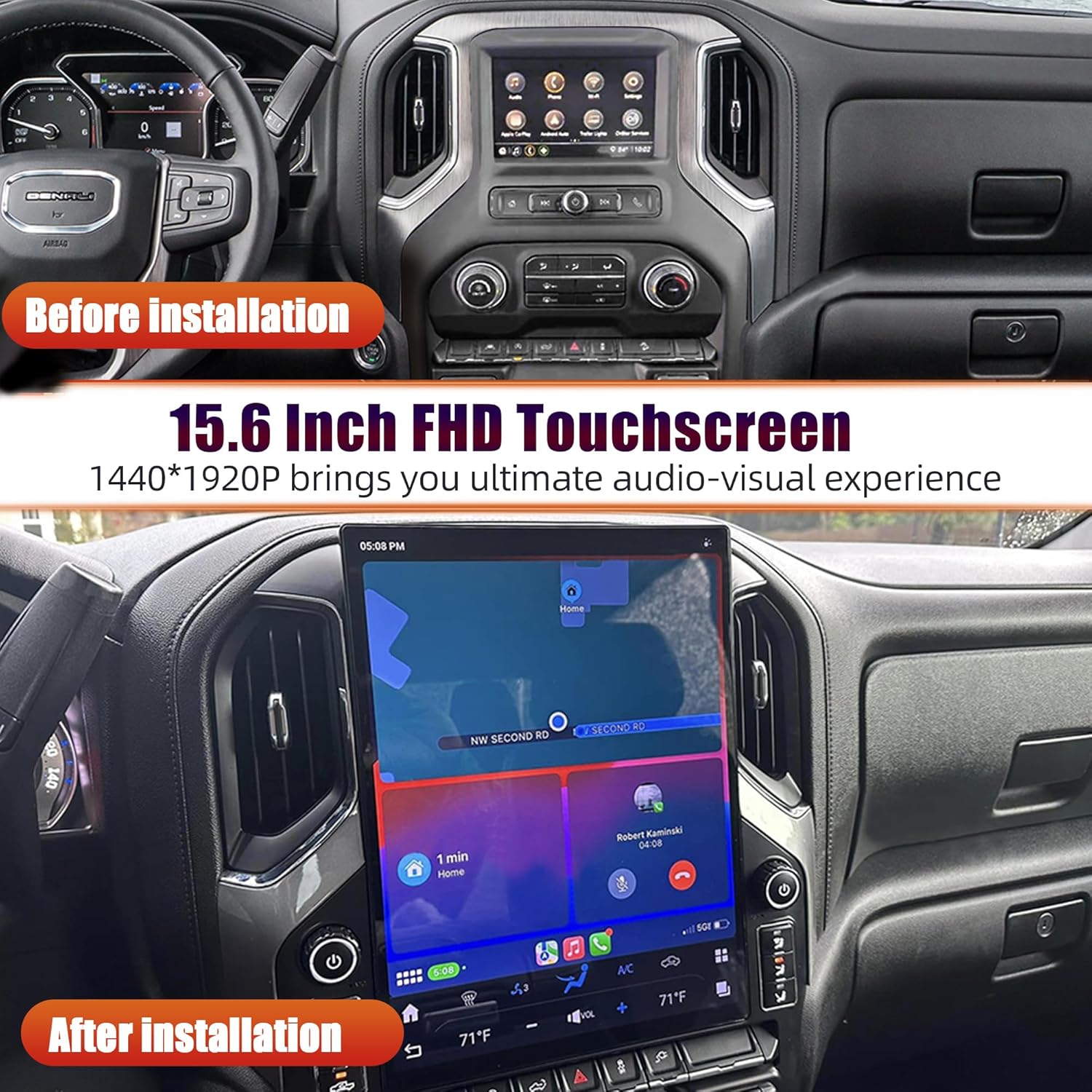
Figure 4: Visual comparison of the dashboard before and after head unit installation.
For a visual guide, refer to the official product video below, which demonstrates screen resizing, Bluetooth pairing, and connectivity setup.
Video 1: Demonstration of screen resizing, Bluetooth pairing, and connectivity features of the AuCar head unit.
4. Operating Instructions
4.1. Core Features
- Operating System: Latest Android 13 OS.
- Processor: Pure Snapdragon 665 AIE Eight Core processor chip.
- Memory: 8GB RAM + 128GB ROM.
- Display: 15.6 inch 1440*1920P capacitive Multi-Touch screen, supporting FHD 1080P video.
- Audio: 4*45W EQ audio output, 7850 amplifier, 9 Equalizers for sound, NXP6686 Radio Chip (AM/FM with RDS).
- Connectivity: Built-in WiFi function, supports 4G SIM card.
- Navigation: Built-in GPS Offline Map, supports Online Map.
- Bluetooth: Bluetooth 5.0 for hands-free phone calls and contact list synchronization.
- App Store: Built-in Google Play Store for app downloads.
- Inputs: Support AUX-IN Audio, USB port.
- Vehicle Integration: Supports Steering Wheel Control, OEM Car Camera, and OEM Sound System.

Figure 5: Highlighting the powerful Snapdragon 665 AIE processor and memory.
4.2. Wireless Carplay & Android Auto
The unit supports Wireless Carplay and Android Auto, allowing seamless integration with your smartphone for navigation, calls, messages, and music. Note that when connected to Carplay or Android Auto, the Bluetooth or WiFi function cannot be used simultaneously with the hotspot or other devices. Only wireless Carplay is supported, wired Carplay is not.

Figure 6: Wireless Carplay and Android Auto functionality.
4.3. Network Connectivity
With built-in WiFi and 4G SIM card support, you can easily access online maps, stream content, and download applications from the Google Play Store.

Figure 7: Accessing apps and online services via network connectivity.
4.4. Camera Support
The extra-large screen displays a clear reversing image, making reversing safer. The unit supports OEM car cameras, as well as factory/aftermarket reverse cameras, OEM 360 cameras, and aftermarket front cameras. Note: Only the reverse camera for the car radio display is supported; the rear view mirror camera is not supported.

Figure 8: Enhanced safety with camera support.
4.5. Steering Wheel Control & OEM Features
The head unit supports OEM Steering Wheel Control, allowing you to manage audio and other functions directly from your steering wheel. It also supports the OEM Sound System and OEM Car Seat Heating & Air Conditioning Control, integrating seamlessly with your vehicle's existing features.

Figure 9: Seamless integration with OEM steering wheel controls.

Figure 10: Support for OEM climate controls.
5. Maintenance
To ensure the longevity and optimal performance of your AuCar head unit, follow these general maintenance guidelines:
- Keep the screen clean using a soft, lint-free cloth. Avoid abrasive cleaners.
- Ensure proper ventilation around the unit to prevent overheating.
- Regularly check for software updates to enhance features and security.
- Avoid exposing the unit to extreme temperatures or direct sunlight for prolonged periods.
6. Troubleshooting
6.1. No Sound After Installation
If you experience no sound after completing all wiring connections for the 7-inch and 8-inch models, you need to connect to Bluetooth. The unit requires a Bluetooth connection for audio output in these configurations.
For further troubleshooting or issues not covered in this manual, please contact customer support.
7. Specifications
| Feature | Detail |
|---|---|
| Item Weight | 9.9 pounds |
| Product Dimensions | 9 x 9 x 5 inches |
| Display Size | 15.6 Inches |
| Operating System | Android 13 |
| Processor | Snapdragon 665 AIE Eight Core |
| RAM | 8GB |
| ROM | 128GB |
| Screen Resolution | 1440*1920P |
| Bluetooth Version | 5.0 |
| Connectivity Technology | Bluetooth, Wi-Fi, 4G SIM |
| Audio Output Mode | Stereo |
| OSD Language | English / Russian / French / German / Spanish / Italian / Arabic / Portuguese / Turkish / Thai / Polish / Hebrew etc. |
8. Warranty and Support
8.1. Warranty Information
The AuCar head unit comes with a 30-day manufacturer warranty. Additionally, the product includes 12 months of after-sales support and a 30-day hassle-free return policy.
8.2. Customer Support
For any inquiries, technical assistance, or support, you can contact the seller, syschotech, directly through Amazon. They offer 24-hour online support and no-cost replacements.

Figure 11: Guide on contacting seller for support.
Ask a question about this manual
Ask about setup, troubleshooting, compatibility, parts, safety, or missing instructions. Manuals+ will review the question and use this page’s manual context to help answer it.