
G-Wolves HTR
G-Wolves HTR Lightweight Wireless Gaming Mouse Instruction Manual
Model: HTR (No-Honeycomb, White)
Introduction
This manual provides detailed instructions for the setup, operation, maintenance, and troubleshooting of your G-Wolves HTR Lightweight Wireless Gaming Mouse. Please read this manual thoroughly to ensure optimal performance and longevity of your device.
The G-Wolves HTR is an ultra-lightweight wireless gaming mouse designed for high-performance gaming. It features a PixArt PAW3395 sensor, 8K polling rate capability, and a semi-asymmetrical design optimized for fingertip and claw grip styles.

Image: Top-down view of the G-Wolves HTR Lightweight Wireless Gaming Mouse.
Package Contents
Verify that all items listed below are included in your package:
- G-Wolves HTR Wireless Gaming Mouse
- USB-C Charging/Data Cable
- Wireless Receiver (for 2.4G connection)
- Additional mouse feet/grips (contents may vary)
- Instruction Card
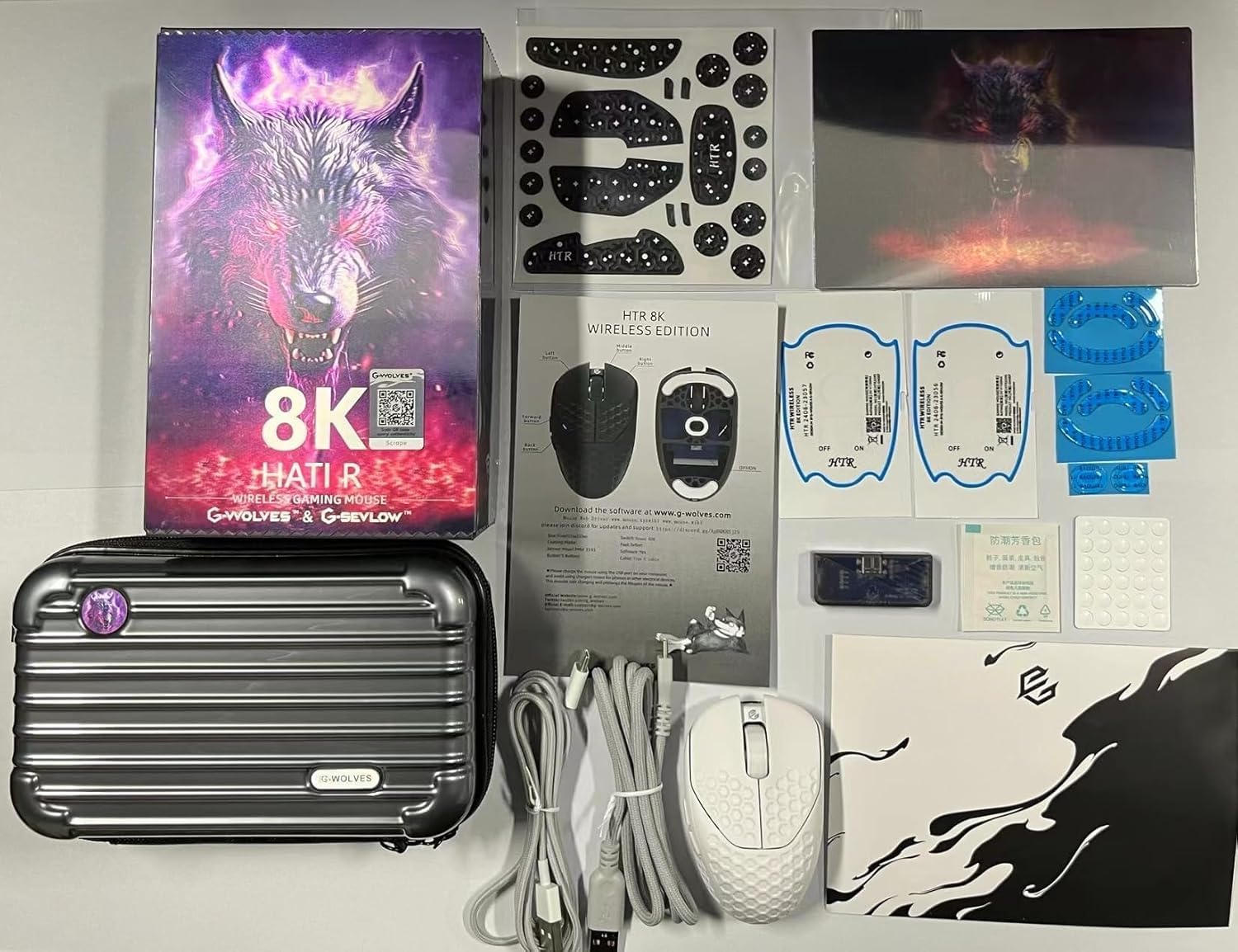
Image: All components included in the G-Wolves HTR package.
Setup Guide
1. Charging the Mouse
Before initial use, connect the mouse to your computer using the provided USB-C cable. The mouse will begin charging automatically. A full charge is recommended for optimal wireless performance.
2. Connecting to Your Computer
Wireless (2.4G) Connection:
- Insert the wireless receiver into an available USB port on your computer.
- Turn on the mouse using the power switch located on the underside of the mouse.
- The mouse should automatically connect to the receiver.
Wired (USB) Connection:
Connect the mouse directly to your computer using the provided USB-C cable. The mouse will function as a wired device and charge simultaneously.
3. Software Installation (Optional)
For advanced customization, including DPI settings, polling rate, button assignments, and macros, download the official G-Wolves software from the G-Wolves website. The software allows you to personalize your mouse settings and save them to the onboard memory.

Image: G-Wolves software interface for mouse customization.
Operating the Mouse
Basic Functions
- Left Click: Primary action.
- Right Click: Secondary action or context menu.
- Scroll Wheel: Scroll up/down, Middle Click.
- Side Buttons: Typically assigned as Forward/Backward by default. These can be customized via software.

Image: Side view of the G-Wolves HTR mouse, showing its profile and side buttons.
DPI Adjustment
The mouse features a PixArt PAW3395 sensor with adjustable CPI (Counts Per Inch) up to 26,000. DPI settings can be cycled through pre-set levels using a dedicated button (if present, otherwise via software) or precisely configured using the G-Wolves software. The software also supports independent X and Y-axis DPI settings.
Polling Rate
The G-Wolves HTR supports an 8kHz polling rate, providing ultra-fast communication with less than 0.25ms data transmission delay. An optional 8kHz receiver can further reduce latency to under 0.125ms for maximum responsiveness. The polling rate can be adjusted through the G-Wolves software.
On-Board Memory
Your customized settings (DPI, polling rate, button assignments, macros) are saved directly to the mouse's onboard memory. This allows you to use your personalized settings on different computers without needing to reinstall the software.
Customization Options
The G-Wolves software provides comprehensive customization options to tailor your mouse to your preferences:
- DPI Settings: Fine-tune CPI levels in 50 DPI increments, including independent X/Y axis adjustments.
- Polling Rate: Select desired polling rate (up to 8kHz).
- Lift-Off Distance (LOD): Adjust the distance at which the sensor stops tracking when lifted.
- Debounce Time: Configure the debounce time for button clicks to prevent accidental double-clicks. The mouse features a pre-debounce algorithm for a true 0ms response time.
- Button Assignment: Reassign functions to the 6 programmable buttons.
- Macros: Create and assign complex macro sequences.
- RGB Lighting: Customize lighting effects and colors.
Refer to the G-Wolves software interface for detailed instructions on each customization feature.
Image: G-Wolves software interface for advanced customization.
Maintenance and Care
- Cleaning: Use a soft, dry cloth to clean the mouse surface. Avoid abrasive cleaners or solvents. For sensor cleaning, use a cotton swab lightly dampened with isopropyl alcohol.
- Storage: Store the mouse in a cool, dry place away from direct sunlight and extreme temperatures.
- Durability: The mouse is equipped with high-durability switches rated for 80 million clicks, ensuring long-term reliability.
Troubleshooting
- Mouse not responding:
- Ensure the mouse is charged. Check if the wireless receiver is properly inserted into a USB port. If using wired mode, ensure the USB-C cable is securely connected to both the mouse and the computer. Try a different USB port.
- Intermittent connection or lag:
- Ensure the mouse is within range of the wireless receiver. Minimize interference from other wireless devices. Update mouse firmware and software to the latest versions.
- DPI/Button settings not applying:
- Ensure the G-Wolves software is running and settings are saved to the onboard memory. After firmware updates, it is recommended to click "reset" and then "refresh" in the software.
- Battery not charging:
- Verify the USB-C cable is functional and connected to a working USB port. Ensure the mouse is powered on when connected for charging.
Technical Specifications
| Feature | Detail |
|---|---|
| Model | HTR (No-Honeycomb) |
| Brand | G-Wolves |
| Connectivity | 2.4G Wireless, USB Wired |
| Sensor | PixArt PAW3395 Optical Sensor |
| Max CPI | 26,000 (adjustable in 50 CPI increments) |
| Polling Rate | Up to 8kHz (with optional 8kHz receiver) |
| Latency | Less than 0.25ms (wireless), under 0.125ms (with 8kHz receiver) |
| Buttons | 6 Programmable Buttons |
| Switch Durability | 80 Million Clicks |
| Weight | Approximately 27-28 grams |
| Dimensions (L x W x H) | 92mm x 57mm x 35mm (3.62 x 2.24 x 1.38 inches) |
| Battery | Rechargeable (included) |
| On-Board Memory | Yes |
Warranty and Support
The G-Wolves HTR Wireless Gaming Mouse comes with a one-year manufacturer's warranty. This warranty covers defects in materials and workmanship under normal use.
For technical support, warranty claims, or further assistance, please visit the official G-Wolves website or contact their customer service department. Refer to the instruction card included in your package for specific contact details or support links.
Manufacturer: Beijing Jingyun Make Technology Co., Ltd. (G-Wolves)
Related Documents - HTR
 |
G-Wolves HATI Wireless Mouse User Manual and Operation Guide Detailed instructions and operational guide for the G-Wolves HATI wireless mouse, covering dual-mode functionality, 2.4G wireless connection, USB wired connection, button functions, and FCC compliance. |
 |
Manual de Usuario Rueda Lunar Flexible HTR sin Buje v11.0 | HTR Robotics Manual detallado para la Rueda Lunar Flexible HTR sin Buje, cubriendo características, especificaciones, mantenimiento, resistencia, escenarios de aplicación y preguntas frecuentes. |
 |
HTR Nabenloses Mondrad Benutzerhandbuch Dieses Benutzerhandbuch liefert detaillierte Informationen über das HTR Nabenlose Mondrad, einschließlich seiner Merkmale, Spezifikationen, Materialien, Haltbarkeit, Wartung, typische Anwendungsszenarien und häufig gestellte Fragen. Es ist für den Einsatz mit Roboter-Rovern in lunaren oder ähnlichen Umgebungen konzipiert. |
 |
Hub-less Lunar Wheel User Manual by Hellenic Technology of Robotics This user manual provides comprehensive information on the Hub-less Lunar Wheel from Hellenic Technology of Robotics, covering its characteristics, materials, specifications, maintenance, and application scenarios. It details the wheel's performance, durability, and integration with rover systems. |
 |
HTR Hub-less Lunar Wheel User Manual: Technical Specifications and Operation Guide Comprehensive user manual for the HTR Hub-less Lunar Wheel, detailing its characteristics, specifications, endurance, maintenance, application scenarios, and frequently asked questions. Designed for lunar and extreme environments. |
 |
Hobbytech X-MID KIT Exploded View Parts Diagram Detailed exploded view diagram of the Hobbytech X-MID KIT remote-controlled vehicle, listing all part numbers for assembly and maintenance. |
Ask a question about this manual
Ask about setup, troubleshooting, compatibility, parts, safety, or missing instructions. Manuals+ will review the question and use this page’s manual context to help answer it.