
1. Introduction
This manual provides detailed instructions for the installation, setup, and operation of your Generic Smart Electronic Door Lock, Model Z17-tuya-160mm. This advanced lock offers multiple keyless entry options including fingerprint, passcode, IC card, mechanical key, and control via the Tuya smart app. Designed for enhanced security and convenience, it features automatic locking and various alarm functions. Please read this manual thoroughly before installation and use to ensure proper function and safety.
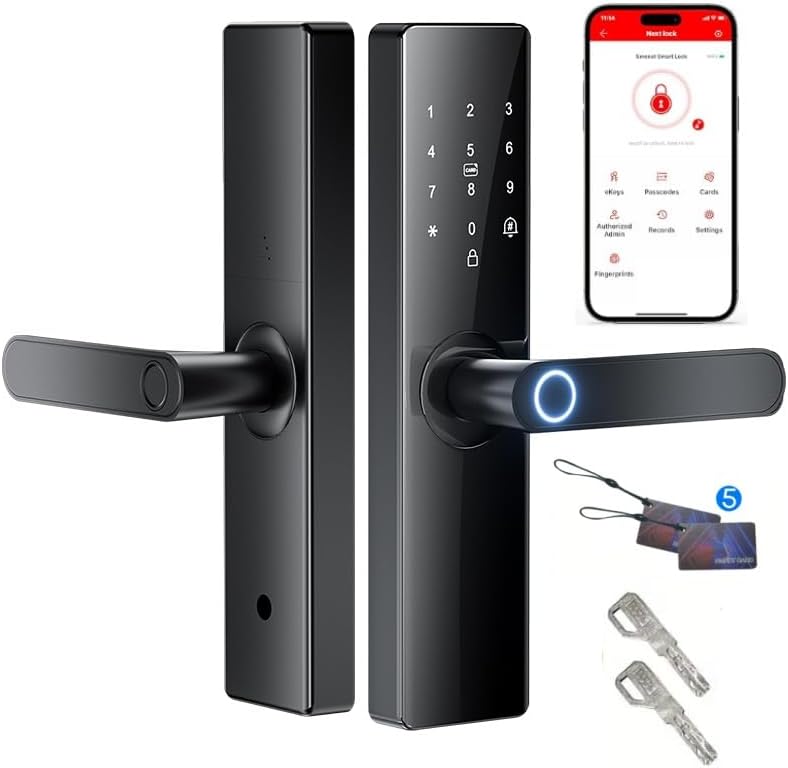
Image: Overview of the Generic Smart Electronic Door Lock, showcasing its sleek design, keypad, fingerprint sensor, and the Tuya app interface on a smartphone. Also visible are two IC cards and two mechanical keys, representing the various access methods.
2. Safety Information and Precautions
- Door Compatibility: This lock is suitable for door frame thicknesses between 4 cm and 7 cm (approximately 1-3/8" to 1-3/4"+). Verify your door's thickness before proceeding with installation.
- Tools Required: Installation requires an angle grinder, a tape measure, a screwdriver (Phillips), and a hole-making tool. Ensure you have these tools available.
- Battery Installation: The lock requires 4 AAA batteries (not included). Ensure correct polarity when inserting batteries. Do not mix old and new batteries or different types of batteries.
- Environmental Conditions: Avoid exposing the lock to extreme temperatures or direct water spray.
- Professional Installation: If you are unsure about any step of the installation process, it is recommended to consult a qualified locksmith or professional installer.
3. Package Contents
Please check the package contents against the list below. If any items are missing or damaged, contact customer support.

Image: Exploded view of the lock components and accessories. This includes the front and rear lock panels, mounting hardware (screws, spindles), a lock body, two mechanical keys, and two IC cards. Dimensions for the lock body are also shown.
- Front and Rear Lock Panels
- Mounting Hardware (Screws, Spindles, Spring)
- Installation Template
- Mechanical Keys (x2)
- IC Cards (x2)
- Lock Body (Mortise)
4. Setup and Installation
The installation process involves four main steps. Ensure you have the necessary tools (angle grinder, tape measure, screwdriver, hole-making tool) and refer to the provided installation template.

Image: A visual guide illustrating the four main steps for installing the smart door lock. This includes preparing the door with holes and slots, installing the lock body, attaching the front panel, and finally securing the rear panel and inserting batteries.
4.1. Prepare the Door (Make Holes and Cut Slots)
Use the provided hole size template to mark and create the necessary holes and slots on your door. Accurate measurements are crucial for proper fit.

Image: A detailed diagram showing the cutting guide for door preparation, indicating precise measurements and positions for holes and slots required for the lock body and panels.
4.2. Install the Lock Body
Insert the lock body (mortise) into the prepared slot on the door edge. Ensure the latch direction is correct for your door's opening direction (inward or outward). The latch can be adjusted if needed.
4.3. Install the Front Panel
Carefully align and install the front panel of the lock, feeding the necessary cables through the door. Secure it according to the instructions.
4.4. Install the Rear Panel and Batteries
Connect the cables from the front panel to the rear panel. Secure the rear panel to the door. Open the battery compartment and insert 4 AAA batteries (not included), ensuring correct polarity. Close the battery cover.
5. Operating Instructions
Your smart lock offers multiple convenient ways to unlock your door.
5.1. Fingerprint Unlock
Place your registered fingerprint on the biometric sensor located on the handle. The lock will unlock within 0.3 seconds if the fingerprint is recognized.
5.2. Passcode Unlock
Enter your registered passcode on the touchscreen keypad. Press the '#' key to confirm.
Void Bit Password (Anti-Peep Function)

Image: Illustration of the void bit password feature. It shows how to enter a correct 6-11 digit password embedded within a longer sequence of up to 24 digits, preventing others from observing your actual code.
To enhance security, you can enter a "void bit password" of up to 24 digits. Your actual 6-11 digit correct password can be embedded anywhere within this longer sequence. This prevents onlookers from discerning your true passcode.
5.3. IC Card Unlock
Present a registered IC card to the card reader area on the lock's front panel. The lock will unlock upon successful recognition.
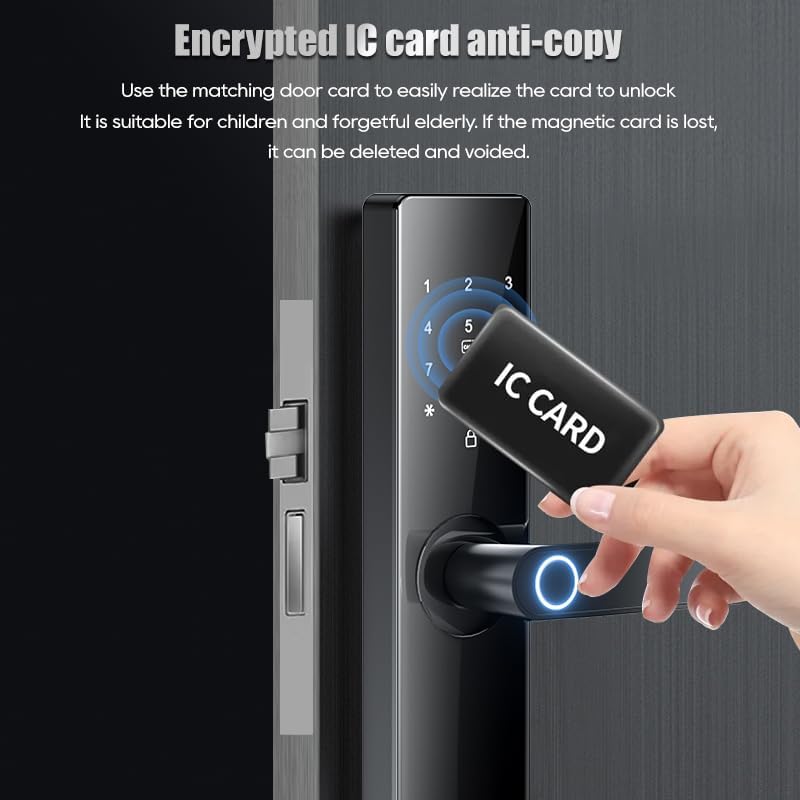
Image: A hand holding an IC card near the smart lock's card reader, demonstrating the encrypted IC card anti-copy function. This feature allows easy unlocking and the ability to delete or void lost cards.
5.4. Mechanical Key Unlock
In case of emergency or battery depletion, use the provided mechanical keys to manually unlock the door. Insert the key into the keyhole and turn.
5.5. Tuya App Control
Download the Tuya Smart app from your device's app store. Follow the in-app instructions to pair your lock with your smartphone via Wi-Fi. Once paired, you can remotely manage and control your lock, including unlocking, locking, adding/deleting users, and viewing access logs.
5.6. Automatic Locking
The lock can be configured to automatically secure itself after a set period (3-900 seconds) upon exit. Refer to the Tuya app settings for customization.
6. Maintenance
- Battery Replacement: The lock is powered by 4 AAA batteries. When the battery level is low (below 20%), a voice alert will be issued. Replace all four batteries promptly to ensure continuous operation.
- Cleaning: Clean the lock's surface with a soft, dry cloth. Avoid using abrasive cleaners or solvents that could damage the finish or electronic components.
- Fingerprint Sensor: Keep the fingerprint sensor clean and dry for optimal performance.
- Emergency Power: In case of complete battery depletion, the lock features a USB emergency charge port for temporary power access using a power bank.
7. Troubleshooting
The lock is equipped with multiple alarm features to alert you to potential issues.

Image: Diagram illustrating the multiple alarm functions: Anti-pry alarm (triggered by abnormal prying), Low battery alarm (voice alert when battery is below 20%), and Trial and error alarm (triggered after 5 incorrect password attempts, locking the system and sounding an alarm).
- Anti-Pry Alarm: If the lock body is abnormally pried, a treble alarm will be triggered. Check the lock for physical damage and ensure it is securely installed.
- Low Battery Alarm: When the battery power is less than 20%, a voice alert will notify you. Replace the batteries immediately.
- Trial and Error Alarm: Entering an incorrect password 5 times in a row will cause the system to automatically lock and trigger a treble alarm. Wait for the lockout period to expire or use another access method (e.g., fingerprint, key) to reset.
- Lock Not Responding: If the lock is unresponsive, check the battery level. If batteries are depleted, use the mechanical key or the USB emergency charge port.
- Connectivity Issues: Ensure your Wi-Fi network is stable and the lock is within range. Re-pair the lock with the Tuya app if necessary.
Protection Against Interference

Image: An illustration demonstrating the smart lock's independent protection electronic scheme, designed to shield against strong magnetic field interference and prevent illegal unlocking methods, often referred to as "black box attacks."
The lock incorporates an independent protection electronic scheme designed to resist interference from strong magnetic fields, effectively preventing failures caused by such interference and illegal unlocking techniques.
8. Specifications

Image: Diagram showing key dimensions of the smart electronic door lock, including a width of 62mm and a height of 270mm for the main unit.
| Feature | Detail |
|---|---|
| Model Name | Z17-tuya-160mm |
| Brand | Generic |
| Lock Type | Biometric |
| Material | Zinc |
| Color | Black |
| Finish Type | Polished |
| Item Dimensions (L x W x H) | 7.8 x 5 x 13 inches (Product Dimensions) |
| Item Weight | 4.29 pounds |
| Special Features | Card unlock, Fingerprint, Passcode Unlock, TUYA APP |
| Control Method | App (TUYA) |
| Connectivity Protocol | Wi-Fi |
| Power Source | 4 x AAA Batteries (not included) |
| Door Thickness Compatibility | 4-7 cm (1-3/8" to 1-3/4"+) |
| UPC | 779601711423 |
9. Warranty and Support
Your Generic Smart Electronic Door Lock comes with the following assurances:
- Money-Back Guarantee: Enjoy a 30-day worry-free money-back guarantee from the date of purchase.
- Product Warranty: The product is covered by a two-year warranty against manufacturing defects.
- Customer Support: Lifetime customer support is available for any questions or issues you may encounter. Please refer to your purchase documentation for contact information.
- Returns/Exchanges: We promise to unconditionally return or exchange goods in case of quality or any issues.