
Introduction
This manual provides comprehensive instructions for the setup, operation, and maintenance of your RETROSUN RMF-TX920U Replacement Voice Remote Control. This remote is designed to be compatible with select 2024 Sony Bravia TV Series models, offering voice search capabilities and backlit buttons for enhanced usability.

Figure 1: Front and back view of the RMF-TX920U remote control, showcasing its sleek design and textured back.
Compatibility
The RMF-TX920U remote control is specifically designed to work with the following 2024 Sony Bravia TV Series models:
- K-65XR80, K-65XR90
- K-75XR80, K-75XR90
- K-85XR80, K-85XR90
- K-65XR80C, K-65XR90C
- K-75XR80C, K-75XR90C
- K-85XR80C, K-85XR90C
- K65XR80, K65XR90
- K75XR80, K75XR90
- K85XR80, K85XR90
- K65XR80C, K65XR90C
- K75XR80C, K75XR90C
- K85XR80C, K85XR90C

Figure 2: Visual representation of the remote's compatibility with various 2024 Sony Bravia TV Series models.
What's in the Box
Upon opening the package, you should find the following items:
- 1 x RETROSUN RMF-TX920U Voice Remote Control
- 1 x Use Manual (this document)
Note: 2x AAA batteries are not included and must be purchased separately.
Setup
1. Battery Installation
To power your remote control, you will need two 1.5V AAA batteries. Follow these steps to install them:
- Locate the battery compartment cover on the back of the remote control.
- Slide the cover downwards or press the latch to open it.
- Insert two AAA batteries, ensuring the positive (+) and negative (-) terminals align correctly with the markings inside the compartment.
- Close the battery compartment cover securely.

Figure 3: Illustration of battery installation, showing the placement of two AAA batteries.
2. Pairing the Remote Control
There are two primary methods for pairing your new remote control with your Sony Bravia TV:
Method A: Pairing a New Remote Directly
- Ensure your TV is turned on. If not, press the "Power" key on the TV itself or a previously paired remote to turn it on.
- On the new RMF-TX920U remote, simultaneously press and hold the "Vol-" (Volume Down) and "Voice" (Microphone) keys together for 3-5 seconds.
- The indicator light on the remote will flash, indicating it has entered pairing status.
- Once pairing is successful, the indicator light will turn off.

Figure 4: Step-by-step guide for initial remote pairing, highlighting the required buttons.
Method B: Connecting a New Remote with an Already Paired Remote (via TV Settings)
If you have another working remote or can navigate your TV's settings, use this method:
- Press the "HOME" key on your existing remote or TV.
- Navigate to and select "SETTING" then "Remote & accessories".
- Select "Add accessory" and press the "OK" key to confirm.
- On the new RMF-TX920U remote, simultaneously press and hold the "Vol-" (Volume Down) and "Voice" (Microphone) keys together for 3-5 seconds.
- The indicator light on the remote will flash, indicating it has entered pairing status.
- After successful pairing, the indicator light will go out, and the TV should confirm the connection.

Figure 5: Visual guide for pairing the remote through the TV's settings menu.
Operating Instructions
1. Button Functions Overview
Familiarize yourself with the various buttons and their functions on your RMF-TX920U remote control:

Figure 6: Comprehensive layout of the remote control buttons with their corresponding functions.
- Power: Turns on or switches to standby/networked standby mode.
- TV: Switches to a TV channel or input and displays the TV menu.
- Search function: Initiates a search.
- MIC (Voice): Speak into here to use the microphone in the remote control. An LED is above the microphone.
- Menu: Accesses the TV's main menu.
- Input: Displays and selects the input source.
- Enter/Navigation D-Pad: Used for on-screen menu navigation and selection.
- Up/Down/Left/Right: Navigates on-screen menus.
- Back: Returns to the previous screen.
- Home: Displays the TV Home menu.
- Google Assistant (Microphone): Long press the microphone button to activate Google Assistant for voice commands.
- Channel (+/-): Selects the channel.
- Volume (+/-): Adjusts the volume.
- Mute: Mutes the sound. Press again to restore the sound.
- Pause/Play: Operates media content on the TV and connected BRAVIA Sync-compatible devices.
- Quick settings: Displays Quick Settings.
- Guide: Displays the digital program guide of the TV or cable/satellite box.
- App buttons (Online service): Dedicated buttons for quick access to streaming services like Sony Pictures Core, Netflix, Prime Video, Disney+, Crunchyroll, and YouTube.
2. Voice Search Features
The RMF-TX920U remote control features a built-in microphone for voice commands, making navigation and content search more convenient.
- Long press the microphone button (Voice button) on the remote control.
- Speak your command clearly into the microphone. For example, "Show me a cartoon," "Open Netflix," or "Search for action movies."
- The TV will process your command and perform the requested action or display search results.

Figure 7: Demonstration of the voice search feature, showing the microphone button and its use.
3. Backlit Functionality
The remote control features backlit buttons, which illuminate when touched, allowing for clear visibility in low-light conditions.

Figure 8: The remote's backlit buttons glowing in the dark for improved visibility.
Maintenance
To ensure the longevity and optimal performance of your remote control, follow these maintenance guidelines:
- Cleaning: Wipe the remote control regularly with a soft, dry cloth. Do not use liquid cleaners, sprays, or abrasive materials, as they may damage the surface or internal components.
- Battery Replacement: Replace batteries when the remote's response becomes sluggish or the indicator light does not illuminate during use. Always replace both batteries at the same time with new ones of the same type (AAA).
- Storage: Store the remote in a cool, dry place away from direct sunlight, extreme temperatures, and high humidity.
- Avoid Drops: Protect the remote from physical impact. Dropping the remote can damage internal circuitry or external casing.
Troubleshooting
If you encounter issues with your RMF-TX920U remote control, refer to the following common troubleshooting steps:
| Problem | Possible Cause | Solution |
|---|---|---|
| Remote not responding to TV. |
|
|
| Voice search not working. |
|
|
| Backlight is dim or not working. |
|
|
Specifications
| Feature | Detail |
|---|---|
| Model Number | RMF-TX920U |
| Brand | RETROSUN |
| Compatibility | 2024 Sony Bravia TV Series (specific models listed in Compatibility section) |
| Connectivity Technology | Infrared (IR), Bluetooth (for Voice function) |
| Special Features | Voice Control, Backlit Buttons |
| Power Source | 2 x AAA 1.5V Batteries (not included) |
| Item Weight | 2.11 ounces (approx. 60 grams) |
| Package Dimensions | 6.89 x 1.5 x 0.67 inches (approx. 17.5 x 3.8 x 1.7 cm) |
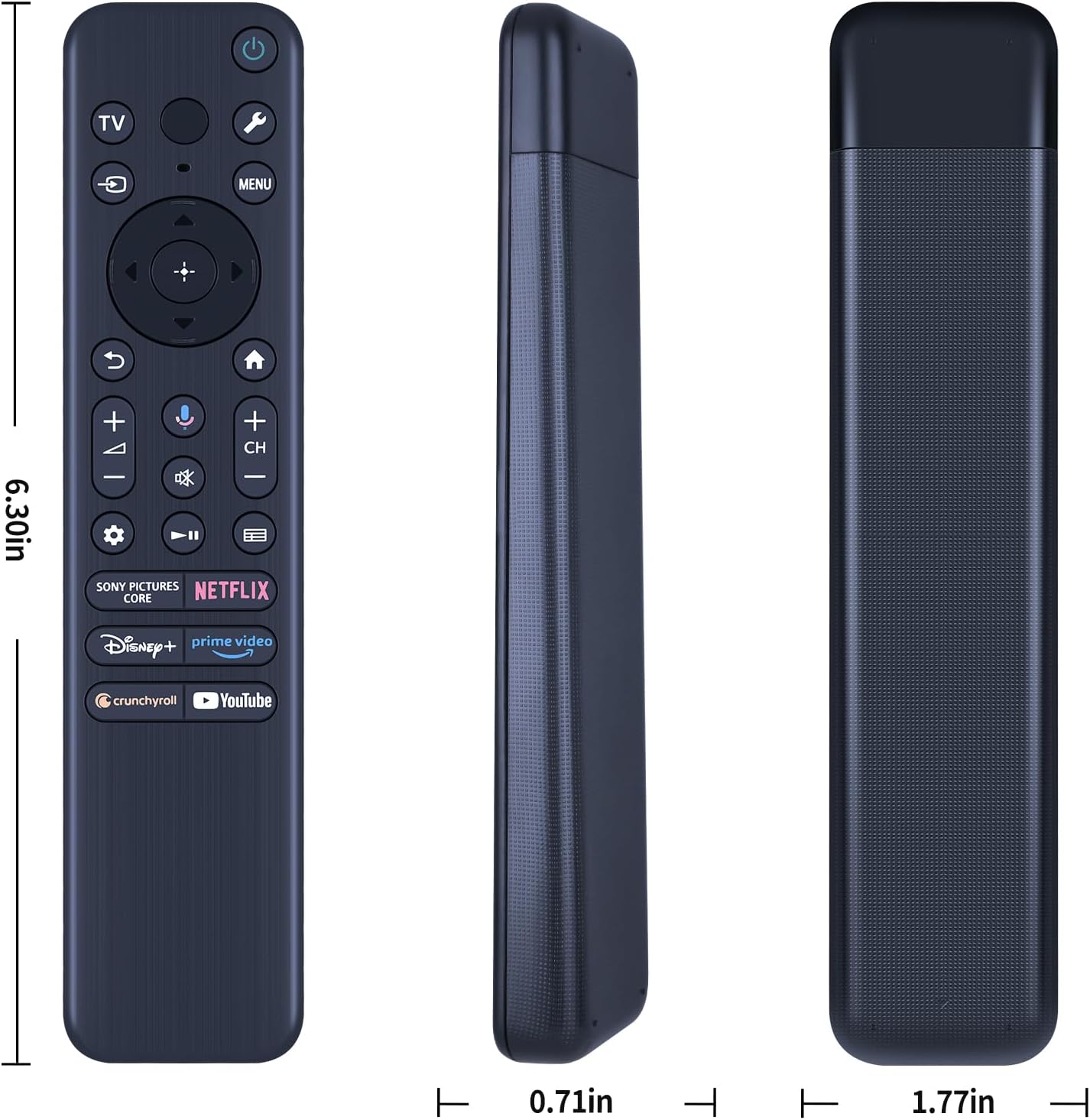
Figure 9: Detailed dimensions of the RMF-TX920U remote control.
Warranty and Support
For information regarding warranty coverage, technical support, or to purchase replacement parts, please refer to the seller's information on the product listing page or contact RETROSUN customer service directly. Keep your purchase receipt as proof of purchase for any warranty claims.
You can visit the official RETROSUN store for more information: RETROSUN Store on Amazon.


