
1. Product Overview
This screen protector is designed for the PASOUL IPASON E243 display, offering multiple protective features. It is engineered to reduce eye strain by cutting blue light and UV rays, minimize reflections with anti-glare processing, and maintain a clean screen with fingerprint resistance. The self-adhesive design ensures easy, bubble-free installation.

Image 1: Key Features Overview. This image illustrates the main benefits of the screen protector, including blue light reduction, anti-reflection, screen protection, antibacterial properties, water repellency, bubble dispersion, and fingerprint resistance.
2. Features
- Eye Protection (Blue Light & UV Cut): Reduces blue light by approximately 48% and UV rays by 99%, significantly lessening eye strain during prolonged use. The low-reflection design further mitigates the impact of blue light.
- Anti-Glare Processing: Designed with a low-reflection surface to suppress reflections from sunlight or fluorescent lights, improving screen visibility in bright environments. This ensures a clear display even outdoors or in brightly lit rooms.
- Hard Coat Protection: Features a hard coat finish to protect the screen from scratches and minor impacts, preserving the display's integrity.
- Fingerprint Resistance: Utilizes a special material that resists fingerprints and smudges, making it easy to keep the touch panel clean. Any accumulated fingerprints can be easily wiped away.
- Water Repellent Coating: An additional coating repels water, protecting your device's screen from water damage.
- Self-Adhesive for Easy Installation: The film is a self-adhesive type, allowing for smooth application without the need for special adhesives or double-sided tape. It is designed to minimize air bubbles during installation.

Image 2: Blue Light Cut Mechanism. This diagram illustrates how the screen protector filters harmful blue light before it reaches the eye, protecting the cornea and lens.
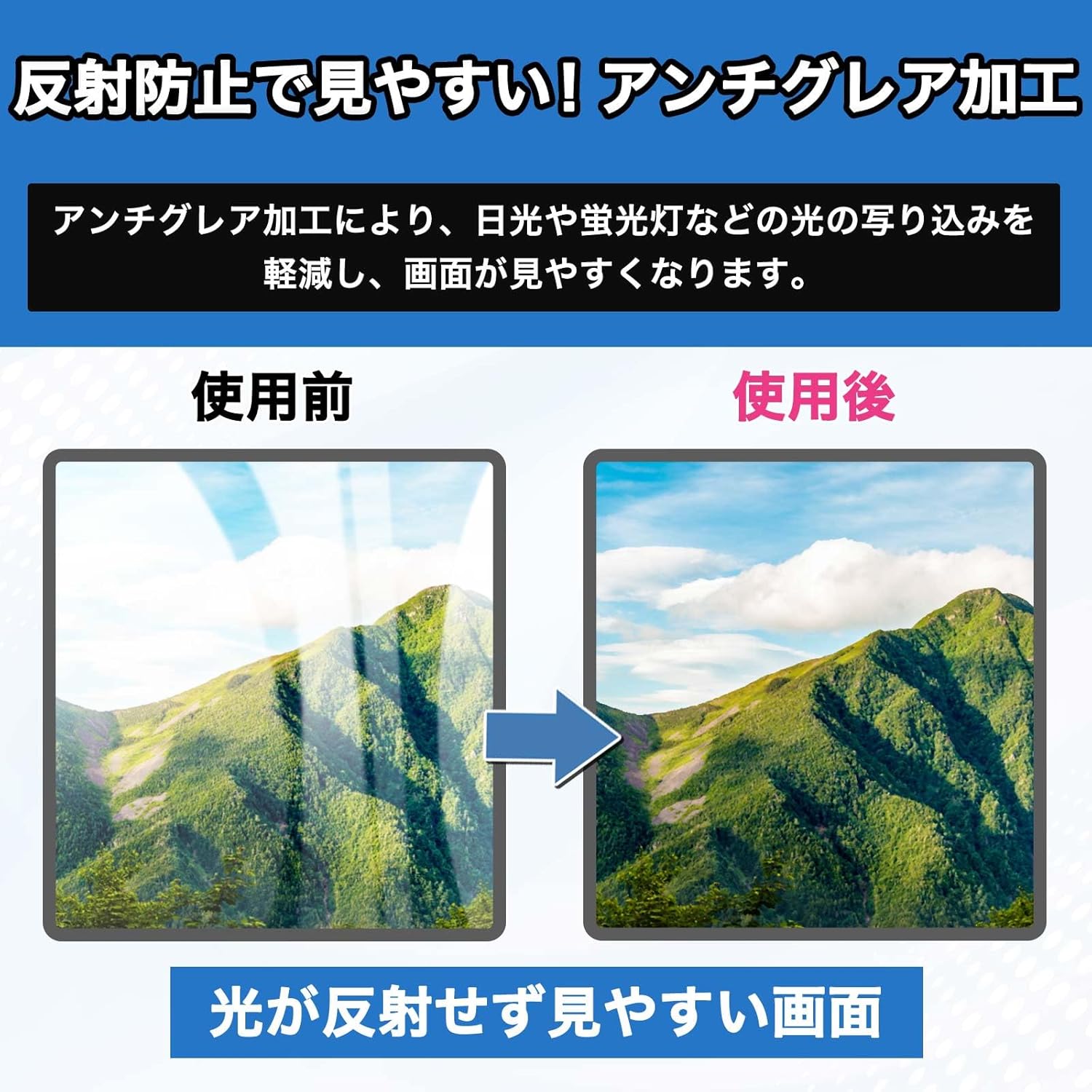
Image 3: Anti-Glare Effect. This image demonstrates the effectiveness of the anti-glare processing, showing a clear difference in screen visibility by reducing reflections from ambient light.

Image 4: Hard Coat Protection. This graphic illustrates how the hard coat layer on the screen protector provides robust defense against scratches and damage to the display.

Image 5: Fingerprint Prevention. This image shows a before-and-after comparison, highlighting how the screen protector's coating prevents fingerprints and keeps the screen clean.

Image 6: Water Repellent Coating. This graphic illustrates the water-repellent properties of the screen protector, showing how it causes water to bead up and roll off, protecting the display.
3. Setup and Installation
Follow these steps for optimal installation of your screen protector:
- Prepare Your Workspace: Choose a clean, dust-free environment to prevent dust particles from getting trapped under the film.
- Clean the Screen: Use the provided cleaning cloth and dust removal sticker to thoroughly clean the PASOUL IPASON E243 display. Ensure there are no dust, smudges, or fingerprints on the screen.
- Align the Protector: Carefully peel off a small portion of the protective layer from the adhesive side of the screen protector. Align the protector with the edges of your display's active viewing area.
Note: The film is sized to cover only the display area, not the entire frame. - Apply the Protector: Once aligned, slowly peel off the rest of the protective layer while gently pressing the screen protector onto the display. Use a squeegee (if provided in the tool set) or a soft cloth to smooth out the film from one end to the other, pushing out any air bubbles.
- Remove Air Bubbles: If small bubbles remain, gently push them towards the edges of the screen using the squeegee or cloth. For stubborn bubbles, you may carefully lift a corner of the film and reapply, ensuring no dust is present.
- Final Wipe: Once applied, give the screen a final gentle wipe with the cleaning cloth to remove any remaining smudges.
The package includes one LCD protective film and an installation tool set to assist with this process.
4. Operating Instructions
Once installed, the screen protector operates passively to enhance your viewing experience and protect your device. No specific operational steps are required for the protector itself.
- Reduced Eye Strain: Enjoy extended usage of your PASOUL IPASON E243 display with reduced eye fatigue due to the blue light and UV cut features.
- Clearer Visibility: Benefit from improved screen clarity in various lighting conditions thanks to the anti-glare properties.
- Enhanced Durability: The hard coat layer provides an invisible shield against daily wear and tear, keeping your screen pristine.
5. Maintenance
To ensure the longevity and effectiveness of your screen protector, follow these simple maintenance guidelines:
- Cleaning: Due to its fingerprint-resistant coating, the screen protector is easy to clean. Use a soft, lint-free cloth (like the one provided in the installation kit) to gently wipe away any smudges or dust. For more stubborn marks, slightly dampen the cloth with water; avoid harsh chemicals or abrasive materials.
- Avoid Sharp Objects: While the hard coat offers protection, avoid intentionally scratching the film with sharp objects to maintain its integrity.
- Storage (if removed): If you ever need to remove and store the protector, ensure it is kept flat and protected from dust and bending to prevent damage.
6. Troubleshooting
Here are solutions to common issues you might encounter during or after installation:
- Air Bubbles:
- Small Bubbles: Most small bubbles will disappear naturally within 24-48 hours. You can gently push them towards the edges with a soft cloth or squeegee.
- Large Bubbles: If a large bubble persists, it might be due to trapped dust. Carefully lift the nearest corner of the screen protector, use a dust removal sticker to pick up the dust particle, and then reapply the film slowly.
- Dust Under the Film: This is the most common cause of bubbles. If you notice dust, carefully lift the film and use a dust removal sticker to lift the dust. Avoid using your fingers.
- Misalignment: If the protector is significantly misaligned, carefully peel it off slowly and reapply, ensuring proper alignment with the display's active area.
- Film Does Not Adhere Properly: Ensure the screen was thoroughly cleaned and free of oils or residues before application. If the adhesive side was touched, it might lose some stickiness.
7. Specifications
| Feature | Detail |
|---|---|
| Compatible Model | PASOUL IPASON E243 Display |
| Film Size | 527mm x 297mm (Covers display area only, not frame) |
| Blue Light Cut Rate | Approx. 48% |
| UV Cut Rate | Approx. 99% |
| Features | Blue Light Cut, UV Cut, Anti-Glare, Hard Coat, Fingerprint Resistant, Water Repellent, Self-Adhesive |
| Package Contents | LCD Protective Film x1, Installation Tool Set |
| Product Weight | 25 g |
| Package Dimensions | 31 x 21.2 x 0.2 cm |
| Manufacturer Reference | LBAXD02579 |
Note: Due to slight variations in monitor models, there may be a size difference of 1-3mm between the film and the monitor. Please confirm your monitor's display area size before purchase. Specifications are subject to change without prior notice.
8. Warranty and Support
Information regarding product warranty and customer support is not available in the provided product data. Please refer to the seller's or manufacturer's website for details on warranty coverage and support options.


