
Introduction
Thank you for choosing the Soundstream BX-26PS Bass Restoration Processor. This device is designed to enhance the low-frequency response of your audio system, providing deeper and more impactful bass. Its IP66 waterproof rating makes it suitable for various applications, including car, marine, motorcycle, ATV, and UTV audio systems. This manual provides essential information for proper installation, operation, and maintenance of your BX-26PS.
Safety Information
- Always disconnect the vehicle's battery before beginning any installation.
- Ensure all wiring is properly insulated to prevent short circuits.
- Mount the unit securely to avoid damage from vibrations or movement.
- Do not operate the unit if it has been submerged in water beyond its IP66 rating or if any connections are compromised.
- Consult a professional installer if you are unsure about any part of the installation process.
Product Overview
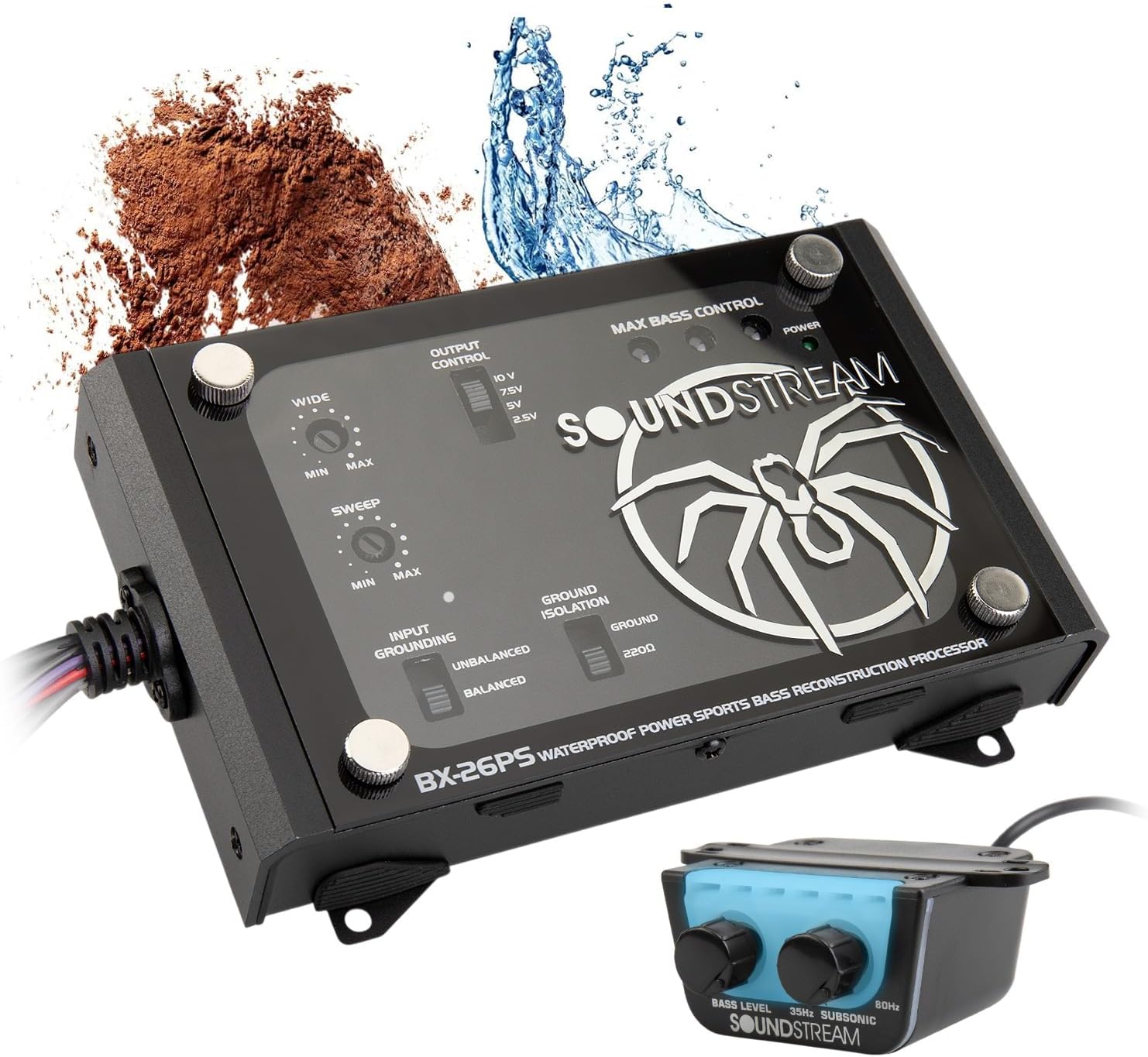
The Soundstream BX-26PS is a digital bass reconstruction processor designed to restore and enhance the low-frequency information often lost during the compression or transmission of audio signals. It features an IP66 waterproof and dustproof rating, making it ideal for harsh environments. The unit includes various controls for fine-tuning bass response and an external remote bass control knob for convenient adjustments.

Package Contents
- Soundstream BX-26PS Bass Restoration Processor Unit
- Remote Bass Control Knob with Cable
- Mounting Hardware (Screws, etc.)
- Wiring Harness
Setup and Installation
Mounting the BX-26PS Unit
Choose a secure, dry location for mounting the BX-26PS unit. While the unit is IP66 rated, protecting it from direct exposure to extreme elements will prolong its lifespan. Ensure adequate ventilation around the unit. Use the provided mounting hardware to secure the processor firmly to a flat surface.


Wiring Connections
The BX-26PS requires power, ground, remote turn-on, audio input, and audio output connections. Refer to the wiring diagram below for detailed connections. Use appropriate gauge wiring for power and ground connections.
- Power (B+): Connect to a constant +12V source from the vehicle's battery.
- Ground (GND): Connect to a solid chassis ground point. Ensure a clean, bare metal connection.
- Remote (REM): Connect to the remote turn-on output of your head unit or amplifier.
- Input (RCA): Connect the RCA outputs from your head unit or signal processor to the BX-26PS input RCAs.
- Output (RCA): Connect the BX-26PS output RCAs to the input of your amplifier.
Remote Bass Control Knob Installation
Install the remote bass control knob in a convenient location within reach of the driver. Connect the remote knob's cable to the designated port on the BX-26PS unit.

Operation and Adjustments
The BX-26PS offers several controls to fine-tune your bass experience. Adjustments should be made carefully and incrementally to achieve optimal sound quality.
Main Unit Controls
- WIDE Control: Adjusts the Q (bandwidth) of the bass restoration circuit. A wider setting will affect a broader range of frequencies, while a narrower setting will focus on a more specific frequency band.
- SWEEP Control: Selects the center frequency for the bass restoration. This allows you to target specific low frequencies for enhancement.
- OUTPUT CONTROL: Sets the maximum output voltage of the bass processor (10V, 7.5V, 5V, 2.5V). Match this to the input sensitivity of your amplifier to prevent clipping.
- GROUND ISOLATION: Switch between UNBALANCED, BALANCED, and GROUND settings. Use this to eliminate ground loop noise. Start with UNBALANCED, and if noise persists, try BALANCED or GROUND.
- MAX BASS CONTROL: This is the primary gain control for the bass restoration circuit. Adjust this to set the overall level of bass enhancement.
- POWER LED: Indicates when the unit is powered on.

Remote Bass Control Knob
The remote bass control knob provides convenient, on-the-fly adjustment of the bass level from your listening position. It typically controls the overall bass output or a specific frequency range, depending on the main unit's settings.
- BASS LEVEL: Adjusts the intensity of the bass restoration.
- 30Hz / SUBSONIC / 60Hz: This knob likely controls a variable low-pass filter or a specific frequency boost, allowing you to tailor the bass response to your preferences and speaker capabilities.
Recommended Applications
The Soundstream BX-26PS is designed for versatility across various vehicle types, thanks to its robust IP66 waterproof and dustproof construction.


Maintenance
The Soundstream BX-26PS is designed for durability and requires minimal maintenance.
- Cleaning: Use a soft, damp cloth to clean the exterior of the unit. Avoid harsh chemicals or abrasive cleaners.
- Waterproof Rating: The IP66 rating protects against powerful water jets and dust ingress. While robust, avoid prolonged submersion or high-pressure washing directly on the unit. Ensure all cable glands and covers are properly sealed.
- Connections: Periodically check all wiring connections to ensure they are secure and free from corrosion.
Troubleshooting
| Problem | Possible Cause | Solution |
|---|---|---|
| No Power / Unit Not Turning On |
|
|
| No Bass Enhancement |
|
|
| Distorted Bass |
|
|
| Engine Noise / Ground Loop Hum |
|
|
Specifications
| Model Name | BX-26PS |
| Input Voltage | 12 Volts (DC) |
| Power Source | 12VDC |
| Connectivity Technology | RCA |
| Audio Output Mode | Stereo |
| Frequency Response | 63 KHz (Note: This typically refers to the upper limit of the processor's frequency range.) |
| Special Feature | Waterproof, IP66, Power Sport |
| Water Resistance Level | Waterproof (IP66) |
| Recommended Uses | For Vehicles, For Marine Applications, Power Sports, Motorcycle, Car Audio |
| Material | Metal, Plastic, Silicone |
| Color | Black |
| Product Dimensions (W x D x H) | 6.5"W x 4"D x 1.5"H |
| Item Weight | 2.2 Pounds |
| Included Components | Bass Control Knob |
| UPC | 709483072367 |
Warranty Information
The Soundstream BX-26PS Bass Restoration Processor comes with a Limited Warranty. For specific terms, conditions, and duration of the warranty, please refer to the warranty card included with your product or visit the official Soundstream website. Keep your proof of purchase for warranty claims.
Customer Support
If you encounter any issues not covered in this manual or require further assistance, please contact Soundstream customer support. Contact information can typically be found on the Soundstream official website or on the product packaging.


