
Introduction
This manual provides comprehensive instructions for the MZMZM X6 S6 40m Laser Distance Meter. This professional digital measuring tool is designed for precise distance, area, and volume calculations, suitable for construction, DIY projects, and various other applications. Please read this manual carefully before using the device to ensure safe and optimal performance.
Product Overview
The MZMZM X6 S6 Laser Distance Meter is a compact and durable device featuring an electronic level control for accurate angle measurements. It offers versatile measurement modes and a clear display for easy reading.
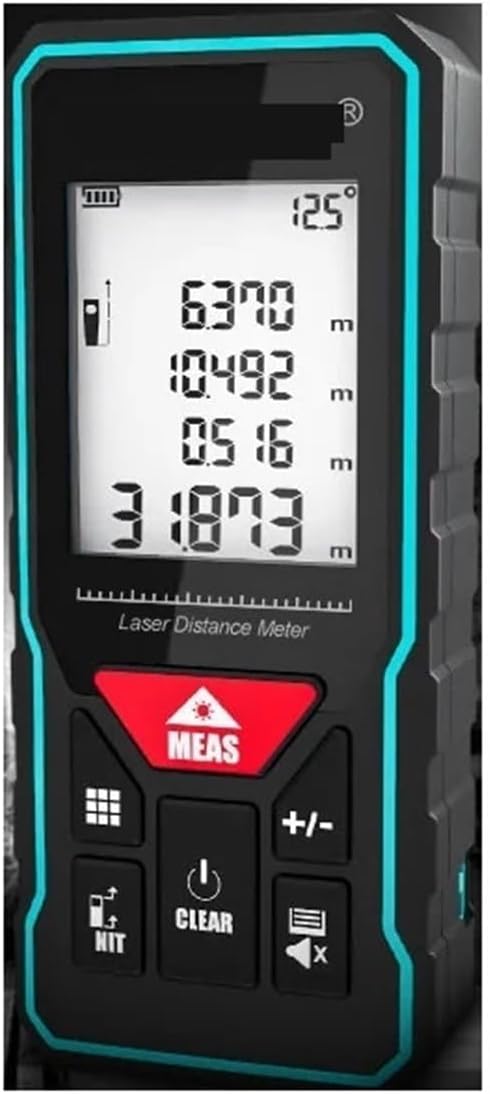
Figure 1: Front view of the MZMZM X6 S6 Laser Distance Meter, showing the display with measurement readings and control buttons.

Figure 2: Detailed view of the MZMZM X6 S6 Laser Distance Meter's display and button functions. Labels indicate the display screen, function keys, switch machine (power), benchmark/unit key, measurement key, plus and minus keys, and historical data/mute button.
Package Contents
Upon opening the package, please verify that all items listed below are present and in good condition:
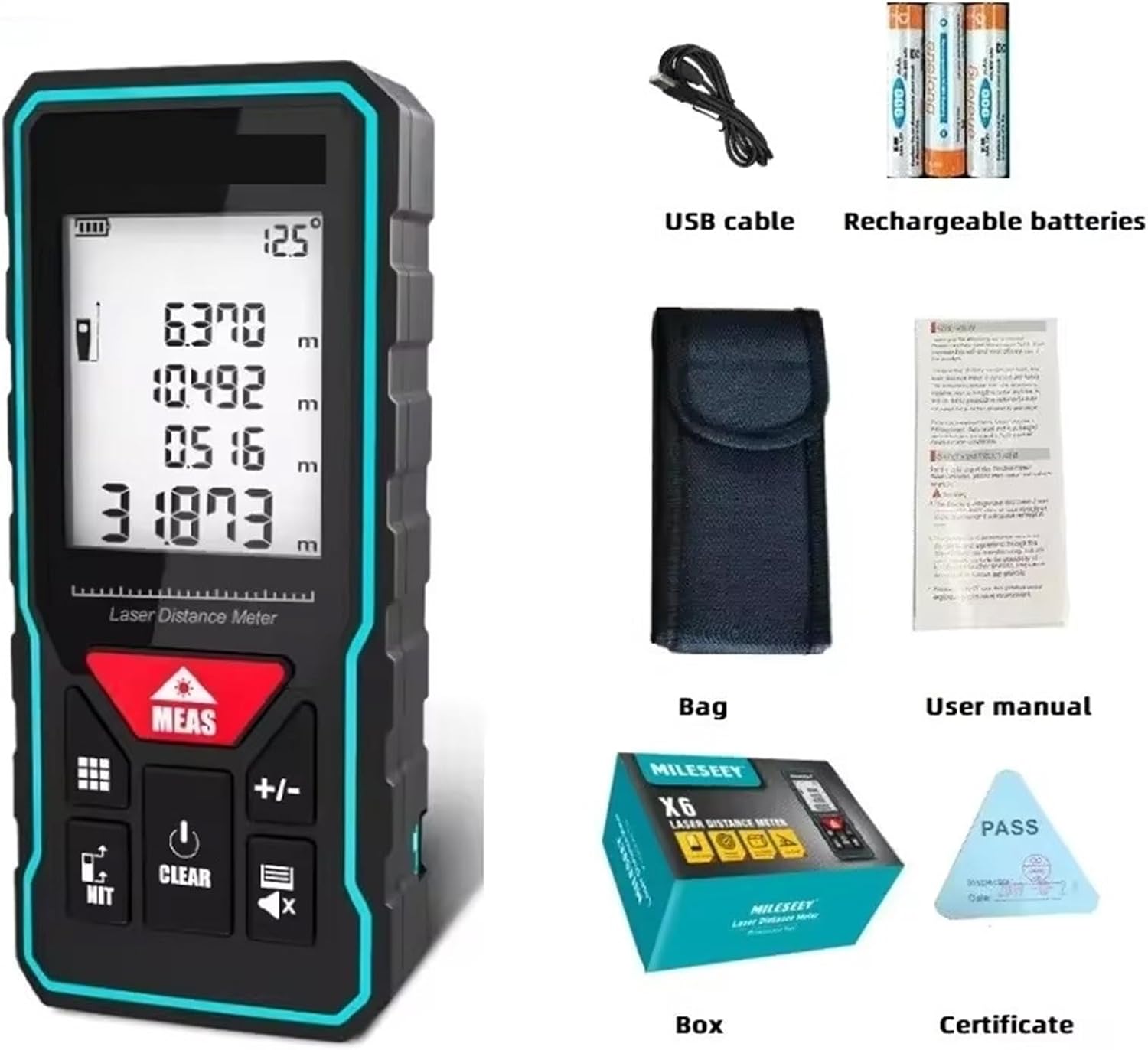
Figure 3: Contents of the MZMZM X6 S6 Laser Distance Meter package, including the device, USB cable, rechargeable batteries, carrying bag, user manual, product box, and certificate.
- MZMZM X6 S6 Laser Distance Meter
- USB Charging Cable
- Rechargeable AAA Batteries (3x)
- Carrying Bag
- User Manual
- Product Box
- Certificate
Note: The S6 40m model is a rechargeable variant. Other X6 models may require separate purchase of AAA batteries and might not include a USB cable or rechargeable batteries.
Setup
1. Battery Installation and Charging
The MZMZM X6 S6 40m model uses rechargeable AAA batteries. Before first use, ensure the batteries are fully charged.
- Locate the battery compartment on the device.
- Insert the three rechargeable AAA batteries, ensuring correct polarity (+/-).
- Connect the provided USB charging cable to the device's charging port and to a standard USB power adapter (not included) or computer USB port.
- The battery indicator on the display will show charging status. Charge until the indicator shows full.
2. Powering On/Off
- To power on: Press and hold the "Switch machine" button (refer to Figure 2).
- To power off: Press and hold the "Switch machine" button again. The device also features an automatic shutdown function after three minutes of inactivity to conserve power.

Figure 4: Illustration of the automatic shutdown feature, which activates after three minutes of inactivity to save power.
Operating Instructions
1. Basic Measurement
- Point the laser at the target object.
- Press the "MEAS" button (Measurement key) once to activate the laser.
- Press the "MEAS" button again to take a single measurement. The result will be displayed on the screen.
2. Measurement Modes
The device supports various measurement modes. Use the "Function keys" (grid icon) to cycle through the available modes.

Figure 5: Visual representation of the various measurement modes available on the device, including single measurement, continuous measurement, area measurement, volume measurement, Pythagorean theorem (single and double), automatic level, and automatic vertical.
- Single Measurement: Measures the distance from the device to a single point.
- Continuous Measurement: Allows for dynamic measurement, displaying real-time distance as the device moves.
- Area Measurement: Measures length and width to calculate the area.
- Select Area Measurement mode.
- Take the first measurement (e.g., length).
- Take the second measurement (e.g., width).
- The device will automatically calculate and display the area.
- Volume Measurement: Measures length, width, and height to calculate the volume.
- Select Volume Measurement mode.
- Take the first measurement (e.g., length).
- Take the second measurement (e.g., width).
- Take the third measurement (e.g., height).
- The device will automatically calculate and display the volume.
- Pythagorean Measurement (Single/Double): Used for indirect measurement of heights or distances where direct measurement is not possible. Follow the on-screen prompts for each leg of the triangle.
- Automatic Level: Measures horizontal distance.
- Automatic Vertical: Measures vertical distance.
3. Unit and Benchmark Settings
- Press the "Benchmark/Unit key" (NIT icon) to change the measurement unit (e.g., meters, feet, inches).
- This key also allows you to switch the measurement benchmark (front or rear of the device).
4. Adding/Subtracting Measurements
- Use the "+/-" keys to add or subtract subsequent measurements from the current value.
5. Clearing Data and Mute
- Press the "CLEAR" button to clear the last measurement or exit a mode.
- The "Historical data/mute" button (speaker icon) allows you to review past measurements and toggle sound alerts.
Maintenance
- Cleaning: Use a soft, damp cloth to clean the device. Do not use abrasive cleaners or solvents. Ensure the laser lens is kept clean for accurate measurements.
- Storage: Store the device in its carrying bag in a cool, dry place when not in use. Avoid extreme temperatures and direct sunlight.
- Battery Care: For rechargeable models, charge the batteries regularly, even if the device is not used frequently, to maintain battery health. If storing for extended periods, charge the batteries to about 50% and recharge every few months.
Troubleshooting
- Device does not power on:
- Check battery charge level. Recharge if necessary.
- Ensure batteries are inserted with correct polarity.
- Inaccurate measurements:
- Ensure the laser lens is clean.
- Verify the measurement benchmark setting (front or rear).
- Ensure the target surface is suitable for laser reflection (avoid highly reflective or transparent surfaces).
- Check for obstructions in the laser path.
- Laser not visible:
- The laser may be difficult to see in bright sunlight. Try to shade the target area or use the device in lower light conditions.
- Error message on display:
- Refer to the specific error code in the full user manual (if available) or try restarting the device.
Specifications
| Feature | Specification |
|---|---|
| Brand | MZMZM |
| Model | X6 S6 40m |
| Measurement Accuracy | ±2mm |
| Laser Level | Class II |
| Laser Type | 630-670 nm, <1 mW |
| Historical Memory | 20 sets |
| Buttons | Soft rubber buttons |
| Power Type | Rechargeable AAA Batteries (3x) |
| Dimensions | 116 x 52 x 28 mm |
| Weight | 50 Grams |
| Material | Plastic |
| Country of Origin | China |
Warranty and Support
Information regarding specific warranty terms and customer support contacts is not available in this document. Please refer to the product packaging or contact your retailer for details on warranty coverage and technical assistance.