
Introduction
This manual provides detailed instructions for the safe and effective operation of your MZMZM Professional Laser Distance Meter. This device is designed for precise digital measurements, offering various functions for professional and DIY applications. Please read this manual thoroughly before using the device.
The MZMZM Laser Distance Meter is available in several models, including the X5 and X6 series, with varying measurement ranges (40M, 60M, 80M, 100M). This manual specifically covers the X5 model (100m variant) but provides general guidance applicable to other models where noted.
Product Overview
The MZMZM Laser Distance Meter is a compact and durable tool designed for accurate distance measurements. It features a clear display and intuitive controls for ease of use.

Figure 1: Front view of the MZMZM Laser Distance Meter with key components labeled. This includes the display screen, function keys, switch machine button, benchmark/unit key, measurement key, plus and minus keys, and historical data/mute button.
Models and Features:
- X5 Model: Powered by 2 AAA batteries (not included). Available in various measurement ranges. Packaging may vary (orange or black box).
- X6 Model (Non-Rechargeable): Powered by 3 AAA batteries (not included). Includes an angle measurement function and an updated chip for enhanced performance.
- X6 Model (Rechargeable): Equipped with a built-in rechargeable battery and includes a USB cable for charging. Offers an eco-friendly and long-lasting power solution.
All models are CE and FCC certified, ensuring compliance with safety and quality standards. The device dimensions are approximately 116 x 52 x 28 mm.
Setup
Battery Installation:
- Locate the battery compartment cover on the back of the device.
- Slide or unclip the cover to open the compartment.
- For X5 models, insert 2 AAA batteries, ensuring correct polarity (+/-). For X6 non-rechargeable models, insert 3 AAA batteries, observing polarity.
- For X6 rechargeable models, ensure the device is charged using the provided USB cable before first use.
- Close the battery compartment cover securely.
Initial Power On:
Press the power button (often labeled "Switch machine" or with a power icon) to turn on the device. The display will illuminate, indicating it is ready for use.
Operating Instructions
The MZMZM Laser Distance Meter offers versatile measurement modes for various applications. The measurement precision is ±2mm.

Figure 2: Illustration of the various measurement modes available on the device, including Single Measurement, Continuous Measurement, Area Measurement, Volume Measurement, Pythagorean, Second Pythagorean, Automatic Level, and Automatic Vertical.
Basic Measurement (Single Measurement):
- Point the laser at the target surface.
- Press the MEAS button once. The laser will activate.
- Press the MEAS button again to take the measurement. The result will be displayed on the screen.
Mode Selection:
Use the function keys (often represented by icons like squares for area, cubes for volume, or triangles for Pythagorean) to cycle through different measurement modes. The display will show the active mode.
- Continuous Measurement: Ideal for tracking distances as you move the device.
- Area Measurement: Measure two sides (length and width) to calculate the area.
- Volume Measurement: Measure three sides (length, width, height) to calculate the volume.
- Pythagorean Measurement: Use for indirect measurements where direct access is not possible (e.g., height of a building).
- Electronic Level Control: (X6 models) For precise angle measurements.
Historical Data and Mute:
The device can store up to 20 sets of historical measurements. Use the "Historical data/mute" button to access past readings or to toggle the sound on/off.
Automatic Shutdown:
To conserve battery life, the device features an automatic shutdown function. It will power off after three minutes of inactivity.

Figure 3: The device features automatic shutdown after three minutes of inactivity to save power and ensure long-lasting battery performance.
Maintenance
- Cleaning: Use a soft, damp cloth to clean the device. Do not use abrasive cleaners or solvents. Ensure the laser lens is clean for accurate measurements.
- Storage: Store the device in a cool, dry place when not in use. If storing for extended periods, remove the batteries to prevent leakage.
- Handling: The device is designed to be durable, but avoid dropping it or subjecting it to strong impacts.
- Battery Replacement: Replace batteries promptly when the low battery indicator appears on the display.
Troubleshooting
| Problem | Possible Cause | Solution |
|---|---|---|
| Device does not turn on. | Low or dead batteries; incorrect battery installation. | Replace batteries with new ones, ensuring correct polarity. For rechargeable models, ensure it is charged. |
| Inaccurate measurements. | Laser lens is dirty; unstable measurement surface; device not held steady. | Clean the laser lens. Ensure the target surface is flat and reflective. Hold the device steady during measurement. |
| Display is dim or flickering. | Low battery power. | Replace or recharge batteries. |
| Device beeps continuously. | Error condition (e.g., out of range). | Refer to the on-screen error code if available. Move closer to the target or ensure the target is within the device's range. |
Specifications
| Feature | Detail |
|---|---|
| Brand | MZMZM |
| Model | X5 (100m variant) / X6 series |
| Measurement Precision | ±2mm |
| Laser Level | Class II |
| Laser Type | 630-670 nm, <1 mW |
| Historical Memory | 20 sets |
| Buttons | Soft rubber buttons |
| Power Source (X5) | 2 x AAA batteries (not included) |
| Power Source (X6 Non-Rechargeable) | 3 x AAA batteries (not included) |
| Power Source (X6 Rechargeable) | Built-in rechargeable battery (USB cable included) |
| Certifications | CE, FCC |
| Dimensions | 116 x 52 x 28 mm |
| Weight | 50 Grams |
| Material | Plastic |
| Country of Origin | China |
Warranty and Support
Specific warranty information for this product is not available in the provided details. For warranty claims, technical support, or spare parts inquiries, please contact the retailer or manufacturer directly. Keep your purchase receipt as proof of purchase.
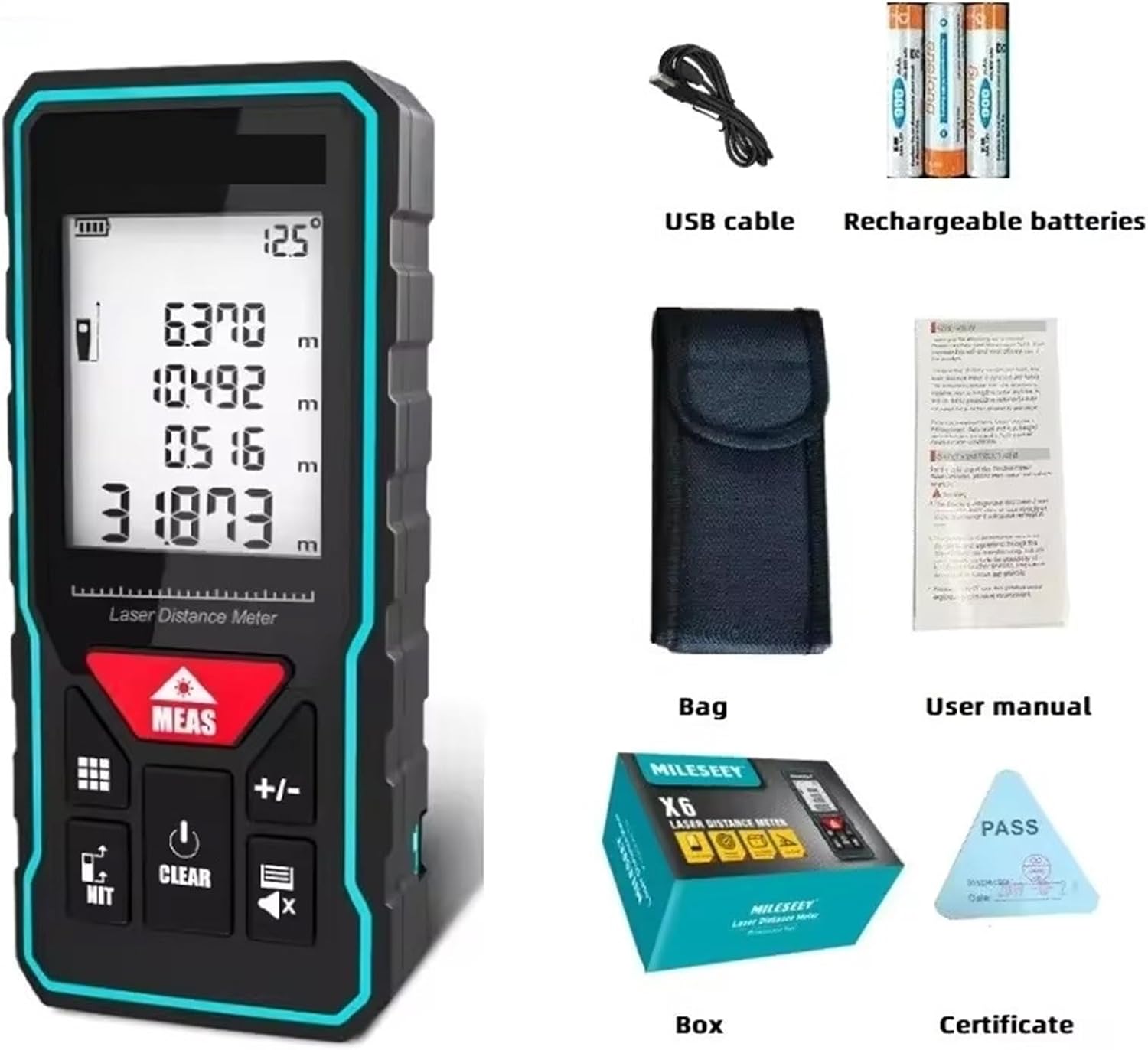
Figure 4: The product package includes the laser distance meter, a USB cable (for rechargeable models), a carrying bag, a user manual, and a certificate.