
1. Introduction
This manual provides essential information for the installation, operation, and maintenance of your ZMYUXME TP.V56.PB801 Universal TV Driver Board. This three-in-one board is designed for versatile compatibility with various TV models, simplifying TV repair and functionality restoration. Please read these instructions carefully before proceeding with installation or operation.
2. Safety Information
- Always disconnect the TV from the power source before attempting any installation or repair.
- Handle the driver board with care to avoid damage to electronic components.
- If you are unsure about any step, consult a qualified technician.
- Ensure proper grounding to prevent electrostatic discharge.
3. Package Contents
Verify that all items are present in your package:
- 1 x ZMYUXME TP.V56.PB801 Universal TV Driver Board
- 1 x Remote Control
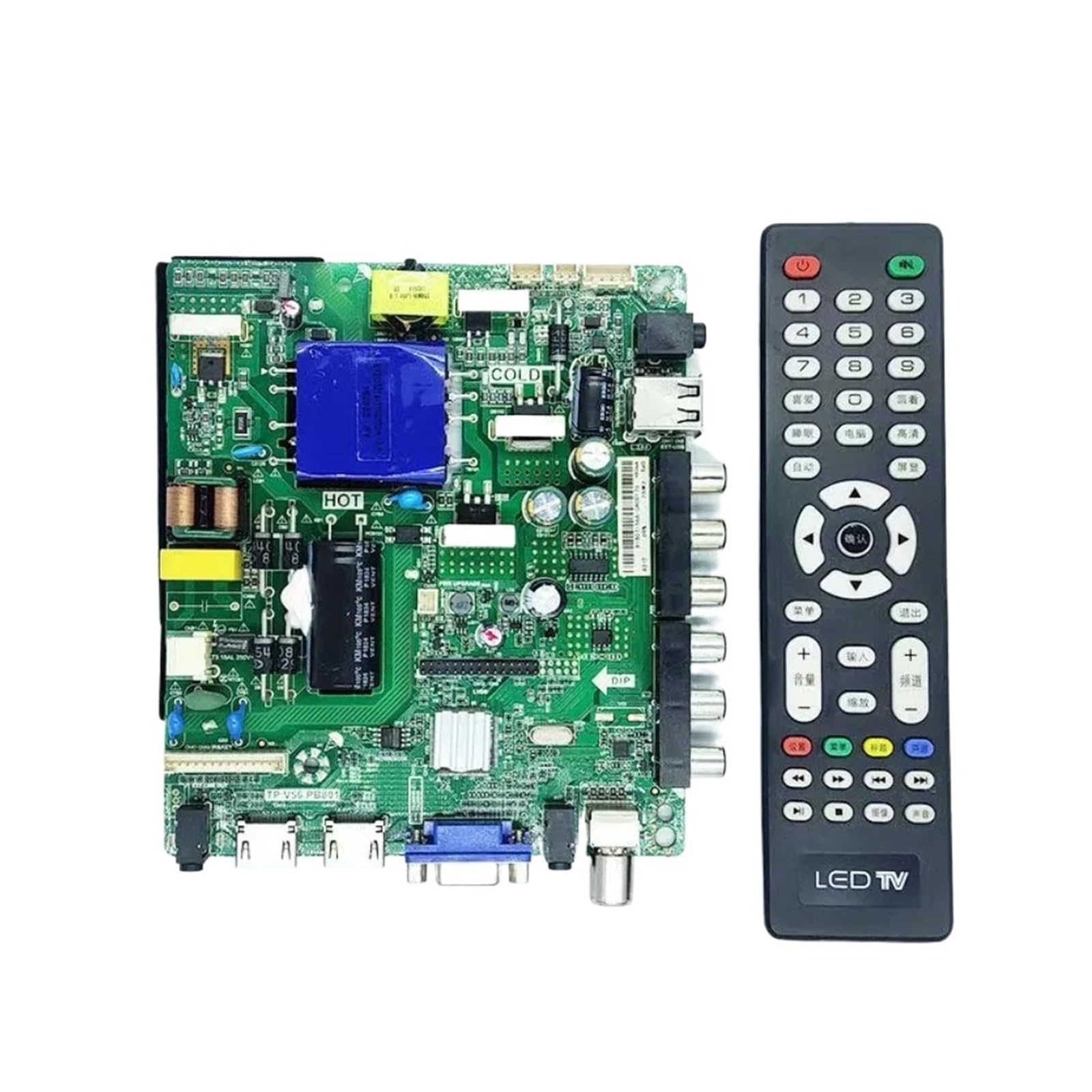
Image: The ZMYUXME TP.V56.PB801 universal TV driver board shown alongside its accompanying remote control. The board features various ports and components.
4. Setup and Installation
The TP.V56.PB801 board is designed for compatibility with various TV models. Please follow these steps for proper installation:
- Compatibility Check: Ensure that the board model (TP.V56.PB801 or compatible variants like TP.VST59S.PB801, 726, 716, 813, SKR.801) matches your TV's requirements. Verify that the output holes and installation interface are compatible.
- Backlight Voltage: This board variant supports backlight voltages of 45V-66V. If your TV's backlight voltage is different (e.g., 66V-90V), ensure you have the correct variant. If unsure, consult the seller with a picture of your original motherboard.
- Screen Resolution Programming: The current board variant supports 1366x768 resolution. If your TV screen requires a different resolution, it is crucial to inform the seller after placing your order. Our engineers will program the board with the correct data to ensure normal operation.
- Physical Installation:
- Carefully remove the old driver board from your TV.
- Align the new TP.V56.PB801 board with the mounting points in your TV chassis.
- Secure the board using appropriate screws.
- Connect all necessary cables (power, display panel, input ports) to the corresponding connectors on the new board. Refer to your TV's service manual for specific connection diagrams if needed.
- Initial Power-Up: After installation, reconnect the TV to the power source. Power on the TV and verify display functionality. If the display is incorrect or absent, power off immediately and recheck all connections and programming.

Image: Top view of the ZMYUXME TP.V56.PB801 TV driver board, highlighting the various input/output ports including HDMI, VGA, USB, and antenna connections.

Image: Angled view of the ZMYUXME TP.V56.PB801 TV driver board, providing a clearer look at the integrated circuits and power components.
5. Operating Instructions (Remote Control)
The included remote control allows you to operate your TV after the driver board installation. Familiarize yourself with its functions:

Image: Close-up of the remote control included with the ZMYUXME TV driver board, showing various buttons for power, channel, volume, and input selection.
- Power Button: Turns the TV on or off.
- Number Buttons (0-9): Direct channel selection.
- Volume Up/Down (+/-): Adjusts the audio volume.
- Channel Up/Down (CH+/-): Changes the TV channel.
- Input/Source Button: Cycles through available input sources (HDMI, VGA, AV, USB).
- Menu Button: Accesses the TV's on-screen display (OSD) menu for settings adjustments.
- Navigation Buttons (Arrows, OK): Used to navigate and select options within the OSD menu.
- Mute Button: Silences the TV audio.
6. Maintenance
The ZMYUXME TP.V56.PB801 driver board requires minimal maintenance. To ensure longevity:
- Keep the TV and its internal components free from dust and debris. Use compressed air for cleaning if necessary, ensuring the TV is powered off and unplugged.
- Avoid exposing the TV to extreme temperatures or humidity.
- Ensure adequate ventilation around the TV to prevent overheating of internal components.
7. Troubleshooting
| Problem | Possible Cause | Solution |
|---|---|---|
| No Power | Power cable disconnected; faulty power supply; board not seated correctly. | Check power cable connection; verify power supply unit; re-seat the driver board. |
| No Display / Incorrect Display | Incorrect screen resolution programming; display cable loose; backlight voltage mismatch. | Confirm screen resolution programming with seller; check display cable connections; verify backlight voltage compatibility. |
| Remote Control Not Working | Dead batteries; IR sensor blocked; remote not paired (if applicable). | Replace batteries; ensure clear path to TV's IR sensor; no pairing is typically required for this type of remote. |
| No Audio | Volume muted or too low; faulty speakers; audio cable issues. | Unmute and increase volume; check speaker connections; test with external audio source. |
8. Specifications
- Model: TP.V56.PB801 (also compatible with TP.VST59S.PB801, 726, 716, 813, SKR.801)
- Type: Three-in-one Universal TV Driver Board
- Supported Resolution (Current Variant): 1366x768
- Supported Backlight Voltage (Current Variant): 45V-66V
- Main Power Connector Type: 24-Pin
- Graphics Card Interface: Integrated
- Memory Slots Available: 1
- Total HDMI Ports: 1
- Item Weight: 50 Grams
9. Warranty and Support
For any questions regarding installation, troubleshooting, or product functionality, please contact your seller or refer to the product listing for support information. Ensure you provide your product model number (TP.V56.PB801) and details of your TV screen model for efficient assistance, especially concerning resolution programming.