
Introduction
This manual provides instructions for the AULCMEET RM-C3607 Replacement Remote Control. This remote is designed to be compatible with various JVC UHD and LCD TV models, offering a direct replacement without the need for complex setup procedures.
Compatible JVC TV Models:
- LT-43VA3205I
- LT-50VA3205I
- LT-65VA3205I
- LT-43VA3000
- LT-43VA3200
- LT-50VA3200
- LT-55VA3200
Setup
Battery Installation
The RM-C3607 remote control requires two AAA alkaline batteries (not included) for operation.
- Locate the battery compartment on the back of the remote control.
- Slide the battery cover downwards to open it.
- Insert two AAA batteries, ensuring the positive (+) and negative (-) terminals align correctly with the indicators inside the compartment.
- Slide the battery cover back into place until it clicks securely.

Image: Battery compartment of the RM-C3607 remote control, illustrating correct battery insertion.
Initial Use
The AULCMEET RM-C3607 is an infrared (IR) remote control. It does not require any programming, pairing, or complex setup beyond battery installation. It is pre-configured with fixed codes from the factory to work with the specified JVC TV models. Simply insert the batteries and point the remote control directly at your JVC TV's IR receiver to begin use.
Operating Instructions
To operate your JVC TV with the RM-C3607 remote control, ensure there is a clear line of sight between the remote and the TV's infrared receiver.
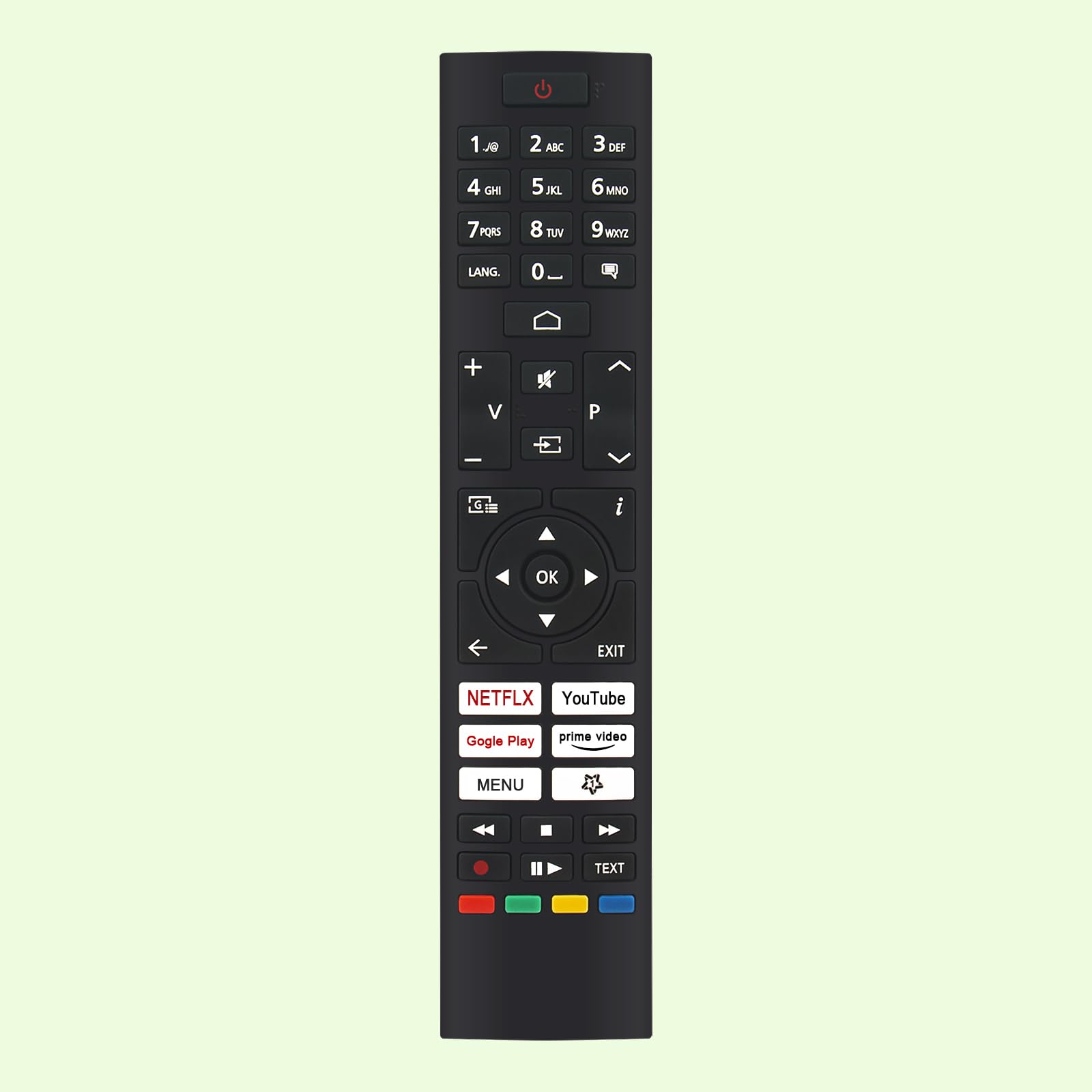
Image: Front view of the RM-C3607 remote control, highlighting button layout and overall dimensions (approximately 21 cm / 8.27 in long and 4.5 cm / 1.77 in wide).
Key Functions Overview
- Power Button (⏻): Turns the television on or off.
- Number Buttons (0-9): Directly select TV channels.
- LANG. Button: Changes audio language or subtitle options.
- Volume Up/Down (+ / −): Adjusts the television's volume level.
- Channel Up/Down (▲ / ▼): Changes TV channels sequentially.
- Mute Button (🔇): Mutes or unmutes the television's audio.
- Input/Source Button (⎌): Selects the input source (e.g., HDMI 1, AV).
- Navigation Pad (Up, Down, Left, Right, OK): Navigates through on-screen menus and confirms selections.
- Back Button (←): Returns to the previous menu or screen.
- EXIT Button: Exits the current menu or application.
- Smart TV Buttons (NETFLIX, YouTube, Google Play, Prime Video): Provide direct access to these streaming applications.
- MENU Button: Opens the television's main settings menu.
- Media Playback Controls (⏸ Play, ⏹ Stop, ⏪ Rewind, ⏩ Fast Forward): Controls media playback.
- Color Buttons (Red, Green, Yellow, Blue): Used for specific functions within TV menus or applications as indicated on-screen.
- TEXT Button: Accesses teletext or other text-based services.
Maintenance
Battery Replacement
Replace the batteries when the remote control's response becomes inconsistent, the range decreases, or it stops functioning. Always use new AAA alkaline batteries for optimal performance.
Cleaning
To clean the remote control, wipe it with a soft, dry cloth. Do not use liquid cleaners, abrasive materials, or chemical solvents, as these can damage the remote's surface or internal components.
Troubleshooting
Remote Control Not Responding
- Check Batteries: Ensure the batteries are new and inserted correctly with the positive (+) and negative (-) terminals aligned.
- Remove Obstructions: Make sure there are no objects blocking the line of sight between the remote control and the TV's infrared receiver.
- TV Power: Verify that the television is powered on and not in standby mode.
Limited Operating Range
- Replace Batteries: Weak batteries can reduce the remote's effective range. Replace them with new AAA alkaline batteries.
- Proximity: Ensure you are within the maximum operating range of approximately 10 meters (33 feet) from the television.
Specifications
| Feature | Detail |
|---|---|
| Brand | AULCMEET |
| Model Name | RM-C3607 |
| Connectivity Technology | Infrared (IR) |
| Compatible Devices | JVC UHD TV, JVC LCD TV (specific models listed above) |
| Battery Type | 2 x AAA Alkaline (not included) |
| Maximum Range | 10 Meters |
| Number of Buttons | 25 |
| Special Features | Ergonomic Design |
| Color | Black |
Warranty and Support
No specific warranty information is provided in the product details. For warranty claims, technical assistance, or further support regarding your AULCMEET RM-C3607 Replacement Remote Control, please contact the manufacturer, AULCMEET, or your original retailer directly.