
1. Introduction
This manual provides comprehensive instructions for the setup, operation, and maintenance of your Beelink SER8 Mini PC. Please read this manual thoroughly before using the device to ensure optimal performance and longevity. The Beelink SER8 is a compact and powerful mini PC designed for a wide range of applications, from gaming and multimedia to business and office tasks.

Image 1.1: Front view of the Beelink SER8 Mini PC, showcasing its compact design and front ports.
2. Package Contents
Verify that all items listed below are included in your package. If any items are missing or damaged, please contact customer support.
- 1 x SER8 8745HS Mini PC
- 1 x HDMI Cables
- 1 x Power Adapter (US Standard)
- 1 x User Manual
3. Setup Guide
Follow these steps to set up your Beelink SER8 Mini PC for the first time.
- Connect to Power: Connect the power adapter to the DC IN port on the rear of the Mini PC and then plug it into a power outlet.
- Connect to Display: Use the provided HDMI cable to connect the Mini PC to your monitor or TV. The device supports up to three displays via HDMI 2.1, DP 1.4, and the rear USB-C port.
- Connect Peripherals: Connect your keyboard and mouse to the available USB ports. For wired network access, connect an Ethernet cable to the 2.5G LAN port.
- Power On: Press the power button located on the front of the Mini PC. The power indicator light will illuminate.
- Initial Windows Setup: Follow the on-screen instructions to complete the Windows 11 Pro setup. This typically involves selecting your region, language, and creating a user account.

Image 3.1: Diagram illustrating the various ports on the front and rear of the Beelink SER8 Mini PC for connecting peripherals and displays.
4. Operating Instructions
4.1 Power Management
- Power On: Press the power button.
- Shut Down: Click the Start menu in Windows, then select Power > Shut down.
- Restart: Click the Start menu in Windows, then select Power > Restart.
- Sleep: Click the Start menu in Windows, then select Power > Sleep.
4.2 Connecting Multiple Displays
The Beelink SER8 supports up to three independent displays. Connect your monitors using a combination of the following ports:
- 1 x HDMI 2.1 (4K@120Hz)
- 1 x DP 1.4 (4K@120Hz)
- 1 x Rear USB-C (USB4, 4K@120Hz, supports video output)
After connecting, Windows should automatically detect the displays. You can configure display settings (resolution, orientation, extended/duplicate desktop) via Windows Display Settings.

Image 4.1: The Beelink SER8 Mini PC connected to three external monitors, demonstrating its triple display support for enhanced productivity.
4.3 Network Connectivity
- Wired Connection: Connect an Ethernet cable to the 2.5G LAN port for high-speed wired internet access.
- Wireless Connection: The Mini PC features Wi-Fi 6 for fast and stable wireless internet. To connect, go to Windows Settings > Network & Internet > Wi-Fi, turn Wi-Fi on, and select your network.
- Bluetooth: Bluetooth 5.2 is integrated for connecting wireless peripherals such as keyboards, mice, and headphones. Enable Bluetooth in Windows Settings > Bluetooth & devices.

Image 4.2: Visual representation of the Beelink SER8 Mini PC's Wi-Fi 6 and Bluetooth 5.2 capabilities, ensuring stable and reliable wireless connections.
5. Key Features
The Beelink SER8 Mini PC is engineered with advanced components to deliver high performance in a compact form factor.
5.1 Processor and Graphics
- CPU: AMD Ryzen 7 8745HS (8 Cores/16 Threads, up to 4.9GHz Max Turbo Frequency). This processor provides robust performance for demanding applications and multitasking.
- GPU: AMD Radeon 780M Graphics (12-core, 2600 MHz). Integrated RDNA 3 architecture graphics deliver excellent visual performance for gaming, video editing, and graphic design.

Image 5.1: Detailed graphic highlighting the specifications of the AMD Ryzen 7 8745HS processor, including core count, threads, cache, and max turbo frequency.
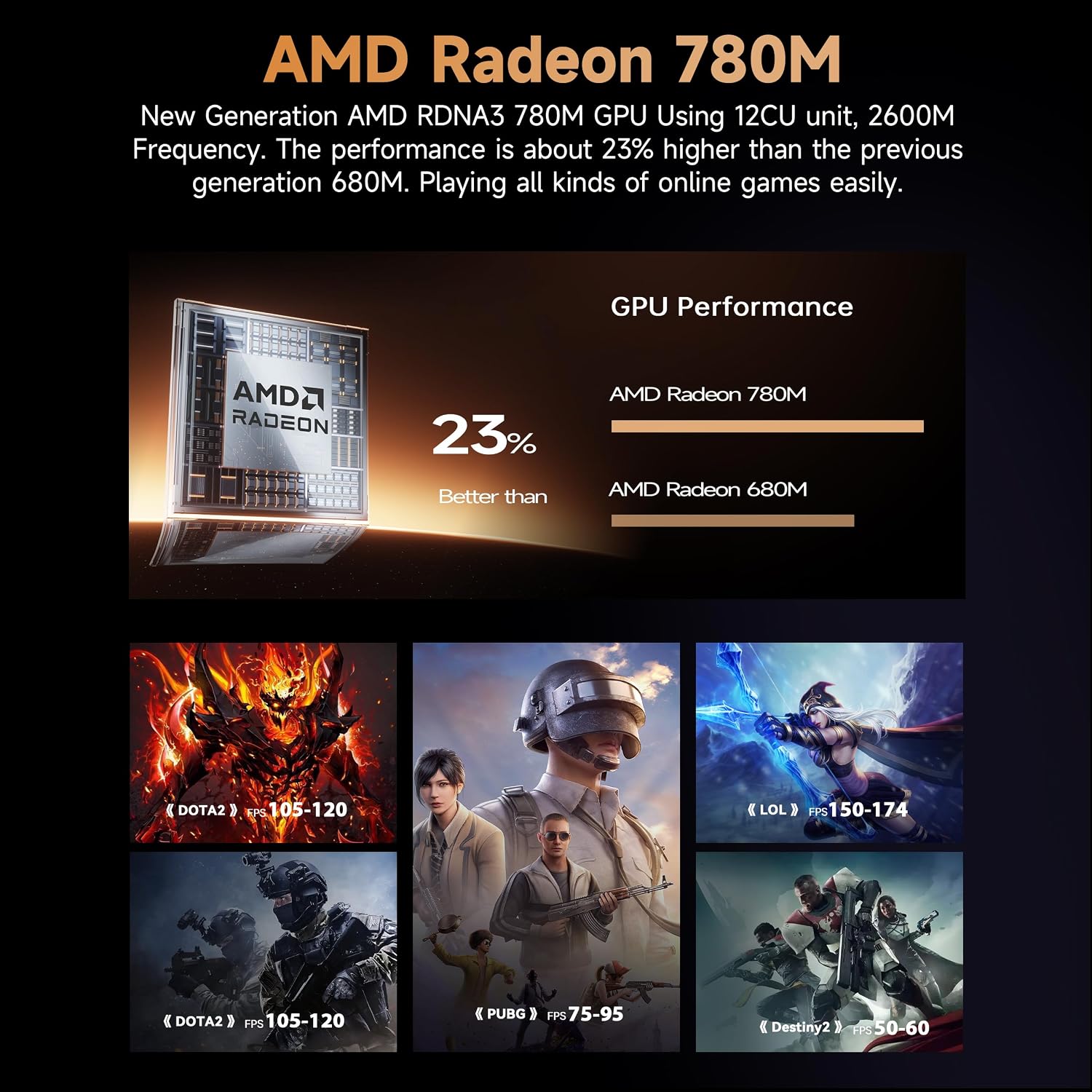
Image 5.2: Illustration of the AMD Radeon 780M graphics performance, showing a comparison to previous generations and expected frame rates in popular games.
5.2 Memory and Storage
- RAM: 32GB DDR5-5600MHz (16GB*2, dual-channel). Expandable up to 256GB, providing ample memory for demanding applications and multitasking.
- SSD: 1TB M.2 PCIe 4.0x4 NVMe SSD (dual-channel). Expandable up to 8TB, offering high-speed storage for rapid boot times and application loading.

Image 5.3: An internal view of the Beelink SER8 Mini PC, highlighting the 32GB DDR5 RAM modules and the 1TB PCIe 4.0 SSD for fast performance and ample storage.
5.3 Connectivity Ports
The SER8 Mini PC offers a wide range of ports for versatile connectivity:
- Front Ports: Power Button, 3.5mm Audio Jack, Front USB-C Port (10Gbps), USB3.2 Port (10Gbps).
- Rear Ports: DC IN, USB4 (40Gbps/TBT3/PD charging/video output), HDMI 2.1 (4K@120Hz), 3.5mm Audio Jack, USB2.0 (480Mbps) x2, DP1.4 (4K@120Hz), 2.5G LAN, USB3.2 (10Gbps).
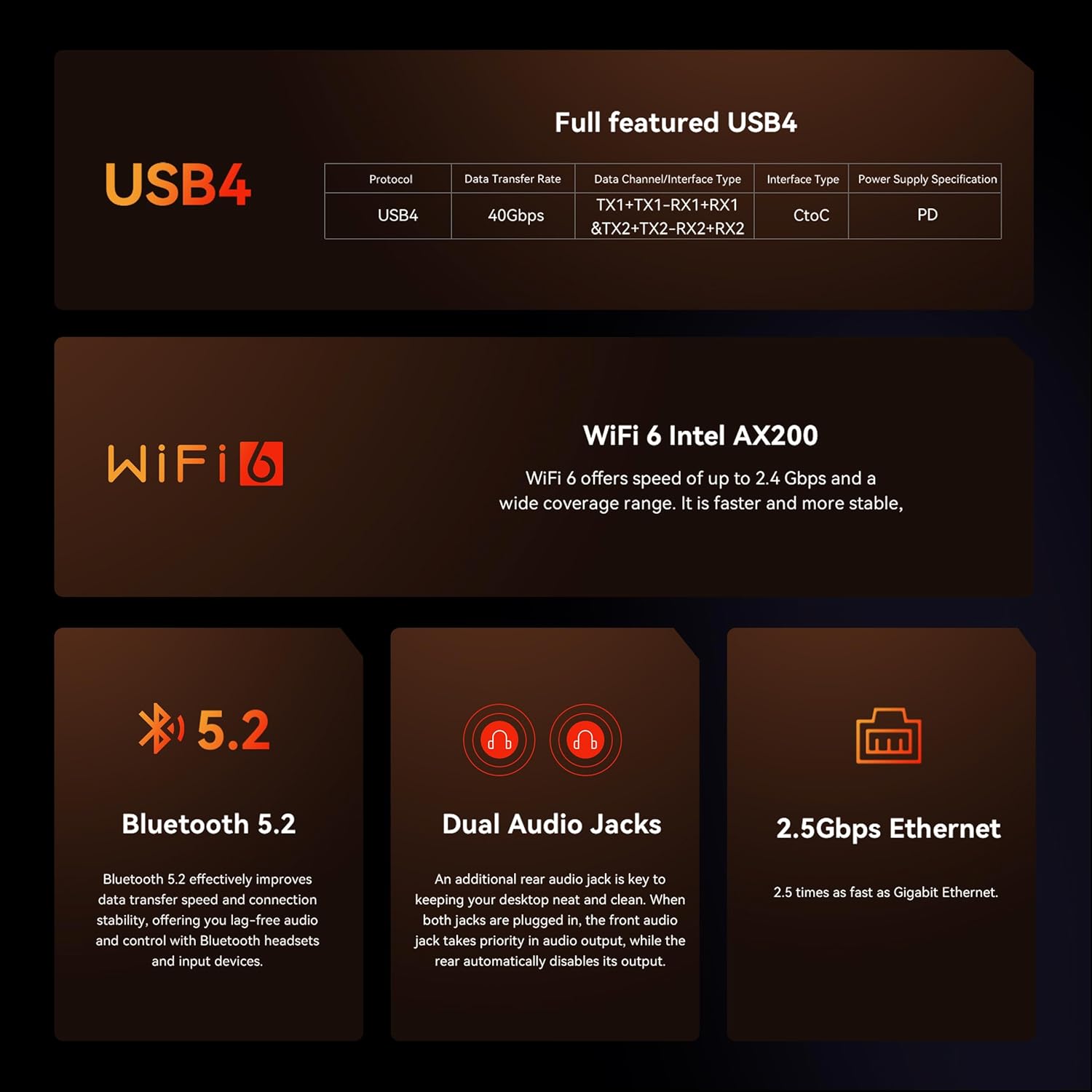
Image 5.4: Overview of the Beelink SER8 Mini PC's comprehensive connectivity options, including USB4, Wi-Fi 6, Bluetooth 5.2, dual audio jacks, and 2.5Gbps Ethernet.
5.4 Cooling System
The SER8 features an advanced MSC2.0 heat treatment system with upgraded air ducts and a VC vapor chamber. This design ensures efficient heat dissipation, stable operation at 65W power, and a quiet user experience with lower fan speeds.

Image 5.5: Highlights of the Beelink SER8 Mini PC, including its efficient AMD Radeon 780M cooling, AMD Ryzen 7 8745HS processor, DDR5 RAM and PCIe 4.0 SSD, and ultra-quiet operation.
6. Maintenance
Proper maintenance ensures the longevity and optimal performance of your Beelink SER8 Mini PC.
- Dust Prevention: The Mini PC incorporates a new dust-proof design with a high-density breathable etched metal mesh at the bottom. Regularly clean the exterior with a soft, dry cloth. Avoid blocking the ventilation openings.
- Software Updates: Keep your Windows operating system and drivers updated to ensure security and performance.
- Environmental Conditions: Operate the Mini PC in a well-ventilated area, away from direct sunlight, excessive heat, and moisture.
- Power Supply: Use only the original power adapter provided with the device.

Image 6.1: An exploded view illustrating the new dustproof technology integrated into the Beelink SER8 Mini PC, featuring a mesh filter at the bottom to prevent dust accumulation.
7. Troubleshooting
This section addresses common issues you might encounter with your Beelink SER8 Mini PC.
| Problem | Possible Cause | Solution |
|---|---|---|
| No display on monitor. | Loose cable connection, incorrect input source, monitor off. |
|
| Mini PC does not power on. | Power adapter not connected, faulty power outlet. |
|
| No internet connection (Wi-Fi). | Wi-Fi disabled, incorrect password, router issue. |
|
| Slow performance. | Too many applications running, insufficient RAM, overheating. |
|
8. Specifications
Detailed technical specifications for the Beelink SER8 Mini PC.

Image 8.1: A comprehensive table detailing the product specifications of the Beelink SER8 Mini PC, including dimensions, CPU, graphics, storage, interfaces, and accessories.
| Feature | Detail |
|---|---|
| Brand | Beelink |
| Series | SER8 8745HS |
| Model Number | SER |
| CPU | AMD Ryzen 7 8745HS (8C/16T, up to 4.9GHz) |
| Graphics | AMD Radeon 780M (12-core, 2600 MHz) |
| RAM | 32GB DDR5-5600MHz (16GB*2, dual-channel, expandable to 256GB) |
| Storage | 1TB M.2 PCIe 4.0x4 NVMe SSD (dual-channel, expandable to 8TB) |
| Operating System | Windows 11 Pro |
| Wireless Connectivity | Wi-Fi 6, Bluetooth 5.2 |
| Ethernet | 2.5Gbps LAN |
| Video Output | 1x HDMI 2.1 (4K@120Hz), 1x DP 1.4 (4K@120Hz), 1x Rear USB-C (USB4, 4K@120Hz) |
| USB Ports | 1x Front USB-C (10Gbps), 2x USB3.2 (10Gbps), 2x USB2.0 (480Mbps), 1x Rear USB-C (USB4) |
| Audio Ports | Dual 3.5mm audio jacks (HP&MIC) |
| Dimensions (LxWxH) | 5.3 x 1.75 x 5.3 inches (135 x 44.7 x 135 mm) |
| Item Weight | 3.1 pounds |
9. Warranty and Support
Beelink provides comprehensive support for your SER8 Mini PC.
- Warranty: The product typically comes with a 12-month warranty. Please refer to your purchase documentation for specific warranty terms.
- Customer Service: Beelink offers 7-day, 24-hour customer service.
- Technical Support: Lifetime technical support is provided for the product.
- Replacements: New replacements are provided during the warranty period for eligible issues.
For assistance, please log into your Amazon account, navigate to "Your Orders," and select the option to "Ask Product Question" for the Beelink SER8 Mini PC. This will connect you with Beelink customer support.

Image 9.1: Steps to contact Beelink customer support via Amazon, including logging in, accessing orders, and asking a product question.

Image 9.2: Overview of Beelink's support offerings, including 12-month warranty, 7D+24H customer service, lifetime technical support, and fulfillment by Amazon.