
1. Introduction
The KSUN UV119D is a versatile handheld multi-band two-way radio designed for reliable communication. It supports transmitting and receiving on VHF/UHF bands, and receiving on AM aviation band, FM band, and 10-group NOAA weather alerts. This manual provides essential information for the safe and efficient operation of your device.
2. What's in the Box
- 1 x KSUN UV119D Amateur Radio
- 1 x Dual Band VHF/UHF Tactical Antenna (13.1-inch Gooseneck Antenna)
- 1 x 7.4V 9800mAh High Capacity Li-ion Battery
- 1 x US Standard Desktop Charger
- 1 x Belt Clip
- 1 x User’s Manual
3. Setup
3.1. Battery Installation
- Align the 9800mAh Li-ion battery with the battery compartment on the back of the radio.
- Slide the battery into place until it clicks securely.
- Ensure the battery release latch is engaged to prevent accidental detachment.
3.2. Antenna Attachment
- Screw the 13.1-inch gooseneck antenna clockwise onto the antenna connector at the top of the radio.
- Tighten the antenna firmly by hand. Do not overtighten.
- The flexible design allows for angle adjustment for optimal reception.
3.3. Charging the Battery
The radio supports two charging methods: using the desktop charging cradle or directly via a Type-C USB cable.
- Desktop Cradle Charging: Place the radio with the battery installed into the desktop charging cradle. Ensure the charging contacts align. The indicator light on the cradle will show charging status.
- Type-C Charging: Connect a Type-C USB cable to the charging port on the side of the radio. This method allows for direct charging from compatible USB power sources.

Image: The KSUN UV119D radio showcasing its high-capacity lithium battery.
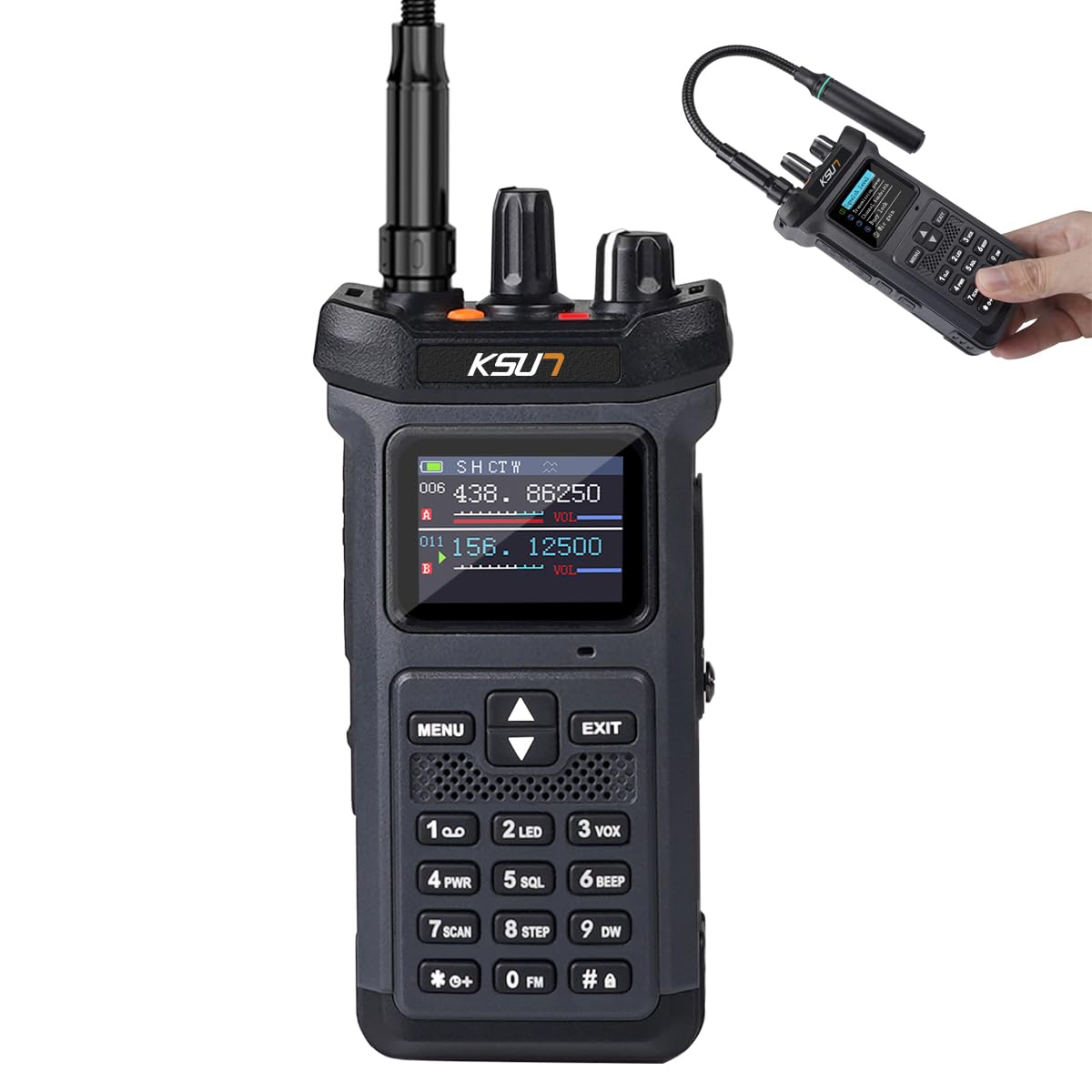
Image: The KSUN UV119D radio's reverse charging function, capable of charging other devices like smartphones via its USB-C port.
4. Operating Instructions
4.1. Power On/Off and Volume
- Power On: Rotate the top-right knob clockwise until you hear a click. The display will light up.
- Power Off: Rotate the top-right knob counter-clockwise until you hear a click.
- Volume Adjustment: Rotate the top-right knob (after powering on) to adjust the audio volume.
4.2. Channel and Frequency Selection
- Switching VFO/Channel Mode: Press the "#" key to toggle between VFO (Variable Frequency Oscillator) mode for direct frequency input and Channel mode for pre-programmed channels.
- Manual Frequency Input (VFO Mode): In VFO mode, use the numeric keypad to enter the desired frequency.
- Channel Selection (Channel Mode): Use the UP/DOWN arrow keys to navigate through stored channels.
- Switching A/B Band: Press the "EXIT" button to switch between the A and B bands for dual-watch operation.
Video: Demonstrates basic operating instructions for the KSUN UV119D, including VFO mode, manual frequency input, and channel switching.
4.3. Transmitting and Receiving
- To Transmit: Press and hold the Push-To-Talk (PTT) button on the left side of the radio. Speak clearly into the microphone. Release the PTT button to listen.
- To Receive: Ensure the PTT button is not pressed. The radio will automatically receive signals on the selected frequency/channel.
4.4. Menu Navigation
- Press the "MENU" button to access the radio's settings.
- Use the UP/DOWN arrow keys to scroll through menu options.
- Press "MENU" again to select an option or confirm a setting.
- Press "EXIT" to go back to the previous menu or exit the menu entirely.
4.5. Dual Mode LED Flashlight
The radio features a dual-mode LED flashlight for various situations.
- White Light: Provides illumination in dark environments.
- Red/Blue Strobe: Used for signaling or issuing warning messages in emergency situations.

Image: The KSUN UV119D radio's high-intensity flashlight, featuring both white light and red/blue strobe functions.
4.6. Emergency Alarm Function
In unexpected situations, press the dedicated emergency alarm button to emit an alarm sound, signaling for assistance.

Image: Illustration of the KSUN UV119D's emergency alarm function, indicating an SOS signal.
4.7. NOAA Weather Receiver
The radio can receive 10-group NOAA weather alerts, providing timely weather information and warnings. Consult the full menu for specific NOAA channel access and alert settings.
4.8. AM/FM Reception
The radio includes AM aviation band and FM broadcast band reception. Use the appropriate mode selection in the menu to switch to these bands and tune to desired stations.
5. Features Overview
The KSUN UV119D is equipped with several features to enhance communication and utility:
- Full Band Receiving Handheld Transceiver: Supports VHF/UHF for two-way communication, and receives AM aviation, FM broadcast, and NOAA weather bands.
- 13.1-inch Rotate Gooseneck Antenna: A flexible and bendable antenna designed for optimal reception by allowing angle and direction adjustments.
- 9800mAh High Capacity Battery: Provides extended operational time, supporting continuous use for up to 24 hours and standby for 120 hours.
- Type-C Fast Charging: Offers convenient and rapid charging via a Type-C cable, in addition to the desktop cradle.
- Dual Mode LED Flashlight: Includes a white light for general illumination and a red/blue strobe for emergency signaling.
- Emergency Alarm Function: A dedicated feature to emit an alarm sound in critical situations.
- One-Button Frequency Match: Simplifies frequency modulation for seamless communication without complex manual adjustments.
- Multi-function Comms Device: Integrates scanning, radio, alarm, flashlight, and weather forecast capabilities.
- 1.77-inch Color Screen: Provides clear and visible communication content, enhancing readability, especially in low-light conditions.
- AI Voice Denoising: Intelligently recognizes and eliminates environmental noise, paired with an 80-decibel loudspeaker for clearer and louder sound.

Image: The KSUN UV119D radio's one-button frequency match feature, simplifying communication setup.

Image: Overview of the KSUN UV119D as a multi-function communication device, showing various settings and modes.

Image: A close-up view of the 1.77-inch color screen, showing clear display of communication content.

Image: Visual representation of the AI voice denoising feature, illustrating noise reduction for clearer audio.

Image: The KSUN UV119D featuring its 360-degree adjustable gooseneck antenna for flexible positioning.
Video: An introduction to the various functions and features of the KSUN UV119D radio.
6. Maintenance
- Cleaning: Use a soft, damp cloth to clean the radio's exterior. Do not use harsh chemicals or solvents.
- Battery Care: Store the battery in a cool, dry place when not in use. Avoid fully discharging the battery for extended periods.
- Antenna Care: Handle the gooseneck antenna carefully to avoid damage. Do not bend it excessively.
- Storage: When storing the radio for long periods, remove the battery and store the radio in a dry, dust-free environment.
7. Troubleshooting
| Problem | Possible Cause | Solution |
|---|---|---|
| Radio does not power on | Low or dead battery; improperly installed battery. | Charge the battery; ensure battery is correctly installed. |
| Cannot transmit or receive | Incorrect frequency/channel; antenna not attached; out of range. | Verify frequency/channel settings; attach antenna securely; move closer to other radios. |
| Poor audio quality | Low signal strength; interference; volume too low. | Adjust antenna position; move to an area with less interference; increase volume. |
| Battery not charging | Charger/cable faulty; improper connection. | Check charger and cable; ensure secure connection to radio and power source. |
8. Specifications
| Feature | Detail |
|---|---|
| Item Weight | 0.353 ounces |
| Product Dimensions | 1.57 x 2.44 x 5.51 inches |
| Item Model Number | KSUN UV119D |
| Batteries | 1 x 12V batteries required. (included) |
| Brand | KSUN TFSI |
| Color | Grey |
| Number of Channels | 199 |
| Special Feature | Emergency Alarm |
| Frequency Range | VHF/UHF |
| Talking Range Maximum | 20 Kilometer (in open areas without obstructions) |
| Voltage | 7.4 Volts (DC) |
| Water Resistance Level | Not Water Resistant |
9. Warranty and Support
Warranty: The KSUN UV119D GMRS Radio comes with a 1-year warranty from the date of purchase. This warranty covers manufacturing defects and malfunctions under normal use.
Customer Support: For technical assistance, troubleshooting, or warranty claims, please contact KSUN TFSI customer support. Refer to the contact information provided with your product packaging or visit the official KSUN TFSI website for support details.