1. Introduction
This manual provides essential information for the safe operation, maintenance, and troubleshooting of your Generic TIDLI206681 Compact Brushless Cordless Impact Drill. Please read this manual thoroughly before using the tool to ensure proper function and to prevent injury.
The Generic TIDLI206681 is a versatile 20V cordless impact drill designed for various drilling and fastening applications. It features a brushless motor for enhanced efficiency and durability, a high maximum torque, and multiple speed and torque settings for precise control.
2. Product Overview
Familiarize yourself with the components of your impact drill before operation.
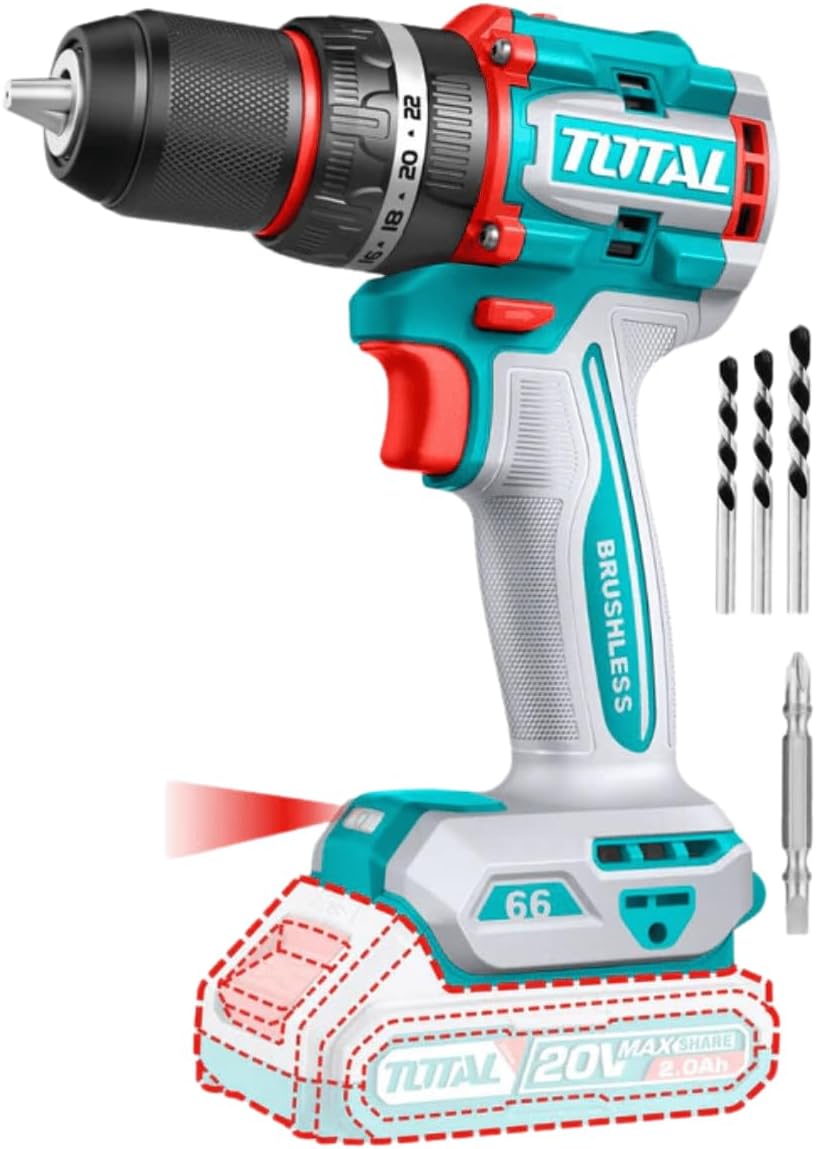
Figure 1: Generic TIDLI206681 Compact Brushless Cordless Impact Drill. This image displays the drill unit along with a Cr-V 65mm bit and three masonry drill bits. The battery and charger are not shown as they are sold separately.

Figure 2: Key features of the Generic TIDLI206681 Impact Drill. This image highlights the P20S platform, impact function (66Nm), compact brushless design, spindle lock, and indicates that the battery and charger are sold separately.
Key Features:
- Brushless Motor: Provides increased efficiency, longer runtime, and extended tool life.
- 20V Power: Operates on a 20-volt battery system (battery and charger sold separately).
- High Torque: Maximum torque of 66Nm for demanding applications.
- Variable Speed: Two mechanical speed gears (0-500rpm and 0-2000rpm) for optimal control.
- Impact Function: Max impact rate of 30000bpm for efficient drilling in masonry.
- Metal Chuck: Durable 13mm chuck capacity for various drill bits.
- Torque Settings: 22+1+1 settings for precise torque control and impact drilling.
- Spindle Lock: For easy bit changes.
- Integrated LED Work Light: Illuminates the work area for improved visibility.
3. Specifications
| Feature | Specification |
|---|---|
| Model Number | TIDLI206681 / TRHLI202081 |
| Voltage | 20V |
| Motor Type | Brushless |
| No-load Speed | Gear 1: 0-500rpm, Gear 2: 0-2000rpm |
| Max Impact Rate | 30000bpm |
| Max Torque | 66Nm |
| Chuck Capacity | 13mm (Metal Chuck) |
| Torque Settings | 22+1+1 |
| Mechanical Gears | 2-speed |
| Weight | 5 kg (tool only, approximate) |
| Dimensions (L x W x H) | 22 x 7 x 15 cm (approximate) |
| Included Accessories | 1 Pcs Cr-V 65mm bit, 3 Pcs masonry drill bits |
| Power Source | Battery Powered (Battery and Charger sold separately) |
| Material | Metal |
4. Setup
4.1 Battery Installation and Removal
This tool requires a 20V Lithium-Ion battery and a compatible charger, both sold separately.
- To Install: Align the battery pack with the battery port on the base of the drill handle. Slide the battery into the port until it clicks securely into place. Ensure it is fully seated.
- To Remove: Press the battery release button (usually located on the battery pack itself) and slide the battery pack out of the tool.
4.2 Charging the Battery
Refer to the instruction manual provided with your 20V Lithium-Ion battery charger for proper charging procedures. Always use a compatible charger for your battery pack.
4.3 Installing and Removing Drill Bits/Accessories
- To Install: Rotate the chuck counter-clockwise to open the chuck jaws. Insert the drill bit or accessory fully into the chuck. Rotate the chuck clockwise to tighten the jaws securely around the bit. For best grip, ensure the bit is centered.
- To Remove: Rotate the chuck counter-clockwise to loosen the jaws and remove the bit.
5. Operation
5.1 Powering On/Off
The drill is activated by pressing the trigger switch. The speed is variable depending on the pressure applied to the trigger. Release the trigger to turn the drill off.
5.2 Forward/Reverse Rotation
A forward/reverse selector switch is located above the trigger. Push the switch to the left for forward rotation (drilling/fastening) and to the right for reverse rotation (removing screws/bits). Ensure the switch is in the center position to lock the trigger and prevent accidental startup.
5.3 Speed Selection
The drill features a 2-speed mechanical gear selector switch, typically located on top of the drill housing.
- Gear 1 (Low Speed, High Torque): For heavy-duty drilling, driving large fasteners, or when maximum torque is required (0-500rpm).
- Gear 2 (High Speed, Low Torque): For fast drilling in wood, plastic, or light metal, and for smaller fasteners (0-2000rpm).
Always select the appropriate speed before starting the drill. Do not change gears while the drill is running.
5.4 Torque and Mode Selection
The torque adjustment collar is located behind the chuck. Rotate the collar to select the desired torque setting or operating mode.
- Torque Settings (1-22): For driving screws. Select a lower setting for smaller screws or softer materials, and a higher setting for larger screws or harder materials.
- Drill Mode (Drill Bit Icon): For general drilling without impact.
- Impact Drill Mode (Hammer Icon): For drilling into masonry or concrete, utilizing the impact function (30000bpm).
5.5 LED Work Light
The integrated LED work light automatically illuminates when the trigger is pressed, providing visibility in dimly lit work areas.
6. Maintenance
6.1 Cleaning
- Always disconnect the battery pack before performing any cleaning or maintenance.
- Use a soft, damp cloth to clean the exterior of the tool. Do not use harsh chemicals or abrasive cleaners.
- Keep the ventilation openings clear of dust and debris to prevent overheating. Use compressed air if necessary.
6.2 Storage
- Store the drill and battery pack in a cool, dry place, away from direct sunlight and moisture.
- Ensure the battery is partially charged (around 50%) before long-term storage.
- Store out of reach of children.
7. Troubleshooting
| Problem | Possible Cause | Solution |
|---|---|---|
| Drill does not start | Battery not installed correctly Battery discharged Forward/reverse switch in center (locked) position | Re-install battery securely Charge battery Move switch to forward or reverse position |
| Reduced power or speed | Battery low Overload Wrong speed setting | Charge battery Reduce pressure or use a sharper bit Switch to a higher speed gear if appropriate |
| Chuck not holding bit | Chuck not tightened sufficiently Bit shank is dirty or damaged | Tighten chuck firmly Clean or replace bit |
| Excessive vibration | Bent or damaged drill bit Improperly installed bit | Replace bit Re-install bit correctly |
8. Safety Information
Always observe basic safety precautions when using power tools to reduce the risk of fire, electric shock, and personal injury.
- Work Area Safety: Keep your work area clean and well-lit. Cluttered or dark areas invite accidents.
- Electrical Safety: Avoid body contact with earthed or grounded surfaces. Do not expose power tools to rain or wet conditions.
- Personal Safety: Always wear eye protection. Use hearing protection when operating impact tools. Dress properly; avoid loose clothing or jewelry. Secure long hair.
- Tool Use and Care: Do not force the power tool. Use the correct power tool for your application. Disconnect the battery pack before making any adjustments, changing accessories, or storing power tools.
- Battery Tool Use and Care: Recharge only with the charger specified by the manufacturer. Use power tools only with specifically designated battery packs.
9. Warranty and Support
For warranty information or technical support, please refer to the documentation provided at the point of purchase or contact your retailer. Keep your purchase receipt as proof of purchase.


