
1. Introduction
Thank you for choosing the elejoy 15A MPPT Step-Up Solar Charge Controller EL-MU400SP. This device is designed to efficiently charge 24V-85V lead-acid and lithium batteries from solar panels, maximizing energy harvest through its advanced MPPT (Maximum Power Point Tracking) technology. It is suitable for various applications including home solar systems, camping setups, and RVs. This manual provides essential information for safe installation, operation, and maintenance of your solar charge controller.
2. Safety Instructions
- Read all instructions carefully before installation and operation.
- Ensure all wiring is correctly polarized and securely connected to prevent damage to the controller or battery.
- Always connect the battery first, then the solar panel. Disconnect in the reverse order: solar panel first, then battery.
- Do not disassemble or attempt to repair the controller. Contact qualified personnel for service.
- Install the controller in a well-ventilated area, away from flammable materials and direct sunlight.
- Wear appropriate personal protective equipment (PPE) when working with batteries and solar panels.
- Ensure the solar panel's open-circuit voltage (Voc) does not exceed the controller's maximum input voltage.
3. Product Overview
3.1 Key Features
- Wide Voltage Range: Supports 24V-85V lead-acid and lithium batteries.
- Step-Up MPPT Technology: Charges high-voltage batteries from lower-voltage solar panels.
- High PV Utilization: Achieves ≥99% maximum PV utilization efficiency.
- Robust Heat Dissipation: Features an aluminum heat sink and unique structural design for optimal thermal management.
- HD LED Display: Real-time monitoring of current, voltage, and other data.
- Multi-Mode Control: Offers various load control modes for flexible energy management.
3.2 Components
The elejoy EL-MU400SP controller features a durable aluminum casing with an integrated heat sink for efficient cooling. The front panel includes an HD LED display and control buttons for easy operation.

Figure 3.2.1: Front view of the controller showing the LED display and control buttons. The display indicates input PV voltage and current, and output battery voltage and current. Control buttons include 'OK', '-', and '+' for setting output voltage.

Figure 3.2.2: Angled view of the controller, illustrating the robust aluminum heat sink design and the secure input/output wiring terminals.
4. Setup and Installation
4.1 Mounting the Controller
- Choose a dry, well-ventilated location, protected from direct sunlight, high temperatures, and moisture.
- Ensure sufficient clearance around the controller for proper airflow and heat dissipation.
- Mount the controller vertically on a non-flammable surface using appropriate screws.
4.2 Wiring Connections
Follow the wiring diagram carefully. Incorrect wiring can damage the controller and connected devices. Always connect the battery first, then the solar panel. Disconnect in the reverse order.
- Connect the Battery: Connect the positive (+) and negative (-) terminals of your battery to the "OUTPUT" terminals of the controller. Ensure correct polarity.
- Connect the Solar Panel: Connect the positive (+) and negative (-) terminals of your solar panel(s) to the "INPUT" terminals of the controller. Ensure correct polarity.
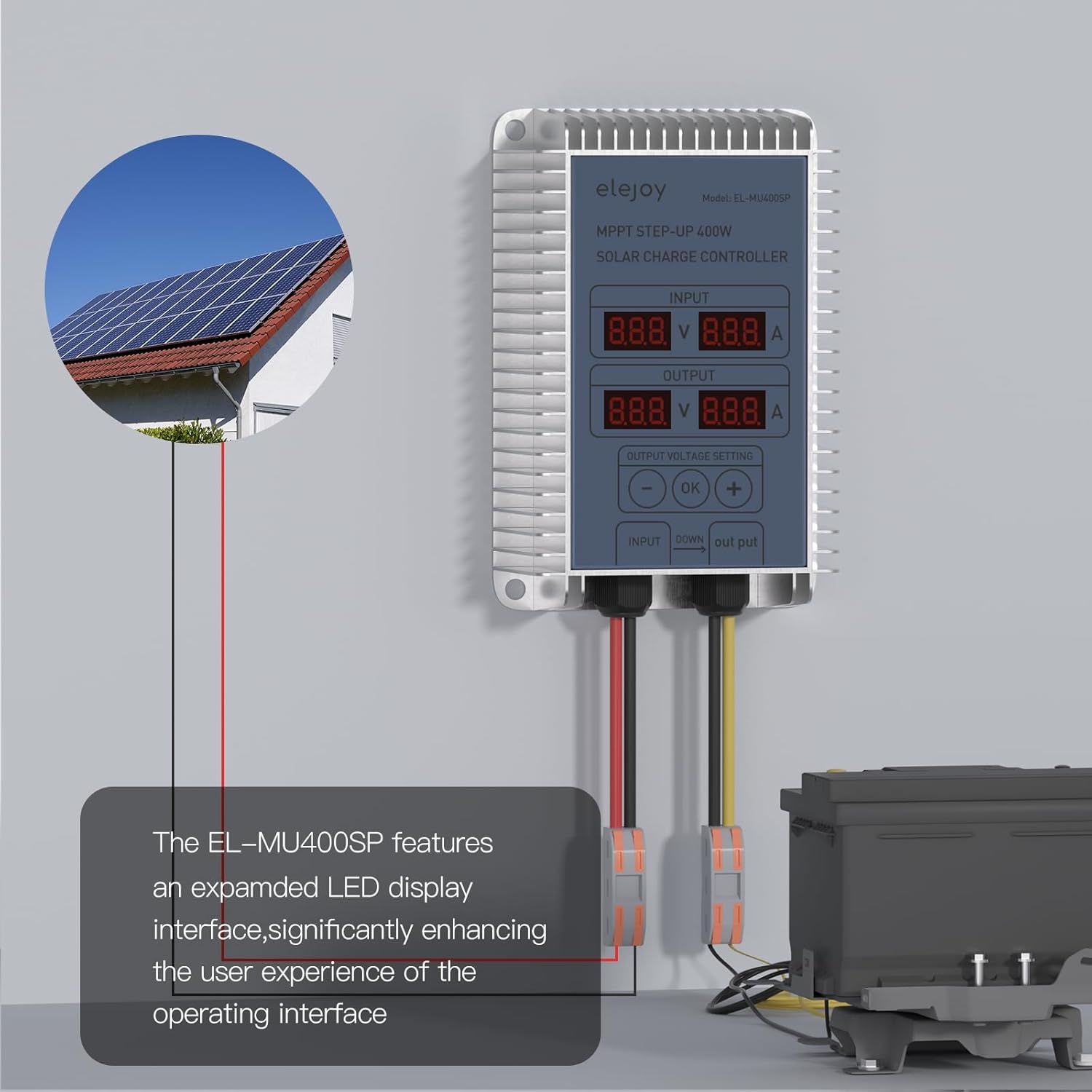
Figure 4.2.1: Typical wiring setup for the elejoy MPPT Step-Up Solar Charge Controller. Solar panels connect to the input, and the battery connects to the output.

Figure 4.2.2: Detailed connection diagram, emphasizing the PV input range and the connection points for solar panel and battery.
5. Operating Instructions
5.1 Initial Power-Up
Once the battery and solar panel are connected, the controller will automatically power on. The HD LED display will show real-time input (PV) and output (battery) voltage and current values.
5.2 Display Information
The LED display provides critical operational data:
- INPUT: Displays the voltage (V) and current (A) from the solar panel.
- OUTPUT: Displays the voltage (V) and current (A) being delivered to the battery.
Figure 5.2.1: The LED display interface, indicating input and output electrical parameters and the output voltage setting controls.
5.3 Setting Output Voltage
The controller allows adjustment of the output voltage to match your battery's charging requirements. Use the '-', 'OK', and '+' buttons:
- Press the 'OK' button to enter the output voltage setting mode.
- Use the '-' and '+' buttons to adjust the desired output voltage.
- Press 'OK' again to confirm and save the setting.
The controller automatically detects 24V-85V lithium battery activation. It is compatible with various battery types including LiFePO4, SLD, FLD, GEL, and AGM.

Figure 5.3.1: Battery compatibility and automatic detection feature for 24-85V lithium batteries.
6. Maintenance
- Regular Inspection: Periodically check all wiring connections for tightness and corrosion.
- Cleaning: Keep the controller clean and free from dust and debris. Use a dry cloth to wipe the casing. Do not use liquids or solvents.
- Ventilation: Ensure the area around the controller remains unobstructed to allow for proper heat dissipation.
- Environmental Check: Verify that the operating environment remains within the specified temperature and humidity ranges.
7. Troubleshooting
| Problem | Possible Cause | Solution |
|---|---|---|
| Controller not powering on | Battery not connected or low voltage; incorrect wiring. | Check battery connections and voltage. Ensure battery is connected first. |
| No charging current | Solar panel not connected or insufficient sunlight; incorrect solar panel wiring. | Verify solar panel connections and ensure adequate sunlight. Check solar panel voltage. |
| Output voltage incorrect | Output voltage setting is wrong. | Adjust the output voltage using the control buttons as described in Section 5.3. |
| Overheating | Poor ventilation; excessive load. | Ensure proper airflow around the controller. Reduce load if necessary. |
8. Specifications
| Parameter | Value |
|---|---|
| Model | EL-MU400SP |
| Brand | elejoy |
| Max PV Input Power | 400W |
| Max PV Input Voltage (VOC) | 55V |
| Rated Charge Current | 15A |
| Battery Voltage Range | 24V-85V (Lead-Acid, LiFePO4, Lithium) |
| PV Utilization Efficiency | ≥99% |
| Material | Aluminum |
| Product Dimensions (L x W x H) | 4.72" x 3.15" x 1.57" |
| Item Weight | 0.48 kg |
| Display Type | LED |
| Operating Temperature | -20°C to 50°C |

Figure 8.1: Physical dimensions of the elejoy EL-MU400SP controller.
9. Warranty and Support
elejoy products are manufactured to high-quality standards. For warranty information, technical support, or service inquiries, please contact elejoy customer support through their official website or the retailer from whom the product was purchased. Please have your model number (EL-MU400SP) and purchase details ready when contacting support.
For more information, visit the official elejoy Store on Amazon.