1. Introduction
The TARARIUM 400GPH Cold Plunge Filter H4F-S8F is a versatile 4-in-1 water purification system designed for cold tubs, ice baths, hot tubs, spas, and small swimming pools. It integrates water circulation, filtration, impurity removal, and oxygenation to maintain clean and healthy water. This filter features U-V disinfection for effective sterilization without chemical additives and a dual filtration system to ensure crystal clear water.

Image: Overview of the TARARIUM Multifunctional Cold Water Filter, highlighting its UV sterilization, water cycling, and double filtration capabilities.
2. Safety Information
- Always unplug the filter and UV unit before performing any maintenance, cleaning, or when using the cold plunge.
- Ensure the adjustable aeration tube remains above water for proper air intake.
- Do not operate the UV lamp outside of water. Direct exposure to UV light can be harmful.
- Regularly inspect the power cords for any damage. Do not use if cords are frayed or damaged.
- This product is designed for water purification. Do not use it for purposes other than its intended use.
- Keep out of reach of children.
3. Package Contents
Verify that all components are present and in good condition upon unpacking:
- Filter Unit Body
- Water Pump
- UV Lamp
- Filter Spacers / Baffles
- Filter Plates / Media
- Air Tube
- Suction Cups
- Power Adapter (if separate)
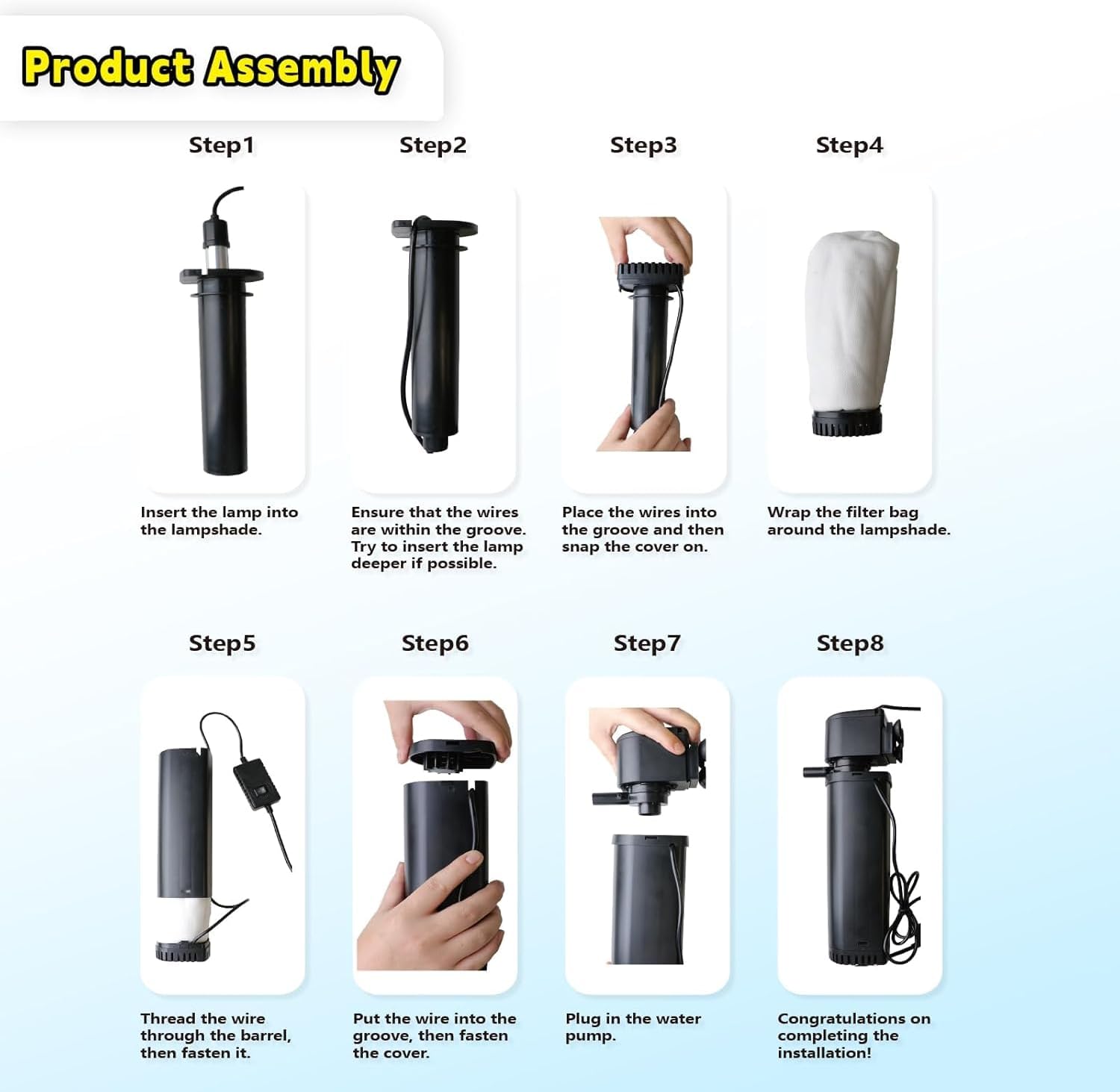
Image: All individual components of the filter unit laid out on a table, including the main body, pump, UV lamp, filter media, and tubing.
4. Product Features
- 4-in-1 Functionality: Combines water circulation, filtration, impurity removal, and oxygenation.
- High Flow Rate: 400 GPH (Gallons Per Hour) suitable for 100-800 gallon capacities.
- U-V Disinfection: Features U-V sanitation for faster, residue-free sterilization, eliminating 99.99% of microorganisms.
- Dual Filtration System: Utilizes a membrane bag for fine impurity capture and ultraviolet light for disinfection, clarifying cloudy or green water within 3-7 days.
- Bottom Suction Design: Effectively removes mud and debris from the bottom of the tub or pool.
- Adjustable Air Valve: Boosts oxygen production and increases dissolved oxygen levels in the water.
- Innovative Suction Cup Design: Allows for flexible placement, either vertically or horizontally.

Image: Detailed view of the UV sterilizer component, illustrating its function in eliminating microorganisms in water.

Image: Close-up of the ultra-fine bionic cashmere filtration material, showing its ability to capture pollen, dust, and microorganisms.
5. Setup Instructions
Follow these steps to assemble and install your TARARIUM Cold Plunge Filter:
- Insert UV Lamp: Carefully insert the UV lamp into the main filter body. Ensure the wires are within the designated groove.
- Install Baffles: Place the baffles into the filter body, ensuring they snap securely into place.
- Place Filter Media: Insert the filter plates or media into the filter body.
- Install Pump: Attach the water pump to the top of the filter body. Ensure it is firmly connected.
- Connect Air Tube: Connect the air tube to the designated port on the pump. The other end of the air tube should remain above the water surface for aeration.
- Secure Placement: Use the suction cups to firmly attach the assembled filter unit to the side of your cold plunge, ice bath, or pool. Ensure it is submerged in water, but the air tube remains exposed to air.
Image: Visual guide showing the eight steps for assembling the filter, from inserting the UV lamp to plugging in the water pump.
Setup Video Guides:
Video: A detailed guide on how to install your pool filter, demonstrating each step of the assembly process.
Video: An installation video specifically for the Cold Plunge Filter, showing the physical steps of putting the unit together.
Video: A product installation video display, providing a visual walkthrough of the setup process for the filter.
6. Operating Instructions
Once the filter is properly installed and submerged in water (with the air tube above water), plug in the power cord. The filter will begin circulating and purifying the water.
Adjusting Aeration:
The filter includes an adjustable air valve to control the amount of oxygen bubbles released into the water. This helps increase dissolved oxygen levels.
- To increase bubbles: Turn the air valve counter-clockwise.
- To decrease/stop bubbles: Turn the air valve clockwise.
Video: Demonstration of how to adjust the filter bubbles using the air valve, showing both increasing and decreasing aeration.
UV Light Operation:
The UV light is integrated for sterilization. A visible indicator on the power adapter or unit will confirm its operation.

Image: A visual representation of clear water in a cold plunge, demonstrating the effectiveness of the filter in maintaining water clarity.
Video: Shows the filter in operation, maintaining crystal clear water in an aquarium, demonstrating its effectiveness.
7. Maintenance
Regular maintenance is crucial for the optimal performance and longevity of your filter.
- Filter Media Cleaning: The filter media should be cleaned every 1-2 weeks. Rinse the filter media thoroughly with clean water.
- Filter Media Replacement: Replace the filter media once a month to ensure continued effective filtration.
- UV Lamp: The UV lamp has a limited lifespan and should be replaced periodically as per manufacturer recommendations (typically every 6-12 months, depending on usage).
- Pump Cleaning: Periodically clean the water pump to remove any accumulated debris that may hinder its performance.
Disassembly for Cleaning:
Video: A guide on how to disassemble the product for cleaning and maintenance, showing the steps to take apart the filter unit.
8. Troubleshooting
| Problem | Possible Cause | Solution |
|---|---|---|
| Filter not circulating water / No suction |
|
|
| Water remains cloudy or green |
|
|
| No bubbles from air tube |
|
|
| Filter unit detaches from tub wall |
|
|
9. Specifications
| Feature | Detail |
|---|---|
| Model Number | H4F-S8F |
| Brand | TARARIUM |
| Flow Rate | 400 GPH |
| Recommended Tank Size | 100-800 Gallons |
| UV Sanitation | Yes |
| Filtration Type | Dual Filtration (Mechanical & UV) |
| Item Weight | 2.35 pounds |
| Package Dimensions | 14.25 x 4.76 x 3.86 inches |

Image: Diagram showing the physical dimensions of the filter unit and the included filter bags.
10. Warranty and Support
For warranty information and customer service, please refer to the documentation included with your purchase or contact TARARIUM customer service directly. Keep your purchase receipt as proof of purchase for any warranty claims.
Manufacturer: TARARIUM
Seller: TaoSurer (via Amazon)
Return Policy: 30-day refund/replacement period (as per Amazon's buybox winner information).


