
Introduction
This manual provides comprehensive instructions for the JOLGRDWS Universal Air Conditioner Remote Control. It is designed to be compatible with various Qlima air conditioner models, including SC3325, S3364, S3331, and SC3348. This remote control requires no programming and is ready for use after battery installation.
1. Setup
1.1 Battery Installation
- Locate the battery compartment on the back of the remote control.
- Slide the battery cover downwards or outwards to open it.
- Insert two (2) 1.5V AA alkaline batteries, ensuring the correct polarity (+ and -) as indicated inside the compartment.
- Close the battery cover securely.
Note: Batteries are not included with the remote control.

Figure 1: Battery compartment with cover open, illustrating battery insertion.
1.2 Initial Use
This remote control is designed for immediate use with compatible Qlima air conditioner models without requiring any programming. Once batteries are installed, point the remote control towards your air conditioner and begin operation.
2. Operating Instructions
Familiarize yourself with the buttons and their functions for optimal control of your air conditioner.
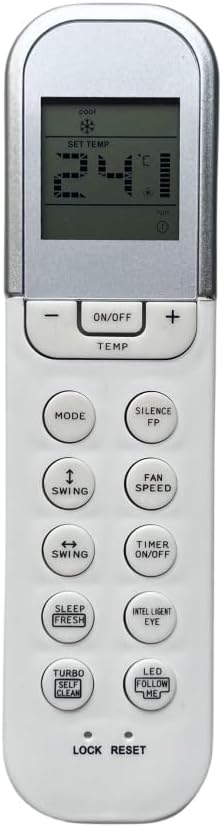
Figure 2: Front view of the remote control with button layout.
2.1 Basic Functions
- ON/OFF: Press to turn the air conditioner on or off.
- TEMP (+/-): Adjusts the desired temperature setting.
- MODE: Cycles through operating modes such as Cool, Heat, Fan, Dry, Auto.
- FAN SPEED: Adjusts the fan speed (e.g., Low, Medium, High, Auto).
- SWING (Vertical): Controls the vertical louver movement.
- SWING (Horizontal): Controls the horizontal louver movement.
- TIMER ON/OFF: Sets the timer for automatic power on or off.
2.2 Special Functions
- SILENCE/FP: Activates silent operation mode or Freeze Protection (functionality may vary by AC model).
- SLEEP/FRESH: Activates sleep mode for comfortable night operation or fresh air function.
- TURBO/SELF CLEAN: Engages turbo mode for rapid cooling/heating or initiates a self-cleaning cycle.
- INTELLIGENT EYE: Activates the intelligent eye sensor (if available on AC) for optimized comfort and energy saving.
- LED FOLLOW ME: Activates the 'Follow Me' function, allowing the AC to adjust temperature based on the remote's location.
- LOCK/RESET: The 'LOCK' function may lock the remote to prevent accidental changes. 'RESET' typically restores default settings.
3. Maintenance
3.1 Battery Replacement
When the remote control's display dims or its response becomes sluggish, it is time to replace the batteries. Follow the battery installation steps in Section 1.1. Always replace both batteries simultaneously with new 1.5V AA alkaline batteries.
3.2 Cleaning
To clean the remote control, wipe it gently with a soft, dry cloth. Do not use liquid cleaners, abrasive materials, or chemical solvents, as these can damage the remote's surface or internal components.
3.3 Storage
If the remote control will not be used for an extended period, remove the batteries to prevent leakage and potential damage to the device.
4. Troubleshooting
- Remote not responding:
- Check if the batteries are correctly installed and have sufficient charge. Replace if necessary.
- Ensure there are no obstructions between the remote control and the air conditioner's receiver.
- Confirm you are within the effective operating range of the air conditioner.
- Limited operating range:
- Replace old batteries with new ones.
- Ensure the remote's infrared emitter is clean and unobstructed.
5. Specifications
| Brand | JOLGRDWS |
| Model | JOLGRDWS |
| Compatible Devices | Air Conditioner (Qlima models: SC3325, S3364, S3331, SC3348, etc.) |
| Connectivity Technology | Infrared (IR), Radio Frequency (RF) |
| Controller Type | IR and RF |
| Special Features | No programming required, Universal |
| Battery Type | 2 x AA 1.5V Alkaline (not included) |
| Weight | Approximately 50 Grams |
| Frequency | 433 MHz |
6. Warranty and Support
Specific warranty information for this product is not available in the provided documentation. For any warranty claims, technical support, or further assistance, please contact the seller or retailer from whom the product was purchased.