
1. Introduction
Thank you for choosing the SOOWERY SOOVDD666BW Drawer Dresser with Charging Station. This product is designed to provide organized storage and convenient device charging for your bedroom or living room. This manual contains important information regarding the assembly, operation, maintenance, and troubleshooting of your new dresser. Please read it thoroughly before assembly and retain it for future reference.

An assembled SOOWERY drawer dresser, featuring a rustic brown wood-look top and fabric drawers, with a black steel frame. A charging station is visible on the top surface.
2. Safety Instructions
- Always follow the assembly instructions carefully.
- Do not overload drawers or shelves.
- Ensure the dresser is placed on a flat, stable surface to prevent tipping.
- Keep children away during assembly. Small parts may pose a choking hazard.
- For the charging station, use only with compatible devices and ensure the power cord is not pinched or damaged.
- Do not expose the charging station to water or excessive moisture.
- Unplug the charging station from the wall outlet when not in use or during electrical storms.
3. Package Contents
Before beginning assembly, verify that all components are present and undamaged. If any parts are missing or damaged, please contact SOOWERY customer support.
- Steel Frame Components
- Wood Top Panel with Integrated Charging Station
- Fabric Drawers (2 units)
- Drawer Handles
- Assembly Hardware (screws, Allen wrench, etc.)
- Instruction Manual
4. Assembly Instructions
Assembly typically requires one person and approximately 30-60 minutes. A Phillips head screwdriver may be required (not included).
- Unpack Components: Carefully remove all parts from the packaging and lay them out on a clean, soft surface to prevent scratches.
- Assemble Steel Frame: Connect the vertical and horizontal steel frame components using the provided screws and Allen wrench. Ensure all connections are secure.
- Attach Wood Top: Secure the wood top panel, which includes the charging station, to the top of the assembled steel frame using the designated screws.
- Insert Fabric Drawers: Unfold the fabric drawers and insert the bottom panels. Attach the drawer handles to the front of each fabric drawer. Slide the assembled drawers into their respective slots within the frame.
- Position Dresser: Place the dresser in its desired location. Ensure the power cord for the charging station can reach a wall outlet without tension.
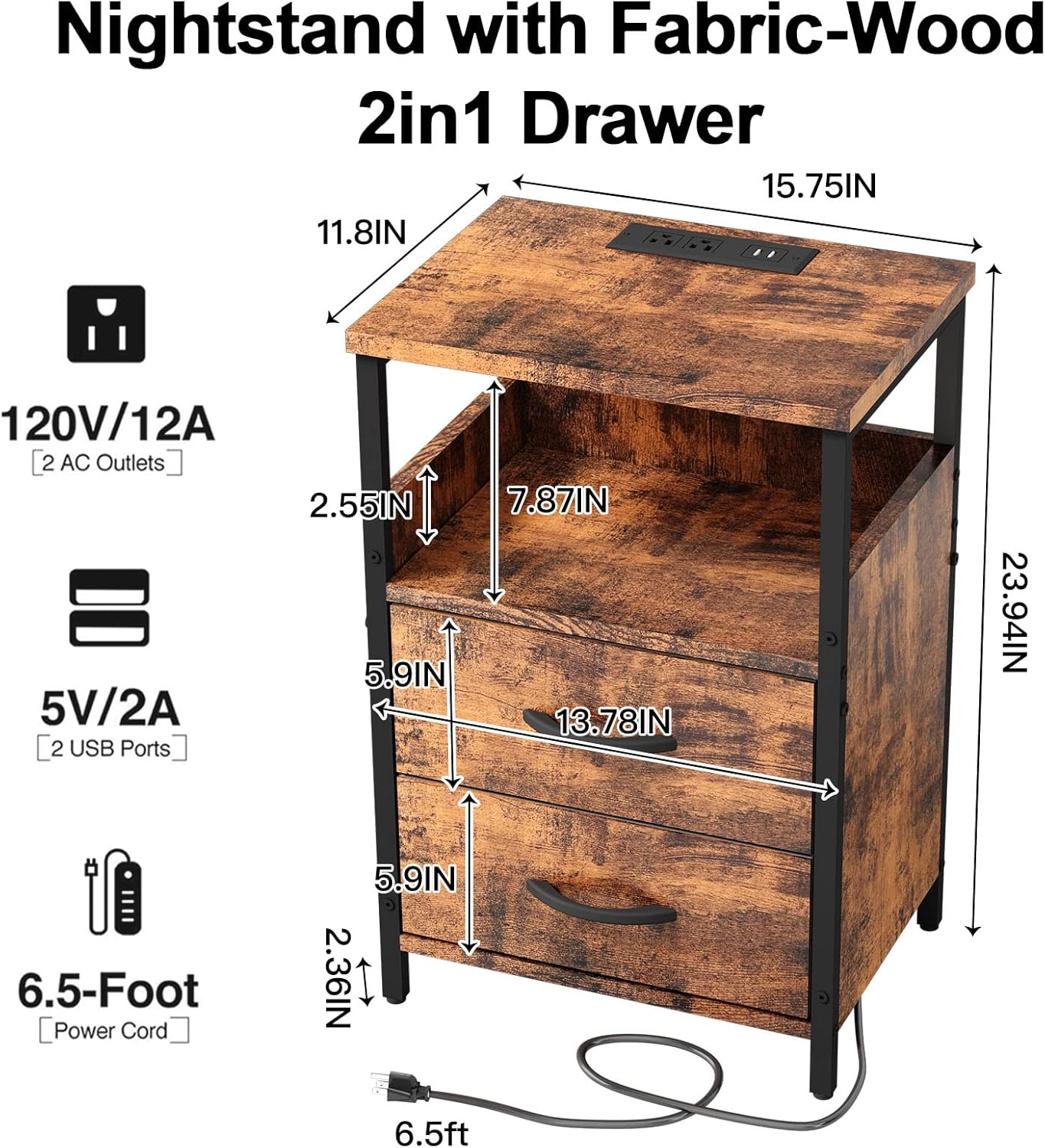
A diagram illustrating the dimensions of the SOOWERY drawer dresser, including overall height, width, depth, and individual drawer and shelf measurements. It also highlights the charging station specifications.

The SOOWERY drawer dresser with its two fabric drawers partially open, revealing storage space and the internal structure.
5. Operating Instructions (Charging Station)
The integrated charging station provides convenient power access for your electronic devices.
- Connect to Power: Plug the 6.5-foot power cord from the dresser into a standard 120V AC wall outlet.
- AC Outlets: Use the two 120V/12A AC outlets to power lamps, laptops, or other small appliances.
- USB Ports: Use the two 5V/2A USB ports to charge smartphones, tablets, and other USB-powered devices.
- Usage: Insert your device's charging cable into the appropriate USB port or plug your device's power adapter into an AC outlet.

A detailed view of the integrated charging station on the top surface of the dresser, showing two AC outlets and two USB ports, with a tablet charging.

The top surface of the SOOWERY dresser with a tablet actively charging via the built-in USB port, alongside a coffee cup and a lamp.
6. Maintenance
- Cleaning: Wipe the wood top and steel frame with a dry, soft cloth. For fabric drawers, spot clean with a damp cloth and mild detergent if necessary, then air dry completely.
- Avoid Harsh Chemicals: Do not use abrasive cleaners or strong chemicals, as they may damage the finish.
- Check Connections: Periodically check all screws and connections to ensure they remain tight. Retighten if necessary.
- Power Cord: Inspect the power cord regularly for any signs of damage. If damaged, discontinue use of the charging station and contact customer support.
7. Troubleshooting
- Dresser is unstable: Ensure all screws are fully tightened. Verify the dresser is on a level surface.
- Charging station not working:
- Check if the power cord is securely plugged into a working wall outlet.
- Ensure the device you are trying to charge is properly connected to the USB port or AC outlet.
- Test the wall outlet with another appliance to confirm it has power.
- Try a different charging cable or device to rule out device-specific issues.
- Drawers do not slide smoothly: Ensure the fabric drawers are correctly assembled and inserted. Check for any obstructions.
8. Specifications
| Brand | SOOWERY |
| Model Name | SOOVDD666BW |
| Product Dimensions | 11.8"D x 15.75"W x 23.9"H |
| Size | 11.8"D x 15.8"W x 23.9"H (2 Drawers) |
| Item Weight | 18 pounds |
| Color | Brown |
| Room Type | Bedroom, Living Room |
| Assembly Required | Yes |
| AC Outlets | 2 (120V/12A) |
| USB Ports | 2 (5V/2A) |
| Power Cord Length | 6.5 feet |
9. Warranty and Support
SOOWERY stands behind the quality of its products. For any questions, concerns, or assistance with assembly or operation, please do not hesitate to contact SOOWERY customer support. We are committed to providing prompt and helpful service.
Please refer to your purchase documentation for specific warranty details.