Introduction
This document provides instructions for the Generic Replacement Remote Control, designed for use with specific Aiwa Music Center models including RBT-3000M, XR-FA660, XR-FA770, and XR-MN75. This remote is a functional replacement and may not replicate all features or functions of your original equipment remote control. Please review this manual to understand its operation and capabilities.
Product Overview
The replacement remote control features a standard layout for audio system operation. Familiarize yourself with the button arrangement as shown in the image below.
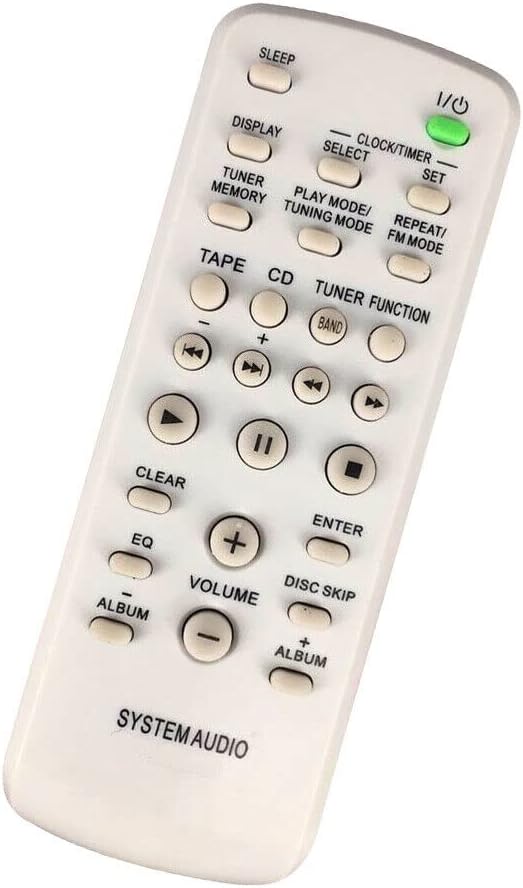
Figure 1: Front View of the Remote Control. This image displays the front of the white replacement remote control, highlighting its array of buttons. Key buttons visible include Power (I/O), Sleep, Display, Clock/Timer Set, Select, Tuner Memory, Play Mode/Tuning Mode, Repeat/FM Mode, Tape, CD, Tuner Function, Band, various playback controls (rewind, fast forward, play, pause, stop), Clear, EQ, Enter, Volume up/down, Disc Skip, and Album up/down. The bottom of the remote is labeled "SYSTEM AUDIO".
The rear of the remote control, where the battery compartment is located, is designed for easy access.

Figure 2: Back View of the Remote Control. This image shows the rear of the white replacement remote control. The design is simple, featuring a smooth surface with a visible battery compartment cover in the lower section, indicating where batteries are to be inserted.
Setup
Battery Installation
- Locate the battery compartment on the back of the remote control (refer to Figure 2).
- Slide the battery compartment cover downwards or press the latch and lift to open.
- Insert two AAA batteries (not included), ensuring the positive (+) and negative (-) terminals align correctly with the markings inside the compartment.
- Replace the battery compartment cover by sliding it back into place until it clicks securely.
Note: Always use new batteries and replace both batteries at the same time. Do not mix old and new batteries or different types of batteries.
Operating Instructions
This remote control requires no programming or setup. Simply insert batteries and point it towards your Aiwa Music Center. Functionality may vary depending on your specific Aiwa model.
Basic Functions
- Power (I/O): Press to turn the music center on or off.
- Volume (+/-): Adjusts the audio output level.
- Playback Controls (►, ⏸⏸, ◀◀, ■, ⏹⏹): Control CD or Tape playback (Play, Pause, Fast Forward, Rewind, Stop).
- CD / TAPE / TUNER: Selects the input source.
- BAND: Switches between FM and AM radio bands.
Specific Functions
- DISPLAY: Toggles display information on the music center.
- CLOCK/TIMER SET: Accesses clock and timer settings.
- TUNER MEMORY: Stores or recalls radio station presets.
- PLAY MODE / TUNING MODE: Changes playback modes (e.g., repeat, shuffle) or tuner modes (e.g., auto-tune, manual tune).
- REPEAT / FM MODE: Activates repeat playback or changes FM reception mode.
- EQ: Adjusts equalizer settings.
- ENTER: Confirms selections.
- DISC SKIP: Skips to the next or previous disc in a multi-disc changer (if applicable).
- ALBUM (+/-): Navigates between albums or folders.
For detailed information on specific functions, please refer to your original Aiwa Music Center's instruction manual.
Maintenance
- Cleaning: Wipe the remote control with a soft, dry cloth. Do not use abrasive cleaners or solvents.
- Battery Care: Remove batteries if the remote control will not be used for an extended period to prevent leakage. Dispose of used batteries responsibly according to local regulations.
- Storage: Store the remote control in a cool, dry place away from direct sunlight and extreme temperatures.
Troubleshooting
- Remote not responding:
- Ensure batteries are inserted correctly with the correct polarity.
- Replace old batteries with new ones.
- Check for any obstructions between the remote and the music center's infrared receiver.
- Ensure you are within the effective range and pointing the remote directly at the music center.
- Some functions do not work:
- As a replacement remote, some advanced or specific functions of your original remote may not be supported. This is not a defect of the product.
- Verify that the function you are trying to use is applicable to your specific Aiwa Music Center model.
Specifications
| Brand | Generic |
| Model Number | NKEB20245237934 |
| Compatible Devices | Aiwa Music Centers (RBT-3000M, XR-FA660, XR-FA770, XR-MN75) |
| Material | ABS/Plastic |
| Power Source | 2 x AAA Batteries (not included) |
| Special Feature | Digital Display (referring to the original device's capability, not the remote itself) |
Warranty and Support
This product is a generic replacement remote control. Specific warranty information may vary by seller. For any issues or support inquiries, please contact the retailer or seller from whom you purchased this product. It is recommended to retain your purchase receipt for warranty claims, if applicable.