
1. Introduction
The HANMATEK BD60 is an advanced automotive battery tester designed to accurately assess the health and performance of 12V and 24V lead-acid batteries. This device provides comprehensive analysis of battery parameters including State of Health (SOH), State of Charge (SOC), Voltage, Cold Cranking Amps (CCA), and internal resistance. It also performs cranking and charging system tests, offering valuable insights into your vehicle's electrical system. Equipped with a built-in thermal printer, the BD60 allows for immediate printing of test results for record-keeping or customer reports.
2. Product Overview and What's in the Box
The HANMATEK BD60 battery tester is a robust and user-friendly tool for automotive diagnostics. Below is an image of the product and its typical contents.

Image: The HANMATEK BD60 Car Battery Tester, showing the main unit, red and black test clamps, and a protective carrying case.
Package Contents:
- 1x HANMATEK BD60 24V 12V Car Battery Tester
- 1x User Manual (multi-language)
- 1x USB Type-C Cable
- 1x Protective Carrying Case
- Thermal Printer Paper Roll (pre-installed or included)

Image: The complete package contents of the BD60, laid out to show the tester, cables, manual, and carrying case.
3. Key Features
- Comprehensive Battery Analysis: Tests 12V and 24V lead-acid batteries, providing SOH, SOC, Voltage, CCA, and internal resistance readings. Offers professional advice on battery replacement or charging.
- Wide Application Range: Compatible with 100-2000 CCA lead-acid batteries, including regular flooded, AGM flat plate/spiral, GEL, EFB, UPS, and EPS types. Suitable for various vehicles such as cars, SUVs, ATVs, motorcycles, marine vessels, and buses.
- Cranking and Charging System Tests: Evaluates the electrical system's ability to start the engine and checks the charging system status to prevent overcharge or incomplete charge.
- Built-in Thermal Printer: Allows for instant printing of test results without the need for ink cartridges or ribbons. Uses standard thermal paper.
- Safe and Reliable Operation: Features reinforced input protection, reverse connection protection, overvoltage protection, and test clamp bad contact protection. Utilizes the four-wire Kelvin test method for accurate results without damaging the battery.
- User-Friendly Design: Equipped with a 2.4-inch large-screen LCD display for clear and intuitive display of test processes and results. Supports multiple user interface languages (English, German, Japanese).

Image: The BD60 display illustrating the four main test modes: Battery Test, Startup Test, Load Test, and Charging Test.

Image: The BD60 in use, connected to a car battery, demonstrating its built-in thermal printer and the Type-C charging port.
4. Safety Information
Please read and understand all safety warnings and instructions before operating the HANMATEK BD60 battery tester. Failure to follow these instructions may result in electric shock, fire, or serious injury.
- Always wear appropriate eye protection and protective clothing when working with batteries.
- Ensure good ventilation in the work area as batteries can emit explosive gases.
- Avoid sparks, flames, and smoking near batteries.
- Do not touch battery acid. If contact occurs, flush immediately with water and seek medical attention.
- Connect the test clamps correctly: Red clamp to positive (+) terminal, Black clamp to negative (-) terminal. The BD60 features reverse connection protection, but correct connection is always recommended.
- Do not operate the tester if it appears damaged.
- Keep the device away from children.
5. Setup
5.1 Initial Power-On
- The BD60 is powered directly by the vehicle's battery. Ensure the battery has sufficient charge to power the device.
- Connect the red test clamp to the positive (+) terminal of the battery.
- Connect the black test clamp to the negative (-) terminal of the battery.
- The device will power on automatically and display the main menu.
5.2 Language Selection
Upon first use or after a reset, you may need to select your preferred language. Navigate through the menu using the arrow buttons and confirm with the 'Enter' button. The user interface supports English, German, and Japanese.

Image: The BD60 display showing the language selection menu, with options for English, Deutsch, Français, Italiano, and Español.
6. Operating Instructions
The BD60 offers several testing modes to thoroughly evaluate your battery and vehicle's electrical system.
6.1 Battery Test
This test assesses the overall health of the battery.
- From the main menu, select "Battery Test".
- Choose the battery type (e.g., Flooded, AGM, GEL).
- Enter the battery's CCA rating (usually found on the battery label).
- The tester will perform the analysis and display results including SOH, SOC, Voltage, CCA, and internal resistance.

Image: A table detailing battery life measurement based on SOH percentages and recommended actions (Replace, Attention, Normal, Good, Please Charge) for both 12V and 24V systems.
6.2 Cranking Test (Startup Test)
This test evaluates the battery's ability to provide sufficient power to start the engine.
- From the main menu, select "Cranking Test" or "Startup Test".
- Follow the on-screen prompts to start the vehicle's engine.
- The tester will record the minimum starting voltage and display the result.

Image: A table outlining startup test results based on the starting voltage value, categorizing them as Good, Normal, or Attention.
6.3 Charging Test (Alternator Test)
This test checks the vehicle's charging system (alternator) to ensure it is functioning correctly and not overcharging or undercharging the battery.
- From the main menu, select "Charging Test".
- Follow the on-screen prompts, which may include revving the engine to a specific RPM.
- The tester will analyze the alternator's output and display the results.

Image: A table presenting charging test results based on dynamic voltage values, categorized as Excellent, Good, Normal, or Attention for both 12V and 24V systems.
6.4 Load Test (Generator Performance)
This test measures the generator's performance under load conditions.
- From the main menu, select "Load Test".
- Follow the on-screen instructions, which may involve turning on specific vehicle accessories to create a load.
- The tester will measure the voltage and provide an assessment of the generator's performance.

Image: A table displaying loading test results based on voltage values, categorized as Normal or Attention for both 12V and 24V systems, with troubleshooting advice for 'Attention' results.
6.5 Printing Test Results
After completing any test, you can print the results using the built-in thermal printer.
- Once the test results are displayed, press the "Print" button on the device.
- The results will be printed on the thermal paper.
- To feed more paper, press the "Feed" button.
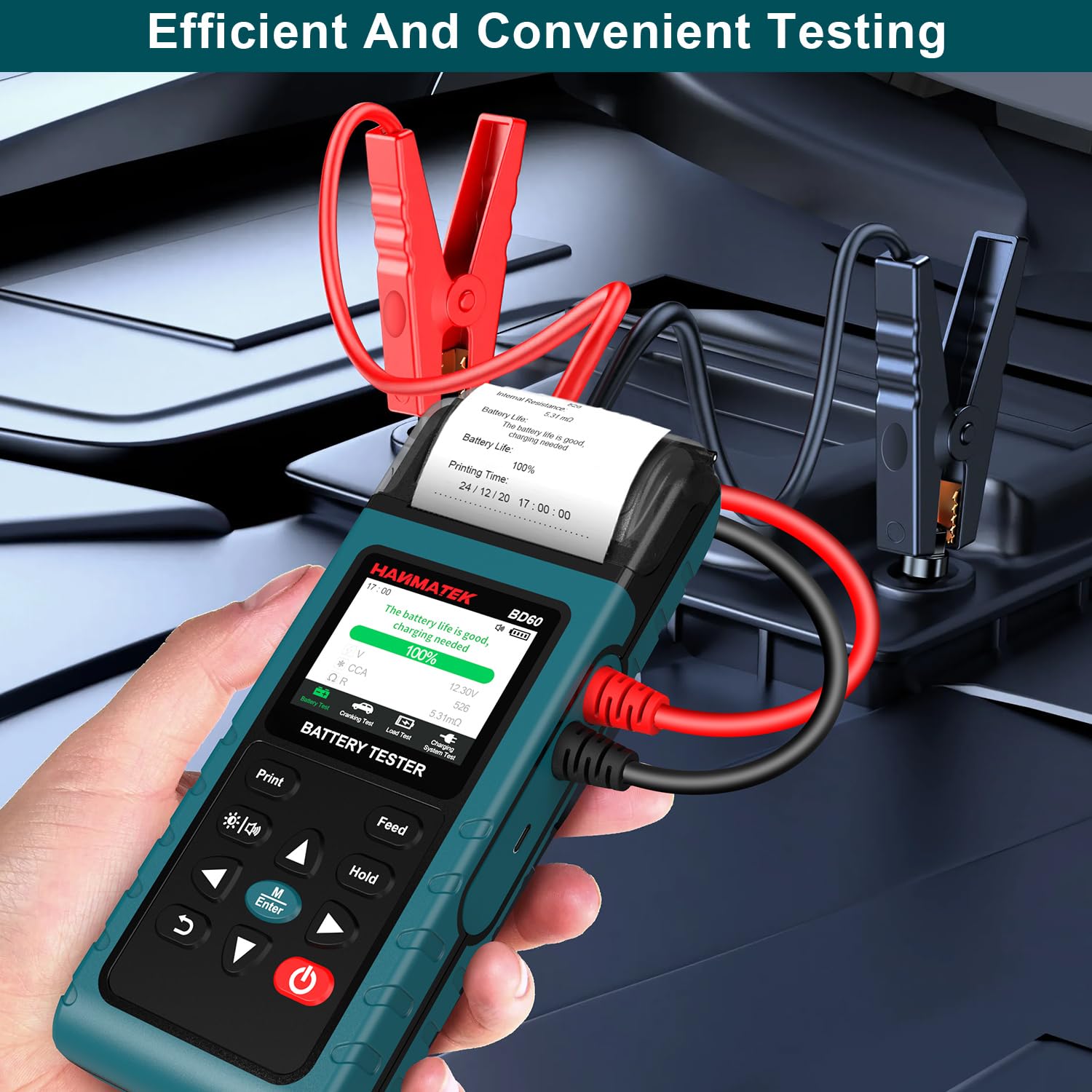
Image: The BD60 connected to a car battery, actively printing test results, demonstrating efficient and convenient testing.
7. Maintenance
- Cleaning: Wipe the device with a soft, dry cloth. Do not use abrasive cleaners or solvents.
- Storage: Store the BD60 in its protective carrying case in a dry, cool environment when not in use. Avoid extreme temperatures.
- Thermal Paper: Ensure you have spare thermal paper rolls. Replace the roll when it runs out. Only use standard thermal paper.
- Cable Inspection: Regularly inspect the test cables and clamps for any signs of damage, wear, or corrosion. Replace if necessary.
8. Troubleshooting
- Device does not power on: Ensure the test clamps are securely connected to the correct battery terminals. The battery may be too discharged to power the device; try charging the battery first.
- Inaccurate readings: Ensure the battery terminals are clean and free of corrosion. Verify that the CCA value entered for the battery test matches the battery's actual rating. If the battery voltage is less than 12.0V (for 12V systems) or 24.0V (for 24V systems), the measurement result may be invalid; charge the battery and retest.
- Printer not working: Check if the thermal paper roll is correctly installed and not empty. Ensure the printer cover is closed properly.
- "Bad Contact" error: Re-secure the test clamps to the battery terminals, ensuring a firm and clean connection.
- Generator performance issues (Loading Test): If the test indicates an 'Attention' status, check the generator belt for wear and ensure there are no short circuits in the wiring.
9. Specifications
| Feature | Specification |
|---|---|
| Model Number | BD60 |
| Supported Battery Types | 12V & 24V Lead-Acid (Flooded, AGM Flat Plate/Spiral, GEL, EFB, UPS, EPS) |
| CCA Range | 100-2000 CCA |
| Display | 2.4-inch LCD |
| Printer | Built-in Thermal Printer |
| Test Method | Four-wire Kelvin Test |
| Input Protection | Reverse Connection, Overvoltage, Bad Contact |
| User Interface Languages | English, German, Japanese |
| Item Weight | 0.47 Kilograms (1.04 Pounds) |
| Package Dimensions | 9.53 x 5.16 x 3.19 inches |
| Manufacturer | Shenzhen Hanmatek Precision Technology Co.,Ltd. |
10. Warranty and Support
For warranty information and technical support, please refer to the documentation included with your product or contact HANMATEK customer service directly. Contact details can typically be found on the manufacturer's official website or on the product packaging.
