
1. Introduction
This manual provides essential information for the safe and effective operation, maintenance, and troubleshooting of your MEROUS 4D Zero Gravity SL-Track Shiatsu Massage Chair, Model YJ-V9Z. Please read this manual thoroughly before using the product and retain it for future reference.
The MEROUS massage chair is designed to provide a comprehensive massage experience, featuring 4D massage rollers, an extended SL-track, zero-gravity recline, full-body airbags, foot rollers, waist heating, Bluetooth connectivity, and voice control. It is engineered for personalized comfort and relaxation.
2. Safety Information
Important Safety Instructions:
- Always unplug the massage chair from the electrical outlet immediately after use and before cleaning.
- Do not use the chair in a wet or damp environment. Keep away from water.
- This appliance is not intended for use by persons with reduced physical, sensory, or mental capabilities, or lack of experience and knowledge, unless they have been given supervision or instruction concerning use of the appliance by a person responsible for their safety.
- Children should be supervised to ensure that they do not play with the appliance.
- Never operate the chair if it has a damaged cord or plug, if it is not working properly, if it has been dropped or damaged, or dropped into water. Contact customer support for assistance.
- Keep the power cord away from heated surfaces.
- Do not use attachments not recommended by the manufacturer.
- Do not stand on or in the massage chair. Use only while seated.
- Do not use the chair for more than 30 minutes at a time to prevent overheating.
- Consult a physician before using this massage chair if you have any medical conditions, are pregnant, or have a pacemaker.
3. Package Contents
Upon unpacking, please ensure all components are present and undamaged. If any parts are missing or damaged, contact MEROUS customer support immediately.
- Main Massage Chair Body
- Footrest Assembly
- LCD Control Screen
- Power Cord
- User Manual (this document)
- Assembly Tools (if required)
4. Setup and Assembly
The MEROUS massage chair is largely pre-assembled. Minor assembly is typically required for the footrest and connecting the control panel.
4.1 Unpacking and Placement
- Carefully remove all packaging materials.
- Ensure the chair is placed on a flat, stable surface.
- Allow sufficient space around the chair for reclining and footrest extension.
- The minimum doorway size for installation is approximately 30.7 inches.
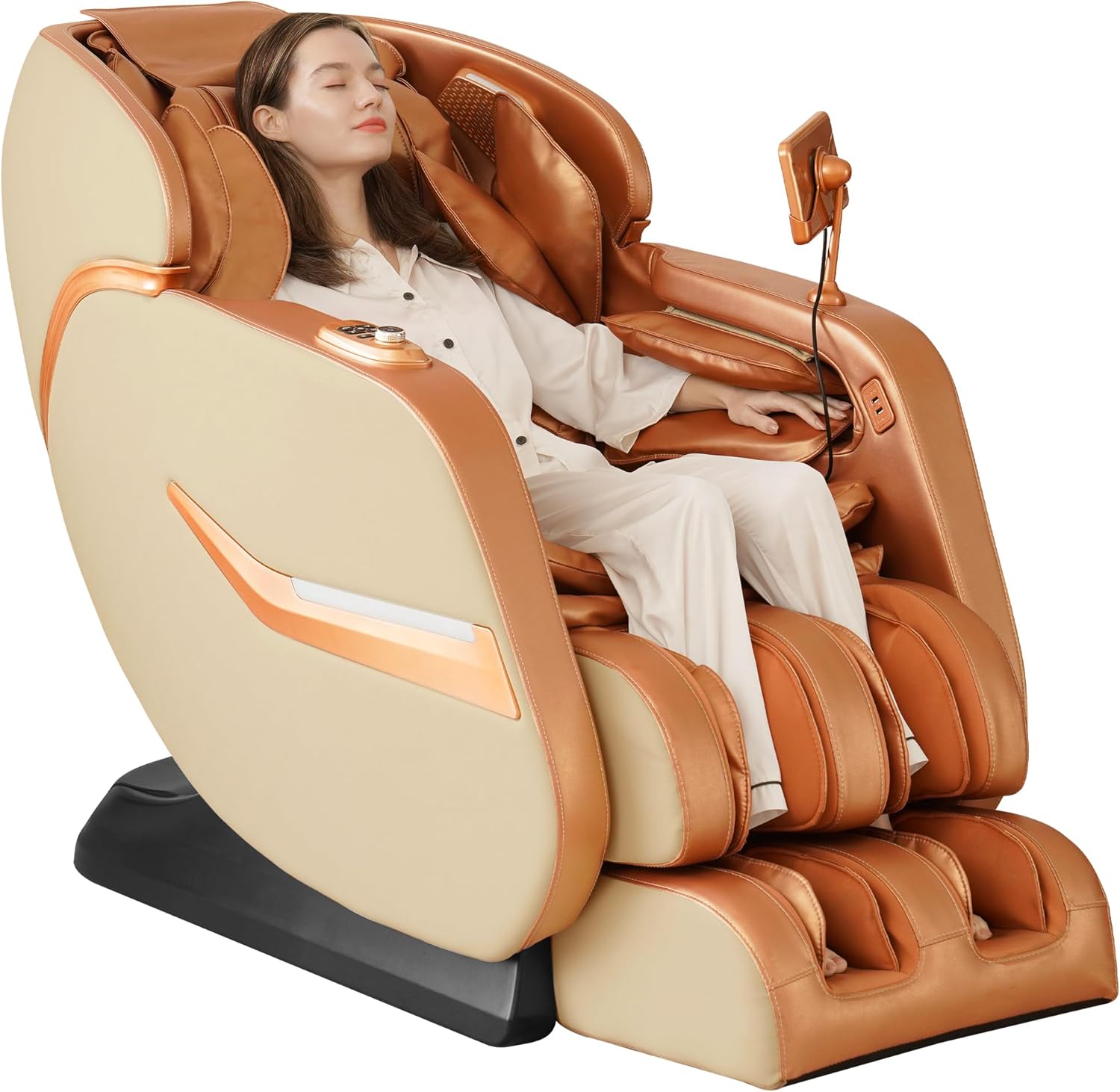
Image 1: The MEROUS 4D Zero Gravity SL-Track Shiatsu Massage Chair in Gold color.
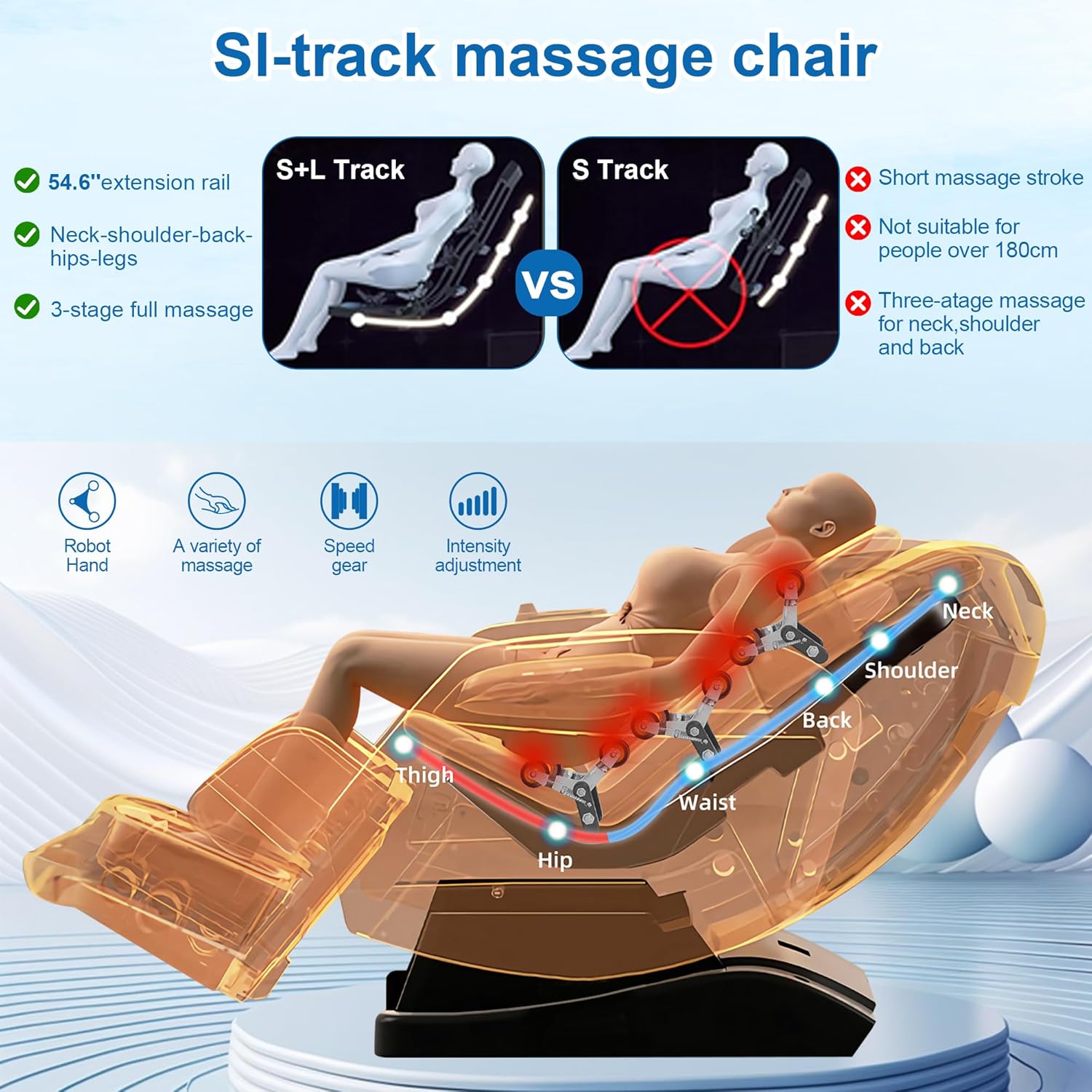
Image 2: Illustration of the massage chair's pre-assembled packaging and the recommended minimum doorway width of 30.7 inches for installation.
4.2 Footrest Assembly
Refer to the included assembly diagram for specific instructions on attaching the footrest. Typically, this involves aligning the footrest with the main body and securing it with provided bolts or connectors.
4.3 Power Connection
- Connect the power cord to the chair's power inlet.
- Plug the power cord into a grounded electrical outlet.
5. Operating Instructions
Your MEROUS massage chair offers various features and control methods for a customized massage experience.
5.1 Control Methods
The chair can be controlled via the LCD touch screen, armrest shortcut keys, or voice commands.

Image 3: Overview of the three primary control interfaces: the LCD touch screen, integrated armrest buttons, and voice command functionality.
- LCD Control Screen: Use the touch screen to navigate through massage programs, adjust settings, and monitor the massage process.
- Armrest Shortcut Keys: Conveniently located buttons on the armrest provide quick access to frequently used functions like power, recline, and massage intensity.
- Voice Control: Activate voice control by saying "Hello Nana." Instructions for voice commands are located on the back of the LCD touch screen.
5.2 Automatic Body Scanning
Upon activation, the chair performs an automatic body scan to detect your body shape and size. This allows the massage rollers to adjust their position for a personalized and accurate massage tailored to your specific needs.
5.3 Massage Programs and Techniques
The chair features advanced 4D massage rollers and an extended SL-track for comprehensive coverage from neck to hips.
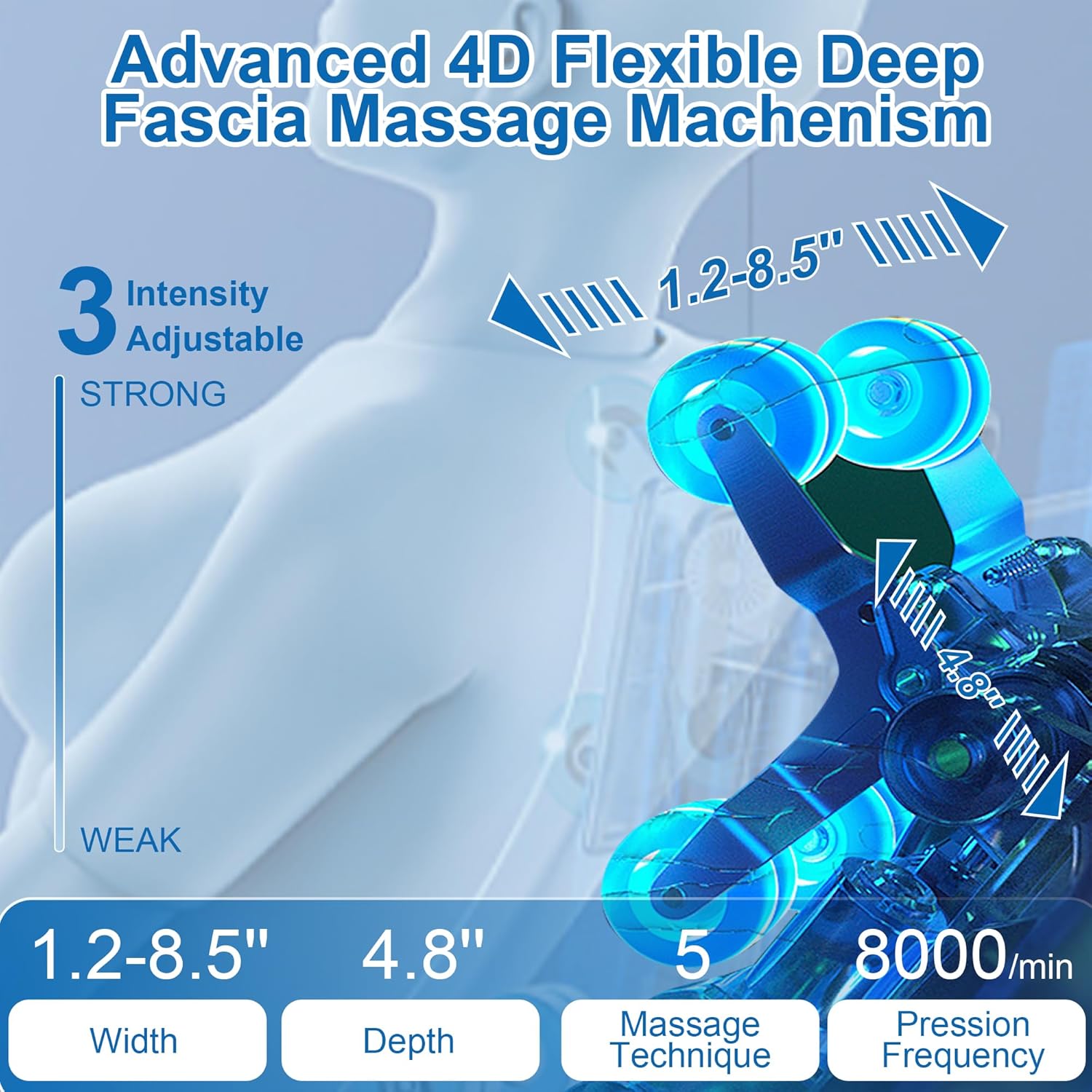
Image 4: Details of the 4D massage mechanism, highlighting adjustable width (1.2-8.5"), depth (4.8"), 5 massage techniques, and 3 intensity levels.
Image 5: Visual comparison demonstrating the extended 54.6-inch S+L track, which provides comprehensive massage coverage for the neck, shoulders, back, hips, and legs, compared to a shorter S-track.
- 4D Massage Rollers: Mimic human hands with adjustable width, depth, and intensity.
- SL-Track Design: The 54.6-inch SL-track follows the natural curve of your spine, providing massage from your neck down to your glutes.
- Massage Techniques: Choose from 5 techniques including Shiatsu, Kneading, Tapping, Knocking, and Tapping & Kneading.
- Auto Modes: Select from 5 pre-programmed auto massage modes for various needs.
- Intensity Levels: Adjust massage intensity to 3 different levels.
5.4 Zero Gravity Function
The zero-gravity feature reclines the chair to elevate your legs above your heart, reducing spinal compression and improving blood circulation. This position creates a sensation of weightlessness, enhancing the massage experience.

Image 6: Depiction of the zero-gravity recline, designed to reduce pressure on the body and enhance relaxation.
5.5 Airbag Massage and Waist Heating
The chair incorporates 32 airbags strategically placed throughout the chair to provide compression massage for the full body, including arms, shoulders, hips, and legs. The waist heating function provides soothing warmth to the lower back area.

Image 7: Visual representation of the full-body airbag massage and integrated waist heating features.
5.6 Foot Rollers Massage and Stretching
Integrated foot rollers provide kneading massage to stimulate acupoints on the soles of your feet. The leg airbags apply compression, and the chair's stretching function helps to elongate the body and relieve muscle tension.
5.7 Bluetooth Connectivity
Connect your device via Bluetooth to the chair's integrated speakers to enjoy music or audio during your massage session.

Image 8: The HIFI Bluetooth speakers allow for audio playback, enhancing the massage experience with music.
6. Maintenance
Proper maintenance ensures the longevity and optimal performance of your massage chair.
- Cleaning: Wipe clean the chair's surfaces with a soft, damp cloth. Do not use abrasive cleaners or solvents.
- Storage: When not in use for extended periods, unplug the chair and store it in a cool, dry place away from direct sunlight.
- Inspection: Regularly inspect the power cord and plug for any signs of damage. If damage is found, discontinue use and contact customer support.
7. Troubleshooting
If you encounter issues with your massage chair, refer to the following common problems and solutions:
| Problem | Possible Cause | Solution |
|---|---|---|
| Chair does not power on. | Power cord not properly connected; power outlet malfunction; main power switch off. | Ensure power cord is securely plugged into both the chair and a working outlet. Check if the main power switch (usually located near the power inlet) is in the 'ON' position. |
| LCD touch screen does not power on. | Loose connection to the screen; internal fault. | Check the connection cable to the LCD screen. If the issue persists, contact customer support for technical assistance. |
| Massage rollers are not moving or feel weak. | Program selection error; intensity setting too low; obstruction. | Select a different massage program or increase the intensity setting. Ensure there are no obstructions behind the backrest. |
| Airbags are not inflating or deflating correctly. | Air pressure setting; internal air pump issue. | Adjust the airbag pressure setting via the control panel. If the problem continues, contact customer support. |
| Voice control is unresponsive. | Microphone obstruction; incorrect command; feature disabled. | Ensure the microphone is clear. Speak clearly and use the correct commands (e.g., "Hello Nana"). Check if voice control is enabled in the settings. |
For issues not listed here or if troubleshooting steps do not resolve the problem, please contact MEROUS customer support.
8. Specifications
| Feature | Detail |
|---|---|
| Brand | MEROUS |
| Model Name | YJ-V9Z |
| Color | Gold |
| Product Dimensions (D x W x H) | 66.9" x 30.4" x 42.1" |
| Item Weight | 145.1 pounds |
| Maximum Weight Recommendation | 350 Pounds |
| Back Style | Solid Back |
| Special Features | Adjustable Backrest, Ergonomic, Foot Rest, Heated, Reclining |
| Product Care Instructions | Wipe Clean |
| Unit Count | 1.0 Count |
| Style | Modern |
| Pattern | Solid |
| Included Components | Body |
| Shape | L-Shape |
| Arm Style | Basic |
| Surface Recommendation | Carpet |
| Indoor/Outdoor Usage | Indoor |
| Seat Height | 22.1 Inches |
| Seat Depth | 19.7 inches |
| Fill Material | Memory Foam |
| Seat Length | 20.1 Inches |
| Manufacturer | MEROUS |
| ASIN | B0DPKP1TNJ |
| Date First Available | December 4, 2024 |
9. Warranty and Support
MEROUS is committed to providing high-quality products. For any questions, concerns, or technical assistance, please contact our customer support team.
9.1 Protection Plans
Extended protection plans are available for purchase to cover your investment beyond the standard manufacturer's warranty. These plans offer additional coverage for 2 or 3 years.
- 2-Year Protection Plan: Available for purchase.
- 3-Year Protection Plan: Available for purchase.
- Complete Protect: A monthly plan covering eligible past and future purchases.
For details on coverage and terms, please refer to the specific protection plan documentation.
9.2 Customer Support
Our customer support team is available to assist you with product inquiries, troubleshooting, and warranty claims. Please have your model number (YJ-V9Z) and purchase information ready when contacting support.
For support, please visit the MEROUS Store or refer to your purchase documentation for contact details.