1. Introduction
This manual provides detailed instructions for the installation, operation, and maintenance of your Electrosmart 10.1" Android 13 Car Radio Head Unit. This unit is specifically designed for Jeep Liberty models manufactured between 2008 and 2012. It integrates advanced features such as wireless CarPlay, Android Auto, GPS navigation, and a backup camera to enhance your driving experience.
Please read this manual thoroughly before installation and use to ensure proper functionality and to prevent damage to the unit or your vehicle.

Image: Electrosmart 10.1" Car Radio Head Unit installed in a Jeep Liberty dashboard.
2. What's in the Box
Verify that all components listed below are included in your package:
- 10.1" Android 13 Car Radio Head Unit
- Power Cable Harness
- RCA Cable Set
- USB Cables (2)
- Radio Cable
- GPS Antenna
- Reversing Input Cable
- Backup Camera
- External Microphone
- Installation Manual (this document)
- Trim Tool
- Mounting Brackets and Screws
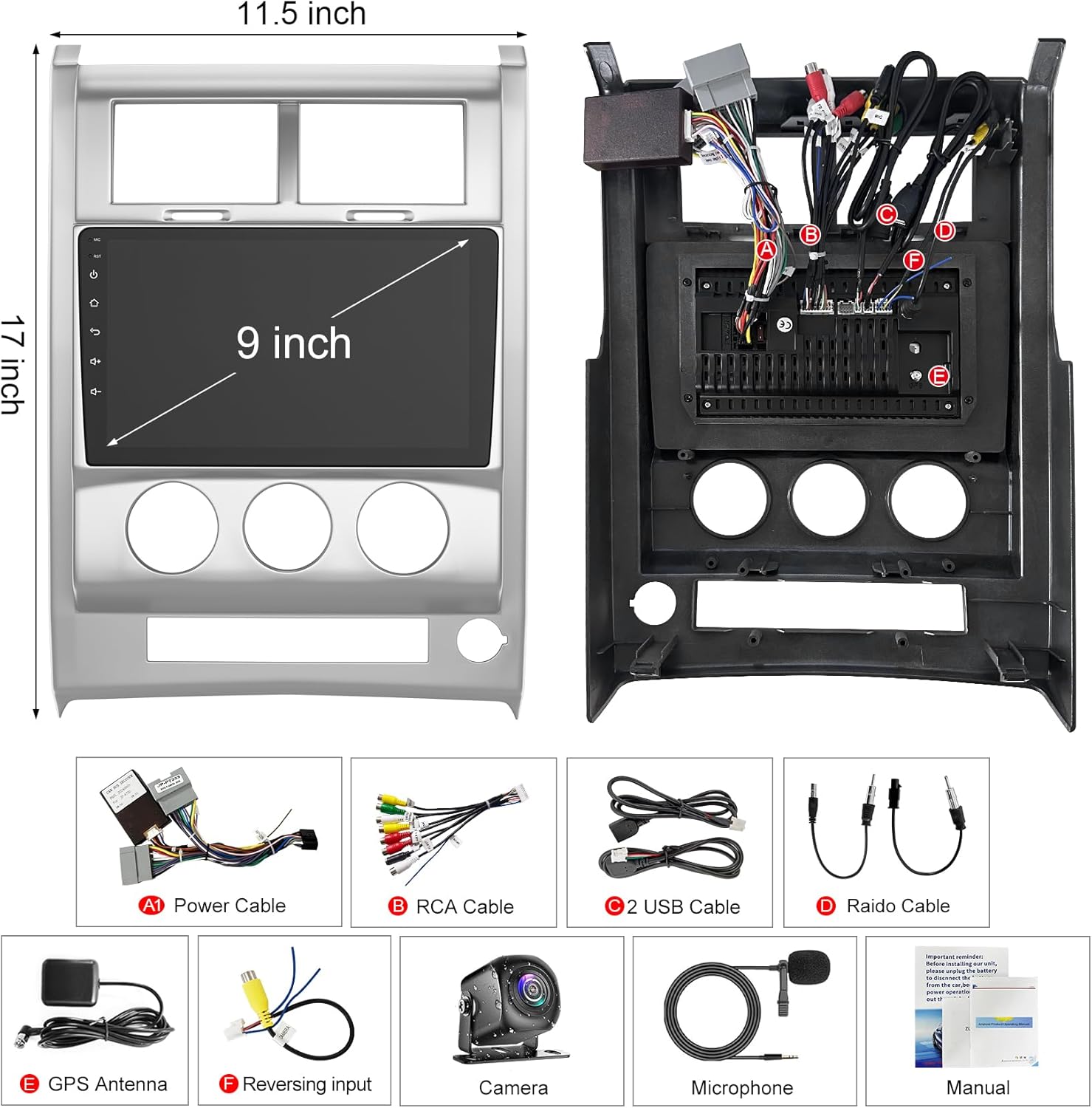
Image: All components included in the Electrosmart Car Radio package.
3. Product Overview
The Electrosmart 10.1" Car Radio features a user-friendly interface and robust connectivity options. Below is an overview of the unit's physical features and connections.
Front Panel Controls and Ports
- IR Sensor: For remote control operation.
- Built-in Noise Canceling Mic: For clear hands-free communication.
- BT Button: Activates Bluetooth interface.
- Menu/Back Buttons: Navigates through the system interface.
- Next/Forward Track Buttons: Controls media playback.
- On/Off & Volume Knob: Powers the unit and adjusts audio levels.
- Previous/Back Track Buttons: Controls media playback.
- USB Port: For media playback and smartphone connectivity.
- Reset Button: Restores the unit to default settings if needed.
- Aux Input: For connecting external audio devices.
- Memory Card Slot: For additional storage or media playback.
Rear Panel Connections
The rear panel provides various ports for power, audio/video input/output, and peripheral connections:
- 15 Amp Fuse: For electrical protection.
- Wiring Harness Connectors: For vehicle power and speaker connections.
- RCA Jacks: For audio/video input and output (e.g., external amplifiers, headrest monitors).
- Antenna Input: For radio reception.
- External Microphone Input: For improved voice clarity during calls.
4. Setup & Installation
The Electrosmart head unit features a plug-and-play design for Jeep Liberty 2008-2012, simplifying installation. All necessary wiring harnesses are included. Professional installation is recommended if you are unfamiliar with car audio systems.
General Installation Steps:
- Disconnect Battery: Always disconnect the vehicle's negative battery terminal before starting any electrical work.
- Remove Old Head Unit: Carefully remove the existing car radio using appropriate trim tools to avoid damage.
- Connect Wiring Harnesses: Connect the provided power and speaker harnesses to the vehicle's wiring. Ensure all connections are secure.
- Connect Peripherals: Connect the GPS antenna, backup camera, external microphone, and any other accessories as needed.
- Mount the Unit: Secure the new head unit into the dashboard using the provided mounting brackets and screws.
- Reconnect Battery: Reconnect the vehicle's negative battery terminal.
- Test Functionality: Power on the unit and test all functions (radio, Bluetooth, CarPlay/Android Auto, camera, etc.) before fully reassembling the dashboard.
5. Operating Instructions
5.1 Power On/Off
Press the volume knob to power the unit on or off. Rotate the knob to adjust the volume.
5.2 Wireless CarPlay & Android Auto
Connect your iPhone or Android phone wirelessly via Bluetooth or USB cable to access CarPlay or Android Auto features. This allows for navigation, calls, messages, and music playback through the head unit's display.
- For CarPlay: Enable Bluetooth on your iPhone and pair it with the car radio. Open the 'Zlink5' application on the head unit.
- For Android Auto: Ensure the Android Auto app is installed on your phone. Connect your phone to the radio via Bluetooth or a USB cable. Open the 'Zlink5' application on the head unit.

Image: Wireless CarPlay and Android Auto functionality.

Image: Connection methods for Wireless CarPlay and Android Auto.
5.3 GPS Navigation
The unit includes a built-in GPS navigation module. You can download offline navigation apps from the Play Store or use online maps when connected to Wi-Fi.
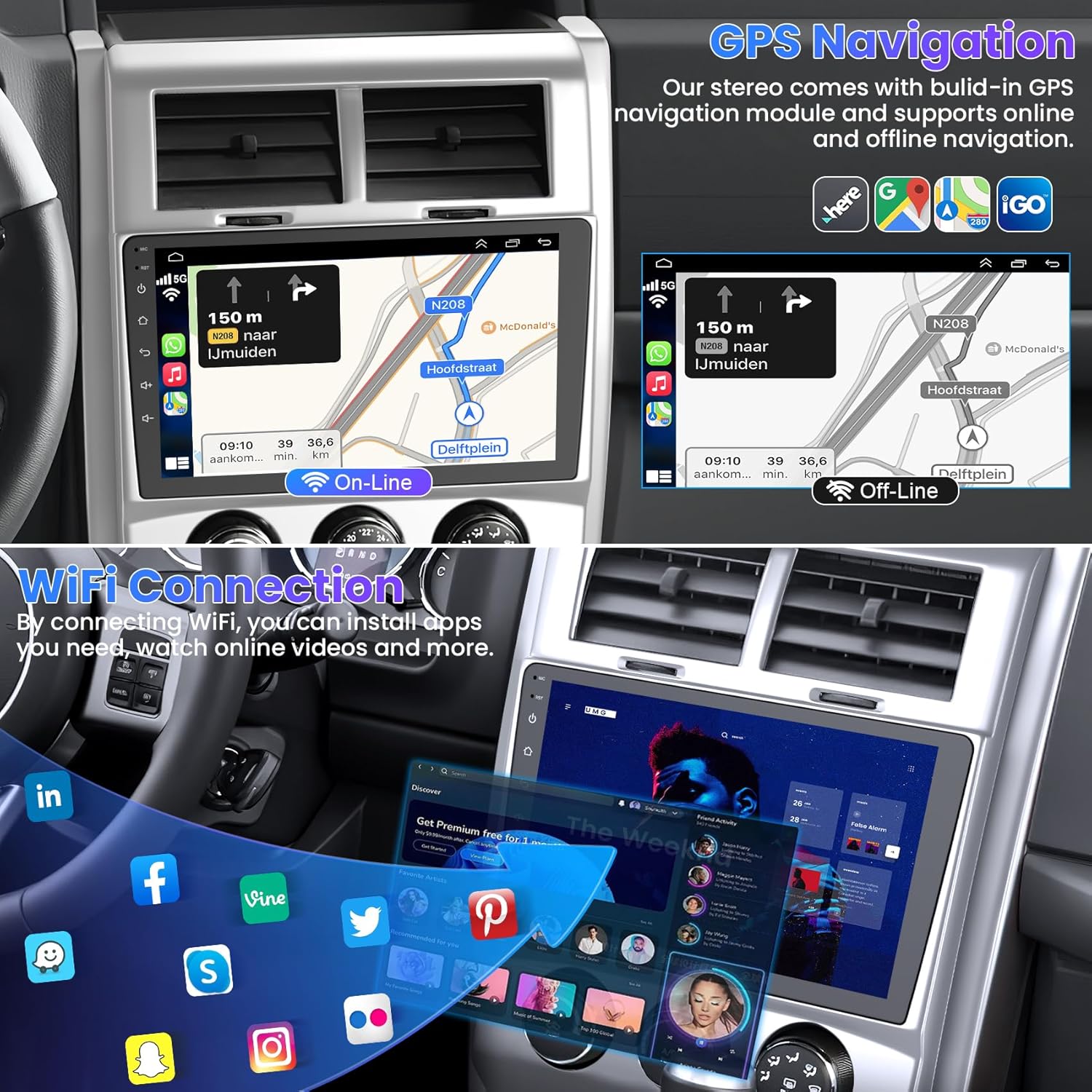
Image: GPS Navigation with online and offline map options.
5.4 WIFI Connection
Connect the head unit to a Wi-Fi network to download applications, stream online music, and watch videos (e.g., YouTube).

Image: Wi-Fi Connectivity Icon.
5.5 Bluetooth 5.2
Bluetooth 5.2 enables hands-free calling, phonebook synchronization, and wireless music playback. Pair your smartphone with the unit via Bluetooth settings.

Image: Bluetooth 5.2 for hands-free calls and music.
5.6 FM Radio
Access the FM radio function to listen to local broadcasts. The unit supports saving preset stations.
Image: FM Radio interface.
5.7 Steering Wheel Control (SWC)
The unit supports steering wheel controls, allowing you to manage functions without taking your hands off the wheel. Refer to the system settings for SWC configuration.

Image: Steering Wheel Control setup interface.
5.8 Backup Camera
The included backup camera automatically displays a reverse image on the screen when the vehicle is shifted into reverse. It features a 170° wide view, night vision, and waterproof design.
Image: Backup Camera view with parking guidelines.
5.9 Audio Settings (DSP/EQ)
Customize your audio experience with the built-in Digital Sound Processor (DSP) and Equalizer (EQ) settings. Choose from various presets (Pop, Rock, Classic, Jazz) or create custom sound profiles.

Image: DSP/EQ Settings for audio customization.
5.10 Full RCA Output & Split Screen
The unit supports full RCA video output, allowing you to connect external displays like headrest monitors for rear-seat entertainment. The split-screen function enables simultaneous display of two different applications on the main screen.
6. Maintenance
To ensure the longevity and optimal performance of your car radio, follow these maintenance guidelines:
- Screen Cleaning: Use a soft, lint-free cloth to gently wipe the touch screen. Avoid abrasive cleaners or harsh chemicals.
- Software Updates: Periodically check for and install software updates to ensure the system runs efficiently and has the latest features.
- Avoid Extreme Temperatures: Do not expose the unit to extreme heat or cold for extended periods.
- Secure Connections: Periodically check all wiring connections to ensure they are secure and free from corrosion.
7. Troubleshooting
If you encounter issues with your Electrosmart car radio, refer to the following common troubleshooting steps:
- No Power: Check the vehicle's fuse box and the unit's 15 Amp fuse. Ensure all power connections are correctly made.
- No Sound: Verify speaker connections. Check volume levels and EQ settings. Ensure the mute function is not active.
- Touch Screen Unresponsive: Try performing a system reset using the reset button.
- Bluetooth Connectivity Issues: Ensure Bluetooth is enabled on both the head unit and your smartphone. Try unpairing and re-pairing the devices.
- GPS Not Working: Ensure the GPS antenna is properly connected and has a clear view of the sky. Check GPS settings in the system menu.
- Backup Camera Not Displaying: Verify the camera's power and video connections. Ensure the vehicle is in reverse.
If problems persist after attempting these steps, please contact customer support for further assistance.
8. Specifications
| Feature | Specification |
|---|---|
| Display Size | 10.1 Inches |
| Operating System | Android 13 |
| CPU | Quad Core |
| RAM | 4GB |
| ROM | 64GB |
| Connectivity Technology | Bluetooth 5.2, Wi-Fi |
| Special Features | Wireless CarPlay, Android Auto, GPS Navigation, FM Radio, EQ Settings, Backup Camera, USB, 1080p Video Player, Video/Audio Output, AUX Audio/Video Input, External Microphone, Steering Wheel Control, Split Screen |
| Vehicle Service Type | Car (Jeep Liberty 2008-2012) |
| Mounting Type | Dashboard Mount |
| Item Weight | 4.95 pounds |
| Product Dimensions | 10.1 x 10.1 x 10.1 inches |
| Map Type | North America |
9. Warranty & Support
This Electrosmart Car Radio Head Unit comes with a 1-Year Warranty from the date of purchase. This warranty covers manufacturing defects and malfunctions under normal use.
For warranty claims, technical support, or any inquiries regarding your product, please contact Electrosmart customer service through the retailer where the product was purchased. Please have your purchase receipt and product model information ready when contacting support.