
urge medical B0DPKGLV4J
urge medical Electric Wheelchair for Adults Instruction Manual
Model: B0DPKGLV4J
1. Introduction
This manual provides essential information for the safe and effective use of your urge medical Electric Wheelchair for Adults, Model B0DPKGLV4J. Please read this manual thoroughly before operating the wheelchair to ensure proper function, safety, and longevity of the product. Keep this manual for future reference.
The urge medical Electric Wheelchair is designed to provide mobility and independence for adults. It features a lightweight, foldable design, all-terrain capabilities, and a powerful motor system for reliable performance.
2. Safety Information
Always prioritize safety when operating the electric wheelchair. Failure to follow these instructions could result in injury or damage to the product.
- Electromagnetic Braking System: The wheelchair is equipped with an electromagnetic braking system for immediate and secure stopping. Always ensure the brakes are functioning correctly before use.
- Seat Belts: Always use the integrated seat belt to ensure user stability and safety, especially when navigating inclines or uneven terrain.
- Tires: The wheelchair features durable, puncture-resistant tires. Regularly inspect tires for wear and proper inflation.
- Weight Capacity: Do not exceed the maximum load bearing capacity of 330 lbs (150 kg). Exceeding this limit can compromise stability and safety.
- Incline Limits: The wheelchair can safely climb inclines up to 13°. Avoid steeper slopes.
- Environmental Conditions: Avoid operating the wheelchair in extreme weather conditions, such as heavy rain or snow, to prevent damage to electronic components.
- Obstacles: Exercise caution when encountering obstacles. The wheelchair can pass through steps up to 3.2 inches (8 cm).
3. Package Contents
Upon unpacking, please verify that all components are present and undamaged:
- urge medical Electric Wheelchair main unit
- Joystick controller
- Removable 12-amp battery (quantity may vary based on purchase)
- Battery charger
- User Manual
4. Setup and Assembly
4.1 Unfolding the Wheelchair
The wheelchair is designed for easy folding and unfolding. To unfold:
- Place the folded wheelchair on a flat, stable surface.
- Gently pull the backrest upwards until the frame locks into place.
- Push down on the seat frame until it is fully extended and flat.
- Ensure all locking mechanisms are securely engaged before use.

Image 4.1: Wheelchair in folded and unfolded states, showing the breathable cushion.
4.2 Battery Installation and Charging
The wheelchair uses a removable 12-amp battery.
- Locate the battery compartment, typically under the seat or at the rear.
- Insert the battery securely into its compartment. Ensure it clicks into place if applicable.
- To charge, connect the charger to the battery charging port and then to a standard electrical outlet. The battery display on the joystick will indicate charging status.
- A full charge provides approximately 15 miles of travel range.
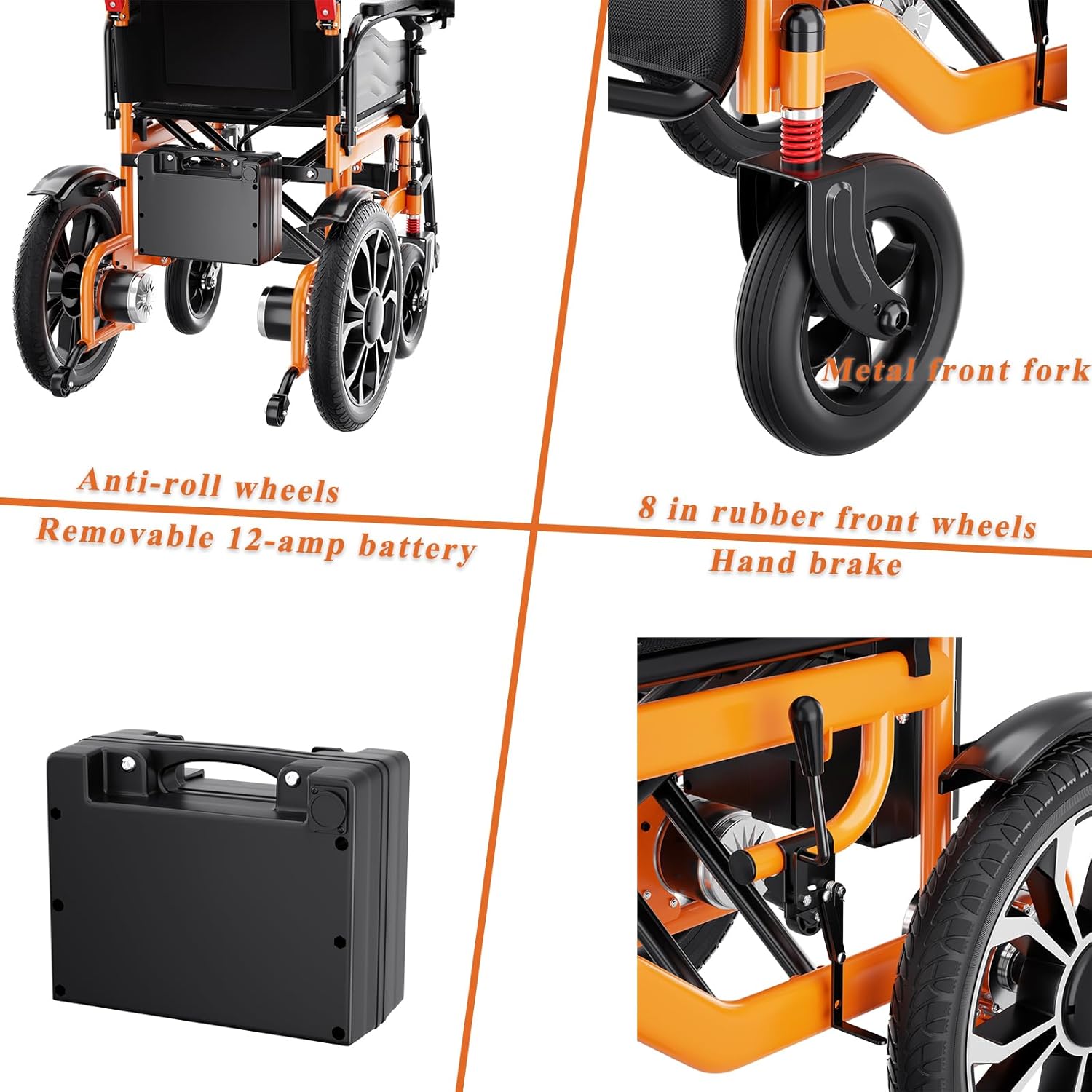
Image 4.2: Removable 12-amp battery compartment.
4.3 Footrest Adjustment
The footrest is removable and its length is adjustable for user comfort.
- To adjust the length, locate the adjustment pins or levers on the footrest support.
- Press or release the mechanism and slide the footrest to the desired length.
- Ensure the footrest is securely locked in position before use.
- To remove, follow the reverse procedure for adjustment or consult the specific removal mechanism.

Image 4.3: Adjustable and removable footrest.
5. Operating Instructions
5.1 Joystick Controller Functions
The wheelchair is controlled by a sensitive 360° joystick. Familiarize yourself with its functions:

Image 5.1: Joystick Controller Layout.
- Power Switch: Turns the wheelchair on/off.
- Battery Display: Shows the current battery charge level.
- Speed Display: Indicates the current speed setting.
- Speed Adjustment Buttons (+/-): Increases or decreases the wheelchair's speed.
- Slow Down Button: Instantly reduces speed for cautious maneuvering.
- Whistle Key: Activates an audible signal.
- SOS Key: Activates an emergency alert function (consult local regulations for use).
- Mute Key: Mutes audible alerts or voice prompts.
5.2 Driving the Wheelchair
- Power On: Press the Power Switch on the joystick. The battery and speed displays will illuminate.
- Starting Movement: Gently push the joystick in the desired direction (forward, backward, left, or right). The wheelchair will move smoothly in response.
- Adjusting Speed: Use the '+' and '-' buttons to select your preferred speed setting. Start with a low speed until you are comfortable with the controls.
- Stopping: Release the joystick. The electromagnetic braking system will automatically engage, bringing the wheelchair to a smooth stop.
- Navigating Terrain: The 16-inch all-terrain rear wheels and 10-inch all-terrain front wheels provide excellent grip. Approach inclines and uneven surfaces cautiously.

Image 5.2: urge medical Electric Wheelchair in operation.
6. Maintenance
Regular maintenance ensures the optimal performance and longevity of your wheelchair.
- Cleaning: Wipe down the frame and surfaces with a damp cloth. Avoid using abrasive cleaners or excessive water, especially near electronic components.
- Cushion Care: The breathable cushion is removable and washable. Follow the care instructions on the cushion label for cleaning.
- Tire Inspection: Periodically check tire pressure and inspect for any signs of wear, punctures, or damage.
- Battery Care: Charge the battery regularly, even if the wheelchair is not in frequent use, to maintain battery health. Store the battery in a cool, dry place.
- Fasteners: Periodically check all bolts, screws, and fasteners to ensure they are tight. Do not overtighten.

Image 6.1: Removable and washable breathable cushion.
7. Troubleshooting
If you encounter issues with your wheelchair, refer to the following common problems and solutions:
- Wheelchair does not power on:
- Ensure the battery is fully charged and correctly installed.
- Check that the power switch on the joystick is pressed.
- Wheelchair does not move:
- Verify the joystick is pushed in a clear direction.
- Check for any error codes on the speed or battery display.
- Ensure no obstacles are preventing wheel movement.
- Unusual noises during operation:
- Inspect wheels for debris or damage.
- Check for loose components.
If the problem persists after attempting these solutions, please contact customer support for further assistance.
8. Specifications
| Feature | Specification |
|---|---|
| Model | B0DPKGLV4J |
| Product Dimensions (Unfolded) | 31.6"D x 24"W x 35.7"H |
| Folded Dimensions | 31"D x 28.8"W x 14.6"H (approximate, based on image) |
| Item Weight | 68 Pounds |
| Material | Carbon Steel |
| Motor Power | 2 x 250W (Total 500W) |
| Battery Type | 12A (Removable) |
| Travel Range | Up to 15 miles per charge |
| Max Incline | 13° |
| Load Bearing Capacity | 330 lbs |
| Rear Wheel Size | 16 inches (All-terrain) |
| Front Wheel Size | 10 inches (All-terrain) |

Image 8.1: Wheelchair dimensions.
9. Warranty and Support
For warranty information, please refer to the documentation included with your purchase or contact the retailer. For technical support, replacement parts, or any other inquiries, please contact urge medical customer service through the contact information provided on the product packaging or the official urge medical website.
Ask a question about this manual
Ask about setup, troubleshooting, compatibility, parts, safety, or missing instructions. Manuals+ will review the question and use this page’s manual context to help answer it.