
1. Introduction
Thank you for choosing the FreshDcart 25W High-Speed Electric Cleaning Brush, Model JY-6010. This rechargeable spin power scrubber is designed to simplify your cleaning tasks, offering a powerful and versatile solution for various surfaces in your home. This manual provides essential information for safe operation, effective use, and proper maintenance of your device.

Figure 1: FreshDcart Electric Cleaning Brush with various brush heads and charging cable.
2. Safety Information
- Read all instructions before using the appliance.
- Keep the appliance away from children.
- Do not immerse the main unit in water. The device is splash-proof (IPX7 rated) but not designed for submersion.
- Use only the provided charging cable.
- Do not operate the appliance if it is damaged or malfunctioning.
- Avoid using harsh chemicals or abrasive cleaners with the brush heads, as this may damage them.
- Ensure the charging port cover is securely closed before use in wet environments.
3. Package Contents
Verify that all items are present in your package:
- 1 x FreshDcart Electric Cleaning Brush Main Unit
- 1 x Adjustable Telescopic Extension Rod
- 9 x Interchangeable Brush Heads (various types for different cleaning tasks)
- 1 x USB Type-C Charging Cable
- 1 x User Manual
4. Product Overview
Familiarize yourself with the components of your electric cleaning brush:
- Main Unit: Contains the motor, battery, power switch, and LED display.
- Brush Head Attachment Point: Where interchangeable brush heads connect.
- LED Power Display: Indicates battery level.
- Power Switch: Controls power and speed settings.
- Type-C Charging Port: For recharging the internal battery.
- Retractable Rod: Allows for adjustable length for extended reach.
- Non-Slip Handle: Provides a secure grip during use.
- Hanging Hole: For convenient storage.

Figure 2: Labeled components of the FreshDcart Electric Cleaning Brush.
5. Setup
5.1 Initial Charging
Before first use, fully charge the electric cleaning brush. Connect the USB Type-C charging cable to the charging port on the main unit and plug the other end into a compatible USB power adapter (not included). The LED power display will indicate charging status. A full charge takes approximately 3 hours and provides up to 90 minutes of runtime.
5.2 Assembly
- Attach Brush Head: Select the desired brush head and firmly press it onto the attachment point of the main unit until it clicks into place.
- Attach Extension Rod (Optional): If extended reach is required, align the main unit with the extension rod and twist to secure. The rod can be adjusted to your preferred length by twisting and pulling/pushing the sections.
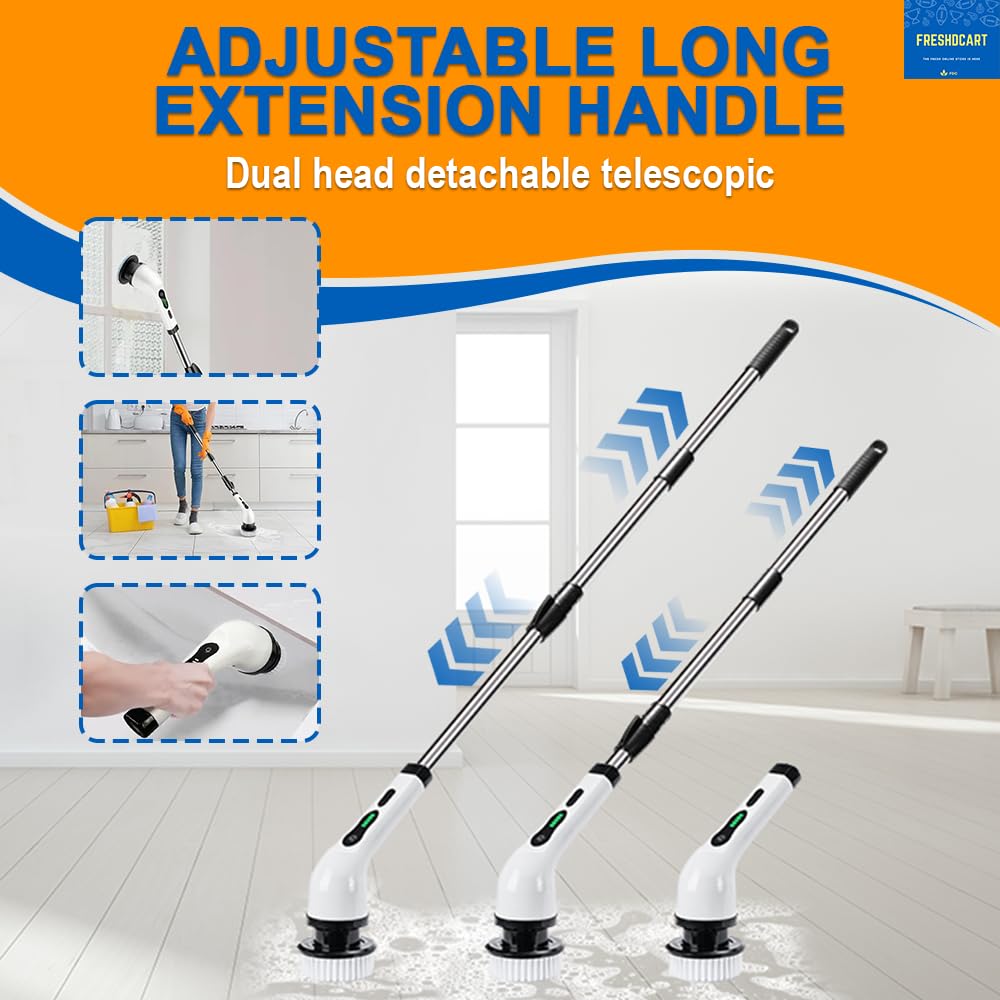
Figure 3: The adjustable extension handle allows for versatile cleaning configurations.
6. Operating Instructions
6.1 Power On/Off and Speed Adjustment
- Press the power button once to turn on the brush at the low-speed setting (350 RPM).
- Press the power button a second time to switch to the high-speed setting (450 RPM) for stubborn stains.
- Press the power button a third time to turn off the brush.

Figure 4: The brush offers two speed settings for varied cleaning needs.
6.2 Using Interchangeable Brush Heads
The FreshDcart Electric Cleaning Brush comes with 9 interchangeable brush heads, each designed for specific cleaning tasks:
- Wide Flat Brush: Ideal for large flat surfaces like floors, walls, and shower doors.
- Small Flat Brush: Suitable for smaller flat areas, sinks, and countertops.
- Round Brush: Excellent for curved surfaces, bathtubs, and toilet bowls.
- Corner Brush: Designed to reach into grout lines, corners, and tight spaces.
- Sponge Brush: For gentle cleaning and polishing of delicate surfaces.
- Fibre Sponge: Provides a slightly more abrasive option for tougher stains on sensitive surfaces.
- Wool Cloth: For polishing and buffing.
- Cloth Brush: General purpose cleaning and wiping.
- Large Flat Brush: For very large flat areas or waxing.
Always select the appropriate brush head for the surface and type of dirt to prevent damage.

Figure 5: Overview of the 9 replaceable brush heads and their applications.
7. Maintenance
7.1 Cleaning the Brush Heads
After each use, detach the brush head and rinse it thoroughly under running water. For stubborn residue, use a mild soap. Allow brush heads to air dry completely before storing.
7.2 Cleaning the Main Unit
Wipe the main unit with a damp cloth. Do not use abrasive cleaners or immerse the unit in water. Ensure the charging port cover is sealed when cleaning.

Figure 6: The main unit is IPX7 splash-proof, suitable for use in wet environments but not for submersion.
7.3 Storage
Store the cleaning brush and its accessories in a cool, dry place, away from direct sunlight and extreme temperatures. Utilize the hanging hole for convenient storage.
8. Charging
When the battery level is low, the LED display will indicate this. Connect the Type-C charging cable to the charging port. A full charge takes approximately 3 hours. Do not overcharge the device. Disconnect the charger once the battery is full.

Figure 7: The Type-C charging port and LED battery level display.
9. Troubleshooting
| Problem | Possible Cause | Solution |
|---|---|---|
| Brush does not turn on. | Battery is depleted. | Charge the device fully. |
| Brush does not charge. | Charging cable or adapter is faulty; Port is not connected properly. | Ensure the cable is securely connected. Try a different USB adapter. |
| Brush head stops spinning or spins slowly. | Battery is low; Excessive pressure applied; Obstruction in brush head. | Recharge the battery. Reduce pressure during cleaning. Check for and remove any debris. |
| Water leakage from main unit. | Charging port cover not sealed. | Ensure the Type-C charging port cover is firmly closed before use in wet conditions. |
10. Specifications
| Feature | Specification |
|---|---|
| Brand | FreshDcart |
| Model Number | JY-6010 |
| Power | 25W |
| Battery Capacity | 2500mAh |
| Runtime | Up to 90 minutes |
| Charging Time | Approximately 3 hours |
| Charging Port | USB Type-C |
| Speed Settings | Low (350 RPM), High (450 RPM) |
| Waterproof Rating | IPX7 (Splash-proof) |
| Product Dimensions | 34L x 9W x 16.8H Centimeters (main unit) |
| Item Weight | 1075 Grams |
| Material | Plastic |
11. Warranty and Support
For warranty information or technical support, please refer to the contact details provided with your purchase or visit the official FreshDcart website. Keep your proof of purchase for any warranty claims.