
1. Introduction
This manual provides detailed instructions for the installation, operation, and maintenance of your MTNTOPCN Military Design Pickup Roll Bar, Model MTN909648. This heavy-duty, adjustable-width roll bar is designed for various pickup trucks, including Ford F150, Raptor, Jeep Gladiator, Chevy, RAM, and Toyota models. It features a robust steel construction with a textured black finish, offering enhanced utility and a distinctive appearance.
Please read this manual thoroughly before installation and use to ensure proper function and safety. Keep this manual for future reference.
2. Safety Information
- Always wear appropriate personal protective equipment (PPE), including safety glasses and gloves, during installation.
- Ensure the vehicle is parked on a level surface with the parking brake engaged before beginning installation.
- If drilling is required, verify there are no obstructions (e.g., fuel lines, electrical wiring) beneath the drilling location.
- Seek professional assistance if you are unsure about any step of the installation process.
- Regularly inspect all fasteners and connections to ensure they remain tight and secure.
- Do not overload the roll bar with excessive weight or use it for purposes other than its intended design.
3. Package Contents
Verify that all components listed below are present and undamaged before proceeding with installation:
- Roll Bar Assembly Components
- All necessary Mounting Hardware (bolts, washers, nuts)
- Installation Guide (this manual)
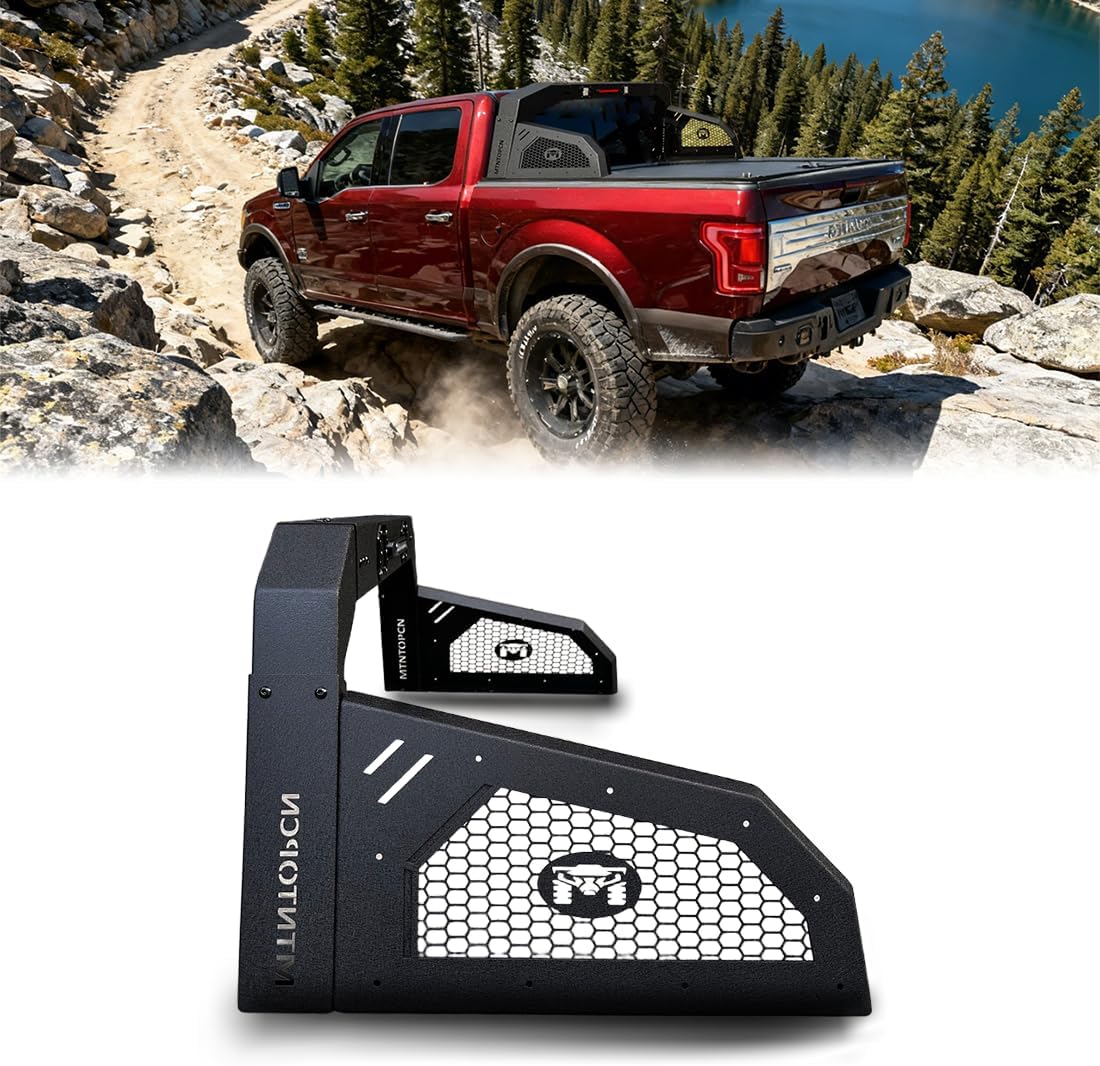
Figure 3.1: Overview of the MTNTOPCN Military Design Pickup Roll Bar components and its appearance when installed on a truck.
4. Specifications
| Feature | Detail |
|---|---|
| Brand | MTNTOPCN |
| Model | MTN909648 |
| Material | Steel |
| Exterior Finish | Textured Black |
| Item Dimensions (L x W x H) | 27.64 x 72 x 23 inches |
| Item Weight | 47 pounds |
| Vehicle Service Type | Truck |
| Automotive Fit Type | Universal Fit (Adjustable Width) |
5. Installation
The MTNTOPCN Military Design Pickup Roll Bar offers adjustable width for compatibility with various truck models. Installation methods may vary slightly depending on whether your truck has a tonneau cover.
5.1 General Assembly Steps
- Prepare Components: Lay out all roll bar components and hardware on a clean, flat surface. Ensure all parts are accounted for as per the package contents.
- Assemble Main Body Sections: Connect the main body sections of the roll bar using the provided M6 x 20 bolts and flat washers. Ensure all connections are secure but do not fully tighten until the entire assembly is complete.
- Attach Crossbars: Secure the front and rear crossbars to the main body using the specified M6 x 20 bolts and flat washers.
- Install Trailer Hitch (if applicable): Attach any trailer hitch components to the designated points on the roll bar.
5.2 Mounting to Truck Bed
There are two primary installation scenarios:
- Installation on a truck without a tonneau cover: Drilling into the truck bed rails is required.
- Installation on an MTNTOPCN Retractable Hard Tonneau Cover or other compatible retractable tonneau covers with flat tracks: This is a bolt-on installation.
- Position Roll Bar: Carefully place the assembled roll bar onto the truck bed rails.
- Adjust Width: Measure the width of your truck's rear cargo bed. Adjust the width of the roll bar to match this measurement (e.g., if width is 1611mm, adjust the roll bar to 1611mm). This is typically done by sliding the adjustable sections and securing them with M8 x 20 hex bolts and flange nuts.
- Secure to Truck Bed:
- For trucks without a tonneau cover: Mark and drill 11mm holes through the truck bed wall where the mounting brackets align. Insert M10 x 35 bolts and tighten them to secure the roll bar. (Three bolts on each side).
- For compatible tonneau covers: Insert M10 x 35 screws into the clamping slots of the tonneau cover tracks. Adjust the gap between the screws to align with the roll bar's mounting points. Place the roll bar onto the tracks and secure it by tightening the screws.
- Connect Wiring: Connect the wiring for the integrated brake light and any auxiliary lights according to your vehicle's electrical system. Professional installation for wiring is recommended if you are unfamiliar with automotive electrical systems.
- Final Tightening: Once the roll bar is correctly positioned and aligned, fully tighten all bolts and nuts to ensure a secure installation.
5.3 Installation Videos
Video 5.1: Detailed installation guide for the MTNTOPCN Military Design Pickup Roll Bar (Model 909212), demonstrating assembly and mounting steps.
Video 5.2: General installation overview for MTNTOPCN Military Design Pickup Roll Bars, covering key assembly and mounting procedures.
6. Operating Instructions
The MTNTOPCN Military Design Pickup Roll Bar is designed to enhance the utility and appearance of your truck. Its primary functions include:
- Accessory Mounting: The integrated slots and mounting points allow for the attachment of various accessories such as auxiliary lights, antennas, or other overland equipment. Ensure any mounted accessories do not obstruct your view or interfere with vehicle operation.
- Adjustable Height: The vertical height of the roll bar can be adjusted to be level with the roof of your vehicle or to a preferred height. This adjustment is typically made by loosening and re-tightening specific bolts on the vertical supports.
- Integrated Lighting: The roll bar includes an integrated brake light and additional lighting. Ensure these are properly wired and functioning for increased visibility and safety.

Figure 6.1: Close-up view highlighting the adjustable width, adjustable height, and integrated lighting features of the roll bar.
7. Maintenance
To ensure the longevity and optimal performance of your MTNTOPCN Military Design Pickup Roll Bar, follow these maintenance guidelines:
- Regular Cleaning: Clean the roll bar regularly with mild soap and water to remove dirt, dust, and road grime. Avoid abrasive cleaners or harsh chemicals that could damage the textured black finish.
- Fastener Inspection: Periodically check all bolts, nuts, and mounting hardware for tightness. Vibrations from driving can cause fasteners to loosen over time. Re-tighten as necessary.
- Corrosion Check: Inspect the roll bar for any signs of rust or corrosion, especially after exposure to harsh weather conditions or off-road use. Address any corrosion promptly with appropriate rust treatment and touch-up paint to maintain the finish.
- Wiring Inspection: Check all electrical connections and wiring for the integrated lights. Ensure wires are securely routed and free from chafing or damage.
8. Troubleshooting
Below are common issues and their potential solutions:
- Issue: Roll bar feels loose or rattles.
Solution: Inspect all mounting bolts and nuts. Tighten any loose fasteners. Ensure the roll bar is correctly seated on the truck bed rails or tonneau cover tracks. - Issue: Integrated lights are not working.
Solution: Check all electrical connections for the lights. Ensure wires are properly connected to the vehicle's power source and ground. Verify that the light bulbs or LEDs are not damaged. Check relevant fuses in your vehicle's fuse box. - Issue: Difficulty adjusting width or height.
Solution: Ensure all adjustment bolts are sufficiently loosened before attempting to slide components. Clean any dirt or debris from the sliding mechanisms. Apply a small amount of silicone lubricant if movement is stiff.
9. Warranty and Support
For warranty information, please refer to the product's purchase documentation or contact MTNTOPCN customer service directly. If you encounter any issues not covered in this troubleshooting section or require further assistance, please reach out to our support team.
MTNTOPCN Customer Support: Please visit the official MTNTOPCN store on Amazon or refer to your purchase invoice for contact details.