
1. Introduction
Thank you for purchasing the DUDUPET CL01 Automatic Cat Litter Box. This device is designed to provide a clean and convenient litter solution for your cat, featuring automatic cleaning, advanced safety sensors, and app control. Please read this manual thoroughly before use to ensure proper operation and maintenance.
2. Safety Information
- Do not use the automatic cleaning function for cats weighing less than 1kg.
- Ensure the device is placed on a stable, level surface.
- Keep the device away from water and moisture to prevent electrical hazards.
- Do not allow children or pets to play with the device during operation.
- Unplug the device before cleaning or performing any maintenance.
- The device supports 2.4GHz WiFi only. It is not compatible with 5GHz WiFi.
The DUDUPET CL01 is equipped with 7 high-precision infrared sensors and 3 hall sensors to ensure your cat's safety. The cleaning cycle will automatically pause if a cat is detected inside or near the entrance during operation.

Image: Illustration of the DUDUPET CL01's internal sensor system, highlighting the 7 infrared sensors and 3 hall sensors designed to protect your cat during operation.
3. Product Overview
The DUDUPET CL01 features a semi-open entrance, a large capacity roller, and a waste collection bin. It is designed for cats weighing between 1.5kg and 9kg.

Image: The DUDUPET CL01 Automatic Cat Litter Box, illustrating its 65L internal capacity and 12L waste collection bin. A cat is shown comfortably inside, demonstrating the spacious design suitable for cats weighing 1.5kg to 9kg.
Key Features:
- Semi-Open Entrance: Allows easy access for cats (1.5kg-9kg) and prevents pinching.
- Automatic Cleaning: Initiates cleaning 5 seconds after the cat exits, separating waste into the bin.
- Multi-Litter Compatibility: Works with tofu litter, mineral litter, bentonite litter, and mixed litter.
- Quiet Operation: Operates at a low noise level (below 40dB), comparable to a quiet office.
- App Control: Dedicated app for iOS/Android for remote operation and monitoring.
- Easy Maintenance: Removable and washable cylinder for simple cleaning.

Image: An infographic highlighting the DUDUPET CL01's main features, including its rotating cleaning mechanism, open entrance design, compatibility with a dedicated mobile application, one-touch cleaning function, and simplified litter refilling process.
4. Setup
4.1 Unboxing and Initial Assembly
Carefully remove all components from the packaging. Ensure all parts are present and undamaged.
Video: This short video demonstrates the initial unboxing and assembly of the DUDUPET CL01 Automatic Cat Litter Box, showing how to attach the main components.
4.2 Adding Cat Litter
Open the main compartment and pour your preferred cat litter into the cylinder. The device is compatible with tofu litter, mineral litter, bentonite litter, and mixed litter.

Image: A visual representation of different cat litter types, including tofu, bentonite, mixed, and mineral, confirming their suitability for use with the DUDUPET CL01 Automatic Cat Litter Box.
4.3 Power Connection and WiFi Setup
Connect the power adapter to the device and plug it into a wall outlet. The device will power on. Download the dedicated DUDUPET app for iOS or Android to connect the device to your 2.4GHz WiFi network and access smart features.

Image: Screenshots of the DUDUPET mobile application, displaying various settings and features such as child lock, Do Not Disturb (DND) mode, scheduled cleaning, data logs for automatic and manual cleaning, and real-time operational status.
5. Operating Instructions
5.1 Automatic Cleaning
The DUDUPET CL01 automatically detects when your cat uses the litter box. After your cat exits, the device will wait for 5 seconds before initiating a cleaning cycle. The internal cylinder slowly rotates to sift the litter, separating clumped waste into the integrated waste bin.
Video: This video demonstrates the DUDUPET CL01 in operation, showing a cat using the litter box and the subsequent automatic cleaning cycle, where the internal mechanism sifts and deposits waste.
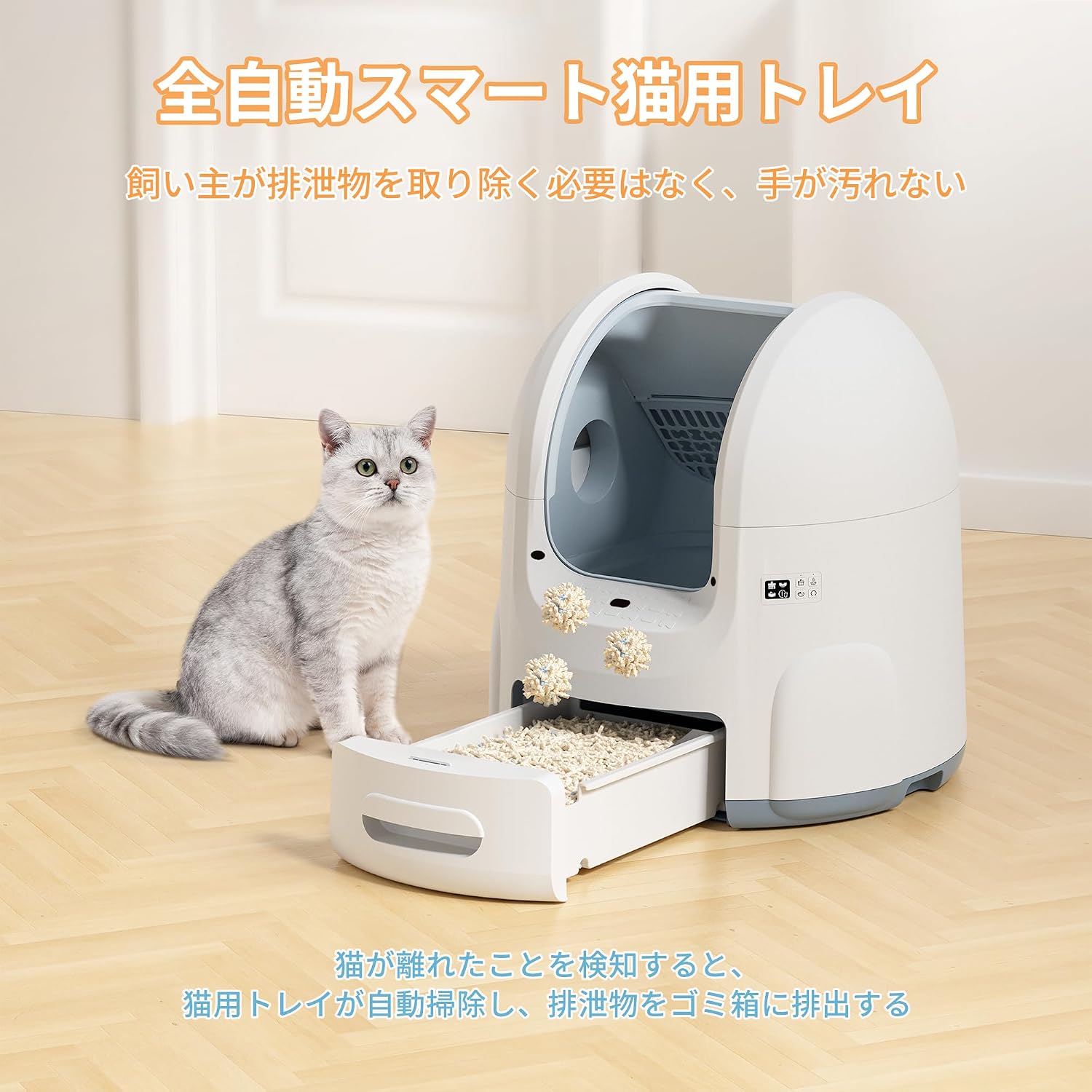
Image: The DUDUPET CL01 Automatic Cat Litter Box with a cat exiting, illustrating the automatic cleaning process where waste is collected and deposited into the pull-out drawer, eliminating the need for manual scooping.
5.2 Manual Cleaning and DND Mode
You can initiate a cleaning cycle manually via the dedicated app or the control panel on the device. The app also allows you to set a Do Not Disturb (DND) mode, which temporarily stops automatic cleaning during specified hours (e.g., overnight) to ensure quiet operation.

Image: The DUDUPET CL01 Automatic Cat Litter Box with visual cues representing sound waves, highlighting its DND mode and quiet operation, which keeps noise levels below 40dB, ensuring minimal disturbance.
6. Maintenance
6.1 Emptying the Waste Bin
Regularly check and empty the waste collection bin located at the bottom of the device. Pull out the drawer, remove the waste bag, and dispose of it. Replace with a new waste bag.
Image: The DUDUPET CL01 Automatic Cat Litter Box with its waste drawer pulled out, revealing collected waste and demonstrating the ease of emptying and replacing the waste bag.
6.2 Cleaning the Cylinder
The internal cylinder can be easily removed for thorough cleaning. Unplug the device, detach the cylinder from the main unit, and wash it with water. Ensure it is completely dry before reassembling.

Image: A four-step visual guide detailing the cleaning process for the DUDUPET CL01. It shows how to discard used litter, remove the top cover, detach the internal roller, and wash the roller under running water.
7. Troubleshooting
| Problem | Possible Cause | Solution |
|---|---|---|
| Device not powering on | Power cable not connected properly; Power outlet issue | Check power cable connection; Try a different power outlet. |
| Automatic cleaning not starting | Cat still inside or near the entrance; DND mode active; Sensors obstructed | Ensure cat has fully exited; Check DND settings in app; Clean sensors. |
| Litter not sifting properly | Too much litter; Incorrect litter type; Cylinder dirty | Reduce litter quantity; Ensure compatible litter is used; Clean the cylinder. |
| WiFi connection issues | Incorrect WiFi band; Weak signal; Incorrect password | Ensure 2.4GHz WiFi is used; Move device closer to router; Re-enter WiFi password in app. |
8. Specifications
- Model: DU-CL01-JP
- Dimensions (L x W x H): 59.7cm x 59.7cm x 64.4cm
- Weight Capacity: Suitable for cats 1.5kg - 9kg
- Litter Capacity: 65L (internal roller)
- Waste Bin Capacity: 12L
- Connectivity: 2.4GHz WiFi (5GHz not supported)
- Noise Level: Below 40dB
- Color: White
9. Warranty and Support
DUDUPET provides a one-year quality service from the date of purchase for the CL01 Automatic Cat Litter Box. In the event of a malfunction within the warranty period, a new product will be replaced free of charge.
For any questions or support needs, please contact DUDUPET customer service.