
1. Introduction
Thank you for choosing the Aurotlu Open Ear Bone Conduction Headphones, Model YYK-Q71. These innovative headphones are designed to provide a comfortable and safe listening experience by allowing you to remain aware of your surroundings while enjoying audio. The open-ear design eliminates the need to insert earbuds into the ear canal, reducing discomfort and promoting hygiene. This manual provides detailed instructions for setup, operation, maintenance, and troubleshooting to ensure optimal performance of your device.

Figure 1.1: The open-ear design allows for situational awareness, crucial for safety in environments like busy streets or offices.
2. Product Overview
2.1. Package Contents
- Aurotlu YYK-Q71 Open Ear Bone Conduction Headphones
- Charging Case
- USB Charging Cable
- User Manual
2.2. Key Features
- Clip-Ear Open Design: Ensures comfort and awareness of surroundings.
- Bluetooth 5.3: Provides stable and low-latency wireless connection.
- Lightweight & Stable Fit: Weighing approximately 0.18 oz, made of soft silicone for secure wear during activities.
- Digital Display Charging Case: 300mAh case provides multiple charges, with LED display for battery status.
- IPX7 Waterproof: Resists sweat and rain, suitable for sports and all-weather conditions.
- Physical Button Control: Easy control for music, calls, and voice assistant.
- Superior HiFi Stereo Sound: Features a 13mm diameter speaker for clear audio.

Figure 2.1: The YYK-Q71 headphones and charging case with digital battery indicator.

Figure 2.2: Battery life and charging capabilities of the headphones and case.
3. Setup
3.1. Initial Charging
Before first use, fully charge the headphones and the charging case. Connect the provided USB charging cable to the Type-C port on the charging case and a power source. The LED display on the case will indicate the charging status. The charging pod can be fully charged in approximately 1 hour and can charge the headphones multiple times.

Figure 3.1: Key specifications related to charging and battery life.
3.2. Pairing with Your Device
- Ensure the headphones are charged.
- Open the charging case. The headphones will automatically enter pairing mode.
- On your device (smartphone, tablet, etc.), go to Bluetooth settings.
- Search for available devices and select "YYK-Q71" from the list.
- Once connected, you will hear a confirmation tone, and the device will show "Connected".
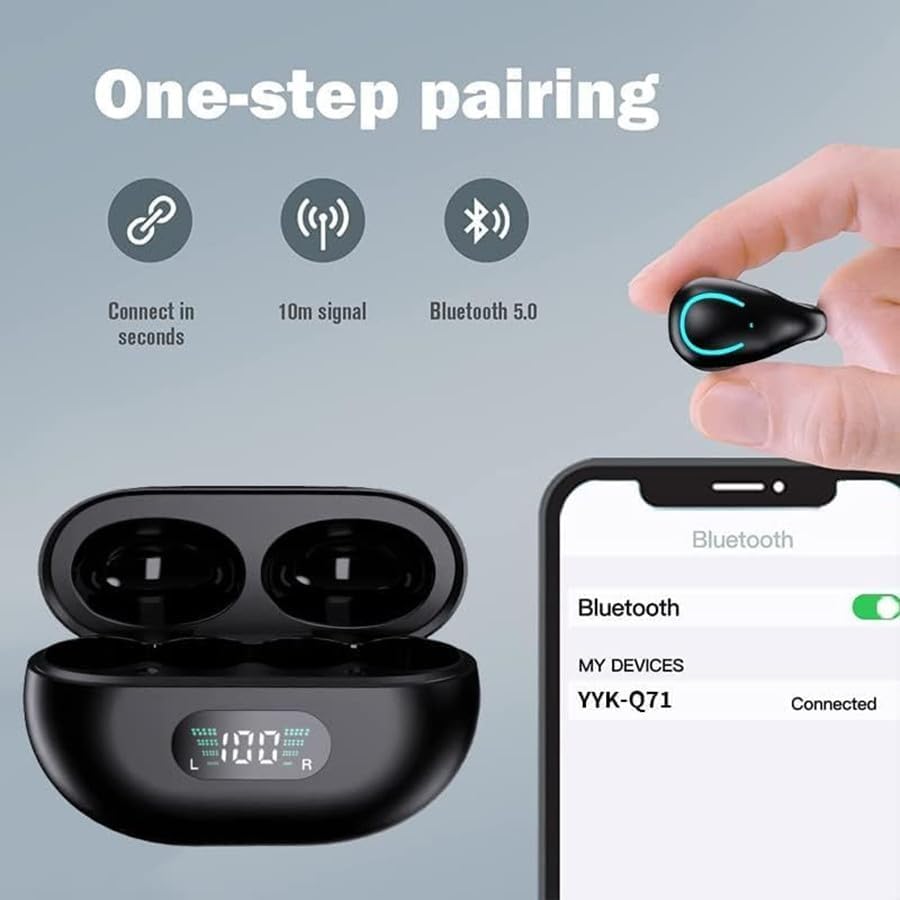
Figure 3.2: One-step pairing process for the YYK-Q71 headphones.
3.3. How to Wear
The YYK-Q71 headphones feature an ergonomic clip-on design. Gently clip each earphone onto your ear, ensuring a comfortable and secure fit. Adjust the position slightly up or down until you achieve the optimal sound quality and comfort. The open-ear design means they do not plug into your ear canal.

Figure 3.3: Proper wearing technique for the Q71 clip-on earphones.
4. Operating Instructions
4.1. Button Controls
The headphones are equipped with multi-function physical buttons for easy control of music playback, calls, and voice assistant activation. Refer to the table below for specific functions:
| Action | Function |
|---|---|
| Click x1 (L/R) | Answer/Hang up Call, Play/Pause Music |
| Long Press 1s (L) | Previous Song |
| Long Press 1s (R) | Next Song |
| Click x3 (L) | Volume + |
| Click x3 (R) | Volume - |
| Press for 1s (L/R) when not playing music | Activate Siri/Voice Assistant |

Figure 4.1: Detailed control functions for the YYK-Q71 headphones.

Figure 4.2: Anti-mistouching physical button and its various functions.
5. Maintenance
5.1. Cleaning
To maintain optimal performance and hygiene, regularly clean your headphones. Use a soft, dry, lint-free cloth to wipe the surface of the earbuds and the charging case. Avoid using abrasive cleaners, solvents, or harsh chemicals. Do not submerge the headphones or charging case in water, despite their IPX7 rating, as this rating applies to specific conditions and does not cover immersion.
5.2. Storage
When not in use, store the headphones in their charging case to protect them from dust and damage. Store the case in a cool, dry place away from direct sunlight and extreme temperatures.
5.3. Water Resistance
The headphones are IPX7 waterproof, meaning they can resist sweat and rain. However, they are not designed for swimming or showering. Ensure the charging port is dry before charging to prevent damage.
6. Troubleshooting
If you encounter any issues with your Aurotlu YYK-Q71 headphones, please refer to the following common troubleshooting steps:
- No Sound or Low Volume:
- Ensure the headphones are properly paired and connected to your device.
- Check the volume level on both your headphones and your connected device.
- Ensure the headphones are positioned correctly on your ears for optimal sound transmission.
- Reboot your device and try re-pairing the headphones.
- Pairing Issues:
- Make sure Bluetooth is enabled on your device.
- Ensure the headphones are in pairing mode (open the charging case).
- Turn off Bluetooth on other nearby devices to avoid interference.
- Forget the device from your phone's Bluetooth list and try pairing again.
- Charging Issues (e.g., one earbud not charging):
- Ensure the charging contacts on both the earbuds and the charging case are clean and free of debris.
- Verify that the charging cable is securely connected to both the case and the power source.
- Check if the charging case itself has sufficient battery.
- Try using a different charging cable or power adapter.
- Intermittent Connection:
- Ensure you are within the effective Bluetooth range (typically 10 meters/33 feet) without significant obstacles.
- Avoid environments with strong electromagnetic interference.
- Ensure the headphones are fully charged.
7. Specifications
| Specification | Detail |
|---|---|
| Model Name | YYK-Q71 |
| Connectivity Technology | Wireless (Bluetooth 5.3) |
| Earpiece Shape | Open-ear |
| Battery Life (Earbuds) | Up to 6 hours per single charge |
| Total Playtime with Charging Case | Up to 60-80 hours |
| Charging Case Battery | 300mAh |
| Charging Port | Type-C |
| Water Resistance Rating | IPX7 |
| Material | Plastic |
| Item Weight (Earbuds) | Approx. 0.18 oz (6.2g) per earbud |
| Manufacturer | Aurotlu |
| UPC | 757567608346 |
8. Warranty and Support
For warranty information or technical support, please contact Aurotlu customer service through the retailer where the product was purchased or refer to the contact information provided on the product packaging or official Aurotlu website. Please have your model number (YYK-Q71) and proof of purchase ready when contacting support.