
1. Introduction
The Whelen 295HFSC9 Dual Siren is a high-performance, 200-watt emergency vehicle siren designed to provide superior audio presence and versatile functionality for diverse response scenarios. This manual provides essential information for the proper installation, operation, and maintenance of your Whelen 295HFSC9 Dual Siren.
Key features include 8 programmable operating profiles, hands-free operation, stereo or mono sound control, and a removable microphone. Safety features such as Park-Kill for automatic siren shutdown and a 'Siren In Use' output signal ensure reliable and secure operation. The unit also produces simulated mechanical tones and composite airhorn tones for effective audio warnings.
2. Safety Information
Please read and understand all safety warnings and instructions before installing or operating the Whelen 295HFSC9 Dual Siren. Failure to do so may result in property damage, serious injury, or death.
- Always disconnect power before performing any installation or maintenance.
- Ensure proper wiring and fusing to prevent electrical hazards.
- Mount the siren securely to prevent dislodgement during vehicle operation.
- Do not operate the siren in a manner that distracts from safe driving.
- High sound levels can cause hearing damage. Use hearing protection when testing or operating the siren in close proximity.
- Ensure the siren is installed by qualified personnel familiar with vehicle electrical systems and emergency equipment.
3. Package Contents
Verify that all components are present and undamaged upon unpacking. If any items are missing or damaged, contact your supplier immediately.
- 1 x Whelen 295HFSC9 Dual Siren Unit
- 1 x Removable Microphone with Coiled Cord and Plug
- 1 x Mounting Bracket
- Mounting Hardware (screws, washers)
- Wiring Harnesses
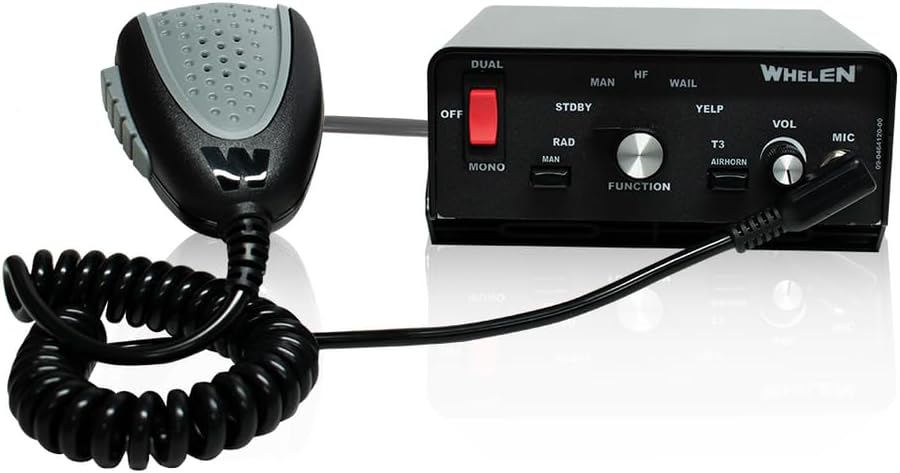
Figure 3.1: Whelen 295HFSC9 Dual Siren unit with attached microphone.

Figure 3.2: The removable microphone, showing the coiled cord and audio jack.

Figure 3.3: Included mounting bracket and associated screws and washers.

Figure 3.4: Rear panel of the siren unit, showing connection ports and included wiring harnesses.
4. Setup and Installation
The Whelen 295HFSC9 Dual Siren is designed for compact installation. Proper mounting and wiring are crucial for optimal performance and safety.
4.1 Mounting the Siren Unit
- Select a secure, dry location within the vehicle, away from excessive heat or vibration.
- Use the provided mounting bracket and hardware to firmly attach the siren unit to a stable surface. Ensure adequate clearance for ventilation.

Figure 4.1: Side view of the siren unit, illustrating how the mounting bracket attaches.
4.2 Electrical Connections
Refer to the wiring diagram provided with your unit for specific connections. General guidelines include:
- Connect the main power input to a fused, constant 12V DC source capable of supplying the required current for a 200-watt siren.
- Connect the ground wire to a solid chassis ground point.
- Connect speaker outputs to appropriate siren speakers. Ensure correct polarity.
- Connect control inputs (e.g., ignition, switch inputs) as per your system design.
- The unit features switch or ignition-activated panel illumination for enhanced usability in low-light conditions. Connect the illumination wire to a switched power source.

Figure 4.2: Bottom view of the siren unit, showing access to the fuses for protection.
5. Operating Instructions
The Whelen 295HFSC9 offers intuitive controls and programmable features for versatile operation.
5.1 Control Panel Overview
Figure 5.1: Front control panel of the Whelen 295HFSC9 Dual Siren.
- OFF Switch: Powers the unit on or off.
- DUAL/MONO Switch: Selects between dual (stereo) or mono sound output.
- MAN/HF Switch: Toggles between manual siren control and hands-free operation.
- Siren Tones (WAIL, YELP, T3, AIRHORN): Buttons to activate specific siren tones.
- FUNCTION Knob: Used to select and program operating profiles.
- VOL Knob: Adjusts the microphone and siren volume.
- MIC Jack: Port for connecting the removable microphone.
- RAD Button: Activates radio rebroadcast function.
5.2 Hands-Free Operation
When the MAN/HF switch is set to HF, the siren can be controlled hands-free, typically by using the vehicle's horn ring or other designated input. This allows for quick and convenient siren activation without diverting attention from driving.
5.3 Programmable Profiles
The siren supports 8 programmable operating profiles, allowing customization for various emergency response scenarios, including Title 13-compliant settings. Refer to the detailed programming guide (usually a separate document or advanced section of the full manual) for instructions on how to configure these profiles using the FUNCTION knob.
5.4 Safety Features
- Park-Kill: This feature automatically shuts down the siren when the vehicle is placed in 'Park' to prevent accidental activation or prolonged operation.
- 'Siren In Use' Output Signal: Provides a signal that can be used to activate other indicators or systems, ensuring operational awareness when the siren is active.
6. Maintenance
Regular maintenance ensures the longevity and reliable operation of your Whelen 295HFSC9 Dual Siren.
- Cleaning: Clean the exterior of the unit with a soft, damp cloth. Do not use abrasive cleaners or solvents.
- Inspection: Periodically inspect all wiring connections for tightness and signs of wear or corrosion.
- Fuse Replacement: If a fuse blows, replace it only with a fuse of the same type and rating as indicated on the unit or in the wiring diagram.
- Ventilation: Ensure that the siren unit's ventilation openings are not obstructed to prevent overheating.
7. Troubleshooting
If you experience issues with your Whelen 295HFSC9 Dual Siren, refer to the following common troubleshooting steps:
| Problem | Possible Cause | Solution |
|---|---|---|
| Siren does not power on. | No power supply; Blown fuse; Loose connection. | Check vehicle's power source; Inspect and replace fuse; Verify all power connections are secure. |
| No siren sound. | Speaker disconnected or faulty; Volume too low; Incorrect mode selected. | Check speaker connections and integrity; Increase volume; Ensure correct siren tone or mode is selected. |
| Microphone not working. | Microphone not plugged in; Faulty microphone; Volume too low. | Ensure microphone is fully inserted into the MIC jack; Test with another microphone if available; Increase volume. |
| Siren cuts out intermittently. | Loose wiring; Overheating; Low voltage. | Check all wiring connections; Ensure adequate ventilation; Verify vehicle's electrical system is providing stable voltage. |
If the problem persists after attempting these solutions, contact Whelen customer support or a qualified service technician.
8. Specifications
| Feature | Specification |
|---|---|
| Model Number | Whelen 295HFSC9 |
| Manufacturer | Whelen Engineering |
| Power Output | 200 Watts |
| Input Voltage | 12V DC (Nominal) |
| Dimensions (L x W x H) | 6 x 7 x 2.5 inches (approx.) |
| Item Weight | 1.66 pounds (approx.) |
| Programmable Profiles | 8 |
| Included Components | Siren unit, microphone, mounting bracket, hardware |
| Batteries Required | No |
9. Warranty and Support
For warranty information, please refer to the documentation provided with your purchase or visit the official Whelen Engineering website. Whelen products are known for their durability and reliability, backed by manufacturer support.
If you require technical assistance, troubleshooting beyond this manual, or have questions regarding your Whelen 295HFSC9 Dual Siren, please contact Whelen Engineering customer support directly. Contact information can typically be found on the manufacturer's website or on your product packaging.
It is recommended to register your product with Whelen Engineering to receive updates and facilitate warranty claims.

