1. Introduction
This manual provides detailed instructions for the setup, operation, maintenance, and troubleshooting of your OYAYO FP88DW Folding Piano Keyboard. Please read this manual thoroughly before using the instrument to ensure proper function and longevity.
2. Package Contents
Verify that all items listed below are included in your package:
- OYAYO FP88DW Folding Piano Keyboard
- Power Adapter (Charger)
- Audio Cable
- Sustain Pedal
- Music Stand
- Gig Bag
- User Manual (this document)

Image: OYAYO FP88DW Folding Piano Keyboard and its accessories, including the power adapter, audio cable, sustain pedal, music stand, gig bag, and user manual.
3. Product Overview
3.1 Key Features
- 88 Semi-Weighted Keys: Designed to provide a responsive playing experience with adjustable touch sensitivity.
- Foldable Design: The keyboard folds 180 degrees for portability and compact storage.
- Integrated Speakers: Enhanced sound quality through built-in speakers.
- Bluetooth Connectivity: Wireless connection to educational apps.
- MIDI/USB-B Interface: Connects to computers or smart devices for music editing and creation.
- Dual Power Modes: Operates on a built-in rechargeable lithium battery or via wired charging.
- Multiple Functions: Includes 129 tones, 128 rhythms, 60 demo songs, recording, metronome, transposition, and teaching mode.
3.2 Components and Ports
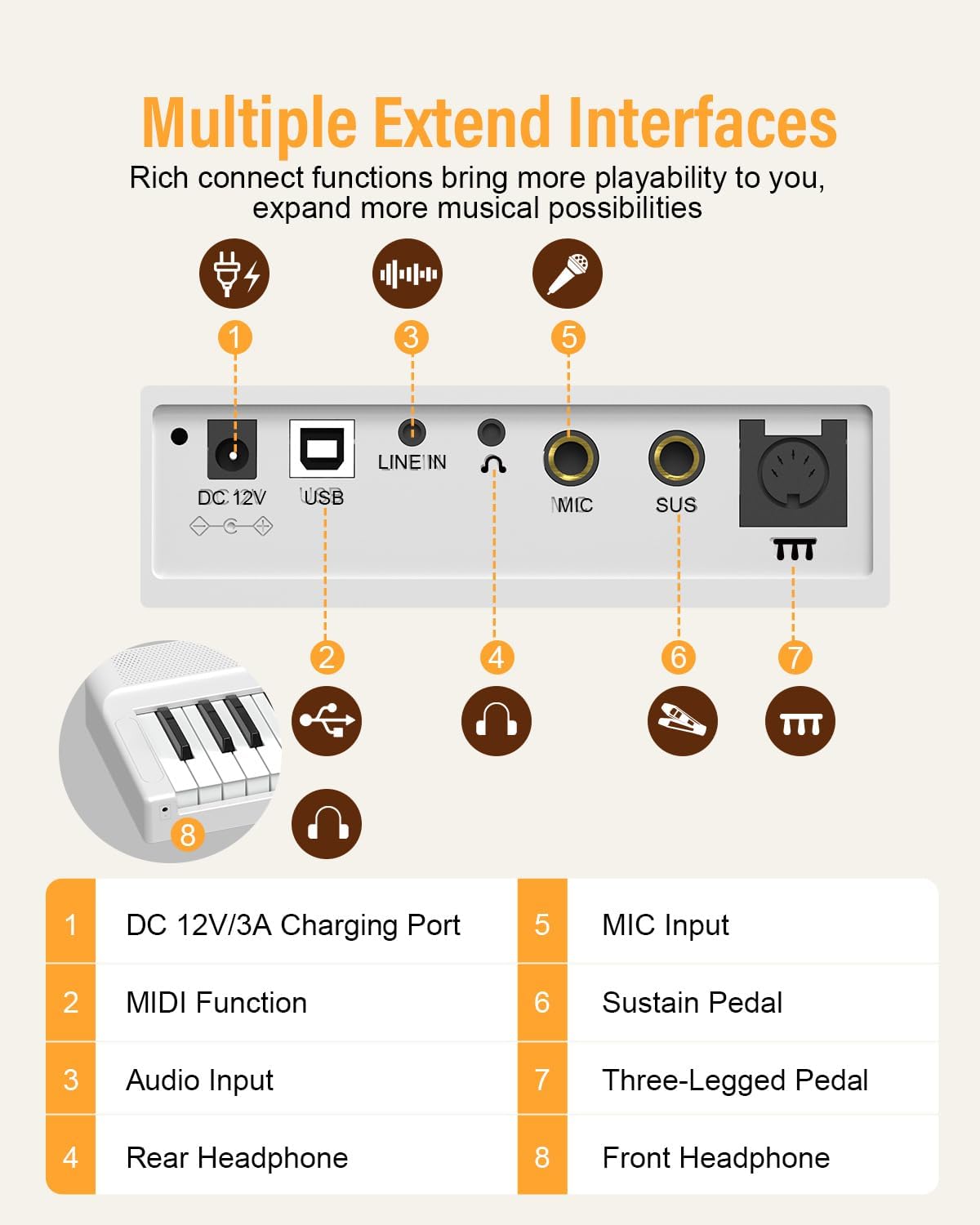
Image: Rear panel diagram illustrating the DC 12V/3A Charging Port, USB (MIDI) port, LINE IN (Audio Input), Rear Headphone jack, MIC Input, SUS (Sustain Pedal) jack, and Three-Legged Pedal jack. A Front Headphone jack is also indicated.
- DC 12V/3A Charging Port: Connect the power adapter here.
- USB (MIDI) Port: Connects to computers or smart devices for MIDI functionality.
- LINE IN (Audio Input): For connecting external audio sources.
- Rear Headphone Jack: For connecting headphones.
- MIC Input: For connecting a microphone.
- SUS (Sustain Pedal) Jack: For connecting the included sustain pedal.
- Three-Legged Pedal Jack: For connecting an optional three-pedal unit.
- Front Headphone Jack: An additional headphone jack located at the front for convenience.
4. Setup
4.1 Unfolding the Keyboard
To unfold the keyboard, place it on a flat, stable surface. Gently open the two halves until they lock into place. Ensure the locking mechanism is secure before use.

Image: The folding mechanism of the OYAYO FP88DW piano, demonstrating how to unfold it for use.
4.2 Powering On
The FP88DW can be powered by its internal rechargeable battery or by the included AC adapter.
- Battery Power: The internal battery provides approximately 10 hours of playtime on a full charge.
- AC Power: Connect the power adapter to the DC 12V/3A charging port on the rear panel and plug it into a wall outlet. The keyboard will charge while in use or when turned off.

Image: A visual representation of the 10-hour battery life of the OYAYO FP88DW piano.
4.3 Connecting the Sustain Pedal
Insert the plug of the sustain pedal into the 'SUS' jack on the rear panel of the keyboard.
5. Operating Instructions
5.1 Power On/Off and Volume Control
- Power: Press the power button to turn the keyboard on or off.
- Volume: Use the rotary knob on the control panel to adjust the master volume.

Image: A close-up view of the control panel, showing the display and the rotary knob for volume and selection.
5.2 Selecting Tones, Rhythms, and Demo Songs
- Tones: Press the 'Tone' button, then use the rotary knob to select from 129 available tones.
- Rhythms: Press the 'RHY' button, then use the rotary knob to select from 128 rhythms.
- Demo Songs: Press the 'Demo' button to cycle through 60 built-in demo songs.
5.3 Bluetooth Connectivity
The keyboard supports Bluetooth for wireless connection to compatible learning applications.
- Ensure Bluetooth is enabled on your smart device (phone, tablet).
- On your device, search for available Bluetooth devices and select 'OYAYO FP88DW'.
- Once connected, you can use the keyboard with compatible music apps.

Image: The OYAYO FP88DW piano demonstrating MIDI and Bluetooth connectivity with external devices like tablets and smartphones for educational apps.
5.4 MIDI/USB-B Connection
Connect the keyboard to a computer or iPad using a USB-B cable for MIDI functionality. This allows for music editing, recording, and interaction with digital audio workstations (DAWs).
5.5 Recording Function
The keyboard includes a recording feature to capture your performances. Refer to the on-screen display and control panel buttons for specific recording and playback instructions.
5.6 Metronome and Transposition
- Metronome: Activate the metronome function to assist with timing and rhythm practice.
- Transposition: Adjust the pitch of the keyboard up or down to play in different keys without changing your finger positions.
5.7 Headphone Use
Connect headphones to either the front or rear 3.5mm headphone jack for private practice. The internal speakers will automatically mute when headphones are connected.

Image: The OYAYO FP88DW piano's sound output options, including wired headphones, mobile/iPad connection, and wired speakers, highlighting the upgraded sound effect.
6. Maintenance
6.1 Cleaning
- Wipe the keyboard surface with a soft, dry cloth.
- For stubborn dirt, slightly dampen the cloth with water and a mild soap solution, then wipe dry immediately.
- Avoid using abrasive cleaners, solvents, or waxes, as these can damage the finish.
6.2 Storage
- When not in use, fold the keyboard and store it in the provided gig bag to protect it from dust and damage.
- Store in a cool, dry place away from direct sunlight and extreme temperatures.
7. Troubleshooting
| Problem | Possible Cause | Solution |
|---|---|---|
| No sound from speakers/headphones. | Volume too low; headphones connected; power issue. | Increase volume. Disconnect headphones if using speakers. Ensure keyboard is powered on and charged. |
| Keyboard does not power on. | Battery depleted; power adapter not connected correctly. | Connect the power adapter and allow the battery to charge. Ensure the adapter is securely plugged in. |
| Bluetooth connection fails. | Bluetooth not enabled on device; device out of range; interference. | Ensure Bluetooth is active on your device. Move device closer to the keyboard. Restart both devices. |
| Keys feel unresponsive or inconsistent. | Dust or debris under keys; touch sensitivity setting. | Gently clean around keys. Check the touch sensitivity settings in the keyboard menu. |
| Keyboard unexpectedly shuts off. | Low battery. | This can indicate a critically low battery. Connect the power adapter immediately to charge the keyboard. |
8. Specifications
| Feature | Detail |
|---|---|
| Model Name | FP88DW |
| Number of Keys | 88 |
| Key Type | Semi-Weighted |
| Tones | 129 |
| Rhythms | 128 |
| Demo Songs | 60 |
| Connectivity | Bluetooth, MIDI/USB-B |
| Power Source | Battery Powered & Corded Electric |
| Battery Life | Approx. 10 hours (full charge) |
| Headphones Jack | 3.5mm Jack (Front & Rear) |
| Other Features | Recording, Metronome, Transposition, Teaching Mode |
| Item Weight | 15.12 pounds (approx. 6.86 kg) |
| Folded Dimensions (L x W x H) | Approx. 630mm x 245mm x 140mm |
| Unfolded Dimensions (L x W x H) | Approx. 1260mm x 245mm x 70mm |

Image: Detailed dimensions of the OYAYO FP88DW piano, including its length, width, height, and weight in both folded and unfolded configurations.
9. Warranty and Support
9.1 Warranty Information
For specific warranty details, please refer to the warranty card included with your product or contact the retailer from whom you purchased the OYAYO FP88DW Folding Piano Keyboard. Warranty terms typically cover manufacturing defects for a specified period from the date of purchase.
9.2 Customer Support
If you encounter any issues or have questions regarding your OYAYO FP88DW, please contact OYAYO customer support or your authorized dealer. Have your model number (FP88DW) and purchase information ready when contacting support.


