
SYESWAY 453GGDLSKFZ
SYESWAY 39.4" Lift Top Coffee Table User Manual
Model: 453GGDLSKFZ
Introduction
Thank you for choosing the SYESWAY 39.4" Lift Top Coffee Table. This multifunctional coffee table is designed to enhance your living space with its innovative lift-top mechanism, integrated charging station, and customizable LED lighting. This manual provides essential information for safe assembly, operation, and maintenance of your new coffee table.

Figure 1: The SYESWAY 39.4" Lift Top Coffee Table in a modern living room.
Safety Information
- Read all instructions carefully before assembly and use.
- Keep all small parts and packaging materials away from children and pets to prevent choking hazards.
- Ensure all connections are secure before using the charging station. Do not overload the electrical outlets.
- Do not stand or sit on the lift-top mechanism. Keep hands and fingers clear when raising or lowering the tabletop.
- Place the coffee table on a flat, stable surface to prevent tipping.
- Avoid exposing the table to excessive moisture or direct sunlight for prolonged periods.
- Maximum weight recommendation for the tabletop is 100 pounds.
Package Contents
Before beginning assembly, ensure all parts are present and undamaged. If any parts are missing or damaged, please contact customer support.
- Coffee Table Components (Engineered Wood Panels)
- Lift-Top Mechanism (Gas Lift Struts and Metal Brackets)
- Integrated Charging Station (USB & Type-C Ports, AC Outlets)
- LED Light Strip with Controller
- Assembly Hardware (Screws, Dowels, etc.)
- Assembly Guide
- Tools (Hex Key, Screwdriver, etc.)

Figure 2: Product dimensions and key features.
Setup and Assembly
Assembly is designed to be straightforward with labeled parts and clear instructions. It is recommended to have two people for certain steps, especially when attaching the lift-top mechanism.
- Unpack and Identify Parts: Carefully remove all components from the packaging. Lay them out on a clean, soft surface to prevent scratches. Refer to the included assembly guide to identify each labeled part.
- Assemble Base Structure: Follow the step-by-step instructions in the assembly guide to construct the main base and lower storage sections of the coffee table. Ensure all screws are tightened securely.
- Install Lift-Top Mechanism: Attach the gas lift struts and metal brackets to the designated points on the table's frame and the underside of the tabletop. This step may require assistance to hold the tabletop steady while securing the brackets. The gas lift struts ensure smooth and silent operation.

Figure 3: Detail of the premium gas lift struts for smooth operation.
- Integrate Charging Station: Install the USB and Type-C charging ports and AC outlets into the pre-cut opening on the side of the table. Connect the power cable as instructed.

Figure 4: Integrated charging station with USB and AC outlets.
- Install LED Lighting: Adhere the LED light strip to the designated area, typically between the two layers of the coffee table. Connect the LED strip to its controller and power source.
- Final Checks: Once assembled, gently test the lift-top mechanism to ensure it operates smoothly. Verify all electrical connections for the charging station and LED lights are secure.
Video 1: Demonstration of the SYESWAY High Glossy LED Coffee Table's features, including the lift-top and LED lighting.
Operating Instructions
Lift-Top Mechanism
The coffee table features a height-adjustable lift-top. To raise the tabletop, gently pull it upwards from the front edge. The gas lift struts will assist in a smooth and silent ascent. To lower, apply gentle downward pressure on the tabletop until it returns to its original position. Ensure no objects are in the way of the mechanism when adjusting.

Figure 5: The coffee table can be used in various configurations, including a regular coffee table, one-side lift, double lift, or as a dining table for 4-8 people.
Charging Station
The integrated charging station includes USB, Type-C, and standard AC outlets. Simply plug your devices into the appropriate port to charge. Ensure the table is connected to a power source for the charging station to function.

Figure 6: Utilize the built-in USB and Type-C ports for convenient device charging.
LED Lighting
The concealed LED strips offer customizable mood lighting. Control the lights using the provided remote control (batteries not included) or via a dedicated mobile application. You can adjust colors (over 60,000 options) and various modes to suit your preference.
- Remote Control: Insert batteries into the remote. Use the buttons to power on/off, change colors, adjust brightness, and select modes.
- Mobile App: Download the recommended app (refer to the assembly guide for QR code or app name). Pair your device with the LED controller via Bluetooth. The app allows for more advanced control, including music sync and timing functions.
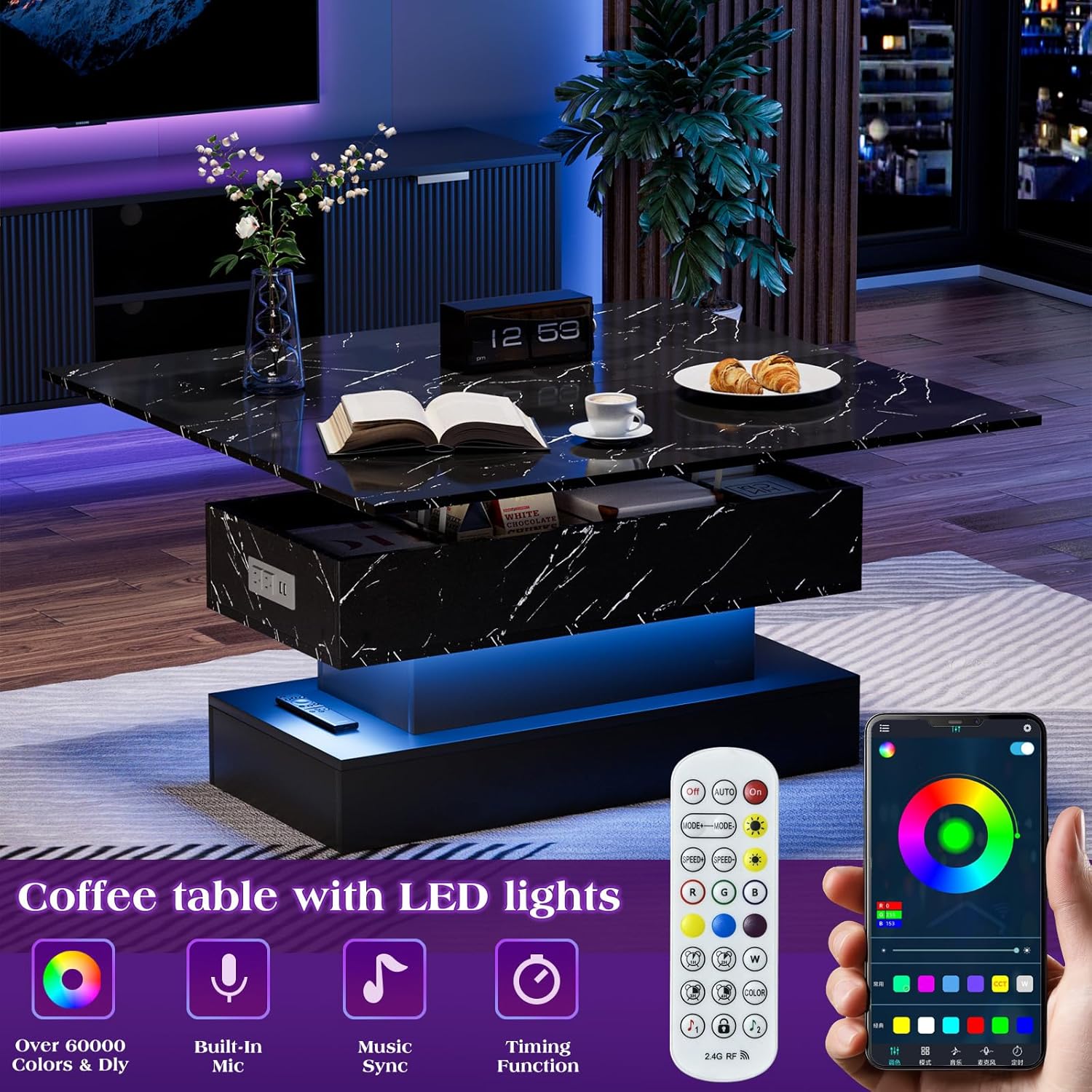
Figure 7: Control the LED lighting with the remote or mobile app for various colors and modes.
Storage Compartments
The table features multiple storage options:
- Hidden Compartment: Located directly under the lift-top, this space is ideal for storing remotes, chargers, and other items you wish to keep out of sight.
- Open Storage Space: The lower section provides open shelves for easy access to books, magazines, or decorative items.

Figure 8: Explore the multiple storage spaces for organization.
Maintenance
Proper care will ensure the longevity and appearance of your coffee table.
- Cleaning: Wipe surfaces with a soft, damp cloth. For the high-glossy marbling print, use a mild, non-abrasive cleaner. Avoid harsh chemicals or abrasive materials that could damage the finish.

Figure 9: The high-glossy marbling print is waterproof and easy to clean.
- Spills: Clean up spills immediately to prevent staining, especially on the marbling print surface.
- Mechanism Care: The gas lift struts are designed for durability. No special lubrication is typically required. If the mechanism becomes stiff, ensure no debris is obstructing its movement.
- Electrical Components: Keep the charging station and LED components dry. Do not attempt to repair electrical parts yourself.
Troubleshooting
| Problem | Possible Cause | Solution |
|---|---|---|
| Lift-top is stiff or not lifting smoothly. | Obstruction in mechanism; loose screws; gas struts need breaking in. | Check for any objects blocking the mechanism. Ensure all screws are tightened. Repeatedly open and close the lift-top to break in the gas struts. |
| Charging station not working. | Table not plugged in; loose connection; device not compatible. | Verify the table's power cord is securely plugged into a working wall outlet. Check the connection of the charging station module. Test with a different device and cable. |
| LED lights not turning on/changing color. | Remote batteries dead/missing; loose connection; app not paired. | Replace remote batteries. Check all LED strip connections. Ensure the mobile app is correctly paired via Bluetooth. |
| Table wobbles. | Uneven floor; loose assembly screws. | Move the table to a level surface. Re-tighten all assembly screws. |
If you encounter issues not listed here or if the problem persists, please contact SYESWAY customer support for assistance.
Specifications
- Brand: SYESWAY
- Model Name: Lift Top Coffee Table
- Model Number: 453GGDLSKFZ
- Product Dimensions: 19.68"D x 39.37"W x 18.93"H
- Material Type: Engineered Wood
- Color: Black
- Item Weight: 91.5 Pounds
- Maximum Weight Recommendation: 100 Pounds
- Included Components: Assembly Guide, Charging Station
- Charging Station Output: USB & Type-C Ports (5V/2A MAX), AC Outlets (125V/12A, 1500W MAX)
- LED Lighting: Over 60,000 colors, multiple modes, app & remote controlled
Warranty and Support
SYESWAY is committed to providing quality products. This product typically comes with a standard manufacturer's warranty covering defects in materials and workmanship. For specific warranty details, please refer to the documentation included with your purchase or contact SYESWAY customer service.
For technical support, missing parts, or warranty claims, please contact the seller, Uniq direct, or visit the official SYESWAY website for contact information. Please have your model number (453GGDLSKFZ) and purchase date available when contacting support.
Return Policy: This product is eligible for returns within 30 days of purchase, subject to the seller's return policy.
Ask a question about this manual
Ask about setup, troubleshooting, compatibility, parts, safety, or missing instructions. Manuals+ will review the question and use this page’s manual context to help answer it.