
Rollplay ZW416-R-FS-WH
Rollplay MINI Cooper Push Car User Manual
Model: ZW416-R-FS-WH | Brand: Rollplay
Introduction
This manual provides essential information for the safe assembly, operation, and maintenance of your Rollplay MINI Cooper Push Car. Designed for toddlers aged 18 months to 4 years, this ride-on car offers versatile play modes, including an adjustable push handle for parent control and a foot-to-floor mode for independent movement. Please read this manual thoroughly before use to ensure proper function and safety.
Safety Information
WARNING:
Plastic bags can be dangerous. To avoid danger of suffocation, keep plastic bags away from babies and children. Always supervise children during use. Ensure all parts are securely fastened before each use. Do not use near stairs, hills, roads, or swimming pools. Only one rider at a time.
Product Features
- Adjustable Push Handle: Can be adjusted for parent comfort or completely removed for independent play.
- Foot-to-Floor Mode: Features an adjustable foot tray, allowing easy conversion for child-powered movement.
- Clutch on Steering Wheel: Prevents conflict between parent's steering via the push handle and the child's steering.
- Opening Door: One functional door for easy entry and exit.
- Working Steering Wheel with Sounds: Requires 2 AAA batteries (not included) for interactive sounds and an engaging experience.
- Assembled Safety Belt: Ensures child safety during operation.
- Realistic MINI Cooper Design: Officially licensed design with chrome headlights and detailed dashboard for an authentic look.
- High Traction Strips: Rubber strips on tires provide added traction and smooth acceleration.

Image: Detailed view of the steering wheel with sound functions, clutch mechanism, and safety belt.
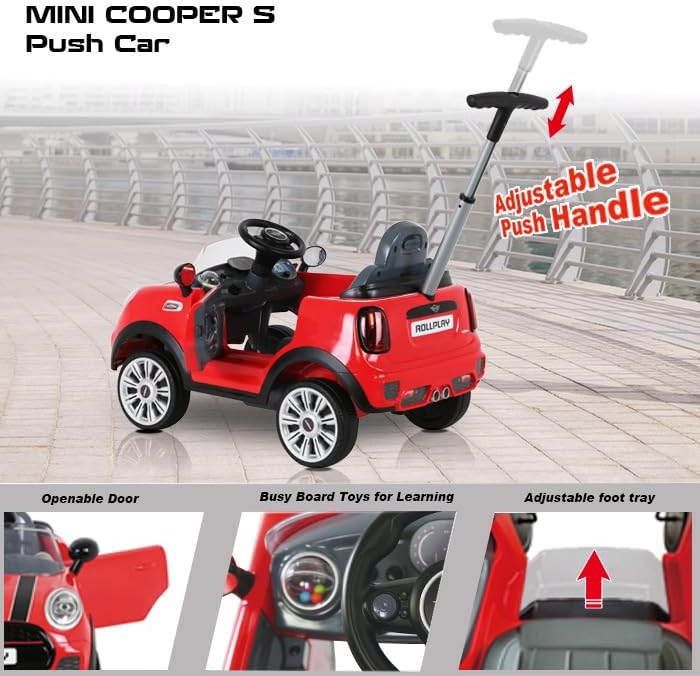
Image: Features of the push car including the adjustable push handle, openable door, and adjustable foot tray.

Image: Illustration of the 3-in-1 functionality: stroller, child walking car, and riding on car modes.
Assembly Instructions
The Rollplay MINI Cooper Push Car requires minimal assembly. Please follow these steps carefully:
- Unpack Components: Carefully remove all parts from the packaging. Verify all components listed in the "What's in the Box" section are present.
- Install Wheels: Attach the wheels to the axles as per the diagrams provided in the quick start guide (not included in this manual, refer to product packaging). Ensure they are securely fastened.
- Attach Steering Wheel: Secure the steering wheel to the steering column. Insert 2 AAA batteries (not included) into the battery compartment of the steering wheel for sound functions.
- Insert Push Handle: Slide the adjustable push handle into the designated slot at the rear of the car until it clicks into place. Ensure it is firmly locked.
- Adjust Foot Tray: Position the foot tray to either cover the footwell for foot-to-floor mode or retract it for use with the push handle.
- Safety Check: Before first use, double-check all connections, screws, and moving parts to ensure they are secure and functioning correctly.
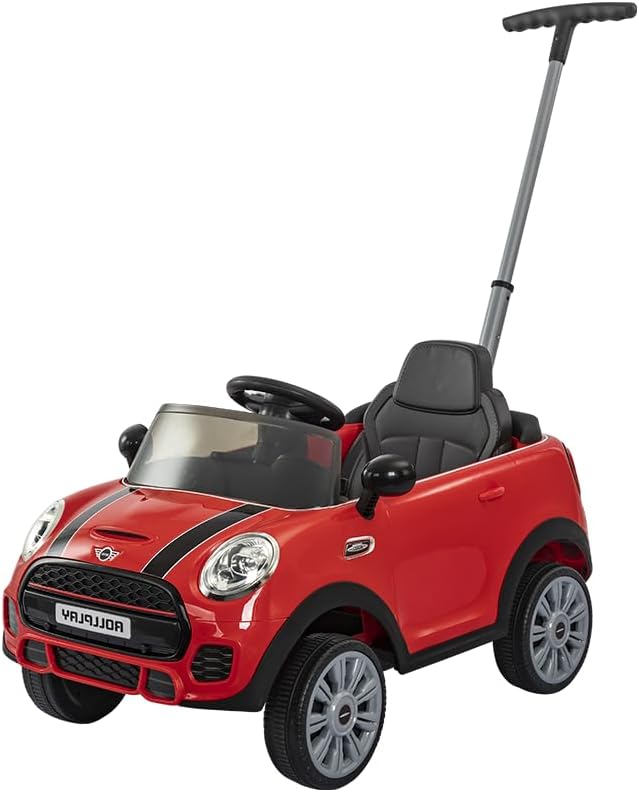
Image: Fully assembled Rollplay MINI Cooper Push Car.
Operating Instructions
Using the Push Handle (Parent Control)
For younger children or when parents wish to control the direction and speed:
- Ensure the adjustable push handle is securely inserted and extended to a comfortable height.
- Place the child in the seat and fasten the safety belt.
- The clutch on the steering wheel allows the parent to steer the car using the push handle without interference from the child's steering.
- Push the car forward using the handle. Guide the car by gently turning the handle in the desired direction.
Foot-to-Floor Mode (Child Control)
For older children who can propel themselves:
- Remove or retract the adjustable push handle if desired.
- Adjust the foot tray to expose the footwell, allowing the child's feet to reach the ground.
- Place the child in the seat and fasten the safety belt.
- The child can now use their feet to push the car forward and steer using the working steering wheel.
Steering Wheel Sounds
To activate the sounds, ensure 2 AAA batteries are installed in the steering wheel. Press the designated buttons on the steering wheel for various interactive sounds.
Video: Demonstration of the Rollplay MINI Cooper Push Car's features, including the opening door, safety belt, working steering wheel with sounds, push handle-controlled steering, and easy conversion to foot-to-floor mode.

Image: Child being pushed in the car by an older child, demonstrating the adjustable push handle.
Maintenance
- Cleaning: Wipe the car with a damp cloth and mild soap. Do not use abrasive cleaners or solvents.
- Storage: Store the car in a dry, cool place away from direct sunlight when not in use.
- Battery Replacement: Replace AAA batteries in the steering wheel when sounds become faint or stop working. Ensure correct polarity.
- Regular Checks: Periodically inspect all nuts, bolts, and fasteners to ensure they are tight. Check wheels and axles for wear.
Troubleshooting
| Problem | Possible Cause | Solution |
|---|---|---|
| Steering wheel sounds not working. | Batteries are dead or incorrectly installed. | Replace batteries (2 AAA) ensuring correct polarity. |
| Car is difficult to push or steer. | Wheels are dirty or obstructed; push handle not fully engaged. | Clean wheels and axles. Ensure push handle is securely locked in place. |
| Door does not close properly. | Obstruction in the door latch mechanism. | Check for any debris or misalignment in the door latch. |
Specifications
- Product Dimensions: 42.5 x 40.6 x 19.2 inches
- Item Weight: 22.3 pounds
- Country of Origin: China
- Model Number: ZW416-R-FS-WH
- Manufacturer Recommended Age: 18 months and up
- Manufacturer: Rollplay
- Power Source (Steering Wheel): 2 x AAA batteries (not included)

Image: Product dimensions diagram.
Warranty and Support
For warranty information or technical support, please contact Rollplay customer service. Details can typically be found on the product packaging or the official Rollplay website. Keep your purchase receipt for warranty claims.
Visit the official Rollplay Store for more products and information: Rollplay Store on Amazon
Ask a question about this manual
Ask about setup, troubleshooting, compatibility, parts, safety, or missing instructions. Manuals+ will review the question and use this page’s manual context to help answer it.