
B0DPG3DLGW
GeekMagic Mini Weather Station Indoor User Manual
Model: B0DPG3DLGW
1. Product Overview
The GeekMagic Mini Weather Station is a compact and stylish digital clock designed to provide real-time weather information, time, date, and indoor temperature. Its unique clear shell design allows for a modern aesthetic, while WiFi connectivity ensures accurate and up-to-date data. This device also supports customizable displays, including photo albums and GIF animations, making it a versatile addition to any desktop.
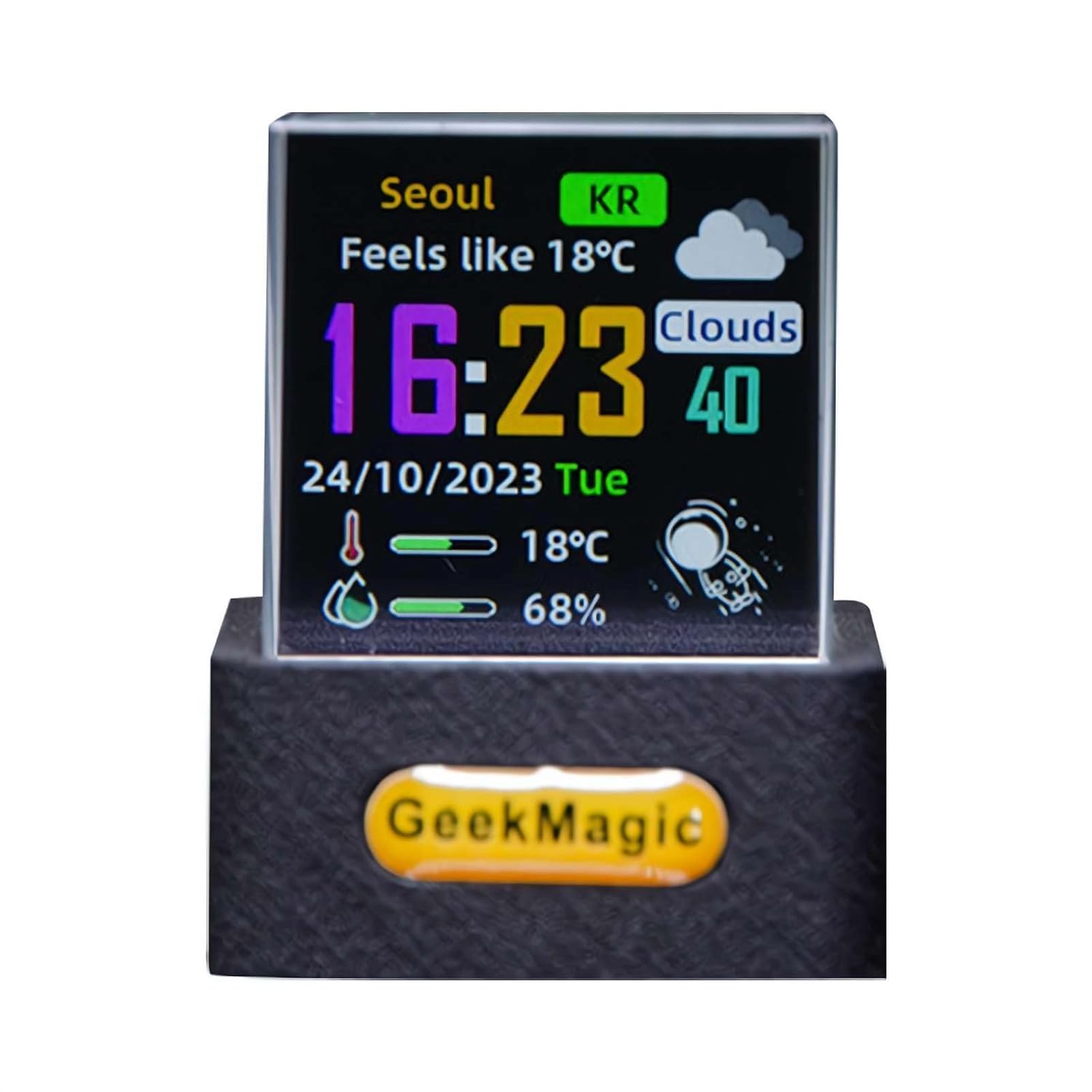
Figure 1: Front view of the GeekMagic Mini Weather Station displaying current weather conditions, time, and indoor temperature.

Figure 2: Comparison of the GeekMagic Mini Weather Station in black and white color variants, showcasing its compact design.
2. Package Contents
Before proceeding with setup, please ensure all items are present in the package:
- GeekMagic Mini Weather Station Unit
- USB Power Cable
- User Manual (Online QR code for video tutorial)

Figure 3: Contents of the product package, including the weather station unit, USB cable, and user manual QR code.
3. Setup Instructions
- Power Connection: Connect the provided USB cable to the weather station unit and plug the other end into a standard USB power adapter (not included) or a powered USB port. The device will power on automatically.
- Initial Boot-up: Upon first power-on, the device will display a setup screen or a QR code for initial configuration.
- WiFi Connection:
- Scan the QR code displayed on the device screen using your smartphone.
- Follow the on-screen instructions on your smartphone to connect the weather station to your home WiFi network. Ensure your WiFi network is 2.4GHz, as 5GHz networks may not be supported.
- Once connected, the device will automatically synchronize time and retrieve weather data based on your location settings.
- Location Settings: Adjust your location settings via the connected smartphone application to ensure accurate local weather information.
4. Operating the Device
The GeekMagic Mini Weather Station offers various display modes and functionalities. Most settings and customizations are managed through the associated smartphone application.
4.1. Time and Weather Display
The primary function of the device is to display current time, date, real-time weather conditions, and indoor temperature. This information updates automatically via WiFi connection.

Figure 4: The weather station displaying the current time and date.
4.2. Photo Album and GIF Display
The device supports displaying personal photos and GIF animations. Upload your desired images or GIFs through the smartphone application to customize your display.
- Photo Album: Upload static images to create a rotating photo display.
- GIF Animations: Upload animated GIF files for dynamic visual effects.

Figure 5: The weather station displaying a personal photo from the photo album feature.

Figure 6: The weather station displaying a graphic of a planet, demonstrating its GIF animation capability.

Figure 7: The weather station displaying a graphic of a jellyfish, another example of its GIF animation capability.
5. Maintenance
- Cleaning: Use a soft, dry cloth to gently wipe the display and the unit. Avoid abrasive cleaners or solvents that may damage the surface.
- Placement: Place the weather station on a stable, flat surface away from direct sunlight, extreme temperatures, and high humidity to ensure optimal performance and longevity.
- Power: Always use the provided USB cable for power. Do not attempt to open or modify the device.
6. Troubleshooting
| Problem | Possible Cause | Solution |
|---|---|---|
| Device does not power on. | No power supply or faulty cable. | Ensure the USB cable is securely connected to a working power source. Try a different USB port or adapter. |
| Cannot connect to WiFi. | Incorrect WiFi password, 5GHz network, or weak signal. | Verify the WiFi password. Ensure you are connecting to a 2.4GHz network. Move the device closer to the WiFi router. Restart the device and try again. |
| Weather information is incorrect or not updating. | Incorrect location settings or no internet connection. | Check your internet connection. Verify and update your location settings in the smartphone application. |
| Display is blank or frozen. | Software glitch or power interruption. | Unplug the device, wait 10 seconds, and plug it back in to perform a restart. |
7. Specifications
| Feature | Detail |
|---|---|
| Product Name | GeekMagic Mini Weather Station Indoor |
| Model Number | B0DPG3DLGW |
| Product Dimensions | 3.5 x 3.1 x 3.8 cm (1.4 x 1.2 x 1.5 inches) |
| Material | Plastic |
| Connectivity | WiFi (2.4GHz) |
| Display Features | Time, Date, Real-time Weather, Indoor Temperature, Photo Album, GIF Animations |
| Power Input | USB (Cable included) |

Figure 8: Detailed dimensions of the GeekMagic Mini Weather Station.
8. Warranty and Support
This product is covered by a standard manufacturer's warranty. For specific warranty terms and conditions, please refer to the product packaging or contact the seller directly. For technical support or further assistance, please reach out to the customer service provided by your retailer or the manufacturer.
Online Resources: For additional support and video tutorials, scan the QR code provided in your package or visit the official GeekMagic support website (if available).