
Important Safety Instructions
Please read all instructions carefully before using your SHARDOR coffee machine. Retain this manual for future reference.
- Always ensure the coffee machine is placed on a stable, level surface away from the edge of the countertop.
- Do not immerse the appliance, power cord, or plug in water or other liquids.
- Unplug from the outlet when not in use and before cleaning. Allow to cool before putting on or taking off parts, and before cleaning the appliance.
- Do not operate any appliance with a damaged cord or plug, or after the appliance malfunctions or has been damaged in any manner.
- Close supervision is necessary when any appliance is used by or near children.
- Avoid contact with hot surfaces. Use handles or knobs.
- Do not use the appliance for other than intended use.
- Use only cold, fresh water in the water reservoir.
Product Overview
The SHARDOR 3-in-1 Single Serve Coffee Machine offers versatile brewing options for your convenience. It is designed to brew both K-cup pods and ground coffee, providing flexibility for your beverage preferences.
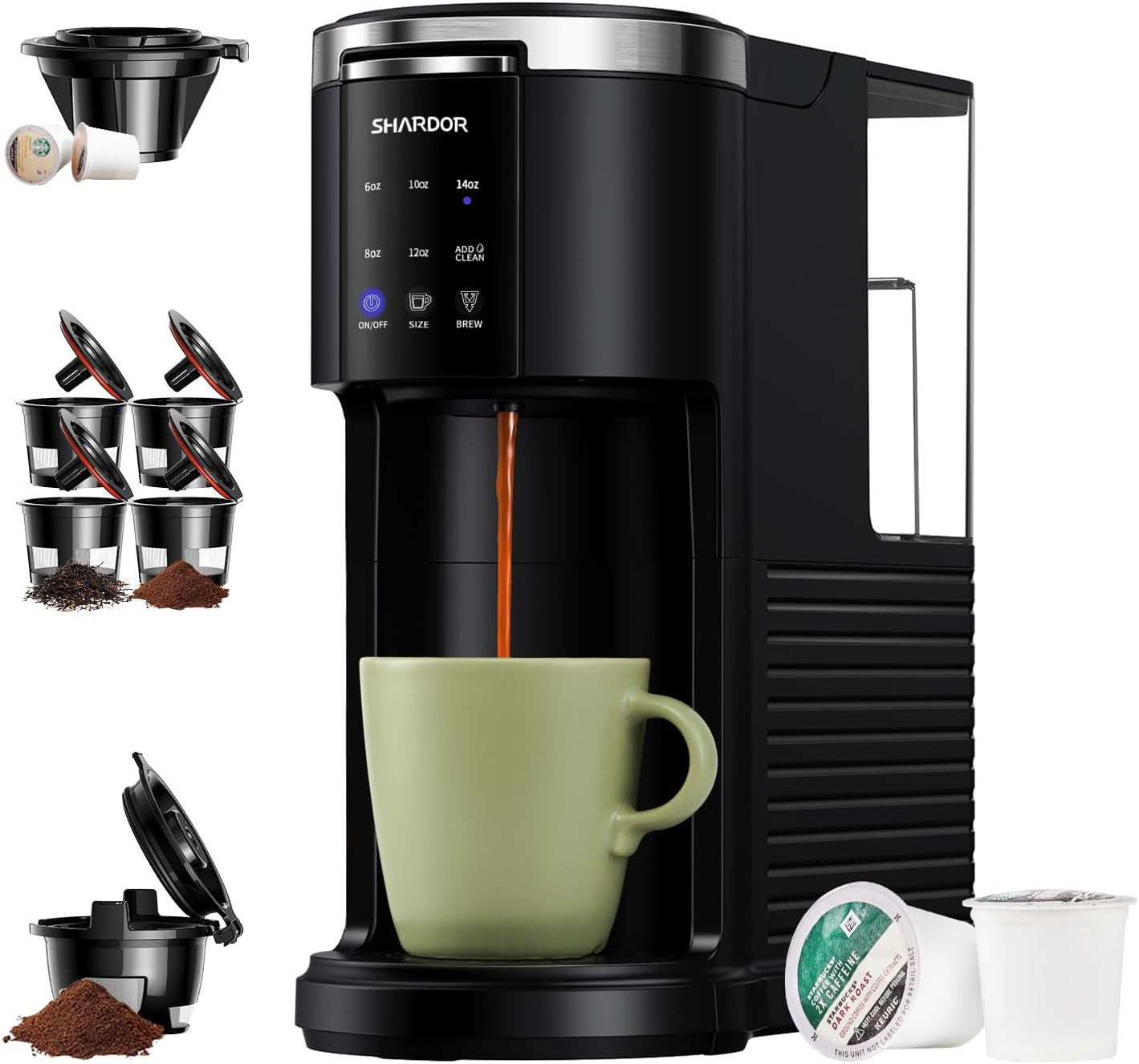
Image: The SHARDOR 3-in-1 Single Serve Coffee Machine, showcasing its compact design and included accessories for K-cup and ground coffee brewing.
Components
- Main Unit with Control Panel
- Removable Water Reservoir (40 oz capacity)
- Drip Tray and Drip Tray Plate
- K-Cup Pod Holder
- Ground Coffee Filter Basket (Reusable)

Image: The removable water reservoir and drip tray, essential components for easy filling and cleaning.
Product Dimensions
- Height: 12.6 inches
- Width: 4.93 inches
- Depth: 10.8 inches

Image: A visual representation of the coffee machine's dimensions, highlighting its compact footprint.
Initial Setup
Before first use, follow these steps to prepare your coffee machine:
- Unpack: Carefully remove all packaging materials and place the coffee machine on a clean, dry, and level surface.
- Clean Components: Wash the removable water reservoir, K-cup pod holder, ground coffee filter basket, and drip tray in warm, soapy water. Rinse thoroughly and dry.
- Fill Water Reservoir: Fill the water reservoir with fresh, cold water up to the MAX fill line. Do not exceed the MAX line.
- First Clean Cycle: Plug the machine into a grounded electrical outlet. Place a large mug (at least 14 oz) on the drip tray. Press the 'ON/OFF' button to power on. Select the 14oz brew size. Press the 'BREW' button to run a water-only cycle. Discard the hot water. Repeat this process 2-3 times to thoroughly clean the internal components.
Operating Instructions
Brewing with K-Cup Pods
- Ensure the water reservoir is filled with fresh, cold water.
- Lift the handle to open the brewing chamber.
- Insert a K-cup pod into the K-cup pod holder. Ensure it is seated correctly.
- Close the handle firmly until it clicks into place.
- Place your mug on the drip tray.
- Press the 'ON/OFF' button to power on the machine.
- Select your desired brew size (6oz, 8oz, 10oz, 12oz, or 14oz) using the 'SIZE' button.
- Press the 'BREW' button to start brewing. The machine will automatically shut off after brewing is complete.

Image: Illustrates the process of inserting a K-cup pod into the designated adapter for brewing.
Brewing with Ground Coffee
- Ensure the water reservoir is filled with fresh, cold water.
- Lift the handle to open the brewing chamber.
- Fill the reusable ground coffee filter basket with your desired amount of ground coffee (do not overfill).
- Place the filled ground coffee filter basket into the brewing chamber.
- Close the handle firmly until it clicks into place.
- Place your mug on the drip tray.
- Press the 'ON/OFF' button to power on the machine.
- Select your desired brew size (6oz, 8oz, 10oz, 12oz, or 14oz) using the 'SIZE' button.
- Press the 'BREW' button to start brewing. The machine will automatically shut off after brewing is complete.

Image: The reusable ground coffee adapter, shown filled with coffee grounds, ready for brewing.
Selecting Brew Size
The SHARDOR coffee machine offers multiple brew size options to suit your preference. Use the 'SIZE' button on the control panel to cycle through the available options: 6oz, 8oz, 10oz, 12oz, and 14oz. The selected size will be indicated by an illuminated light.

Image: A close-up view of the control panel, showing the 'ON/OFF', 'SIZE', and 'BREW' buttons, along with brew size indicators and the 'ADD CLEAN' light.
Maintenance and Cleaning
Regular cleaning and maintenance will ensure optimal performance and longevity of your coffee machine.
Regular Cleaning
- Drip Tray: The drip tray should be emptied and cleaned regularly. It is removable for easy cleaning.
- Water Reservoir: Wash the water reservoir with warm, soapy water periodically. Rinse thoroughly.
- Pod Holders: After each use, remove and rinse the K-cup pod holder or ground coffee filter basket.
- Exterior: Wipe the exterior of the machine with a damp cloth. Do not use abrasive cleaners.
Descaling (Auto Clean Function)
Over time, mineral deposits (scale) can build up in your coffee machine, affecting performance and taste. The 'ADD CLEAN' indicator light will illuminate after approximately 150 uses, signaling that descaling is recommended.

Image: The 'ADD CLEAN' indicator light on the control panel, signaling that a descaling cycle is due.
- Prepare Descaling Solution: Fill the water reservoir with a mixture of 1 part white vinegar and 2 parts water, or use a commercial descaling solution according to its instructions.
- Start Clean Cycle: Place a large mug (at least 14 oz) on the drip tray. Press and hold the 'ADD CLEAN' button for 3 seconds to initiate the descaling cycle. The machine will automatically run a cleaning cycle.
- Rinse Cycles: After the descaling cycle is complete, empty and rinse the water reservoir. Fill it with fresh, cold water. Run 2-3 water-only cycles (14oz each) to thoroughly rinse any remaining descaling solution from the machine.
- Reset Indicator: The 'ADD CLEAN' light should turn off after the descaling and rinse cycles are completed. If it remains on, repeat the rinse cycles.

Image: The control panel indicating the recommended cleaning interval of approximately 150 uses.
Troubleshooting
Refer to this table for common issues and their solutions.
| Problem | Possible Cause | Solution |
|---|---|---|
| Machine does not turn on. | Not plugged in; power outlet issue. | Ensure the power cord is securely plugged into a working outlet. Check circuit breaker. |
| Coffee is not hot enough. | Machine needs descaling; preheating issue. | Perform a descaling cycle. Ensure the machine has adequate time to preheat (usually indicated by a steady light). |
| Slow brewing or partial brew. | Mineral buildup; clogged needle; insufficient water. | Perform a descaling cycle. Clean the needle in the K-cup holder. Ensure water reservoir is filled above the minimum level. |
| "ADD CLEAN" light remains on after descaling. | Descaling cycle not fully completed or not enough rinse cycles. | Ensure the descaling cycle ran to completion. Run 2-3 additional water-only rinse cycles. |
| Water leaks from the machine. | Water reservoir not seated correctly; overfilled reservoir; damaged component. | Ensure the water reservoir is properly seated. Do not overfill. If leakage persists, contact customer support. |
Product Specifications
- Brand: SHARDOR
- Model Name: US-CM9429B-2412 (Item model number: CM9429D-UL)
- Color: Black
- Product Dimensions: 10.8"D x 4.93"W x 12.6"H
- Item Weight: 5.21 pounds
- Coffee Maker Type: Drip Coffee Machine
- Operation Mode: Fully Automatic
- Coffee Input Type: Ground, Pod (K-cup compatible)
- Special Features: Auto Clean Function, Auto Shut-Off, Permanent Filter, Removable Tank, Water Filter
- Included Components: Filter
Warranty and Support
SHARDOR products are manufactured to high-quality standards. For warranty information, product support, or to purchase replacement parts, please refer to the official SHARDOR website or contact their customer service directly.
You can also visit the official SHARDOR store on Amazon for more product information and support: SHARDOR Amazon Store