
SEICANE H7723
SEICANE H7723 Android Stereo User Manual
Radio Upgrade for Ford Explorer 2011-2019
1. Product Overview
The SEICANE H7723 is an advanced 12.1-inch Android stereo system designed as a direct upgrade for Ford Explorer models from 2011 to 2019. This unit integrates seamlessly into your vehicle's dashboard, offering enhanced multimedia and navigation capabilities.
Key features include an 8-Core CPU, 4GB RAM, 64GB ROM, a 1024x768 IPS touch screen, built-in GPS navigation, Wi-Fi connectivity, FM/AM Radio, Bluetooth, CarPlay, Android Auto, HD 1080P video playback, and support for steering wheel controls and original backup cameras.
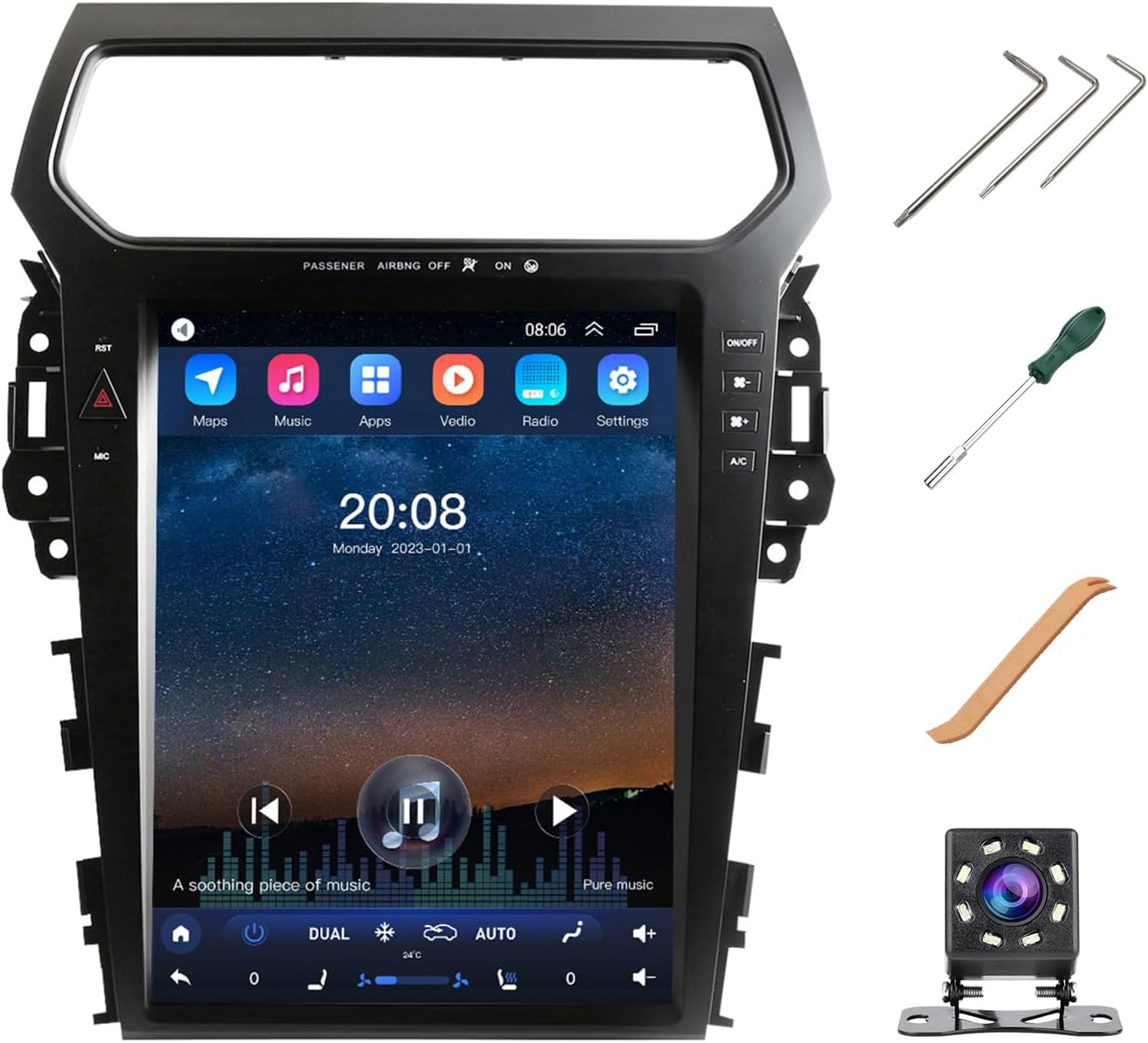
Figure 1: The SEICANE H7723 Android Stereo unit with included accessories like installation tools and a backup camera.
2. Package Contents
Verify that all components are present in the package before beginning installation:
- 12.1-inch screen with GPS
- Power harness
- RCA cable with SIM card wire
- Radio adapter (x2)
- Reverse Camera cable
- Original car's reverse Camera adapter
- Canbus box
- Original car's USB cable
- USB Cable (x2)
- GPS antenna
- Installation tools
- Reversing Camera
- Cordset

Figure 2: All components included in the SEICANE H7723 package.
3. Installation Guide
The SEICANE H7723 is designed for plug-and-play installation, fitting perfectly into the original dashboard slots of compatible Ford Explorer models. No soldering, splicing, or stripping of wires is typically required. Some factory wiring may not be needed.
3.1 Compatibility Check
This unit is compatible with Ford Explorer models from 2011 to 2019. Ensure your vehicle's dashboard configuration matches the supported types for a perfect fit without gaps.

Figure 3: Examples of compatible Ford Explorer dashboards.

Figure 4: Illustration of the unit fitting perfectly into the dashboard without gaps.
3.2 Wiring Connections
Follow the wiring diagrams carefully. The wire coloring and harness structure are similar to your car's original setup. Connect the main power harness to the original car's power harness. Ensure the Canbus box is connected to power on the new unit.
- Connect the two yellow plugs to enable the OEM backup camera.
- Connect the small white plug to enable Steering Wheel Control (SWC) and Air Conditioning (AC) functions.
- Connect the small black plug to activate the new unit's panel buttons.
- Connect to the OEM backup camera plug. If your car does not have a backup camera, this connection is not needed.
- If a plug matches, connect it; otherwise, it may not be needed.

Figure 5: Detailed wiring diagram showing connections for the SEICANE H7723.

Figure 6: Visual guide on connecting various plugs during installation.
4. Operating Instructions
The SEICANE H7723 operates on an Android OS, providing a user-friendly interface similar to a tablet. Navigate through applications using the 12.1-inch touch screen.
4.1 Core Functions
- GPS Navigation: Utilize the built-in GPS system to find the shortest or fastest routes to your destination. The system supports 3D GPS Navigation.
- Multimedia Playback: Play music (MP3, WAV, etc.) and HD 1080P videos directly from local storage or connected USB devices.
- Radio: Access FM and AM radio stations.
- Bluetooth: Connect your smartphone for hands-free calling and audio streaming.
- Wi-Fi & App Download: Connect to Wi-Fi to download and install various applications from the Play Store.
- File Management: Manage files stored on the device.

Figure 7: The unit displaying GPS navigation while music is playing in the background.
4.2 CarPlay & Android Auto
This head unit is compatible with both Apple CarPlay and Android Auto. Connect your smartphone to access features like map navigation, making calls, sending emails, and listening to music directly through the large screen interface. This provides a smarter and safer driving experience.

Figure 8: Demonstration of Wireless CarPlay and Android Auto functionality.
4.3 Steering Wheel Control
The unit supports your original car's steering wheel controls (except "Sync" function). This allows for easy adjustment of volume, switching songs, and hands-free calling without taking your hands off the wheel.
4.4 Air Conditioning Control
The unit supports both manual and automatic air conditioning systems. Note that the original car's air conditioning control buttons will be removed during installation, and all AC adjustments will be made directly on the large screen.
4.5 Backup Camera Support
The SEICANE H7723 is compatible with your vehicle's original backup camera and reverse trajectory. If your car does not have an existing backup camera, a new one is included with the product. This camera provides clear images, enhanced by 8 LED lights for improved visibility during night-time reversing.
4.6 Video Demonstration
Watch the official product video for a visual guide on the unit's features and operation:
Video 1: Demonstration of the SEICANE H7723 Android Stereo's features, including air conditioning control, backup camera display, music playback, and GPS navigation.
5. Maintenance
To ensure optimal performance and longevity of your SEICANE H7723 unit, consider the following maintenance tips:
- Clear Cache Regularly: Periodically clear the cache of applications to prevent slowdowns and maintain system responsiveness.
- Reboot Periodically: Fully reboot the unit every once in a while to refresh the system and resolve minor performance issues.
- Avoid Unnecessary Apps: Installing too many unnecessary or "trash" applications can significantly slow down the unit's performance. Install only essential applications.
- Software Updates: Check for and install official software updates to ensure the system is running the latest version with bug fixes and performance improvements.
6. Troubleshooting
This section provides solutions to common issues you might encounter with your SEICANE H7723 Android Stereo.
- AC Controls Not Working After Install: The integrated Air control units can be sensitive. You must go into the settings and configure it for your specific vehicle after installation. This may require trying different configurations and resetting the unit between attempts. If issues persist, contact technical support.
- Poor Microphone Echo/Quality: If the microphone for calls produces echo or poor quality, ensure all connections are secure. If using an iPhone with iOS 18 or newer, check microphone access permissions for apps like Alexa or Amazon Music. Removing these permissions in your iPhone's settings may resolve audio quality issues.
- Low Sound Volume: If the sound does not go up very high, check the unit's audio settings and ensure all speaker connections are secure. Verify that the original car's amplifier (if applicable, e.g., SONY amplifier) is properly supported and connected.
- Gray Screen/Poor Color: This could indicate a display issue. Ensure all display cables are securely connected. If the problem persists, it may require technical assistance.
- Foreign Language on Home Screen: Access the unit's system settings to change the display language to English or your preferred language.
For persistent issues not covered here, please refer to the "Warranty & Support" section for contact information.
7. Specifications
Detailed technical specifications for the SEICANE H7723 Android Stereo:
| Feature | Detail |
|---|---|
| Model Number | H7723 |
| Operating System | Android OS |
| CPU | 8 Core |
| RAM | 4GB |
| ROM | 64GB |
| Display Size | 12.1 Inches |
| Resolution | 1024x768 IPS |
| Connectivity Technology | Bluetooth, USB, Wi-Fi |
| Map Type | Worldwide |
| Audio Output Mode | Stereo |
| Mounting Type | Dashboard Mount |
| Item Weight | 7.28 pounds |
| Package Dimensions | 17.91 x 15.35 x 4.76 inches |

Figure 9: Illustration highlighting the internal specifications of the unit.
8. Warranty & Support
Warranty: The SEICANE H7723 comes with a 1-year warranty from the date of purchase.
Technical Support: SEICANE offers 24/7 technical support to assist with any installation or usage questions. For assistance, please contact the SEICANE technical service team.
For further inquiries or support, please visit the official SEICANE website or contact their customer service directly.
Ask a question about this manual
Ask about setup, troubleshooting, compatibility, parts, safety, or missing instructions. Manuals+ will review the question and use this page’s manual context to help answer it.