

Introduction
Thank you for purchasing the BOLUO White Nightstand with Charging Station and LED Lights. This manual provides essential information for safe assembly, operation, and maintenance of your new furniture. Please read these instructions carefully before beginning assembly and retain them for future reference.
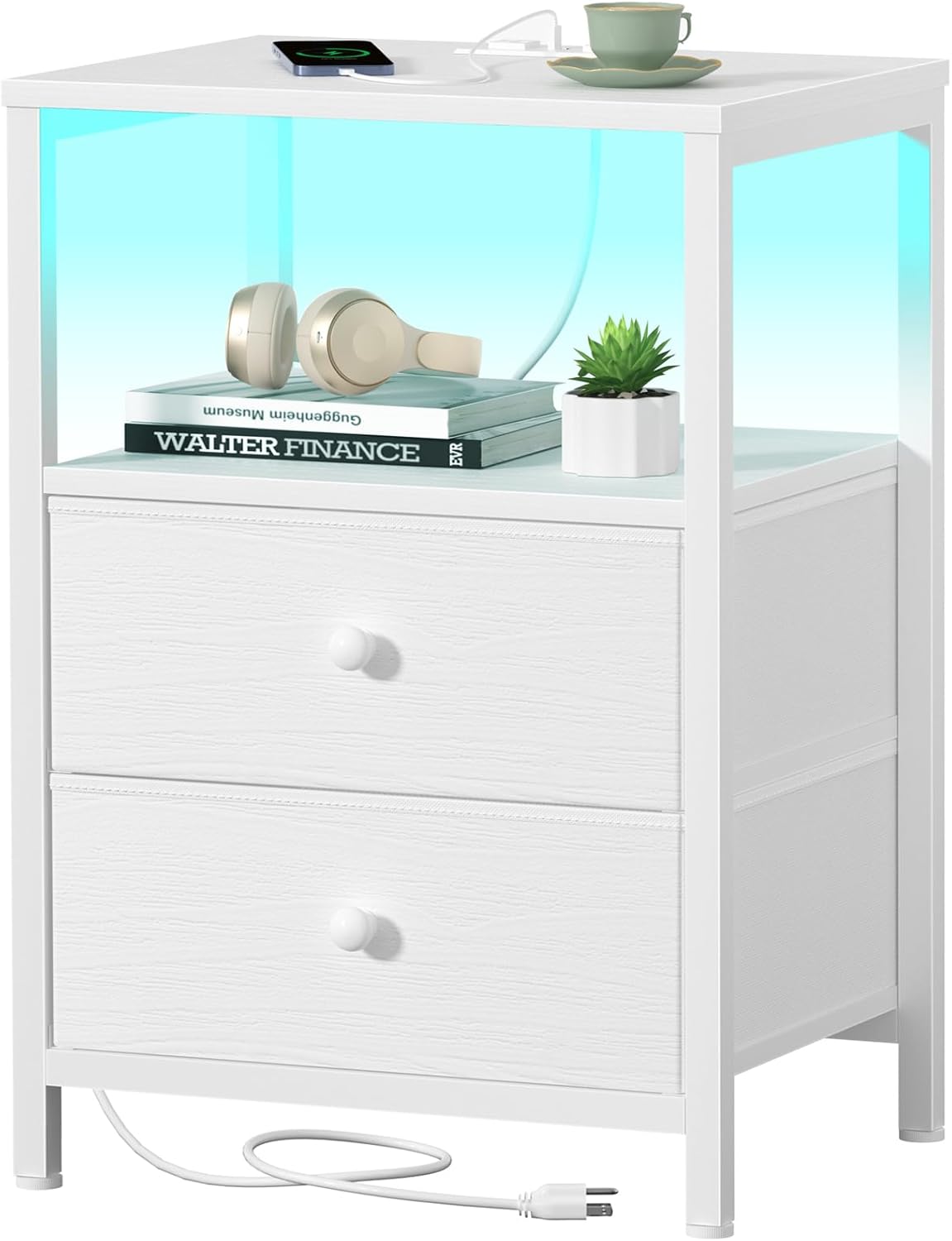
Image: The BOLUO White Nightstand, featuring LED lighting, two fabric drawers, and a top surface with a charging station.
Safety Information
WARNING: Failure to follow these safety instructions could result in injury or damage to the product.
- Always follow the assembly instructions provided.
- Be cautious of pinch points during assembly.
- Do not overload drawers or the top shelf. The maximum weight capacity is 10 lbs for each drawer and 35 lbs for the top shelf.
- Secure the nightstand to the wall to prevent tipping, especially if children are present. Anti-tip hardware may be included or recommended.
- Keep electrical components dry and away from heat sources.
- Do not use the charging station if it appears damaged. Disconnect power immediately if any damage is observed.
- Ensure all connections for the charging station and LED lights are secure before use.
- This product is intended for indoor use only.
Package Contents
Before assembly, please verify that all parts listed below are present and undamaged. If any parts are missing or damaged, please contact customer support.
| Part | Description | Quantity |
|---|---|---|
| A | Top Panel | 1 |
| B | Middle Shelf | 1 |
| C | Side Frames (Left/Right) | 2 |
| D | Bottom Support Frame | 1 |
| E | Fabric Drawers | 2 |
| F | Drawer Front Panels | 2 |
| G | Drawer Knobs | 2 |
| H | Charging Station Unit (with power cord) | 1 |
| I | LED Light Strip | 1 |
| J | Assembly Hardware (screws, bolts, Allen wrench) | 1 set |
| K | Adjustable Feet | 4 |

Image: The BOLUO White Nightstand positioned next to a bed in a modern bedroom, illustrating its compact size and aesthetic.
Assembly Instructions
Please follow these steps carefully. It is recommended to assemble the nightstand on a soft, clean surface to prevent scratches. A Phillips head screwdriver (not included) may be required in addition to the provided Allen wrench.
- Prepare the Frame: Attach the adjustable feet (K) to the bottom support frame (D). Connect the side frames (C) to the bottom support frame (D) using the provided hardware (J). Ensure all connections are finger-tight at this stage.
- Install Middle Shelf: Secure the middle shelf (B) between the side frames (C) using the appropriate hardware (J).
- Attach Top Panel: Place the top panel (A) onto the assembled frame and secure it with hardware (J). Once all frame components are in place, tighten all screws firmly with the Allen wrench.
- Assemble Fabric Drawers: For each fabric drawer (E), insert the drawer front panel (F) into the designated slot. Attach the drawer knob (G) to the front panel.
- Install Charging Station: Carefully place the charging station unit (H) into the recessed area on the top panel. Route the power cord as desired, ensuring it does not get pinched.
- Apply LED Light Strip: Adhere the LED light strip (I) to the underside of the top panel or along the inner edge of the open shelf, as preferred. Connect it to the charging station or a suitable power source.
- Insert Drawers: Slide the assembled fabric drawers (E) into their respective compartments.
- Final Check: Ensure the nightstand is stable and all connections are secure. Adjust the feet (K) to level the nightstand on uneven surfaces.

Image: A diagram illustrating the dimensions of the BOLUO White Nightstand, including height, width, and depth, along with weight capacities for the top and drawers.
Operating Instructions
Charging Station
The integrated charging station provides convenient power access for your devices.
- Power Connection: Plug the 5.9 ft power cord from the charging station into a standard 120V AC wall outlet.
- AC Outlets: Use the two 125V/12A AC outlets to power lamps, alarm clocks, or other small appliances.
- USB Ports: Use the two 5V/2A USB ports to charge smartphones, tablets, smartwatches, and other USB-powered devices.
- Safety Note: Do not exceed the maximum power rating of the charging station. Avoid spilling liquids on the charging unit.

Image: A detailed view of the recessed power strip on the nightstand's top surface, showing two AC outlets and two USB ports, with devices charging.
LED Lighting
The LED light strip offers customizable ambient lighting for your bedroom.
- Activation: The LED light strip is typically controlled via a small remote control or a button on the strip itself. Refer to the specific LED light strip instructions for detailed control methods.
- Color Selection: Choose from over 20 DIY colors to match your mood or room decor.
- Brightness & Speed: Adjust brightness levels and dynamic mode speeds (if applicable) using the controls.
Drawer Usage
The two fabric drawers provide convenient storage.
- Opening/Closing: Gently pull or push the wooden knobs to open and close the drawers.
- Weight Capacity: Do not exceed 10 lbs per drawer to ensure smooth operation and prevent damage.
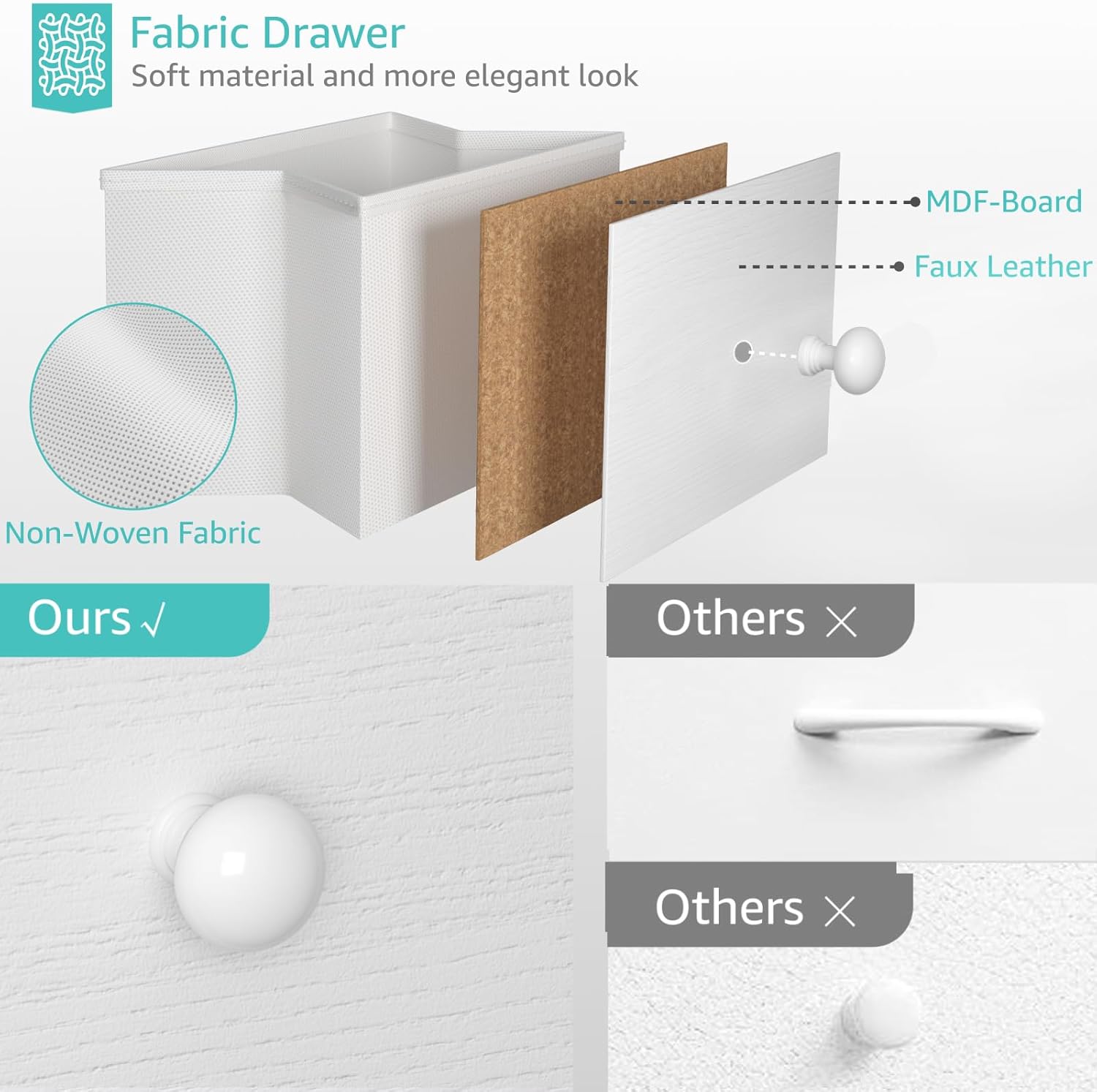
Image: An exploded diagram showing the construction of the fabric drawer, highlighting the non-woven fabric, MDF board, and faux leather front panel with a wooden knob.
Maintenance
Regular maintenance will help prolong the life and appearance of your nightstand.
- Cleaning Surfaces: Wipe wood surfaces with a soft, damp cloth. Avoid harsh chemicals or abrasive cleaners.
- Fabric Drawers: Spot clean fabric drawers with a mild detergent and a damp cloth. Allow to air dry completely. Do not machine wash.
- Electrical Components: Keep the charging station and LED lights free from dust. Do not attempt to clean with liquids while plugged in.
- Tighten Hardware: Periodically check and tighten all assembly hardware to ensure stability.
Troubleshooting
| Problem | Possible Cause | Solution |
|---|---|---|
| Charging station not working | Not plugged in; outlet issue; damaged unit | Ensure power cord is securely plugged into a working outlet. Test the outlet with another device. If damaged, discontinue use and contact support. |
| LED lights not turning on | Loose connection; power issue; remote battery dead | Check all connections to the power source. Ensure the charging station is powered. Replace remote control batteries if applicable. |
| Drawers are stiff or misaligned | Overloaded; incorrect assembly; obstruction | Reduce drawer contents. Recheck drawer assembly. Ensure no items are obstructing the drawer path. |
| Nightstand is wobbly | Loose hardware; uneven floor | Tighten all assembly screws. Adjust the leveling feet on the bottom support frame. |
Specifications
- Brand: BOLUO
- Model Number: White Nightstand with 2 drawers
- Product Dimensions (D x W x H): 11.8" x 15.7" x 23.6"
- Item Weight: 11 Pounds
- Material Type: Engineered Wood, Fabric, Metal
- Color: White
- Number of Drawers: 2
- Top Shelf Weight Capacity: 35 lbs
- Each Drawer Weight Capacity: 10 lbs
- Charging Station: 2 AC Outlets (125V/12A), 2 USB Ports (5V/2A)
- Power Cord Length: 5.9 ft
- LED Light: Multi-color (20+ DIY colors), adjustable brightness/speed
- Included Components: Assembly Guide, Installation Tool
Warranty and Support
For warranty information, please refer to the documentation included with your purchase or contact the retailer. If you encounter any issues or have questions regarding your BOLUO White Nightstand, please contact BOLUO customer support through the retailer's platform or the official BOLUO website.
You can visit the BOLUO Store on Amazon for more information.


